 EcomXray Review (2026)
Transparency: the “Visit” links on this page are affiliate links — we may earn a commission if you sign up, at no extra cost to you. No vendor can pay for a better review or verdict. How we make money →
The split between the two tiers is unusually clean, and worth seeing clearly: everything this app is described as doing, the margins, the net units, the restock advice, is free.
Visit EcomXray → Affiliate link — we may earn a commission if you sign up; it does not change what this page says.
Watch the 2-minute review
The video version of this review, from our YouTube channel.
Pricing (2026)
✓ Pricing re-verified 8 Sep 2026
| This tool | $29 | 4th cheapest of 6 |
| Cheapest | $9 | Track123 |
| Median | $19.50 | |
| Most expensive | $499 | Goflow |
Lowest paid entry price per account a month, billed monthly, in USD, among the 6 e-commerce operations apps we have researched (read between 2026-08-23 and 2026-09-27). Only tools priced in the same unit and on the same billing are compared — not a market survey, and cheapest is not best.
Two tiers. Free: product analytics inside Shopify, cost price and gross margin, net units sold over 30, 90 and 365 days with refunds, cancellations and test orders excluded, 30-day restock recommendations and a revenue rank for top products. Pro is $29 a month, with a 14-day free trial. It carries everything in Free plus editing product name, description and price in place, SEO fields with automatic URL redirects, publishing to channels and managing collections.
There is also a full product activity log, and a Chrome extension showing stock value and editing on your storefront product pages. There is no annual rate on the listing. All charges are billed in USD and recur every 30 days. Developer aMemory ApS, Ellegardvej 36, Sonderborg, Denmark; the app launched 20 July 2026 and, seven weeks on, still carries a 0.0 rating from zero reviews.
The listing's own summary bullets put in-place editing and the audit log among the app's five headline features without marking them Pro, which is the one place the listing reads as more generous than the plan table it sits above. Plans change — always verify the live price on their site.
Category context: E-commerce. Across the 31 tools in this category that we researched with a public US-dollar price, the median entry price is $29 a month (lowest paid plan as listed, per seat where the vendor prices per seat). EcomXray’s entry price of $29 a month sits roughly at that median. Compare pricing conditions in the Software Cost Atlas →
What the pricing page doesn’t say
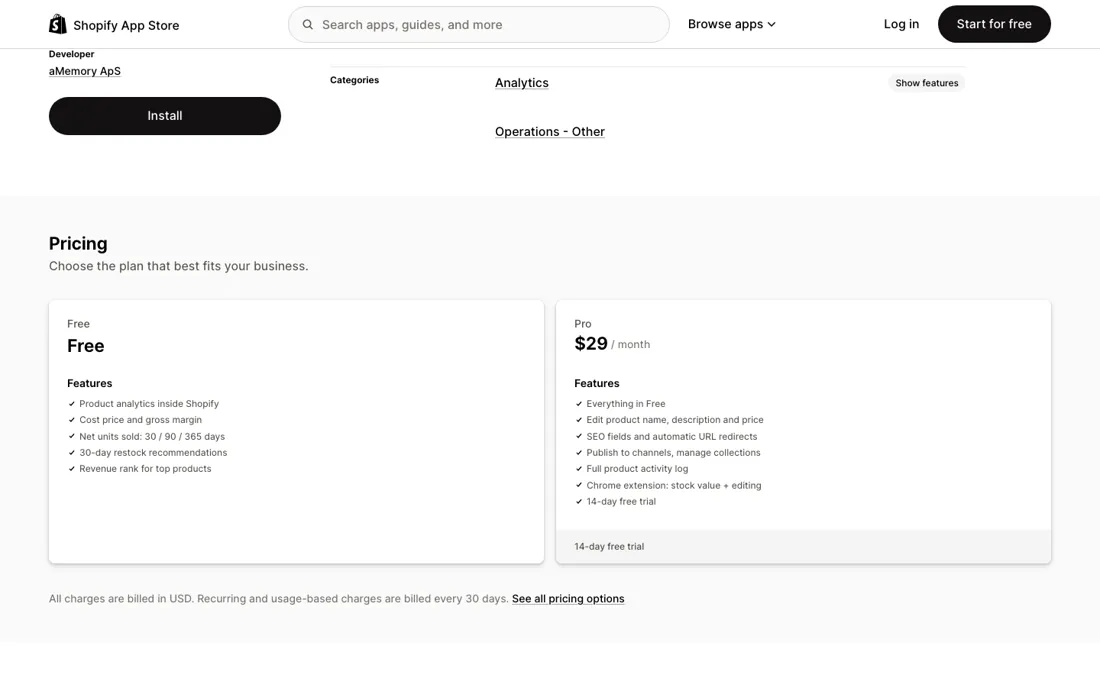
The $29 buys editing, not insight. If you are happy making changes in the Shopify admin you already have, the free plan is the whole product and the paid one is a convenience layer over it. The track record is the real caveat, and it has not moved. The app launched on 20 July 2026 and still had no reviews at all when we checked on 8 September, seven weeks later.
Nothing is known about how it behaves at scale, how it handles a catalogue in the tens of thousands, or how quickly support answers, because nobody has said so in public. And its numbers are only as good as your cost prices. Gross margin comes out of Shopify's own cost-per-item field, so if that field is empty or stale across your catalogue, the margin column is decoration. Fill the cost prices in first, then judge the app.
What EcomXray does
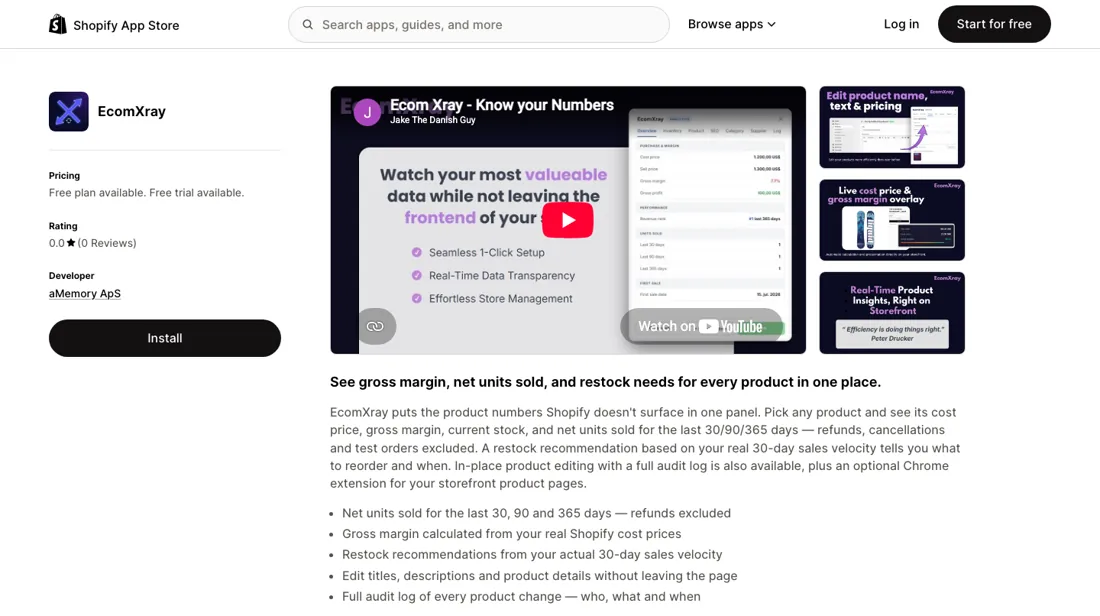
Shows cost price, gross margin, current stock and net units sold over 30, 90 and 365 days for every Shopify product, with restock advice from real sales velocity.
When the paid plan is worth it
The split between the two tiers is unusually clean, and once you see it the decision takes about a minute. Everything this app is sold on is on the FREE plan: cost price and gross margin, net units sold over 30, 90 and 365 days with refunds, cancellations and test orders stripped out, 30-day restock recommendations, and a revenue rank for your top products. The $29 a month buys editing, not insight: changing product name, description and price in place, SEO fields with automatic URL redirects, publishing to channels, managing collections and a full product activity log.
There is also a Chrome extension that shows stock value and lets you edit from your own storefront pages. So the question is not whether the analysis is worth paying for. It is whether you would rather make the changes here than in the Shopify admin you already have open. For a merchant working through a long restock list that is a real saving of clicks; for one who edits a handful of products a week it is $348 a year for a convenience layer.
Two things to settle before either plan. The margin column is only as good as your cost prices, because it comes straight out of Shopify's own cost-per-item field. If that is empty or stale across your catalogue, the numbers are decoration — and filling it in is work you do before the app helps. And the track record is thin: the app launched on 20 July 2026 and has no public reviews at all, so nothing is known about how it behaves on a catalogue in the tens of thousands or how fast support answers.
The free plan costs nothing to find out with, which is the sensible way round here. Pro carries a 14-day free trial and there is no annual rate on the listing; charges are in USD and recur every 30 days.
How to actually use EcomXray
This is a Shopify app, so the install is the Shopify one: Install from the listing, approve the data access, and the app appears in your admin. There is a free plan and a 14-day trial on Pro, so nothing forces a payment decision on day one. The step that actually decides whether the app is useful happens before you open it. Gross margin is computed from Shopify's own cost-per-item field, which is empty by default on most catalogues.
If you install first and look second, you will see a margin column full of blanks and conclude the app does not work. Export your products, fill in cost per item, re-import, and only then judge the numbers. After that the reading order is the one the listing implies: revenue rank to find your top products, net units over 30, 90 and 365 days to see the trend with refunds and test orders already excluded, and the 30-day restock recommendation as the action.
On Pro the Chrome extension puts stock value and inline editing on your own storefront pages, which is the piece worth trying during the trial — it is the part that cannot be replicated in the admin.
Distilled from The Shopify App Store listing at apps.shopify.com/ecomxray, read on 8 September 2026: the two plan cards and their feature lists, the data-access section that shows which scopes the app asks for, the developer and launch details, and the review panel. The restock, margin and net-unit definitions come from the listing's own description; the cost-per-item dependency is Shopify's documented product field, which is where the margin figure is read from.
Frequently asked questions
What does EcomXray cost?
Two tiers, re-read on apps.shopify.com/ecomxray on 19 September 2026 and unchanged since 8 September. Free carries the analytics: cost price and gross margin, net units sold over 30, 90 and 365 days with refunds, cancellations and test orders excluded, 30-day restock recommendations and a revenue rank for top products. Pro is $29 a month with a 14-day free trial. There is no annual rate on the listing, and charges are billed in USD every 30 days.
What does the $29 actually buy?
Editing, not insight. Everything the app is sold on sits on the free plan. Pro adds changing product name, description and price in place, SEO fields with automatic URL redirects, publishing to channels and managing collections, a full product activity log, and a Chrome extension that shows stock value and lets you edit from your own storefront pages. So the question is not whether the analysis is worth paying for -- it is whether you would rather make the changes here than in the Shopify admin you already have open. Working through a long restock list, that is a real saving of clicks. For a handful of edits a week it is $348 a year for a convenience layer.
Why is the gross margin column empty on my products?
Because it is read straight out of Shopify’s own cost-per-item field, which is empty by default on most catalogues. Fill that in first -- export your products, add cost per item, re-import -- and only then judge the numbers. Install first and look second and you will see a column full of blanks and conclude the app is broken. This is work the app cannot do for you, and it is the single thing that decides whether the app is useful on day one.
Is it safe to rely on an app this new?
That is the open question, and the free tier is the honest way to answer it. The app launched on 20 July 2026 and the listing still showed no reviews at all when we re-read it on 19 September, two months on. Nothing is known in public about how it copes with a catalogue in the tens of thousands or how quickly support answers, because nobody has said so. Run the free plan against your own catalogue for a few weeks; the $29 decision only arises after that, and by then you will know.
What should I weigh before buying E-commerce software?
Check your platform and version specifically. Shopify support is close to universal in this category, while WooCommerce, BigCommerce, Magento and headless setups vary a lot, and 'supported' sometimes means a generic API rather than a maintained app. A listing in your own platform's app store, with recent reviews there, is a better signal than the vendor's logo wall.
Is this a hands-on review of EcomXray?
This is a researched assessment, not a hands-on test — where we've used a tool ourselves, we say so explicitly. We name what each tool is good and bad at, and we earn a commission only if you sign up, at no cost to you.
- Re-verified 8 September 2026 on apps.shopify.com/ecomxray; unchanged since 21 August 2026.
- A dated screenshot of that pricing page, kept on this site as the receipt.
Others in this category
Reviewed e-commerce tools that share ground with EcomXray — comparable in what they do, not drop-in swaps:
New reviews, price changes we recorded, and the cost conditions we found. No sponsored placements. Unsubscribe anytime.
This is our researched assessment — not a paid placement. The “Visit” links on this page are affiliate links: we may earn a commission if you sign up, at no extra cost to you, and it never changes our take. How we review →