EditEngine Review (2026)Shopify Bulk Editor, Free to $49.99
 By Daan Haket · Researched and written with an AI assistant · who does what
Undo covers supported in-app edits only: deletes are permanent, and a spreadsheet import is only reversible if you kept the original export yourself.
Shopify merchants with hundreds or thousands of products who change prices, tags, SEO fields or metafields in bulk and want a preview and an undo before anything goes live.
you only edit a handful of products at a time, which Shopify's own bulk editor already covers, or you are not comfortable granting an app broad access to your store data.
Transparency: the “Visit” links on this page are affiliate links — we may earn a commission if you sign up, at no extra cost to you. No vendor can pay for a better review or verdict. How we make money →
Pricing (2026)
✓ Pricing re-verified 26 Oct 2026
“$199.99/year and save 17%”Source: apps.shopify.com/profitonium-bulk-product-edit, read 15 Oct 2026
“$499.99/year and save 17%”Source: apps.shopify.com/profitonium-bulk-product-edit, read 15 Oct 2026
“$99.99/year and save 17%”Source: apps.shopify.com/profitonium-bulk-product-edit, read 15 Oct 2026
“No refunds for partial periods.”Source: profitoniumapps.com/terms-conditions, read 15 Oct 2026
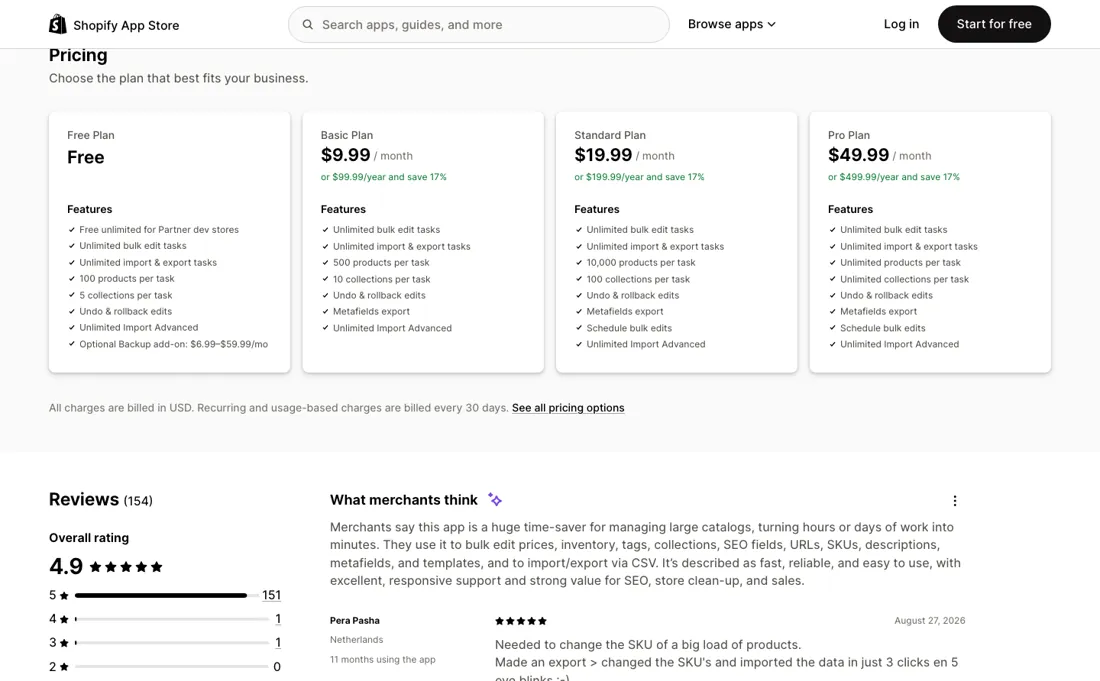
EditEngine has a free plan and three paid plans, and every plan allows unlimited bulk edit, import and export tasks. What changes is how many products and collections one task may touch. Free: 100 products and 5 collections per task, with undo and unlimited Import Advanced. Basic: $9.99 a month or $99.99 a year, 500 products and 10 collections per task, plus metafields export.
Standard: $19.99 a month or $199.99 a year, 10,000 products and 100 collections per task, and scheduled bulk edits. Pro: $49.99 a month or $499.99 a year, unlimited products and collections per task. The annual prices save 17%. Partner development stores get unlimited use for free. An optional Backup add-on is listed as $6.99 to $59.99 a month; the listing does not break that range down. Plans change — always verify the live price on their site.
Category context: E-commerce. Across the 48 tools in this category that we researched with a public US-dollar price, the median entry price is $19 a month (lowest paid plan as listed, per seat where the vendor prices per seat). EditEngine’s entry price of $9.99 a month sits below that median. Compare pricing conditions in the Software Cost Atlas →
What the pricing page doesn’t say
Percentage price changes stack: running the same edit twice applies it twice. The developer's terms give no refunds for partial billing periods, and the app asks for wide access to the store, including products, inventory, orders and customers.
What EditEngine does
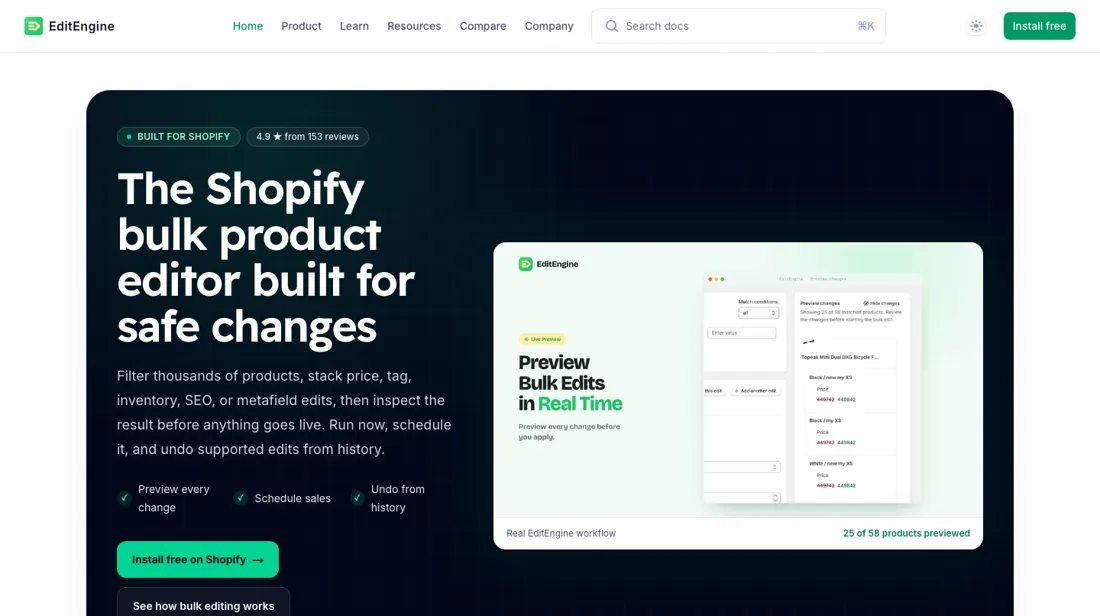
Shopify bulk product editor (by Profitonium): filter products by collection, tag, vendor or status, then change prices, titles, tags, inventory, SEO fields and metafields in one run, with a preview first, scheduled runs for sales and an undo history. Plans are gated on products per task.
Products per task decides the plan
The limits are per task, not per catalogue: on Free you can change 100 products in one run and then run the next batch, so a small store can stay on Free by splitting work. Basic at $9.99 lifts a run to 500 products. Standard at $19.99 is the first plan with scheduled edits, which is what you want for sales that must start and end at a set time, and it handles 10,000 products per run.
Pro at $49.99 removes the cap for very large catalogues. On annual billing each plan costs ten months' worth, so pay yearly only once you know the plan fits.
How to actually use EditEngine
Install EditEngine from the Shopify App Store; the free plan needs no payment. Start small: filter one collection or vendor, pick the field to change (for a price change: Variant Fields, then Price), choose the action and value, and decide on rounding deliberately. Check the preview for every matched variant, including any zero prices, before you start the run. Supported in-app edits can be undone from History, but deletes are permanent, and for a destructive spreadsheet import EditEngine's own advice is to keep the original export as your rollback file and test a tiny batch first.
Distilled from The EditEngine Bulk Product Editor listing in the Shopify App Store (plans, permissions and billing note), read on 26 October 2026 and 15 October 2026; EditEngine's documentation on bulkeditor.app, including the variant price guide; and Profitonium's terms and privacy policy, read on 15 October 2026. EditEngine is an affiliate partner of ours through Shoffi. We have not used the software ourselves.
The natural comparison is Shopify's built-in bulk editor — the bulk editor in Shopify Admin costs nothing extra and lets you edit selected products in a spreadsheet view. EditEngine has to earn its price with rule-based changes across filtered products, a preview of every change, scheduled runs for sales and launches, CSV and XLSX import, and an undo history.
Frequently asked questions
How much does EditEngine cost?
Read on 26 October 2026 on the Shopify listing: Free, Basic $9.99 a month, Standard $19.99 and Pro $49.99, or $99.99, $199.99 and $499.99 a year. Charges are billed in USD every 30 days.
What does the free plan include?
Unlimited bulk edit, import and export tasks, each limited to 100 products and 5 collections, with undo and rollback. Partner development stores get unlimited use for free.
Can I undo a bulk edit?
Supported edits made in the app can be rolled back from History. Deletes are permanent, and for spreadsheet imports you should keep the original export as your own rollback file.
Which plan lets me schedule edits?
Scheduled bulk edits start on the Standard plan ($19.99 a month); Free and Basic run edits immediately.
Is this a hands-on review of EditEngine?
This is a researched assessment, not a hands-on test — where we've used a tool ourselves, we say so explicitly. We name what each tool is good and bad at, and we earn a commission only if you sign up, at no cost to you.
- Read 2026-10-26 on the EditEngine listing in the Shopify App Store; the listing says all charges are billed in USD, every 30 days.
- A dated screenshot of that pricing page, kept on this site as the receipt.
Others in this category
Reviewed e-commerce tools that share ground with EditEngine — comparable in what they do, not drop-in swaps:
New reviews, price changes we recorded, and the cost conditions we found. No sponsored placements. Unsubscribe anytime.
This is our researched assessment — not a paid placement. The “Visit” links on this page are affiliate links: we may earn a commission if you sign up, at no extra cost to you, and it never changes our take. How we review →