Scarcity.AI Review (2026)Real Data, Tunable Truth
 By Daan Haket · Researched and written with an AI assistant · who does what
All three read real data, which is worth saying before anything else — the low stock counter shows inventory levels and the visitors counter reads unique visitors, live traffic and product views.
Shopify merchants who genuinely run low stock or timed promotions and want to surface that on the product page — the low stock counter is tied to real inventory, which makes it the honest one of the three when your stock actually is low.
your stock is not low and your sale does not end, because a claim a shopper would read as false is one the FTC treats as deceptive; or your brand sells on trust, where a blinking counter costs more in credibility than it returns.
Transparency: the “Visit” links on this page are affiliate links — we may earn a commission if you sign up, at no extra cost to you. No vendor can pay for a better review or verdict. How we make money →
Pricing (2026)
✓ Pricing re-verified 10 Oct 2026
| This tool | $4.99 | 4th cheapest of 52 |
| Cheapest | $2.99 | MX AI |
| Median | $15 | |
| Most expensive | $199 | Auware |
Lowest paid entry price per account a month, billed monthly, in USD, among the 52 e-commerce growth apps we have researched (read between 2026-08-19 and 2026-10-14). Only tools priced in the same unit and on the same billing are compared — not a market survey, and cheapest is not best.
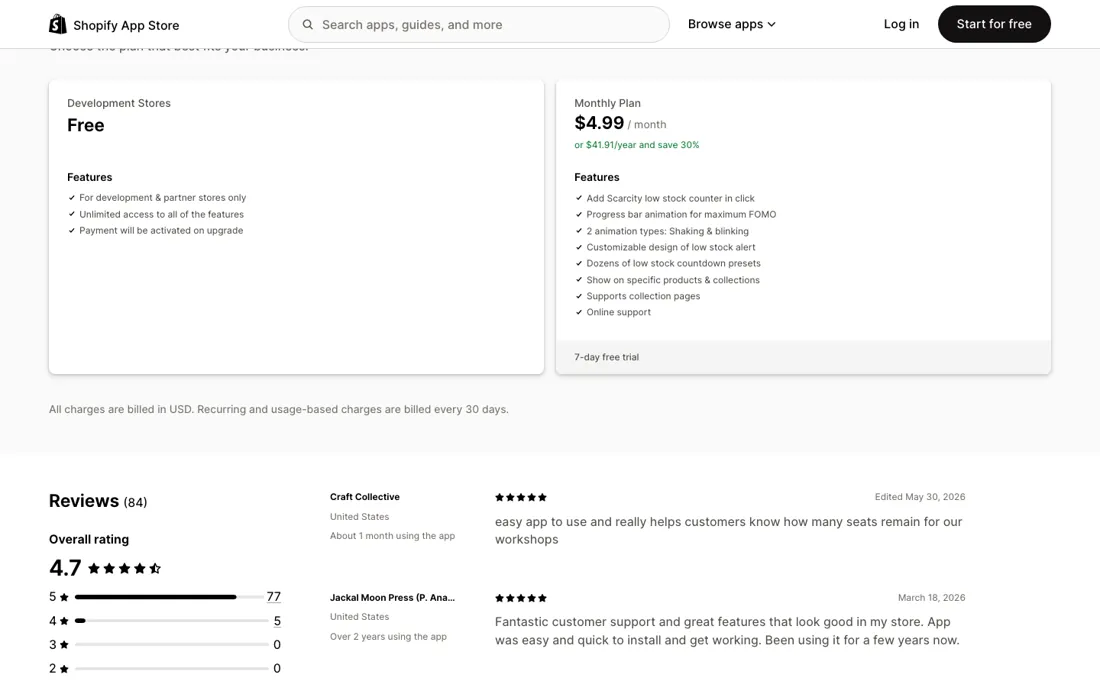
These are three separate apps from one developer, each installed and billed on its own. The Low Stock Counter is $4.99 a month or $41.91 a year at a stated 30% saving, with a 7-day trial; its free tier is Development Stores, meaning development and partner stores only rather than a working free plan. The Visitors Counter has a genuine free plan with the counter itself, style customisation, image presets and a minimum-visitors threshold.
Its Premium plan is $1.99 a month or $16.71 a year at a stated 30% saving, on a 3-day trial, and adds an upsell banner for your most-viewed product, the counter on collection pages, wiggle and blink animations, your own counter image and a buy-it-now button that goes straight to checkout. The Countdown Timer, which listed only a free tier when we read it on 22 August 2026, now has a paid ladder: Development Stores is free for development and partner stores only, the Monthly Plan is $4.99 a month or $41.88 a year with a 7-day trial, and the Plus Plan is $12.99 a month or $109.11 a year for Shopify Plus stores and adds a scarcity message on the checkout page.
Charges are in USD. Developer Effective Apps. Ratings when read on 10 October 2026: 4.7 from 87 reviews on the low stock counter, 4.9 from 43 on the visitors counter and 4.7 from 31 on the countdown timer. Plans change — always verify the live price on their site.
Category context: E-commerce. Across the 40 tools in this category that we researched with a public US-dollar price, the median entry price is $19 a month (lowest paid plan as listed, per seat where the vendor prices per seat). Compare pricing conditions in the Software Cost Atlas →
What the pricing page doesn’t say
Nothing here invents a number. But the visitors counter carries two settings that shape which true number a shopper sees. It can show the counter only after a set number of views, so a quiet product simply displays nothing rather than a small figure. And the time frame is yours to set, so 'twelve people viewed this' can mean twelve in five minutes or twelve since yesterday, presented identically. Neither setting fabricates anything; together they let you present a true number that a reasonable shopper would read as something else.
That distinction is where the legal line sits. The FTC treats false urgency and scarcity as deceptive practice under section 5 of the FTC Act, and the examples in its dark-patterns guidance are close to these mechanics: a low-stock claim when stock is plentiful, or a cart-activity figure well above the real one. The test is whether a reasonable consumer would be misled about a material fact. That test does not apply to the app; it applies to how you configure it, which means the compliance question lands on your desk rather than the developer's.
Watch the video review
The video version of this review, from our YouTube channel.
What Scarcity.AI does
Three Shopify urgency apps — low stock counter, countdown timer and live visitors counter — that read real data but let you choose which true number the shopper sees.
What buyers report about Scarcity.AI
Hands-on: not tested by usReported by buyers: Shopify App Store, all three of this developer's listings: Low Stock C, read August 2026
Themes from the buyer-review sites listed at the foot of this page, read in August 2026. We have not run Scarcity.AI ourselves, so this is other buyers' experience rather than ours. We summarise it here because the complaints are usually the part a vendor page leaves out.
- • The low stock counter is the one with a record behind it: 84 reviews, 77 at five stars and five at four. The most useful review names a use the pitch does not. Craft Collective (United States, about a month, edited 30 May 2026) uses it to show how many seats remain for their workshops — a real count of a real thing rather than a nudge. WatchMatic (United States, 19 days, edited 22 June 2025) names the tension the app lives in and says it resolved: urgency without ruining the brand aesthetic. OVNA OVICH (New Zealand, nine days, 17 July 2024) had already tried another scarcity app that was incompatible with their theme.
- • Jackal Moon Press (United States, over two years, 18 March 2026) is the longest tenure anywhere in the three listings and reports it still installs quickly and looks right. On the countdown timer, Consciousness on Fire (United States, 21 days, 13 April 2022) describes buying it for the opposite of urgency: they wanted customers to be able to hold items in the cart for a few extra minutes to finish checking out.
- • Almost every five-star review across the three apps is about the support desk rather than the feature, and the names change with the years — Shahar in 2020 and 2021 (Angelina Belle Boutique, La Comet, BW Monastery), then Zain, Kamran and Mohammed in 2025 and 2026 (macudopa, Mellow Melon, Novarae).
- • The visitors counter carries the only substantive complaints in the whole three-app record, and both come from the two critics with by far the longest tenure. ZZ Reroll (Malaysia, nine months, 1 September 2023) writes that after more than half a year the visitor count reset without their knowledge, that a customer told them rather than the app, and that the developer stopped replying afterwards. MachineryBroker.com (United States, over a year, 1 April 2024) says only that the counter resets every several days. The developer answered the second one publicly on 3 April 2024, asking whether the counter's settings or its text had been changed, because such adjustments can trigger a reset — which, if it is right, is a mechanic worth knowing before you rely on the number.
- • The low stock counter has a mechanical limit nobody advertises. 527 Photo (United States, two days, 8 January 2021) found that Shopify's Track Quantity has to be switched on for the badge to appear at all, which rules out a print-on-demand catalogue — 700 products in their case — and left them running it on bestsellers only. demoサイト (Japan, four months, 21 May 2021) reports it does not handle inventory per location, so stock held at a location you do not sell from online is not covered.
- • The two remaining one-stars carry no detail at all: Dhedhi Wholesale (Pakistan, 23 days, 9 July 2026) and a Netherlands store with a tenure of less than a minute. The developer replied to both on 10 July 2026 saying it had emailed to ask what went wrong and had not heard back.
Where the ratings disagree. The praise measures the installation and the criticism measures the running. On the visitors counter the five-star tenures read 17 minutes, 23 minutes, 24 minutes, 37 minutes, about 12 hours and one day; nobody there had been running long enough to see a counter reset, while both reset reports come from merchants at nine months and over a year. That gap matters more here than on a typical app, because the entire argument for these three widgets is that they show true numbers. A counter that silently zeroes is still showing a true number — just of a shorter window than the merchant set, and no shopper can tell the difference. Worth noting too what is absent: across all three listings not one reviewer raises the disclosure question at all. The public record is about whether the widget appeared and whether support answered, so it offers no help on the judgement that actually carries risk.
Pages read (August 2026): Shopify App Store
When the paid plan is worth it
For a live store the paid tiers of all three come to $11.97 a month together ($4.99, $1.99 and $4.99), so the money is not the decision. The decision is which of them tells your shopper something true. The low stock counter is the easiest of the three to run honestly, because it reads your inventory. If it says two are left, two are left, and the developer's help centre says custom stock numbers are no longer supported, citing Shopify's policy on inventory display.
The setting to watch is the threshold: choose a number that reflects genuine scarcity for your product rather than one that keeps the badge permanently lit, because a badge that always says 'low stock' stops being information and becomes decoration. The visitors counter is where the paid step is smallest and the care needed is largest. Its $1.99 tier adds a most-viewed-product upsell banner, the counter on collection pages and animations, which are merchandising features.
The free tier is where the judgement sits, and the two settings that matter are covered in the knock below. The countdown timer is no longer free on a live store: $4.99 a month, or $12.99 on the Plus plan for a scarcity message in checkout. Its listing says the pre-checkout timer reserves the cart and empties it at zero. The developer's help centre answers the question that matters: the timer does not hold or reserve inventory, and other shoppers can still buy the item.
What it can do is delete the cart when time runs out. What upgrading does not buy, at either tier, is a real reservation, so do not word the timer as a hold on stock. Its timing options also include 'Reset per visit', which is exactly the setting that turns a deadline into theatre.
How to actually use Scarcity.AI
Decide what is true before you decide what to display. The low stock counter reads your inventory, so the only real setting is the threshold: pick a number that means something for your product rather than one that keeps the badge lit permanently. A badge that is always on stops being read. On the visitors counter, set the time frame to the window a shopper would assume. Most people reading 'nine people are viewing this' assume now, not this week.
If the honest window produces an unimpressive number, that is information about your traffic rather than a reason to widen it, and the 'show only after X views' setting is the same decision in another form. Before the countdown timer goes live, decide what it is counting down to. The developer's help centre says it does not reserve inventory, so word it as a deadline rather than a hold, and leave the 'Reset per visit' mode off unless the offer genuinely restarts for every visitor.
Then reload the page once to check which timing mode you actually configured, before the timer goes anywhere near a live product page. Each app installs and bills separately, so start with the one that matches something genuinely true about your store, and add the others only if the same is true of them.
Distilled from apps.shopify.com listings for scarcity-ai-low-stock-counter, scarcity-cart-countdown-timer and upcount-live-visitors-counter, read 22 August 2026; FTC guidance on dark patterns and section 5 of the FTC Act. Re-verified 10 October 2026 on all three apps.shopify.com listings, plus the Effective Apps help centre (effectify.help/en/category/8aq7mh): "Does The Timer Hold Inventory While Items Are in the Cart?", "Can I add a custom number for the stock?" and "Why it is recommended to set the counter time frame to 1?", read 10 October 2026.
Frequently asked questions
Does the cart countdown timer actually reserve the item?
No. The developer's help centre (effectify.help, "Does The Timer Hold Inventory While Items Are in the Cart?", read 10 October 2026) says the timer does not hold or reserve inventory, so other customers can still buy the same product. What it can do is delete the shopper's cart when time runs out, a setting under Appearance Rules. The listing's line that the timer 'reserves the cart' describes the cart, not your stock.
Can I set the low stock number myself?
Not any more. The help centre article "Can I add a custom number for the stock?" (read 10 October 2026) says custom stock numbers are no longer supported in the app, citing Shopify's policy changes on inventory display. You choose how stock is displayed under Appearance Rule; the number itself comes from your inventory.
Is the countdown timer still free?
Only on development and partner stores. Read on 10 October 2026, its listing (apps.shopify.com/scarcity-cart-countdown-timer) has a Monthly Plan at $4.99 a month or $41.88 a year with a 7-day trial, and a Plus Plan at $12.99 a month or $109.11 a year for Shopify Plus stores with a scarcity message in checkout. When we read it on 22 August 2026 the listing showed only a free tier; that is historical.
Is this a hands-on review of Scarcity.AI?
This is a researched assessment, not a hands-on test — where we've used a tool ourselves, we say so explicitly. We name what each tool is good and bad at, and we earn a commission only if you sign up, at no cost to you.
- Buyer reviews on Shopify App Store, all three of this developer's listings: Low Stock Counter (listing slug scarcity-ai-low-stock-counter, 84 reviews), Upcount Live Visitors Counter (upcount-live-visitors-counter, 37 reviews) and Cart Countdown Timer (scarcity-cart-countdown-timer, 22 reviews), read August 2026.
- Read 2026-10-10 on apps.shopify.com, across all three listings.
- A dated screenshot of that pricing page, kept on this site as the receipt.
Others in this category
Reviewed e-commerce tools that share ground with Scarcity.AI — comparable in what they do, not drop-in swaps:
New reviews, price changes we recorded, and the cost conditions we found. No sponsored placements. Unsubscribe anytime.
This is our researched assessment — not a paid placement. The “Visit” links on this page are affiliate links: we may earn a commission if you sign up, at no extra cost to you, and it never changes our take. How we review →