Koongo Review (2026)From $39/mo Plus Item Surcharges
 By Daan Haket · Researched and written with an AI assistant · who does what
The headline price is a base, not a bill.
Shopify merchants selling across several European marketplaces — Bol, Zalando, Allegro, Cdiscount, Miinto and the rest — who need inventory and order sync to run automatically, and who have priced their own item, feed and order counts against the surcharge table rather than the headline.
you sell on one channel or need product feeds only, where the feed-manager-only form from $14.50 or a dedicated feed app is cheaper; or your catalogue and order volume sit far enough above the included limits that the surcharges, not the plan, become the price.
Transparency: the “Visit” links on this page are affiliate links — we may earn a commission if you sign up, at no extra cost to you. No vendor can pay for a better review or verdict. How we make money →
Pricing (2026)
✓ Pricing re-verified 10 Oct 2026
| This tool | $39 | 6th cheapest of 7 |
| Cheapest | $9 | Track123 |
| Median | $10.99 | |
| Most expensive | $499 | Goflow |
Lowest paid entry price per account a month, billed monthly, in USD, among the 7 e-commerce operations apps we have researched (read between 2026-08-23 and 2026-10-11). Only tools priced in the same unit and on the same billing are compared — not a market survey, and cheapest is not best.
Four tiers on the listing, separated by update frequency rather than by capability. Free covers one store language, 100 items or SKUs, 5 product feeds, one marketplace wizard and up to 10 orders a month, updating once a day. Lite is $39 a month and updates every 6 hours, Starter is $79 and updates every 30 minutes, and Pro is $119 and updates every 15 minutes.
All three include 1,000 items, 5 feeds, one marketplace wizard (in August 2026 a second came free on a summer promotion; the listing no longer shows it on 10 October 2026), and 100 orders a month. All three also carry a 7-day free trial. Every paid tier states surcharges for extras used — items, feeds, marketplaces and orders — and each is also sold in a feed-manager-only form, from $14.50 for Lite, $29 for Starter and $41 for Pro.
Full pricing notes (2 more paragraphs)
All charges on the listing are billed in USD and recur every 30 days. The vendor's own pricing page sells the same four plans in euros at €0, €35, €69 and €99 a month, and states that all prices exclude VAT. Each plan is broken into Core, Marketplace Manager, Feed Manager and Ads Manager modules with separate prices. There is also a surcharge table for extra stores, items, orders, marketplaces, feeds and team seats, where an extra 100 orders runs from €10.00 down to €2.00 as volume grows.
Developer Koongo, a product of NoStress Commerce s.r.o., Prague; the app launched on 5 November 2014 and had 98 reviews at a 4.4 average at the time of writing. Re-read 10 October 2026: the App Store prices ($39, $79, $119) and koongo.com prices (€35, €69, €99 excluding VAT) are unchanged, and koongo.com's surcharge table now prints the amounts per plan: an extra 100 orders at €10.00 down to €2.00 on every paid plan, an extra 1,000 items at €1.00 down to €0.50 on Lite, €2.00 down to €1.00 on Starter and €2.80 down to €1.40 on Pro, and an extra marketplace at €15.00, €30.00 or €42.00.
Plans change — always verify the live price on their site.
Category context: E-commerce. Across the 40 tools in this category that we researched with a public US-dollar price, the median entry price is $19 a month (lowest paid plan as listed, per seat where the vendor prices per seat). Koongo’s entry price of $39 a month sits above that median. Compare pricing conditions in the Software Cost Atlas →
What the pricing page doesn’t say
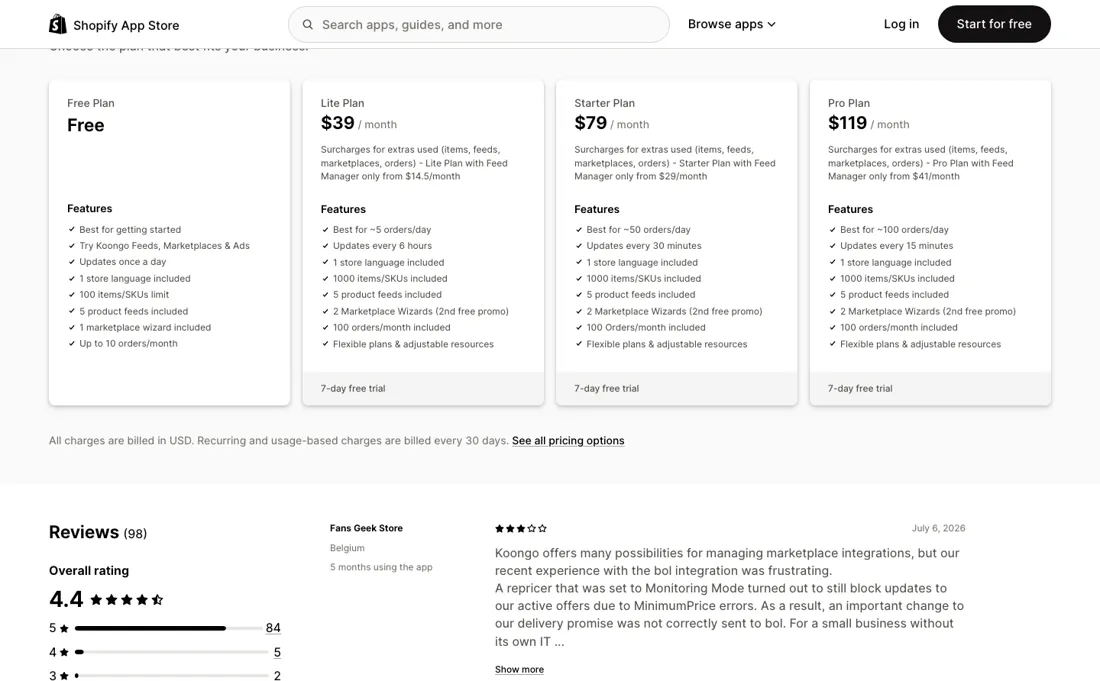
Each paid plan includes 1,000 items, 5 feeds, one marketplace wizard and 100 orders a month, and the listing says plainly that surcharges apply for extras used across all four of those dimensions. For a store with a real catalogue selling on several European marketplaces, every one of those limits is one you pass in week one. Price your own numbers on koongo.com's surcharge table before you take $39 seriously.
The two pricing pages also do not quote the same bill. The App Store lists $39, $79 and $119 and bills in USD. koongo.com lists €35, €69 and €99 and states that all prices exclude VAT. Depending on where you trade and how you are registered, those are meaningfully different amounts for the same plan, and nothing on either page reconciles them. Then the record, which is the most useful thing on this listing.
4.4 from 98 reviews is the lowest average in this category among the apps Shopify shows beside it, and the breakdown explains why: 84 five-star ratings sit alongside six one-star ones. The critical reviews are specific rather than vague, which makes them worth reading in full. In July 2026 a Belgian merchant described a repricer set to Monitoring Mode that still blocked updates to live Bol offers because of MinimumPrice errors, so a delivery-promise change never reached the marketplace.
In January 2026 a UK merchant described unresolved integration errors on OnBuy and a refused refund, with Koongo replying publicly that they had reached out several times without response. Neither is disqualifying on its own. Together they describe an app whose complexity is real and whose marketplace integrations sometimes need support to untangle — which is consistent with the vendor's own listing offering personal onboarding for complex setups. One more line to read before you install: the listing states the app views sensitive customer data as well as device and activity data, and can view and edit products, orders and custom data.
Marketplace order sync needs customer details to work, so that is expected, but it makes this a processor of personal data on your behalf rather than a feed formatter.
Watch the video review
The video version of this review, from our YouTube channel.
What Koongo does
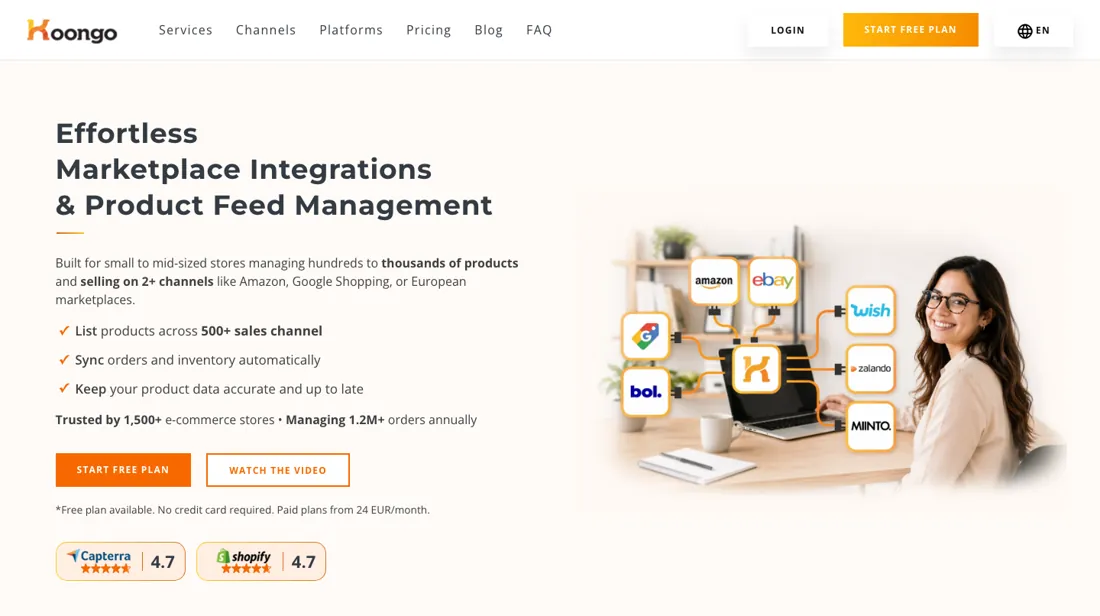
Shopify app that syncs product feeds, stock and orders across Amazon, eBay, Bol, Zalando, Allegro and 500-plus channels from one dashboard.
What buyers report about Koongo
Hands-on: not tested by usReported by buyers: Shopify App Store, read August 2026
Themes from the buyer-review sites listed at the foot of this page, read in August 2026. We have not run Koongo ourselves, so this is other buyers' experience rather than ours. We summarise it here because the complaints are usually the part a vendor page leaves out.
- • 4.4 over 98 reviews. Support carries the positive record and merchants name individuals: Qutton (Estonia, 11 months in, February 2026) calls Koongo one of the best integrators on the market and singles out Raül, and Apsilon (Netherlands, three months, April 2026) sums it up as fast communication and good software.
- • KitchenArt (Netherlands, three months in, October 2025) frames it against the field they tested: "cheaper, but better than competitors we have tested", with support they describe as amazing.
- • Six of the 98 reviews are one star and they cluster on marketplace-specific setup rather than on missing features. Stevvex (US, three years in, April 2025) reports recurring failures with Wish and Amazon, variants published individually, $240 in marketplace penalties and a denied refund; Koongo replied that this was a seasonal account with repeated install and uninstall cycles. Artist Deluxe (France, four months, January 2026) says it took three months to get products syncing to Amazon properly. CeeKay Traders UK (14 days, January 2026) could not clear OnBuy errors even after hiring a freelancer; Koongo replied that a new trial was granted and the refund issued.
- • The most useful review is a three-star. Fans Geek Store (Belgium, five months in, July 2026) found the repricer in monitoring mode was silently blocking marketplace updates through minimum-price errors, so their Bol delivery promise stopped updating; support misdiagnosed it before Pavel found it. Their ask is transparency about which settings block which updates, and visible error flagging — a small shop without an IT person cannot see that failure happening.
- • Bamboebaas (Netherlands, four months in, January 2025, three stars) makes the same point about vocabulary: they needed weekly contact with support to understand what features like "Order Sync" actually do, and say the documentation leaves out what you need to set it up yourself.
Where the ratings disagree. The five-star and one-star reviews are not really disagreeing. Both describe an app whose configuration is hard and whose support is responsive; the split is whether the merchant had someone to chase tickets with. That makes the support relationship, not the feature list, the thing you are buying — and the three-star reviews are the ones that say so plainly.
Pages read (August 2026): Shopify App Store
When the paid plan is worth it
Read the four tiers again and notice what does not change. Items, feeds, marketplace wizards and included orders are identical on Lite, Starter and Pro. What $39, $79 and $119 buy is how often your data refreshes — every 6 hours, every 30 minutes, every 15 minutes — and how fast support answers. That makes the choice unusually clean: you are buying staleness tolerance, and the right tier is decided by how fast your stock moves, not by how big your catalogue is.
So work out what a stale hour costs you. If you sell the last unit on Amazon and Bol within the same six-hour window, the six-hour refresh is the thing that oversells you, and the $40 step to Starter is cheap insurance. If your stock turns slowly, Lite refreshing four times a day is genuinely enough and the higher tiers buy you nothing you can measure. The second sum is the modules, and it is only visible on the vendor's own page.
Koongo prices Core, Marketplace Manager, Feed Manager and Ads Manager separately, which is why the listing also advertises a feed-manager-only version of each plan from $14.50. If you want product feeds for Google Shopping and Meta but no marketplace selling, that cheaper form is the plan you actually want, and you would never find it from the headline prices. The third is the one that decides the real bill: everything past 1,000 items, 5 feeds, one marketplace and 100 orders a month is a surcharge.
A catalogue of 20,000 SKUs selling across four marketplaces is not a $39 store on this app, and the plan price is the smallest line on that invoice.
Questions we are still checking
Facts about Koongo that would change a buying decision, and where we stand on each. An unanswered question does not mean the feature is missing; it means we have not confirmed it yet.
- How many team seats does the base account include before the €5.00 additional-seat charge applies? Still checking
Applies to: Lite and Starter.
Why it matters: koongo.com prices additional team seats at €5.00 each on Lite and Starter and includes one on Pro, but does not say how many users the base account carries.
Checked: Koongo pricing (2026-10-10)
Have a public source that answers one of these? How we review explains how we check and correct.
How to actually use Koongo
Start with the surcharge table, not the trial. Count your SKUs, the feeds you need, the marketplaces you want live and your monthly order volume, then price those against koongo.com's own per-plan surcharge list. The included allowances — 1,000 items, 5 feeds, two marketplaces, 100 orders — are small enough that most real stores are buying surcharges from day one, and knowing that number before the 7-day trial starts is what stops the first invoice being a surprise.
Then connect one marketplace, not four. The failure mode described in the app's own critical reviews is a single integration behaving unexpectedly — a repricer rule blocking offer updates, an error you cannot clear — and that is far easier to diagnose when only one channel is live. Get inventory sync provably correct on the hardest marketplace you sell to before you add the rest. And take the update frequency seriously while you are in the trial.
It is the only thing separating the tiers, so watch how far your stock actually drifts between syncs on the plan you are testing. If nothing oversells on a six-hour refresh during a normal week, Lite is your plan and the higher tiers are buying you reassurance rather than accuracy.
Distilled from apps.shopify.com/koongo and koongo.com/pricing, both read 23 August 2026. Re-verified 10 October 2026 on apps.shopify.com/koongo and koongo.com/pricing (plans, surcharge table and FAQ), plus the help article "Legacy - Update your plan to activate an order connection" (intercom.help/koongo-607303707ce4/en/articles/8582846).
Frequently asked questions
What do I pay once I pass 100 orders or 1,000 items a month?
Usage past the plan is billed automatically on top of it. koongo.com/pricing (EUR, excluding VAT, read 10 October 2026) lists an extra 100 orders at €10.00 down to €2.00 as volume grows on every paid plan, and each further 1,000 items at €1.00 down to €0.50 on Lite, €2.00 down to €1.00 on Starter and €2.80 down to €1.40 on Pro. An extra marketplace is €15.00 on Lite, €30.00 on Starter and €42.00 on Pro. The Shopify listing, read the same day, confirms surcharges for extra items, feeds, marketplaces and orders but does not print the amounts, so price your own volumes on koongo.com before comparing plans.
Do extra team members cost more?
On Lite and Starter an additional team seat is €5.00; Pro includes one additional seat (koongo.com/pricing, read 10 October 2026). The page does not say how many users the base account carries before that charge applies, so that part is not confirmed.
Can I cancel or downgrade at any time?
Per the FAQ on koongo.com/pricing, read 10 October 2026: you can upgrade, downgrade or cancel from account settings at any time, with no long-term contract, lock-in or cancellation fee; upgrades apply immediately and downgrades at the start of the next billing period. Paid plans start with a 7-day trial, and the page says you are never charged automatically after it. Through the Shopify App Store the charges are billed in USD every 30 days (listing, read the same day).
Is this a hands-on review of Koongo?
This is a researched assessment, not a hands-on test — where we've used a tool ourselves, we say so explicitly. We name what each tool is good and bad at, and we earn a commission only if you sign up, at no cost to you.
- Buyer reviews on Shopify App Store (listed as “Koongo: Sell on Marketplaces”), read August 2026.
- Read 2026-08-23 on apps.shopify.com/koongo, listed as “Koongo: Sell on Marketplaces”, and on koongo.com/pricing.
- A dated screenshot of that pricing page, kept on this site as the receipt.
Others in this category
Reviewed e-commerce tools that share ground with Koongo — comparable in what they do, not drop-in swaps:
New reviews, price changes we recorded, and the cost conditions we found. No sponsored placements. Unsubscribe anytime.
This is our researched assessment — not a paid placement. The “Visit” links on this page are affiliate links: we may earn a commission if you sign up, at no extra cost to you, and it never changes our take. How we review →