 Essential Countdown Timer Bar Review (2026)Mind the View Cap
The free plan is smaller than it looks, because of what counts as a view.
Visit Essential Countdown Timer Bar → Affiliate link — we may earn a commission if you sign up; it does not change what this page says.
Pricing (2026)
✓ Pricing re-verified 28 Sep 2026
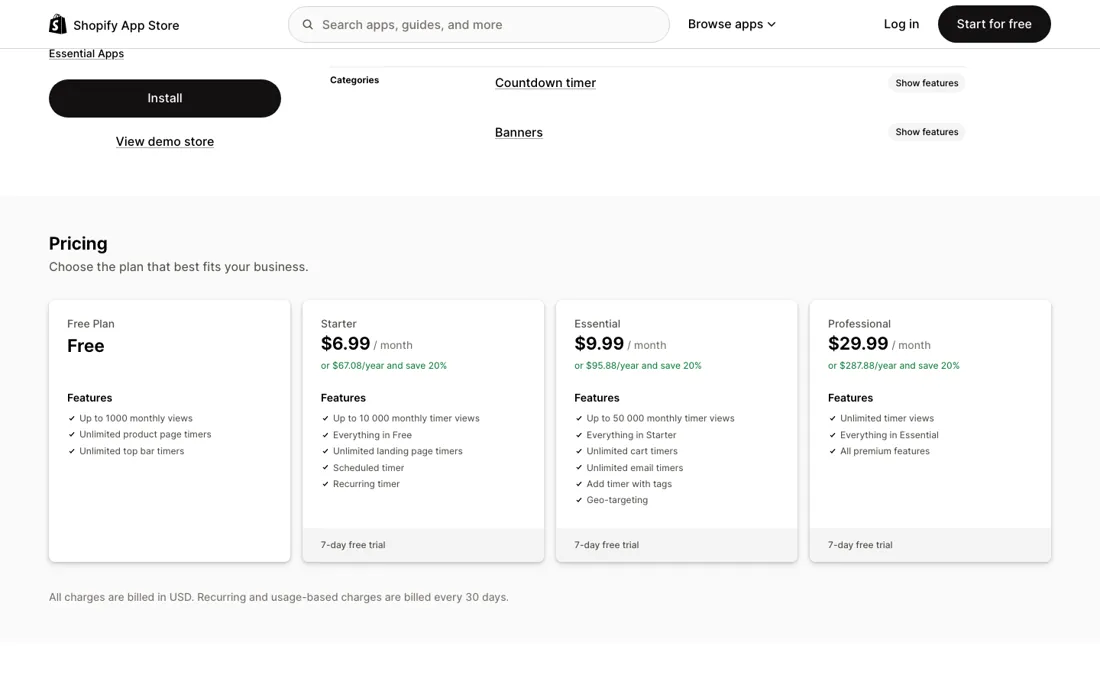
Four plans priced on monthly timer views. Free covers up to 1,000 views a month with unlimited product-page and top-bar timers. Starter is $6.99 a month, or $67.08 a year at a stated 20% saving, for up to 10,000 views, and adds landing-page timers and scheduled and recurring timers. Essential is $9.99 a month or $95.88 a year for up to 50,000 views, and adds cart timers, email timers, placing timers by product tag and geo-targeting.
Professional is $29.99 a month or $287.88 a year for unlimited views and every premium feature. Paid plans carry a 7-day free trial, and the vendor's own site adds a 30-day money-back guarantee. A view is counted every time a timer loads, not once per visitor. There is no overage charge: past the limit you get an email, and if you do not upgrade within 3 days every published timer is unpublished until views reset on the 1st of the month.
All charges are in USD, billed through Shopify every 30 days. Developer Essential Apps, with an address in Vilnius, Lithuania; the listing gives a launch date of 10 February 2022 and shows 1,721 reviews. Plans change — always verify the live price on their site.
What the pricing page doesn’t say
The help centre says a view is every time a timer loads: a shopper who refreshes the page, or browses three product pages with a timer on each, adds several views, and two timers on one page count twice. A thousand views a month is a few hundred browsing sessions on a store with a top bar on every page. Starter's 10,000 and Essential's 50,000 are counted the same way.
Running out does not cost money; it switches the timers off. There is no overage charge. When you reach the limit you get an email, and if you have not upgraded within three days every published timer is unpublished until views reset on the 1st of the month. The month you are most likely to hit the ceiling is the month of your biggest sale, so on a Black Friday campaign that is when the countdown disappears.
If a promotion depends on the timer, size the plan on the traffic you expect at the peak rather than last month's, or watch the usage in the app while the campaign runs. The cart timer, the one that tells shoppers their items are reserved, starts on the $9.99 Essential plan, not on Starter. Whether a claim like that is true depends on how you set it up, and the FTC treats false urgency and scarcity as deceptive practice; an evergreen fixed-minute timer starts fresh for each visitor, so keep it for offers that genuinely work that way.
One incident is worth knowing about: a Chilean merchant with nearly three years on the app wrote that Shopify Support had traced a checkout button that redirected customers to an outside URL to a security vulnerability related to this app. Essential Apps replied that it fixed the issue within two hours of the first report, resolved the cause the same day and reported the incident to Shopify. We found no report of a repeat. We have not installed the app.
What Essential Countdown Timer Bar does
Shopify countdown timer app for announcement bars, product pages, landing pages, carts and emails, with dated, recurring and evergreen timers, geo-targeting and a free plan; priced on how many times the timers load each month.
Buy the plan for your busiest month
Features climb with the plans, but views decide more upgrades than features do. Free gives product-page and top-bar timers for up to 1,000 views. Starter at $6.99 adds landing-page timers and scheduled and recurring timers, with 10,000 views. Essential at $9.99 adds the cart timer, email timers, timers placed by product tag and geo-targeting, with 50,000 views. Professional at $29.99 removes the view ceiling and adds every premium feature. For most stores the step that matters is Essential: three dollars more than Starter, five times the views, and the first plan with a cart timer or email timers.
Professional makes sense once your timers load more than 50,000 times in your peak month, because the alternative is timers that switch themselves off three days after you cross the line. Yearly billing takes 20% off each paid plan, and the vendor's site offers a 30-day money-back guarantee; read its terms before you count on it for a yearly payment.
How to actually use Essential Countdown Timer Bar
Install on the free plan and build the timer in Preview mode or the theme customiser first; the help centre says views are not counted there, so you can get the design right without spending your allowance. Pick the timer type that matches the truth of your offer. A countdown to a date suits a sale that really ends then; a daily recurring timer suits a same-day shipping cut-off; an evergreen fixed-minute timer starts fresh for each visitor, so keep it for offers that work that way.
If the timer does not show, the help centre's article on timers not showing covers the usual causes, and reviewers describe support fixing theme and CSS conflicts for them. Before a big promotion, check the views used so far in the app and estimate the campaign's page loads, counting every page that carries a timer. If you are close to the limit, upgrade before the sale starts: the warning email gives you three days before the timers are unpublished.
Distilled from Essential Countdown Timer Bar's Shopify App Store listing and review pages, including the critical reviews, the vendor's pricing and FAQ page at essential-apps.com/countdown-timer, and its help-centre articles on timer views and on cancelling, all read in a headless browser on 28 September 2026; our Scarcity.AI dossier (read 22 August 2026) for the comparison; FTC guidance on dark patterns. We have not installed the app.
Essential Countdown Timer Bar vs Scarcity.AI, side by side
Both columns come from the same place: each vendor’s own published pricing, read on the date shown in the sources at the foot of this page. We do not average them into a score.
Both names above are affiliate links: we may earn a commission if you sign up, at no extra cost to you. Neither changes what this table says: both columns come straight from the vendors’ own pricing pages.
The natural comparison is Scarcity.AI — Scarcity.AI is the closest comparison in our own dossiers: its developer also publishes a countdown timer, next to a low stock counter and a live visitors counter. On our reading of 22 August 2026 that countdown listing showed a free tier and no paid ladder, while Essential Countdown Timer Bar starts free at 1,000 timer views a month and charges $6.99, $9.99 or $29.99 for more views and for cart, email, scheduled and recurring timers. The difference is scope. Scarcity.AI spreads urgency over three small apps, each installed and billed on its own, and its stock counter reads your real inventory; Essential puts every kind of countdown in one app and prices it on how often the timers load. A store that also wants stock and visitor signals fits Scarcity.AI; a store that mainly needs dated countdowns in several places, including carts and emails, fits Essential..
Visit Essential Countdown Timer Bar →
Frequently asked questions
What does Essential Countdown Timer Bar cost?
Free up to 1,000 timer views a month; Starter is $6.99 a month for 10,000 views, Essential $9.99 for 50,000 and Professional $29.99 for unlimited views, each 20% less on yearly billing, with a 7-day trial on paid plans. Read on the Shopify App Store on 28 September 2026.
What counts as a timer view?
Every time a timer loads, not each visitor. Refreshing a page or opening several pages with timers adds several views. Views reset on the 1st of each month.
What happens when I go over my view limit?
You are not charged extra. You get an email, and if you do not upgrade within 3 days all published timers are unpublished until the monthly reset. The timers stay saved and can be republished.
What should I weigh before buying E-commerce software?
Check your platform and version specifically. Shopify support is close to universal in this category, while WooCommerce, BigCommerce, Magento and headless setups vary a lot, and 'supported' sometimes means a generic API rather than a maintained app. A listing in your own platform's app store, with recent reviews there, is a better signal than the vendor's logo wall.
Is this a hands-on review of Essential Countdown Timer Bar?
This is a researched assessment, not a hands-on test — where we've used a tool ourselves, we say so explicitly. We name what each tool is good and bad at, and we earn a commission only if you sign up, at no cost to you.
- Read 2026-09-28 on apps.shopify.com/essential-countdown-timer, on essential-apps.com/countdown-timer and in the vendor's help article on timer views.
- A dated screenshot of that pricing page, kept on this site as the receipt.
Others in this category
Reviewed e-commerce tools that share ground with Essential Countdown Timer Bar — comparable in what they do, not drop-in swaps:
New reviews, price changes we recorded, and the cost conditions we found. No sponsored placements. Unsubscribe anytime.
This is our researched assessment — not a paid placement. The “Visit” links on this page are affiliate links: we may earn a commission if you sign up, at no extra cost to you, and it never changes our take. How we review →