Pipedrive Review (2026)From $14 a Seat, Billed a Year Up Front
 By Daan Haket · Researched and written with an AI assistant · who does what
Pipedrive manages what happens after a lead enters your pipeline — it doesn't do outbound prospecting or marketing, so you'll pair it with a separate tool for that. As you scale and need sales, marketing and support data joined up, its sales-only focus starts to lean on add-ons.
sales teams that want a simple, visual pipeline they can use on day one, with a separate marketing tool already in place.
you want marketing automation in the same tool (HubSpot) or need built-in outbound prospecting.
Transparency: the “Visit” links on this page are affiliate links — we may earn a commission if you sign up, at no extra cost to you. No vendor can pay for a better review or verdict. How we make money →
Pricing (2026)
✓ Pricing re-verified 26 Aug 2026
| Plan | Price | What you get |
|---|---|---|
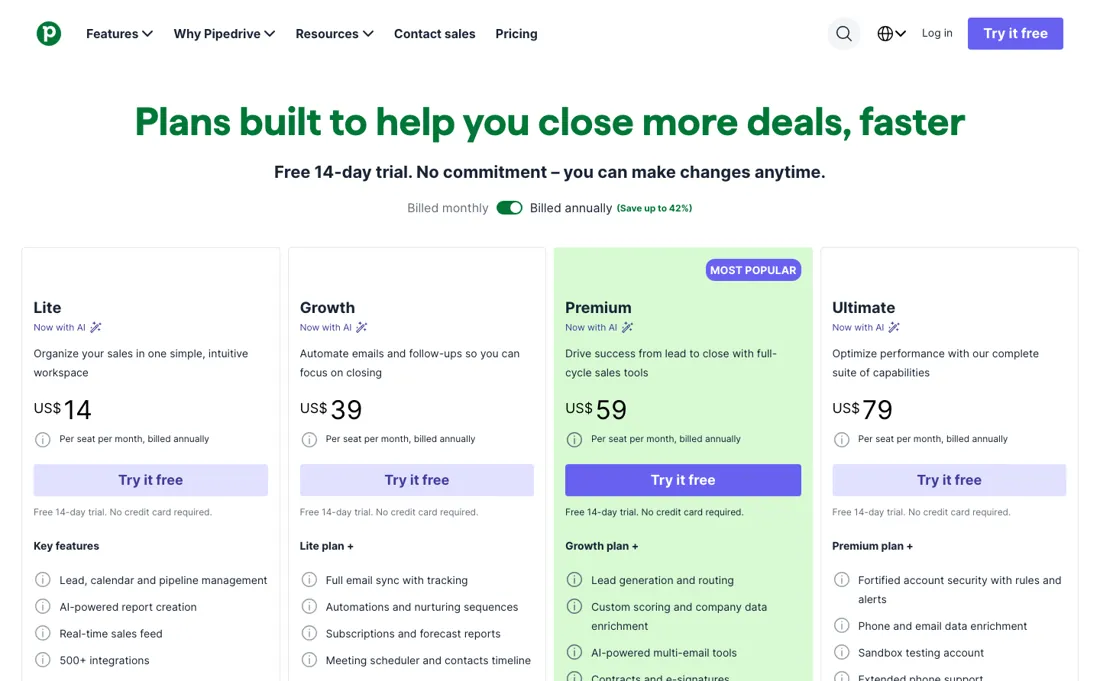
| Lite | US$14 per seat/mo billed annually | pipeline, calendar and lead management, AI report creation |
| Growth | US$39 per seat/mo billed annually | full email sync, automations, forecast reports |
| Premium | US$59 per seat/mo billed annually | lead routing, custom scoring, contracts and e-signatures |
| Ultimate | US$79 per seat/mo billed annually | account security rules, phone and email enrichment, sandbox |
| This tool | $14 | 1st cheapest of 5 |
| Cheapest | $14 | this one |
| Median | $39 | |
| Most expensive | $49 | Streak |
Lowest paid entry price per seat a month, billed annually, in USD, among the 5 sales & outreach tools we have researched (read between 2026-08-26 and 2026-10-09). Only tools priced in the same unit and on the same billing are compared — not a market survey, and cheapest is not best.
Four seat-based plans. Billed annually they are US$14, US$39, US$59 and US$79 per seat per month — which is one payment of $168, $468, $708 or $948 per seat per year, since Pipedrive charges the year up front. The page advertises that annual billing saves up to 42%. Read from the Netherlands the same column reads €14, €39, €59 and €79: the numbers do not convert, they are simply reprinted with a different symbol, so a European pays materially more for the same seat.
We could not get the monthly column to render from the US on three attempts, so this is the annual view only — by Pipedrive's own 42% figure, paying month to month costs meaningfully more. The trial is 14 days with no credit card, though the affiliate landing page our own link leads to advertised 30 days, with LeadBooster, Smart Docs and Projects included, when we followed it on 3 September 2026.
LeadBooster, Projects, Campaigns, Web Visitors and Smart Docs are optional paid add-ons on top, from €13.33 for Campaigns up to €41 for Web Visitors — and those add-ons are where a Pipedrive bill usually stops matching the number you picked off this page. Plans change — always verify the live price on their site.
Category context: Growth & Revenue. Across the 83 tools in this category that we researched with a public US-dollar price, the median entry price is about $30 a month (lowest paid plan as listed, per seat where the vendor prices per seat). Pipedrive’s entry price of $14 a month sits below that median. Compare pricing conditions in the Software Cost Atlas →
Pipedrive’s pricing page, as we read it
Watch the video review
The video version of this review, from our YouTube channel.
⚡ Short on time? Watch the 30-second verdict Short.
What Pipedrive does
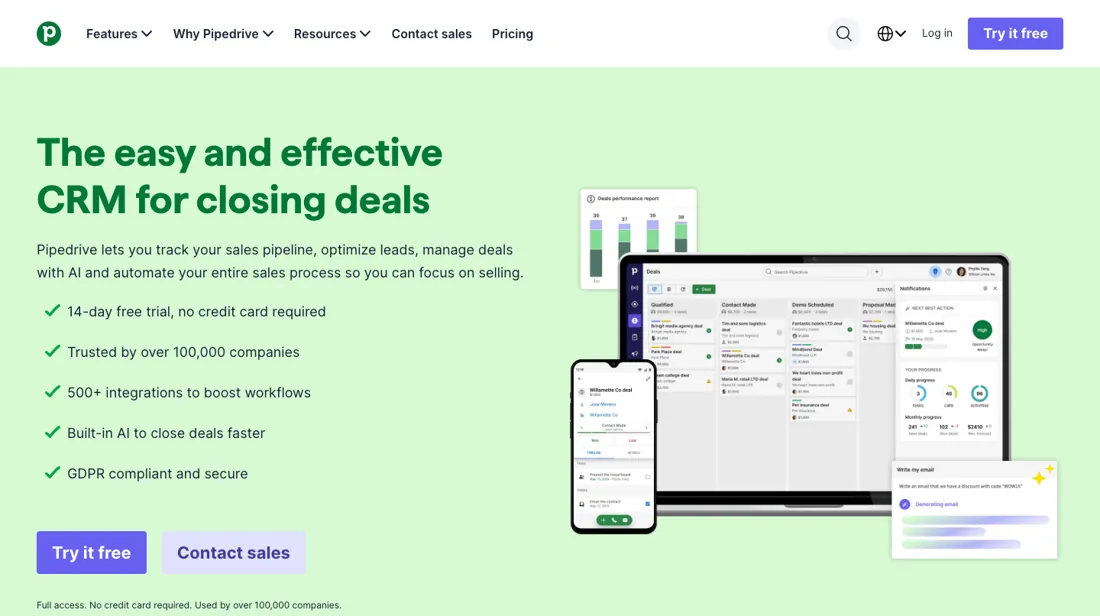
Sales-first CRM built around a visual pipeline: track deals, automate follow-ups and forecast revenue — designed for small and mid-size sales teams. A native MCP server (launched mid-2026) connects it to AI assistants like ChatGPT and Claude for natural-language CRM actions.
What buyers report about Pipedrive
Hands-on: not tested by usReported by buyers: G2, Capterra, Trustpilot and TrustRadius, read August 2026
Themes from the buyer-review sites listed at the foot of this page, read in August 2026. We have not run Pipedrive ourselves, so this is other buyers' experience rather than ours. We summarise it here because the complaints are usually the part a vendor page leaves out.
- • Ease of use is the standout — 93% of 599 Capterra reviewers who rated it named the simple interface, and G2 scores it 8.9/10, above Salesforce. 4.3 on G2 across 2,916 reviews, 4.5 on Trustpilot across 3,229.
- • A sales team is running in it the same week, which is not true of most CRMs.
- • TrustRadius adds the long-tenure view the other platforms lack: reviewers with five and ten years in the product still recommend it for small teams, naming custom fields, pipeline stages and the price-to-function ratio.
- • The $14/user headline is the start of the conversation. Reviewers sign up and then find the features they need are paid add-ons — that pattern dominates complaints on every platform.
- • Reporting is thin on the lower tiers.
- • Automation is trigger-action only. Conditional logic, branching or multi-step workflows break it.
- • Support quality is inconsistent. One G2 reviewer in February 2026 praised the interface and scored support zero out of five over a billing dispute their account executive never resolved.
- • No free plan, and email sync lag is reported.
- • Two separate TrustRadius reviewers name the same concrete gap: you cannot link one person to more than one organisation. If your buyers sit on several entities, that is a data model problem, not a preference.
- • Reporting and dashboarding are the ceiling everyone hits in the same place — fine for a sales team, thin once ops or finance want the analytics pulled together.
- • Permission sets are not granular enough for some, and there is no way to tie commission or quota structures to the deal data.
Where the ratings disagree. Read TrustRadius knowing most of its recent Pipedrive reviews carry an 'Incentivized' label, so the tone runs warmer than G2 or Trustpilot. The useful part is not the score but the specificity: because reviewers describe long deployments, the complaints are about particular missing mechanics rather than about price, which is what dominates elsewhere.
Pages read (August 2026): Trustpilot
When the paid plan is worth it
Pipedrive routes new users to a trial rather than a permanent free tier — 14 days on its own pricing page, 30 days through the affiliate link on this page — so the real decision is not free versus paid but which paid seat to buy. The entry Lite tier, listed on Pipedrive's blog at $14 per seat per month billed annually, pays for itself for a small team that only needs a visible pipeline, since it allows 2,500 active leads and deals per user.
Moving up earns its keep mainly on reporting, automation and integration volume. Premium raises the ceiling to 250 reports per user and 150 active automations. The daily API budget is documented as 30,000 base tokens multiplied by a plan multiplier and the seat count, where Lite carries a multiplier of 1 against 5 on Premium. Upgrading buys no unlimited ceiling, though: Ultimate caps custom fields at 500. It also does not buy hands-on setup, which Pipedrive reserves for qualifying accounts spending over $1000 in monthly recurring spend, and it does not repair a messy import, inconsistent stage naming or weak pipeline discipline.
How to actually use Pipedrive
The quickest route to real value is to start the trial — Pipedrive advertises a 14-day trial with no credit card required, or 30 days if you start from the affiliate link on this page — and shape the pipeline stages before any data lands, because stage names drive every report afterwards. Import comes next, from the account menu under Tools and apps > Import data > Import from spreadsheet.
A couple of hard limits bite: the file has to stay under 50 MB with no more than 50,000 rows, and only users with the correct global permission can run an import, which stalls anyone who joined as an ordinary seat. The sharper trap is ordering. Pipedrive documents importing deals straight from a pipeline or stage view as available only for the first import during onboarding on a trial account, so a throwaway test load burns it — though a stage column in the spreadsheet still works later.
A bad load can still be reverted from the import history tab within 48 hours. Hands-on onboarding is reserved for qualifying accounts spending over $1000 in monthly recurring spend, so most teams work through setup themselves.
Distilled from Pipedrive vendor and documentation pages — the sales onboarding page, the company blog's CRM pricing rundown, the "New Pipedrive plans" and spreadsheet-import help articles, the "Importing deals into a specific stage or pipeline" help article, and the developer rate-limiting reference — all read 4 August 2026.
Pipedrive vs HubSpot, side by side
Each column shows the vendor’s own published entry price, read on the date shown. Entry prices can cover different services or units, so check what each one buys. We do not average them into a score.
The Pipedrive link above is an affiliate link — we may earn a commission if you sign up, at no extra cost to you — and the other column is a plain link. Neither changes what this table says.
The natural comparison is HubSpot — the all-in-one platform with marketing built in.
Frequently asked questions
What does Pipedrive cost per seat in 2026?
Read on 16 August 2026 from an EU address, VAT exclusive: billed annually €14, €39, €59 and €79 per seat a month for Lite, Growth, Premium and Ultimate, charged up front as €168, €468, €708 or €948 per seat a year. Billed monthly the same plans are €24, €49, €79 and €99. The trial is 14 days and asks for no card, or 30 days from the affiliate link on this page, followed on 3 September 2026.
Which Pipedrive features are paid add-ons on top of the seat?
Five, and this is the single most common complaint about the pricing: LeadBooster from €32.50, Smart Docs from €32.50, Web Visitors from €41, Projects from €16 and Campaigns from €13.33, each per month on top of every seat you pay for. Lead capture and email marketing are therefore not in the seat price at any tier. Read on 16 August 2026.
Is Pipedrive good enough as the CRM you grow into?
The pattern across platforms is that teams stay for the ease of use and leave over reporting. Reviewers on TrustRadius who have run it for five to ten years still recommend it for small teams while naming the same two ceilings: reporting and dashboarding thin out as the company scales, and automation is trigger-action, so branching workflows do not fit. Two separate reviewers also name the same specific gap — you cannot link one person to more than one organisation.
Is this a hands-on review of Pipedrive?
This is a researched assessment, not a hands-on test — where we've used a tool ourselves, we say so explicitly. We name what each tool is good and bad at, and we earn a commission only if you sign up, at no cost to you.
- Buyer reviews on G2, Capterra, Trustpilot and TrustRadius, read August 2026.
- Read 2026-08-26 on pipedrive.com/pricing over a US connection; the monthly column below is our 2026-08-16 reading from the EU.
- A dated screenshot of that pricing page, kept on this site as the receipt.
Others in this category
Reviewed growth & revenue tools that share ground with Pipedrive — comparable in what they do, not drop-in swaps:
New reviews, price changes we recorded, and the cost conditions we found. No sponsored placements. Unsubscribe anytime.
This is our researched assessment — not a paid placement. The “Visit” links on this page are affiliate links: we may earn a commission if you sign up, at no extra cost to you, and it never changes our take. How we review →