Capsule Review (2026)Free Tier Stops at 250 Contacts
 By Daan Haket · Tested hands-on · written with an AI assistant · who does what
Capsule's simplicity is the product: it deliberately does less than the CRM giants, which is why small teams actually use it. Throughout this review we weigh it against Salesforce.
small businesses that want a clean, genuinely simple CRM for contacts, pipeline and tasks — one the team will actually keep updated.
you need marketing automation, complex territory logic or enterprise reporting (bigger platforms exist for a reason).
Transparency: the “Visit” links on this page are affiliate links — we may earn a commission if you sign up, at no extra cost to you. No vendor can pay for a better review or verdict. How we make money →
We ran the import ourselves instead of summarising Capsule's help pages. Daan created the account; everything after that was measured in the product. We built a deliberately messy CSV — 24 rows, one row repeated with a different job title and phone number, and one row carrying nothing but an organisation name — imported it with “Import and update duplicates” and the overwrite box ticked, and then tried to undo it. The account was a fresh one on the 14-day premium trial, so nothing below is a free-plan restriction.
- 24 rows became 34 contacts. Capsule creates a separate Organisation record for every distinct organisation name in the file — 22 people plus 12 organisations. Nobody warns you, and it matters: the free plan stops at 250 contacts, so a 24-row spreadsheet costs 34 of them.
- A row with only the Organisation column filled does build a company record on its own. Our “Solitary Holdings BV” row arrived as an organisation with its phone number attached.
- The duplicate row wins. Anna Bakker went in twice, second time as “Head of Marketing” instead of “Marketing Lead”, and the record ended up with the later title. So the last occurrence in the file overwrites the earlier one, inside a single import.
Pricing (2026)
✓ Pricing re-verified 7 Sep 2026
| Plan | Price | What you get |
|---|---|---|
| Free | US$0 | 250 contacts, maximum 2 users |
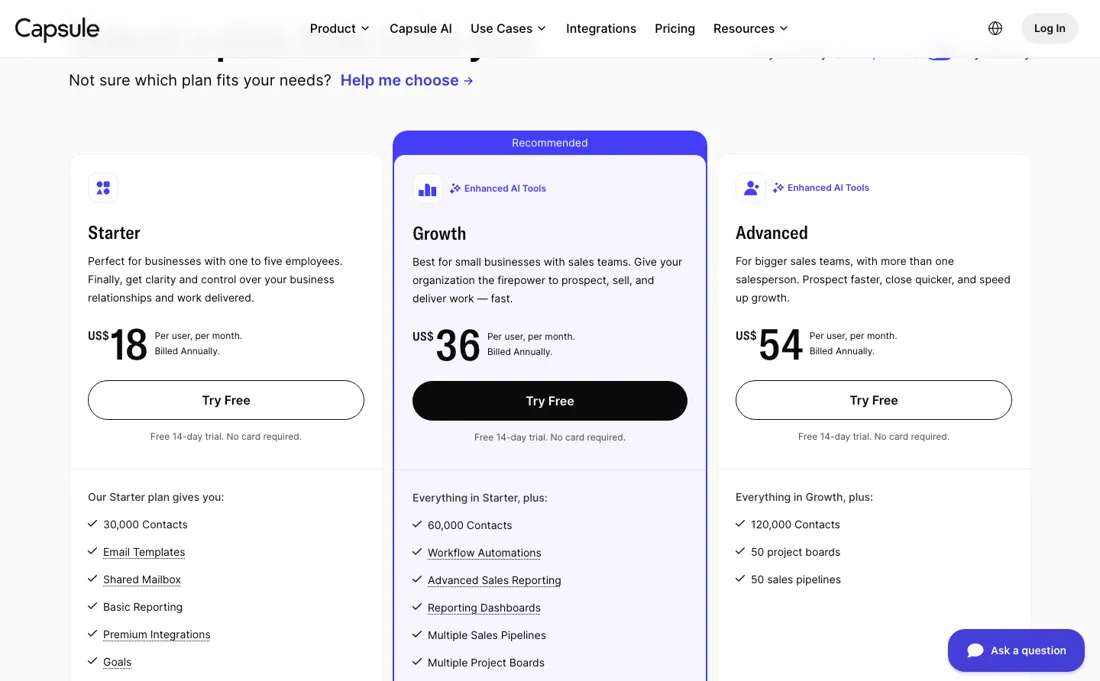
| Starter | US$18 per user/mo billed annually | 30,000 contacts, email templates, shared mailbox |
| Growth | US$36 per user/mo billed annually | 60,000 contacts, workflow automations, reporting dashboards |
| Advanced | US$54 per user/mo billed annually | 120,000 contacts, 50 project boards, 50 pipelines |
| Ultimate | no price on the card — trial and a sales call | 5+ users, dedicated account manager, custom training |
(price page re-read 2026-09-11) The free tier covers two users and 250 contacts, and every paid card is quoted per user a month with a 14-day trial that needs no card. Read over a US connection on 26 August the annual figures were US$18 for Starter, US$36 for Growth and US$54 for Advanced, with contacts as the rungs: 250, 30,000, 60,000 and 120,000.
The reading on 11 September was taken from the Netherlands, where those same four cards render in euros at €15, €28 and €49 on annual billing. Capsule prices through a third-party geo lookup, so read that as a regional difference rather than a cut, and take your own figure from the live page. What did change is the shape of the page: it now carries a fifth card, Ultimate, for teams of five or more, and it is the only one printing no amount at all — Capsule asks you to start a trial and have its sales team get in touch.
An earlier note here said the page stopped at Advanced; it does not. A Marketing add-on is sold beside the CRM, and the AI features can be switched off in your account. Plans change — always verify the live price on their site.
Category context: Growth & Revenue. Across the 83 tools in this category that we researched with a public US-dollar price, the median entry price is about $30 a month (lowest paid plan as listed, per seat where the vendor prices per seat). Compare pricing conditions in the Software Cost Atlas →
Correction after re-checking: (2026) Free tier (250 contacts, 2 users); billed monthly: Starter $21/user/mo, Growth $38, Advanced $60; billed annually: Starter $18, Growth $36, Advanced $54. 14-day trial, no card. Ultimate carried $75 monthly and $72 annual when this was read on 31 July, but its card had stopped printing a price by 11 September and asks for a sales conversation instead, so those two figures are history rather than a quote. (re-verified 2026-07-31, Ultimate re-checked 2026-09-11)
What the pricing page doesn’t say
The honest flip side — advanced automation, deep reporting and integrations thin out at the top tiers, and a scaling sales org can outgrow it. Buy it to finally have a CRM the team fills in; plan a migration path if you're heading toward enterprise process complexity.
Watch the video review
The video version of this review, from our YouTube channel.
⚡ Short on time? Watch the 30-second verdict Short.
What Capsule does
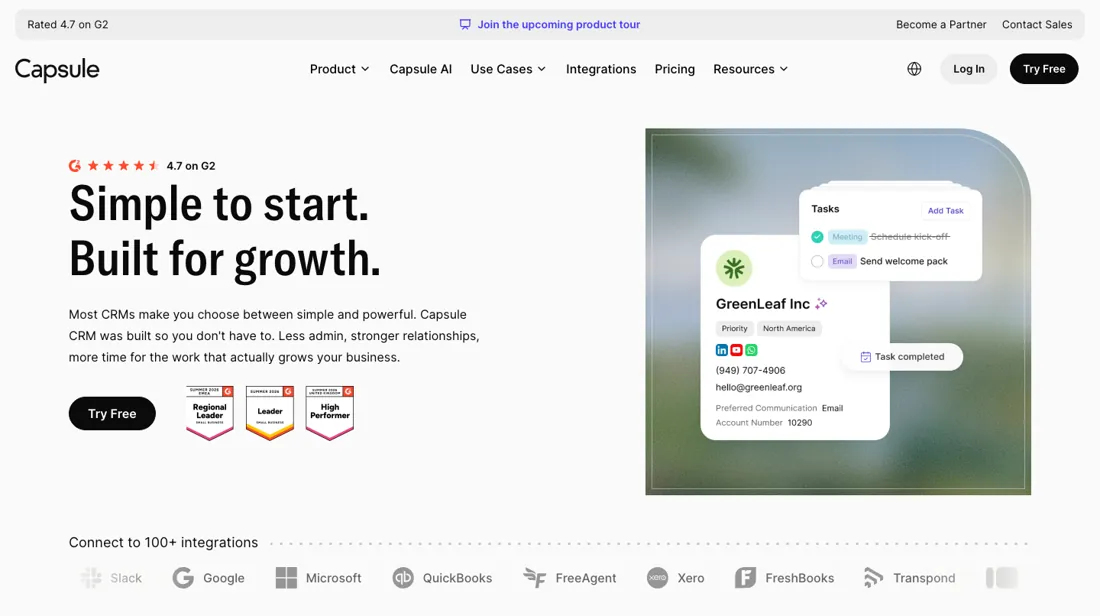
Deliberately simple CRM for small businesses: contacts, pipeline and tasks. The simplicity is the product — advanced automation, deep reporting and integrations thin out, and a scaling sales org can outgrow it.
What buyers report about Capsule
Hands-on: tested 2026-09-07Reported by buyers: G2 and Capterra, read August 2026
Themes from the buyer-review sites listed at the foot of this page, read in August 2026. We tested Capsule ourselves on 2026-09-07, but one test is a narrow sample, so here is what other buyers report. We summarise it here because the complaints are usually the part a vendor page leaves out.
- • Ease of use is the most repeated compliment across roughly 886 verified reviews, at 4.5 to 4.7. Onboarding is fast and the interface stays out of the way.
- • The drag-and-drop pipeline is used by non-technical staff without training, and the pricing is fair below about 15 users. Free for 2 users, paid from $18.
- • There is no phone support and no live chat on any tier. If that matters to you, it matters before you buy, not after.
- • Support response times draw complaints on the lower tiers.
- • Reporting handles the basics but frustrates anyone wanting custom dashboards.
- • Advanced customisation is limited, and the reviewers who wanted more of it were on the top tier already.
When the paid plan is worth it
The free plan is a working two-person CRM rather than a demo: 250 contacts, 1 sales pipeline and 5 custom fields. It also sends mail on the free card: Capsule files that under Advanced Mail Connection, which means your own Gmail or Outlook account and nothing else — other mail servers are an upgrade, and the shared sales@ or support@ inbox starts at Starter (read 13 September 2026). It stops being viable once the team passes the 2-user maximum or the list outgrows 250 records; the cheapest paid tier is Starter, US$21 per user per month billed monthly, US$18 billed annually.
The more consequential line is Starter to Growth (US$38 monthly, US$36 annual). Workflow automations, multiple sales pipelines, project boards, team and access controls, reporting dashboards and the AI enrichment and summary tools all sit at Growth and above. Starter itself adds 30,000 contacts, email templates, a shared mailbox, basic reporting, premium integrations, goals, custom activity types and the AI Pipeline Generator. Pin those premium integrations down before you pick a tier, because Capsule marks them one by one: its Xero, Sage, FreshBooks and Kashflow pages all read Starter and above, while FreeAgent and Zapier are listed on every plan including Free.
A free account can still reach its accounts package, but through FreeAgent or a Zap rather than the direct Xero link. Advanced (US$60 monthly, US$54 annual) mostly raises ceilings, 120,000 contacts, 50 sales pipelines and 50 project boards, so it repays only organisations genuinely running parallel processes. Ultimate sits above Advanced for teams of five or more and adds 240,000 contacts, a dedicated account manager, custom training and ongoing priority support.
Its price is the one number you cannot take off the page: we recorded US$75 monthly and US$72 annual reading it on 31 July, but on 11 September the card printed no amount at all and sent us to a trial and a sales conversation instead, so treat the top of the ladder as quoted rather than published. What no tier changes: every seat costs the same regardless of how lightly it is used, and marketing automation sits outside the product as a separate paid add-on.
What we found running Capsule ourselves
The first findings are at the top of this page. The rest:
- But “overwrite” means exactly the four fields it names — name, job title, organisation and custom fields — and nothing else. The two rows carried different phone numbers and the contact now holds BOTH, sitting side by side. Contact channels are appended, not replaced, so a bad update pass leaves duplicate numbers on the record rather than wrong ones.
- There is no undo, and that is worth knowing before you press Import. The import history logs “34 total imported, 34 contacts created” and offers exactly two things: View and Close. View opens a saved filter holding precisely those 34 contacts — which looks like the undo route until you select all of them and find the only bulk actions are Tag, Create Campaign and Export. No delete. Not on that list, not on the full contact list, not on the contact record, and not on its edit screen. We could not reach a delete anywhere in the interface.
- So the practical rule is the opposite of reassuring: an import is one-way. Test on a handful of rows first, because the clean-up you are counting on does not exist where you would look for it.
Most of our reviews are researched rather than run — how we review explains which is which, and why we do not pretend otherwise.
How to actually use Capsule
Capsule starts empty, and the import screen is where the shaping happens. Import accepts CSV or Excel; a row carrying a first or last name becomes a Person, while a row with only the Organisation column filled builds the company record. Count on more records than rows: every distinct organisation name in the file also becomes its own Organisation, so our 24-row test file arrived as 34 contacts — worth knowing when the free plan stops at 250.
Duplicate rows can be imported as new, ignored, or used to update existing contacts, and the update option carries a second checkbox that spells out its own limits: it overwrites name, job title, organisation and custom fields. Nothing else. We imported the same person twice with different details and the later row's job title won, while both phone numbers ended up on the record side by side — contact channels are added, not replaced.
Treat the import as one-way. Capsule logs what it did and gives you a saved filter of exactly the contacts it created, which looks like an undo until you use it: the only bulk actions on that list are Tag, Create Campaign and Export, and we could not find a delete anywhere in the interface — not in bulk, not on the record, not on its edit screen. Test with a handful of rows before you commit the real file.
Notes are one-way too: they import onto new contacts only, and Excel truncates fields at 32,000 characters, ruling it out for long note histories.
Distilled from Vendor documentation read 2026-07-31: https://capsulecrm.com/support/importing-and-migrating-data/importing-contacts/ (CSV/Excel formats, UTF-8 assumption, Person vs Organisation rows, creating custom fields at the matching stage and the 250-character text-field limit, the DataTag prerequisite, the three duplicate options, the undo limitation, notes on brand new contacts only, the 32,000-character Excel cap), https://capsulecrm.com/support/importing-and-migrating-data/getting-started-with-importing-and-migration/ (supported import routes) and https://capsulecrm.com/support/email-and-communication/storing-emails/ (Mail Drop Box address, forwarding and BCC behaviour, the 25MB maximum email size). Tier context from https://capsulecrm.com/pricing/.
Capsule vs Pipedrive, side by side
Each column shows the vendor’s own published entry price, read on the date shown. Entry prices can cover different services or units, so check what each one buys. We do not average them into a score.
Both names above are affiliate links: we may earn a commission if you sign up, at no extra cost to you. Neither changes what this table says.
The natural comparison is Pipedrive or folk — the SMB-CRM peer group — Capsule wins on calm simplicity, Pipedrive on pipeline power; pick by which your team will really use. Weigh it against Salesforce on the job you actually need done.
Frequently asked questions
What does Capsule cost?
Free for 250 contacts and 2 users, then roughly $21, $38 and $60 per user a month for Starter, Growth and Advanced, read over a US connection. Ultimate, the fifth card, prints no price at all: it asks for a trial and a call, so the $75 we recorded on 31 July is history rather than a quote. The advertised annual saving moves too — up to 14% on the page in August, up to 26% when we looked on 11 September. The trial is 14 days with no card.
Is the free tier a real CRM?
For a solo consultant with a small book, yes: 250 contacts and two users covers a genuine pipeline rather than a demo. The ceiling is contacts, and 250 arrives faster than most people expect once you import an inbox.
Can I avoid the AI features?
Yes, and Capsule says so explicitly on the pricing page: the AI features can be switched off in your account. That is worth knowing for anyone with a client confidentiality concern or a policy against sending CRM content to a model.
Can I email my contact list from Capsule?
Two ways, and they are different products. A connected mailbox sends individual mail from inside Capsule, with an Outlook or Gmail add-in that files the thread against the contact. Bulk campaigns run on Transpond, Capsule's own marketing tool, which is a separate product rather than a feature of the plans above. What their integration page documents, read on 15 September 2026, is a two-way sync rather than a one-off export: tags, lists and custom fields pull through from Capsule, custom fields can be used as merge fields, a Capsule list appears as a segment in Transpond, and edits on either side -- contacts, tags, lists, even mailing status -- sync back to the other. We have not read Transpond's own pricing, so budget it as a second bill rather than something the plans above include.
Is this a hands-on review of Capsule?
Yes. We tested Capsule ourselves on 2026-09-07; the section above says what we tested, what we found and what we did not test, and where a figure comes from the vendor's own documentation instead. Most of our reviews are researched rather than run; we say which is which. We name what each tool is good and bad at, and we earn a commission only if you sign up, at no cost to you.
- Buyer reviews on G2 and Capterra, read August 2026.
- Price page re-read 2026-09-11.
- A dated screenshot of that pricing page, kept on this site as the receipt.
- Our own hands-on session with Capsule (2026-09-07), written up in full further down this page.
Others in this category
Reviewed growth & revenue tools that share ground with Capsule — comparable in what they do, not drop-in swaps:
New reviews, price changes we recorded, and the cost conditions we found. No sponsored placements. Unsubscribe anytime.
This is our researched assessment — not a paid placement. The “Visit” links on this page are affiliate links: we may earn a commission if you sign up, at no extra cost to you, and it never changes our take. How we review →