SoftSync Review (2026)Per-Seat CRM, Pro Stops at Five Users
 By Daan Haket · Researched and written with an AI assistant · who does what
Pro stops at five team members per workspace. Throughout this review we weigh it against HubSpot.
small B2B sales teams of up to five people who want CRM records, email campaigns, meeting summaries and follow-up automation in one workspace, and who want Claude, ChatGPT or Gemini to work with that CRM directly rather than through a connector marketplace.
your team will pass five users soon and the jump to $59 per seat breaks the budget; you run high-volume outbound where 1,000 campaign emails per user a month is too tight; or you rely on a library of prebuilt integrations rather than an API and MCP connection.
Transparency: the “Visit” links on this page are affiliate links: we may earn a commission if you sign up, at no extra cost to you. No vendor can pay for a better review or verdict. How we make money →
What SoftSync costs at your size
What each plan costs a month on annual billing (monthly billing below it), per user from SoftSync’s own pricing page. The cheapest plan at each size is in bold. On annual billing the cheapest plan changes from Pro to Business between 5 and 10 users. Pro stops at 5 users; Business stops at 25 users; Enterprise is quote only.
| Users | Pro | Business | Enterprise |
|---|---|---|---|
| 1 user | $29 $39 monthly | $59 $79 monthly | quote only |
| 3 users | $87 $117 monthly | $177 $237 monthly | quote only |
| 5 users | $145 $195 monthly | $295 $395 monthly | quote only |
| 10 users | not available | $590 $790 monthly | quote only |
| 25 users | not available | $1,475 $1,975 monthly | quote only |
| 50 users | not available | not available | quote only |
Prices read 2026-09-26; tax excluded unless the vendor says otherwise. Calculated by our cost engine; the same numbers are in our open data.
Pricing (2026)
✓ Pricing re-verified 26 Sep 2026
| Plan | Price | What you get |
|---|---|---|
| Pro | $29 per seat a month billed yearly or $39 billed monthly | Max 5 team members, 10 groups, 250,000 records/table, 1 mailbox/user; 1,000 emails/enrichments/chats per month |
| Business | $59 per seat a month billed yearly or $79 monthly | Max 25 team members, 100 groups, 1,000,000 records, 5 mailboxes; 10,000 of each allowance; Priority Support, workspace consultant |
| Enterprise | custom-priced | — |
Summarised from the pricing notes below; the notes carry the conditions.
| This tool | $29 | 1st cheapest of 4 |
| Cheapest | $29 | this one |
| Median | $44 | |
| Most expensive | $49 | Streak |
Lowest paid entry price per seat a month, billed annually, in USD, among the 4 sales & outreach tools we have researched (read between 2026-08-26 and 2026-10-09). Only tools priced in the same unit and on the same billing are compared. This is not a market survey, and cheapest is not best.
Two standard paid plans, priced per seat per month, plus a custom Enterprise tier; there is no free plan. Pro is $29 per seat a month billed yearly or $39 billed monthly, and Business is $59 per seat a month billed yearly or $79 monthly; the page says yearly billing saves about 25%, and its FAQ says prices exclude VAT. Enterprise is custom-priced.
Both paid plans carry the same feature set: flexible records and custom objects, table, pipeline and calendar views, email sync, campaigns and templates, meeting notes and summaries, a desktop recorder and Chrome extension, reports and dashboards, the AI Assistant, Autopilot workflows, record and contact enrichment, integrations, API and MCP access. What changes is capacity: Pro allows at most 5 team members and 10 groups per workspace, 250,000 records per table and 1 mailbox connection per user, with 1,000 campaign emails, 1,000 enrichments and 1,000 chats per user per calendar month; Business raises those to 25 team members, 100 groups, 1,000,000 records, 5 mailboxes and 10,000 of each monthly allowance, and adds Priority Support for data migration and a workspace consultant, which are self-served on Pro.
The page also lists prices in EUR, GBP, AUD, CAD, NZD, CHF, DKK, SEK, NOK and ISK. It publishes no trial length: the FAQ says the checkout page shows any trial terms and whether payment details are needed. Early-stage teams can ask about startup pricing on a call. Plans change, so check the live price on their site before you buy.
Category context: Growth & Revenue. Across the 85 tools in this category that we researched with a public US-dollar price, the median entry price is about $30 a month (lowest paid plan as listed, per seat where the vendor prices per seat). SoftSync’s entry price of $29 a month sits roughly at that median. Compare pricing conditions in the Software Cost Atlas →
Vendor-confirmed: Confirmed in writing by Celine Haaverstad, SoftSync via PartnerStack, 25 Sep 2026. Not tested by us at a checkout.
What the pricing page doesn’t say
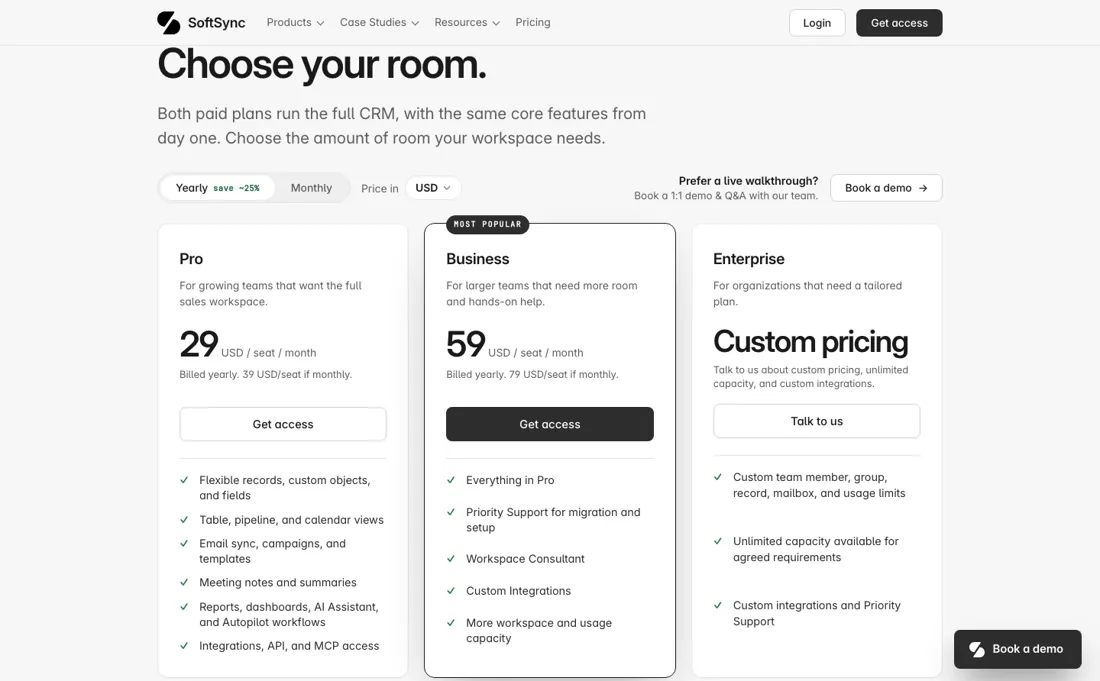
The sixth person does not add a sixth Pro seat; it moves the whole team to Business, which is $59 per seat a month on yearly billing instead of $29. A five-person team on Pro pays $145 a month billed yearly; the same team plus one hire pays $354 on Business, for the same product surface, since the pricing page says both paid plans carry the same core features. If your team is near that line, price the Business plan now rather than after you have moved your pipeline in.
The monthly allowances are per user and per calendar month, and on Pro they are 1,000 campaign emails, 1,000 enrichments and 1,000 AI chats, with one connected mailbox per user. A single rep running cold outreach from SoftSync can reach 1,000 campaign emails well before the month ends, and the page does not say what happens when you do, whether sending stops or an overage is charged. Ask before you plan a campaign around it.
Month-to-month billing costs about a third more than yearly: $39 against $29 on Pro, $79 against $59 on Business. There is no free plan, and the pricing page does not state a trial length; it says the checkout shows any trial terms. SoftSync's own home page says it has no integrations directory and instead gives your AI agent a way in through the API and MCP access; if your stack depends on ready-made connectors, check the specific ones on the integrations page before you commit.
We found no independent buyer reviews we could read, so the only voices on the site are the testimonials SoftSync chose, most of them from founders and investors rather than daily users.
Watch the video review
The video version of this review, from our YouTube channel.
What SoftSync does
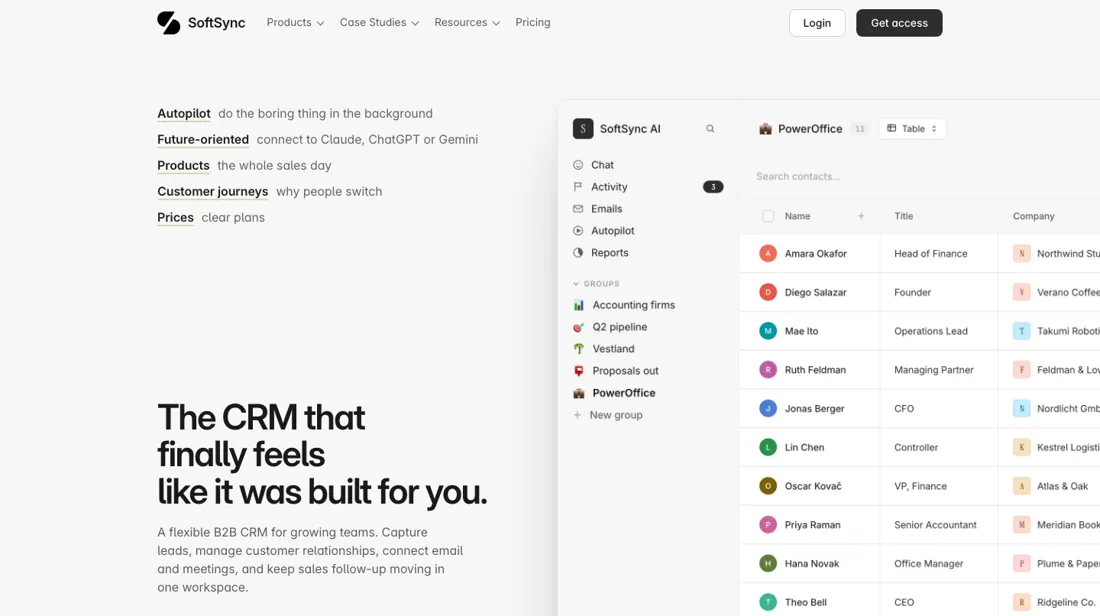
Flexible B2B CRM for small sales teams: records and custom objects, table, pipeline and calendar views, email sync and campaigns, meeting notes and summaries, Autopilot follow-up workflows, and API and MCP access so Claude, ChatGPT or Gemini can work with the CRM directly.
Business buys room, not features
The pricing page is explicit that Pro and Business run the same product: the same records, views, email sync, campaigns, meeting summaries, reports, AI Assistant, Autopilot, integrations, API and MCP access. Business costs twice as much per seat, $59 against $29 billed yearly, and what it buys is room and help. The room is the reason most teams will move. Pro caps a workspace at five team members and ten groups, 250,000 records per table and one mailbox per user, with 1,000 campaign emails, enrichments and chats per user each month.
Business allows 25 team members, 100 groups, a million records per table, five mailboxes per user and 10,000 of each monthly allowance. The help is Priority Support for data migration and a workspace consultant, both self-served on Pro. So the decision is arithmetic, not taste. A team of five or fewer that sends a few hundred campaign emails per rep a month has no reason to leave Pro. A sixth user, a second mailbox per rep, or outbound volume above 1,000 emails per person a month each force Business on their own, and at that point the whole team pays the higher rate.
Enterprise is for capacity beyond 25 people or custom limits and is priced on request.
How to actually use SoftSync
Start from the Get access button and check the trial terms and whether a card is needed on the checkout page, since the pricing page does not state them. Import your existing contacts or deals from a file; import is available on every plan, and on Pro the migration itself is self-served. Connect one mailbox, set up the table or pipeline view you actually work from, and let a week of email and meetings flow in before you judge it.
If you plan to use an AI assistant with it, connect Claude, ChatGPT or Gemini through the MCP access and test one real task end to end, such as asking it to find deals that have gone quiet and draft the follow-ups. Before you pick yearly billing, count the people who will need a seat in the next twelve months: at six or more you are on Business.
Distilled from SoftSync's pricing page at softsync.ai/pricing, including the plan comparison table and every pricing FAQ answer, and its home page at softsync.ai, both read in a headless browser on 26 September 2026. The affiliate terms and the reader offer come from SoftSync's COO through PartnerStack on 25 September 2026. We found no independent buyer reviews we could read, and we have not used the product.
SoftSync vs folk, side by side
Each column shows the vendor’s own published entry price, read on the date shown. Entry prices can cover different services or units, so check what each one buys. We do not average them into a score.
Both names above are affiliate links: we may earn a commission if you sign up, at no extra cost to you. Neither changes what this table says.
The natural comparison is folk: folk is the closest comparison in our own dossiers: also a lightweight, per-seat CRM for small teams that dislike heavyweight sales software. On folk's published prices (re-verified 3 September 2026) Standard is $24 per member a month billed yearly or $30 monthly, against SoftSync Pro at $29 or $39, so folk is the cheaper entry by $5 to $9 a seat. folk also states its trial openly, two weeks without a credit card, where SoftSync's pricing page leaves it to the checkout. SoftSync puts more of the sales day inside the one plan: email campaigns, meeting notes and summaries, a desktop recorder, Autopilot workflows and MCP access for AI assistants are all on Pro, and its enrichment allowance is 1,000 per user a month against folk's 500 on Standard. folk has no five-person ceiling on its entry plan. A team that mainly manages relationships and contacts fits folk; a team of five or fewer that wants outreach, meetings and automation in one place, and wants an AI assistant to act on the records, fits SoftSync.. Weigh it against HubSpot on the job you actually need done.
Frequently asked questions
What does SoftSync cost?
Pro is $29 per seat a month billed yearly or $39 billed monthly; Business is $59 per seat a month yearly or $79 monthly; Enterprise is custom-priced. Prices exclude VAT. There is no free plan. Read on softsync.ai/pricing on 26 September 2026.
What is the difference between Pro and Business?
Capacity and support, not features. Pro allows up to 5 team members, 1 mailbox per user and 1,000 campaign emails, enrichments and chats per user a month; Business allows 25 team members, 5 mailboxes per user and 10,000 of each, plus Priority Support for migration and a workspace consultant.
Does SoftSync work with Claude or ChatGPT?
SoftSync says so on its home page: it connects to Claude, ChatGPT or Gemini, and both paid plans include API and MCP access. It also says it has no integrations directory and gives your AI agent a way in instead.
Does SoftSync put a bot in my meetings?
No. SoftSync's home page (read 6 October 2026) says the meeting notepad listens from your computer, with no bot on the call, and that the summary and next steps are added to the customer's record; the desktop recorder is listed on both paid plans. SoftSync's COO told us through PartnerStack on 6 October 2026 that the recorder now runs on both Mac and Windows; the home page we read does not name the operating systems, so check that your machine is supported before a team-wide rollout.
Is this a hands-on review of SoftSync?
This is a researched assessment, not a hands-on test. Where we've used a tool ourselves, we say so explicitly. We name what each tool is good and bad at, and we earn a commission only if you sign up, at no cost to you.
- Read 2026-09-26 on softsync.ai/pricing in a headless browser, including the plan table and every pricing FAQ answer.
- A dated screenshot of that pricing page, kept on this site as the receipt.
Others in this category
Reviewed growth & revenue tools that share ground with SoftSync. They are comparable in what they do, not drop-in swaps:
New reviews, price changes we recorded, and the cost conditions we found. No sponsored placements. Unsubscribe anytime.
This is our researched assessment, not a paid placement. The “Visit” links on this page are affiliate links: we may earn a commission if you sign up, at no extra cost to you, and it never changes our take. How we review →