Kit Review (2026)Free to 10,000 Subscribers, No Automations
 By Daan Haket · Researched and written with an AI assistant · who does what
Subscriber-based pricing counts everyone on your list — cold subscribers cost the same as fans, so prune before you price. Throughout this review we weigh it against Mailchimp.
creators, writers and coaches building an audience-first business who want email, landing pages, digital products and a creator network in one.
you're an e-commerce store (commerce-native email tools fit better) or your list is big-but-cold — clean it before paying per subscriber.
Transparency: the “Visit” links on this page are affiliate links — we may earn a commission if you sign up, at no extra cost to you. No vendor can pay for a better review or verdict. How we make money →
Pricing (2026)
✓ Pricing re-verified 15 Oct 2026
The free plan is $0/mo and covers up to 10,000 email subscribers, with unlimited landing pages and forms, unlimited email broadcasts, audience tagging and segmentation, and digital products and subscriptions. Kit renamed the old Newsletter plan to Free and took automation out of it: Visual Automations and email sequences are now Creator-and-above, and Kit's affiliate briefing of 2 September 2026 adds that new free accounts open with a 14-day Creator trial and that accounts already on the Newsletter plan keep what they had.
Creator is $39/mo billed monthly, or $33/mo billed yearly ($390 a year, saving $78), and adds unlimited Visual Automations, unlimited email sequences, Kit MCP, SMS marketing and branding removal. Pro — the tier that adds Subscriber Signals, engagement analytics, deliverability reporting, a newsletter referral system and unlimited users — is $79/mo billed monthly, or $66/mo billed yearly ($790 a year, saving $158).
Full pricing notes (3 more paragraphs)
Paying yearly saves 17%. Every paid price on the page is quoted for 1,000 email subscribers and Kit bills by list size, so read the tier for your own list before you budget. Paid plans open with a 14-day free trial without a card, and migrations are free. Read again on 9 October 2026 with the slider, step by step. Creator billed monthly: $39 up to 1,000, $59 up to 3,000, $89 up to 5,000, $119 up to 8,000, $139 up to 10,000, $169 up to 15,000, $189 up to 20,000, $199 up to 25,000, $259 up to 35,000, $319 up to 45,000, $379 up to 55,000, $439 up to 65,000, $499 up to 75,000, $559 up to 85,000, $619 up to 95,000, $679 up to 105,000 subscribers; billed yearly, per month, at the same steps: $33, $50, $75, $100, $116, $141, $158, $166, $216, $266, $316, $366, $416, $466, $516, $566.
Pro billed monthly at the same steps: $79, $99, $139, $169, $189, $249, $269, $279, $363, $447, $519, $591, $663, $735, $807, $879; billed yearly, per month: $66, $83, $116, $141, $158, $208, $225, $233, $303, $373, $433, $493, $553, $613, $673, $733. The page carried a 'LIMITED TIME PRO OFFER' banner on that reading; read again on 10 October 2026, the yearly view spells it out as an extra 25% off the first year of Pro billed yearly: $50/mo instead of $66, or $593 for the first year at 1,000 subscribers, and the plan renews at the standard rate after that first year.
Creator showed no offer and stayed at $33/mo billed yearly ($390). Re-read 15 October 2026 at 1,000 subscribers in the default yearly view: unchanged, with Creator at $33/mo ($390 a year) and the Pro first-year offer still running at $50/mo ($593 for the first year, against $66/mo standard); the page's 'save $355 first year' is measured against twelve monthly payments of $79 ($948), and against the standard yearly $790 the saving is $197.
Plans change — always verify the live price on their site.
Category context: Growth & Revenue. Across the 83 tools in this category that we researched with a public US-dollar price, the median entry price is about $30 a month (lowest paid plan as listed, per seat where the vendor prices per seat). Kit’s entry price of $39 a month sits above that median. Compare pricing conditions in the Software Cost Atlas →
Vendor-confirmed: Stated on Kit's own offer page and confirmed in writing, 7 Oct 2026. Not tested by us at a checkout. Ends 7 Nov 2026 (the vendor gave no time or time zone).
What the pricing page doesn’t say
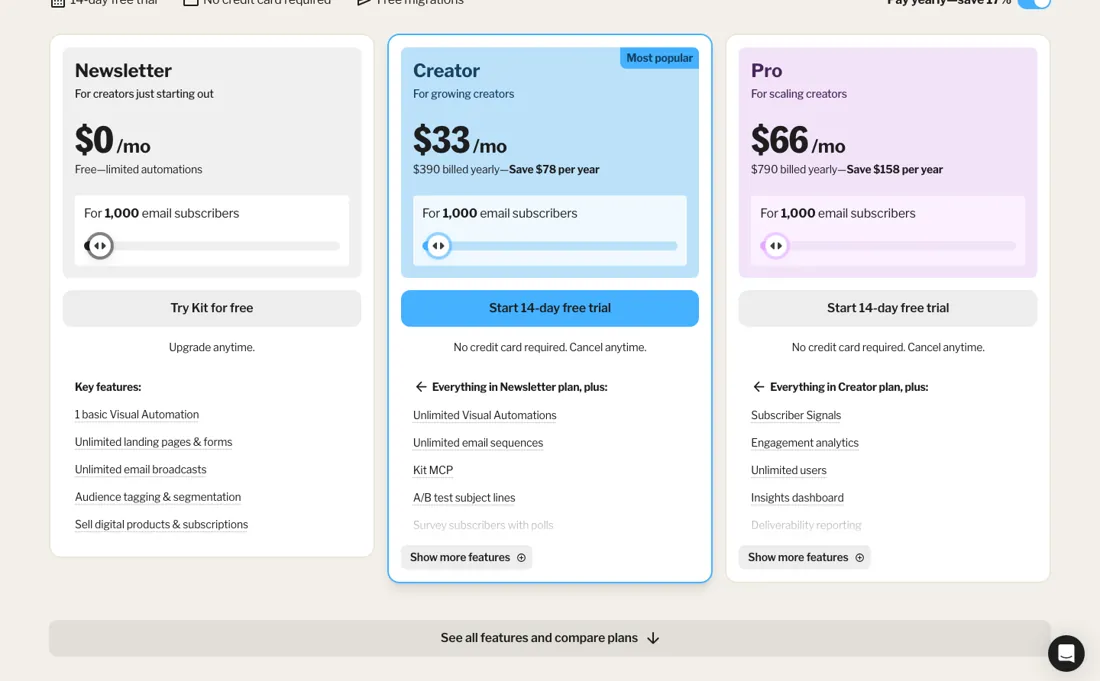
The free plan changed shape in 2026: it now runs to 10,000 subscribers rather than 1,000 (re-verified 2026-09-02), but Visual Automations and email sequences came out of it, so the free tier sends and captures without automating anything — what puts you on Creator at $39/mo, or $33/mo paid yearly, is wanting a welcome sequence rather than list growth. And the 35% price hike in 2025 changed the value math: the free tier is still arguably the best in creator email, but paid tiers now deserve comparison shopping rather than default loyalty. The creator-first features (tip jars, paid newsletters, recommendations) remain the real differentiator.
Watch the video review
The video version of this review, from our YouTube channel.
⚡ Short on time? Watch the 30-second verdict Short.
What Kit does
Email marketing built for creators (formerly ConvertKit). Grow your list with landing pages and forms, then automate newsletters and sell digital products from one place; a beta Kit MCP connects AI assistants like Claude directly to your account. Recent additions: a new landing-page editor, Dynamic Content, Newsletter Sponsorships, and App Store integrations on paid plans — SMS via SlickText, Patreon member sync (tier and support data in automations), Luma/Eventbrite event sync, and two-way HubSpot CRM sync on Pro.
What buyers report about Kit
Hands-on: not tested by usDocumented by the vendor: 3 features, read 2026-10-07Reported by buyers: practitioner reviews and Reddit, read August 2026
Themes from the buyer-review sites listed at the foot of this page, read in August 2026. We have not run Kit ourselves, so this is other buyers' experience rather than ours. We summarise it here because the complaints are usually the part a vendor page leaves out.
- • Tagging, visual automations and creator-oriented forms — it does newsletter-led business better than anything at the price, and reviewers say emails from it feel personal rather than marketed.
- • There is a genuinely free tier rather than a trial — as of September 2026 it runs to 10,000 subscribers, though visual automations and sequences are now paid-only.
- • The price went from $15 to $33 a month billed yearly ($39 month to month) at 1,000 subscribers — a 120% increase that landed alongside the rebrand from ConvertKit. Creators on Reddit were vocal that the money went into brand identity rather than the product.
- • Pricing is per subscriber, so the bill grows with the list whether or not the extra names open anything — Creator starts at $39/month for 1,000 subscribers (re-verified 2026-09-02) and climbs from there.
- • Design flexibility is limited. If you want ecommerce-style campaign templates, this is the wrong tool.
- • Against budget-focused alternatives it gets expensive quickly once you leave the free plan.
When the paid plan is worth it
Read every paid number on Kit's pricing page as at 1,000 subscribers, because that is what they are. Kit bills by list size, so the $39 on Creator and the $79 on Pro are the prices for a small list and both climb as you grow. Look up the rate for your own list before you compare anything -- the tier names tell you what you get, not what you pay.
The free plan is the exception, and in 2026 it got both more generous and thinner: $0 for up to 10,000 subscribers with unlimited landing pages, forms and broadcasts, audience tagging and segmentation, and digital products -- but Visual Automations and email sequences left it for Creator at the same time. So the reason to pay is automation depth rather than capacity, and that is now a hard line rather than a soft ceiling.
Kit's affiliate briefing of 2 September 2026 states that only new signups are affected and that accounts already on the Newsletter plan keep what they had. The Creator-to-Pro step is more specific than most: Pro adds subscriber scoring, engagement analytics and deliverability reporting. Those are diagnostic tools rather than features you use daily, so they earn their keep when your list is big enough that deliverability problems cost real money -- and at that size the per-subscriber rate matters more than the $40 difference anyway.
Kit's own affiliate briefing of 25 August 2026 puts more behind that tier than the diagnostics headline suggests, and dates the additions to its Craft + Commerce 2026 event: Subscriber Signals, which alerts you the moment a high-value subscriber joins, A/B testing with up to five variants, links that stay editable after a broadcast has gone out, SparkLoop's newsletter referral system, unlimited team seats with collaborative editing, and 24/7 priority support.
That list is Kit's rather than ours -- we have not put those features through a test -- but it is the list to weigh if seats or referrals matter to you, because those are the parts you can judge on paper. Annual billing saves 17% ($390 against $468 on Creator, $790 against $948 on Pro). Paid plans open with a 14-day trial without a card, and migrations are free, which removes the usual reason to stay somewhere worse.
Our monthly capture read this vendor's pricing page in July 2026 and again in August 2026, and the amounts were the same both times. We keep watching — the registry records what moves.
How to actually use Kit
Prune your list before you price a plan, because Kit bills by subscriber count and a cold subscriber costs exactly what a fan does. Removing people who have not opened anything in a year is free, improves your deliverability and lowers your tier — it is the highest-return hour in this whole process and most people do it after they start paying rather than before. Then read the price for your own list size rather than the page's.
Every figure Kit publishes is quoted for 1,000 email subscribers — Creator at $39 a month, Pro at $79, or $33 and $66 billed yearly — and the number moves with your list, so the published rates are a starting point rather than your bill. Use the free plan properly, but know what it no longer does. It covers up to 10,000 subscribers with unlimited landing pages, forms and broadcasts, so it is a genuine sending plan rather than a trial — but Visual Automations and email sequences are not part of it any more.
Nothing runs while you sleep on the free tier. The step to Creator is triggered by wanting a welcome sequence, not by passing a subscriber count. If you are switching from another tool, take the free migration and the 14-day trial together. Migrations are free and the trial needs no card, which makes the switching cost unusually low. The thing to test in those two weeks is whether Pro's subscriber scoring and deliverability reporting change what you do, because that is the part of the tier you cannot judge from a feature list.
The rest of what Pro adds (five-variant A/B tests, editable links after sending, SparkLoop referrals, unlimited team seats) you can weigh on paper before the trial even starts. If you are going to wire Kit into anything else, do the webhooks yourself rather than paying a connector to do it. Kit has a dedicated webhooks page at app.kit.com/webhooks, so registering an endpoint is a form you fill in rather than an API call you write, and one endpoint can listen to as many event types as you like.
Kit's own developer documentation lists 28 event types and marks 23 of them as delivering today: subscriber created, activated, unsubscribed, bounced and complained, form signups, sequence starts and completions, tags added and removed, custom-field changes, plus resource events for tags, custom fields, sequences, broadcasts and published posts. The remaining five — product purchased, link clicked, email opened and two landing-page events — are listed as planned, and the API rejects a subscription to them, so check the status column before you design around one.
Two details decide whether that sync survives real life. Deliveries are signed with HMAC-SHA256 so you can verify they came from Kit, and a failed delivery gets up to eight attempts — the original plus seven retries, backing off 30s, 2m, 15m, 1h, 4h, 12h and 24h — over roughly 41 hours rather than being dropped — that is the difference between your endpoint being down for an afternoon and losing a day of subscribers.
Kit also still runs an older webhooks resource that fires one event per webhook and drops what fails; it keeps working and Kit says it is not going away, but build anything new on the endpoint version.
Where this section comes from: our research notes (196 words)
Kit's own pricing page, kit.com/pricing, and its developer documentation at developers.kit.com, both read 10 September 2026. The pricing page carries the free plan at $0 up to 10,000 email subscribers, Creator at $39 a month and Pro at $79, or $33 and $66 billed yearly (the page also prints the yearly totals $390 and $790), every figure quoted for 1,000 subscribers, with a 14-day trial and free migrations. The webhook details come from developers.kit.com/webhooks: the event-types page lists 28 events of which 5 are marked Planned — landing_page.created, landing_page.deleted, subscriber.email_opened, subscriber.link_clicked and subscriber.product_purchased — and states that 'Planned events can't be subscribed to yet: the API rejects them with a 422'; the verifying-signatures page gives X-Kit-Signature as HMAC-SHA256; and the retries page states 'Failed deliveries are retried with backoff: 30s, 2m, 15m, 1h, 4h, 12h, then 24h — up to 8 attempts (the original plus 7 retries) over about 41 hours'.
The legacy resource appears in the same navigation as 'Webhooks (Legacy)'. Help-centre articles read 15 October 2026 for the buying questions: help.kit.com/en/articles/2502651-the-subscriber-profile-page-and-status (which statuses count toward the bill) and help.kit.com/en/articles/2502679-billing-at-kit (automatic tier upgrades, pro-rating, downgrades, the 30-day refund policy, cancellation); kit.com/pricing re-read the same day.
Kit vs Beehiiv, side by side
Each column shows the vendor’s own published entry price, read on the date shown. Entry prices can cover different services or units, so check what each one buys. We do not average them into a score.
Both names above are affiliate links: we may earn a commission if you sign up, at no extra cost to you. Neither changes what this table says.
The natural comparison is Beehiiv or MailerLite — the creator-email rivals — Beehiiv leans newsletter-growth mechanics, MailerLite undercuts on price; Kit wins on creator-commerce maturity. Weigh it against Mailchimp on the job you actually need done.
Frequently asked questions
Which subscribers does Kit bill me for?
Only subscribers with the Confirmed status, and cold subscribers count because they are still confirmed. Unconfirmed subscribers (double opt-in never clicked), unsubscribed, bounced and complained subscribers do not count. Unsubscribing someone keeps their history and takes them off the count; deleting removes the history as well. Source: Kit's help article 'The subscriber profile page and status', read 15 October 2026, which applies to the paid plans. Whether the free plan's 10,000 cap uses the same count is not stated there, so it is not confirmed.
What happens when my list outgrows my tier, and can I get money back?
Kit moves you up on its own: its help article 'Billing at Kit' (read 15 October 2026) says that when you pass your tier's limit 'we move you up automatically', and that a tier or plan change may be pro-rated on your next bill. Going down is not automatic; a downgrade applies on your next billing date. Kit has a 30-day refund policy and does not refund or pro-rate payments made more than 30 days before the request. A cancelled account stays active until the last day of the billing period, so on yearly billing the 30-day window is the only refund route the article names.
Is this a hands-on review of Kit?
This is a researched assessment, not a hands-on test — where we've used a tool ourselves, we say so explicitly. We name what each tool is good and bad at, and we earn a commission only if you sign up, at no cost to you.
- Buyer reviews on practitioner reviews and Reddit, read August 2026.
- Re-verified 2026-09-02.
- A dated screenshot of that pricing page, kept on this site as the receipt.
Others in this category
Reviewed growth & revenue tools that share ground with Kit — comparable in what they do, not drop-in swaps:
New reviews, price changes we recorded, and the cost conditions we found. No sponsored placements. Unsubscribe anytime.
This is our researched assessment — not a paid placement. The “Visit” links on this page are affiliate links: we may earn a commission if you sign up, at no extra cost to you, and it never changes our take. How we review →