PagePulse Review (2026)$29 Buys Two Pages, Not a Site
 By Daan Haket · Tested hands-on · written with an AI assistant · who does what
The tiers gate on two axes at once — members AND tracked pages — so either one forces the upgrade: Starter buys one person just two pages.
solos and small teams who want simple per-page analytics — heatmaps, visitor behavior and AI-summarized insights — with a genuinely free single-page tier to start.
you track many pages or a full content site (the per-page tiers climb fast), or you need deep, raw analytics rather than summarized insights.
Transparency: the “Visit” links on this page are affiliate links — we may earn a commission if you sign up, at no extra cost to you. No vendor can pay for a better review or verdict. How we make money →
The free plan, on a test landing page of our own with PagePulse's tracking script pasted before </body>, as its setup screen instructs. We then sent scripted visits whose every detail we logged: 10 visitors in 11 sessions (one came back in a new tab), 4 arriving from google.com, 3 from x.com and the rest direct, 3 on a phone-sized screen, 6 clicks on 'Start free trial', 3 clicks on 'Book a demo' that led to a second page, and visits of 35, 20 or 5 seconds. A second, smaller run of 3 visitors with one click each followed later, with every message the script sent logged. We compared the dashboard with what we had done.
- The counts were right. Visitors 10 and page views 14 matched exactly, as did the source split (Google 4, X 3, direct 4 of 14 views) and the device split (3 mobile, 7 desktop). In the second run every number moved by exactly what we sent: visitors 10 to 13, page views 14 to 17, 'Start free trial' clicks up by exactly 3.
- Clicks on links and buttons are captured without extra setup and named by their text ('Start free trial', 'Book a demo'). The script itself sent one event per click.
- Engagement does not follow its own definition. The tooltip defines an engaged session as one lasting 10+ seconds, with 2+ page views, or a conversion. By that rule 8 of our first 11 sessions qualify, as they lasted 20 to 35 seconds. The dashboard showed 27%: exactly the 3 sessions with two page views. The 20-second sessions of the second run did not count either.
Pricing (2026)
✓ Pricing re-verified 16 Oct 2026
Five tiers, metered on pages, heatmaps and AI insights. Free $0: 1 page, traffic included, unlimited collaborators, 14 days of data retention and 15 AI insights a month. Starter $36 a month billed monthly, or $29 a month billed annually: 2 pages, 90 days retention, conversion tracking, 100 AI insights. Growth $99 monthly or $79 annually: 5 pages, 2 heatmaps, a year of retention, 250 AI insights.
Pro $149 monthly or $129 annually: 10 pages, 5 heatmaps, three years of retention, cross-domain conversions, 750 AI insights. Scale $249 monthly or $199 annually: 20 pages, 10 members, 15 heatmaps and 1,500 AI insights. The Free to Pro cards list unlimited collaborators (people invited to view pages); the FAQ adds that you only pay for workspace members, who manage pages and settings.
The footnote reads 'Designed for real-world usage. Subject to fair use. Extremely high or sustained usage may require a custom High Volume plan.' Plans change — always verify the live price on their site.
Category context: Marketing. Across the 26 tools in this category that we researched with a public US-dollar price, the median entry price is $29 a month (lowest paid plan as listed, per seat where the vendor prices per seat). PagePulse’s entry price of $29 a month sits roughly at that median. Compare pricing conditions in the Software Cost Atlas →
What the pricing page doesn’t say
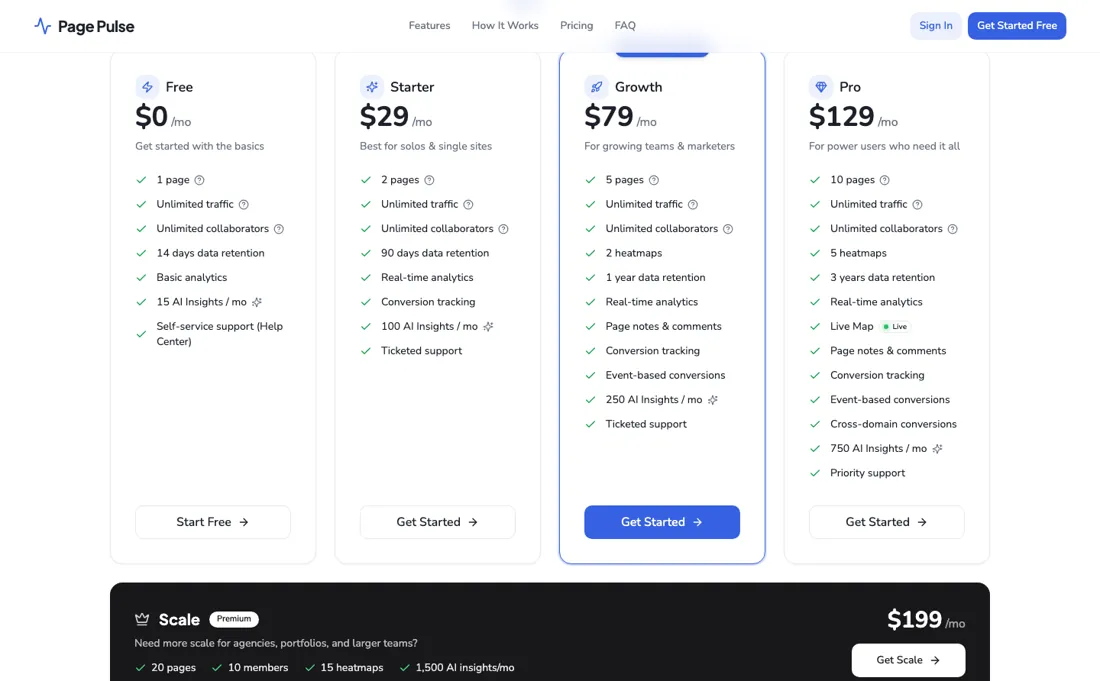
AI insights are metered per month per tier, and the ‘unlimited traffic’ promise carries a fair-use asterisk. If you run a whole content site, count your pages before you count on the price.
Watch the video review
The video version of this review, from our YouTube channel.
⚡ Short on time? Watch the 30-second verdict Short.
What PagePulse does
Per-page site analytics with heatmaps and AI-summarised insights. The tiers gate on members and tracked pages at once, and the 'unlimited traffic' promise carries a fair-use footnote.
When the paid plan is worth it
PagePulse prices on pages, and the ladder does reward volume once you go past Growth. On annual billing a tracked page costs $14.50 on Starter ($29 for 2), $15.80 on Growth ($79 for 5), $12.90 on Pro ($129 for 10) and $9.95 on Scale ($199 for 20); billed monthly the same steps are $18, $19.80, $14.90 and $12.45 a page. Growth is the dearest page on the ladder either way, so buy it for the heatmaps and the year of retention rather than for the page count.
The free tier is genuinely useful rather than a demo: 1 page, 14 days of history and 15 AI insights for $0. If you are watching a single landing page, that may be all you need; the first paid step buys a second page and 90 days of retention. People are cheap here. The cards list unlimited collaborators, who view the pages they are invited to, and the FAQ says you only pay for workspace members, who manage pages and settings.
The FAQ puts 2 members on Growth and 10 on Pro, while the price cards name members only on Scale (10), so ask which applies before you plan a team around it. Annual billing saves 20%, and the terms say all purchases are non-refundable, so start monthly if you are unsure. 'Traffic included' is subject to fair use: the footnote says extremely high or sustained usage may require a custom High Volume plan.
What we found running PagePulse ourselves
The first findings are at the top of this page. The rest:
- A click from our page to our own thank-you page shows up as a traffic source, listed as the site's own domain at 21% next to Google and X.
- The 'Here's what we found' analysis was general copywriting advice drawn from the page text (move the call to action, add testimonials), not from the visit data, and it sat under the line 'Once your tracking is set up', while tracking demonstrably worked.
- The free script records page views, clicks, time on page through a ping every 15 seconds, and load times. It does not record scroll depth, and conversions need your own trackConversion call, which the dashboard says is part of Starter and above.
- Not tested: heatmaps and conversion tracking (paid plans), traffic beyond a few dozen events, and real visitors.
Most of our reviews are researched rather than run — how we review explains which is which, and why we do not pretend otherwise.
How to actually use PagePulse
Count your pages, not your people. Every tier below Scale carries unlimited collaborators, so a team of one and a team of ten pay the same — what moves you up the ladder is how many pages you track: 1 on Free, 2 on Starter at $29, 5 on Growth at $79, 10 on Pro at $129 and 20 on Scale at $199. Scale is the only tier that names a headcount (10 members).
Then look at the second meter, because it is the one that bites quietly: AI insights are capped per month and the steps are steep — 15 on Free, 100 on Starter, 250 on Growth, 750 on Pro and 1,500 on Scale. If the insights are your reason for buying, size on that number rather than on the page count. Start on the free plan, which is a genuine one: one page with unlimited traffic and unlimited collaborators.
That is enough to instrument the single page that matters most — your checkout, your pricing page, your main landing page — and find out whether the insights change anything you do. If they do not on your most important page, they will not on your tenth. Read the fair-use footnote before you rely on 'unlimited' traffic. The line under the table says 'Designed for real-world usage. Subject to fair use.', so if the page you want to track is genuinely high-traffic, ask what the threshold is and what happens when you pass it. Annual billing saves 20%.
Where this section comes from: our research notes (136 words)
PagePulse's own site, getpagepulse.io, read 10 September 2026 in a browser. Note that getpagepulse.io/pricing returns a 404: the plan table lives on the home page under the #pricing anchor. It carries the five tiers with their page counts, retention windows, heatmap counts and AI-insight allowances, the Monthly/Annual toggle marked Save 20%, and the footnote 'Designed for real-world usage. Subject to fair use.' Every figure in our text comes from that table.
Re-read 15 October 2026: the pricing table on getpagepulse.io (all five tiers unchanged; the footnote now adds that extremely high or sustained usage may require a custom High Volume plan) and the terms at getpagepulse.io/legal (refunds, cancellation and fair use). Re-read 16 October 2026 in a browser: both states of the Monthly/Annual toggle (the page opens on Annual) and the FAQ on members and collaborators.
PagePulse vs Crazy Egg, side by side
Each column shows the vendor’s own published entry price, read on the date shown. Entry prices can cover different services or units, so check what each one buys. We do not average them into a score.
Both names above are affiliate links: we may earn a commission if you sign up, at no extra cost to you. Neither changes what this table says.
The natural comparison is Crazy Egg — Crazy Egg is the veteran heatmap suite with snapshot-based pricing; PagePulse is the newer AI-flavored take with a real free tier — both meter usage, so count your pages before choosing.
Frequently asked questions
What does the free plan track, and what needs a paid plan?
On the free plan, in our test on 8 October 2026, the script recorded page views, clicks on links and buttons named by their text, time on page through a ping every 15 seconds, and load times. It does not record scroll depth, and conversions need your own trackConversion call, which the dashboard marks as Starter and above. The pricing, read 16 October 2026, gives Free 1 page, 14 days of data retention and 15 AI insights a month; Starter is $36 a month, or $29 a month billed annually, for 2 pages and 90 days.
Can I trust the engagement rate?
Not as defined. The tooltip counts a session as engaged at 10+ seconds, 2+ page views or a conversion. In our 8 October 2026 test 8 of 11 sessions lasted 20 to 35 seconds, yet the dashboard showed 27%: only the 3 sessions with two page views. Visitor, page-view, source and device counts, by contrast, matched our log exactly.
Is traffic really unlimited?
Not in so many words any more. The cards now say 'Traffic included', with the footnote 'Designed for real-world usage. Subject to fair use. Extremely high or sustained usage may require a custom High Volume plan.' (read 16 October 2026). The plans are metered by pages, heatmaps and AI insights; the price cards name a number of people only on Scale, 10 members.
Can I get a refund if PagePulse doesn't work out?
No. PagePulse's terms (getpagepulse.io/legal, 'Last updated: February 2026', read 15 October 2026) say all purchases are non-refundable. You can cancel at any time from your account or by contacting them, and the cancellation takes effect at the end of the current paid term. The free plan, 1 page with 14 days of data retention, is the way to test before paying.
What can trigger the fair-use clause on 'unlimited traffic'?
The same terms (read 15 October 2026) judge fair use on overall resource consumption, not visitor counts alone: visits, pageviews, tracked events, clicks, pings, data ingestion, storage and processing load. A site with modest visitor numbers can still exceed it. Temporary spikes from a launch or press mention are not automatically excessive. If usage is too high, PagePulse may contact you, require a move to a High Volume or custom plan, or apply limits. In our own test its script sent a ping every 15 seconds on an open page, so long sessions count too.
Is this a hands-on review of PagePulse?
Yes. We tested PagePulse ourselves on 2026-10-08; the section above says what we tested, what we found and what we did not test, and where a figure comes from the vendor's own documentation instead. Most of our reviews are researched rather than run; we say which is which. We name what each tool is good and bad at, and we earn a commission only if you sign up, at no cost to you.
- Re-read 16 October 2026 on getpagepulse.io/#pricing in both billing states; the page opens on Annual billing, marked Save 20%. Our earlier readings of 10 September and 15 October gave the annual-billing figures without saying so, and wrote 'unlimited traffic' where the cards now say 'Traffic included'. /pricing itself returns 404..
- A dated screenshot of that pricing page, kept on this site as the receipt.
- Our own hands-on session with PagePulse (2026-10-08), written up in full further down this page.
Others in this category
Reviewed marketing tools that share ground with PagePulse — comparable in what they do, not drop-in swaps:
New reviews, price changes we recorded, and the cost conditions we found. No sponsored placements. Unsubscribe anytime.
This is our researched assessment — not a paid placement. The “Visit” links on this page are affiliate links: we may earn a commission if you sign up, at no extra cost to you, and it never changes our take. How we review →