Spiky.ai Review (2026)
 By Daan Haket · Researched and written with an AI assistant · who does what
The number to check first is the meeting cap, not the price.
sales and customer-facing teams that already run most conversations on video and want the coaching layer — talk-time, keyword tracking and call review — without buying a full revenue-intelligence platform.
your team's calls are mostly ad hoc or on the phone rather than video, or the meeting volume per rep sits well above 30 a month, in which case only the top tier fits and the cheaper plans are a false economy.
Transparency: the “Visit” links on this page are affiliate links — we may earn a commission if you sign up, at no extra cost to you. No vendor can pay for a better review or verdict. How we make money →
Pricing (2026)
✓ Pricing re-verified 13 Oct 2026
Read across both billing toggles. There is a genuine free tier, capped at 3 meetings per user per month. On annual billing Plus is $15, Pro $24 and Premium $40 per user per month; switch to monthly and the same three read $18, $29 and $49. Annual saves up to 18%. Trials need no card and are, per the page's footnote, equivalent to Premium excluding CRM functionality.
Meeting allowances: 3 on Free, 30 on both Plus and Pro, unlimited on Premium; Ask Scribe questions 40, 60, 100 and 200 across Free to Premium; Premium includes 5 passive seats. Enterprise is custom-priced. Plans change — always verify the live price on their site.
Category context: Sales & CRM. Across the 12 tools in this category that we researched with a public US-dollar price, the median entry price is about $45 a month (lowest paid plan as listed, per seat where the vendor prices per seat). Spiky.ai’s entry price of $15 a month sits below that median. Compare pricing conditions in the Software Cost Atlas →
What the pricing page doesn’t say
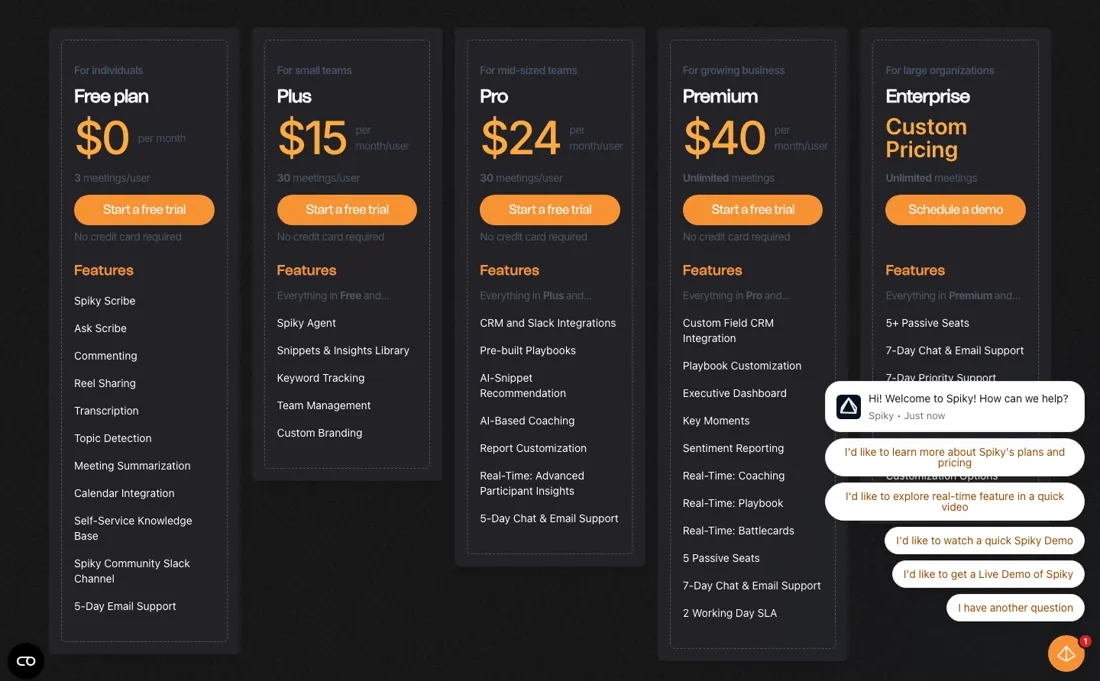
Plus and Pro both stop at 30 meetings per user per month, so the step from $15 to $24 buys features, not capacity. A rep taking two calls a day passes 30 in three weeks, which pushes you to Premium at $40 — nearly triple the entry price — for volume rather than capability. Price this from your team's actual call count and you will land on the right tier; price it from the feature table and you will not.
Watch the video review
The video version of this review, from our YouTube channel.
⚡ Short on time? Watch the 30-second verdict Short.
What Spiky.ai does
AI meeting intelligence for revenue teams — records and analyses sales calls, tracks keywords and talk patterns, and coaches reps.
What buyers report about Spiky.ai
Hands-on: not tested by usReported by buyers: G2, Capterra, GetApp and Software Advice, read August 2026
Themes from the buyer-review sites listed at the foot of this page, read in August 2026. We have not run Spiky.ai ourselves, so this is other buyers' experience rather than ours. We summarise it here because the complaints are usually the part a vendor page leaves out.
- • 4.9 on G2 across 115 reviews, with time saved on note-taking and automatic action items the consistent theme.
- • SOC 2 Type II, GDPR, KVKK and ISO 27001 infrastructure — the compliance position is genuinely solid for a tool this size.
- • Transcript accuracy drops for non-native English speakers and strong accents. It is the top negative theme on G2 and a dealbreaker for a multilingual team — test with your actual callers.
- • The pricing page contradicts itself: $15 or $18, $24 or $29, $40 or $49 for the same tiers depending on which block you read. Confirm what you are signing up for.
- • Free covers 10 meetings per user, Pro $29 for 30, Premium $49 unlimited. Getting a whole team on it is where the cost bites.
- • Customising the coaching and feedback settings takes learning.
When the paid plan is worth it
On the pricing page the meeting quota reads 3 meetings/user on Free, 30 on Plus, 30 on Pro and Unlimited meetings on Premium. The Free card is not a team plan: the vendor's Day 1 checklist states that inviting team members requires Plus, Pro, Premium or Enterprise. The help centre publishes both billing cycles as labelled screenshots. Under Monthly, Plus is $18, Pro $29 and Premium $49 per month/user; under Annually, the same tiers read $15, $24 and $40.
The Pro card adds seven lines above Plus: CRM and Slack Integrations, Pre-built Playbooks, AI-Snippet Recommendation, AI-Based Coaching, Report Customization, Real-Time: Advanced Participant Insights and 5-Day Chat & Email Support. Premium is the first tier the page lists as Unlimited meetings. Its card adds eleven lines above Pro: Custom Field CRM Integration, Playbook Customization, Executive Dashboard, Key Moments, Sentiment Reporting, Real-Time: Coaching, Real-Time: Playbook, Real-Time: Battlecards, 5 Passive Seats, 7-Day Chat & Email Support and a 2 Working Day SLA.
What no upgrade removes is capture itself: Free, Plus, Pro, Premium and Enterprise appear nowhere in the Scribe & Zoom Requirements article, which requires the host to admit Scribe, participants to consent, and 'Record to computer files' enabled on Zoom.
Questions we are still checking
Facts about Spiky.ai that would change a buying decision, and where we stand on each. An unanswered question does not mean the feature is missing; it means we have not confirmed it yet.
- Is an Observer the same as a passive seat, and what does an observer cost outside Premium? Still checking
Applies to: Premium lists 5 passive seats, Enterprise 5+; the roles article describes an Observer status that can view but not analyse meetings.
Why it matters: a manager who only reviews calls would not need a full seat if observers are free or cheaper, but no price or mapping is published.
Checked: Spiky pricing page (2026-10-13); Spiky help: User Roles and Status Explained (2026-10-13) - How are mid-cycle plan changes and cancellations billed? Still checking
Applies to: monthly and annual subscriptions.
Why it matters: the pricing FAQ only says to chat with the team about changing plans; no proration or refund terms are published in the Billing & Payment collection (Pricing Plans, Quota Explained, Seats Explained).
Checked: Spiky help: Billing & Payment (2026-10-13)
Have a public source that answers one of these? How we review explains how we check and correct.
How to actually use Spiky.ai
The vendor's Day 1 checklist puts setup at less than 10 minutes: complete your profile, connect a calendar, connect a CRM if you use one, set Scribe's auto-record preferences and bot name, invite the team, then take a first meeting analysis. A separate help centre article, Integrations Page Explained, names Google Calendar and Outlook Calendar for calendars, and Salesforce, Hubspot and Pipedrive for CRMs. The checklist warns that your first and last name in Spiky Pulse must exactly match the name you use in your video conferencing tools, or participant-based filtering and meeting attribution may not work correctly.
On Zoom, the requirements article asks for 'Record to computer files' to be enabled under Personal - Setting, and by Zoom admins also under Account Settings, with internal and external participants both ticked. The bot still needs the host to admit it and the participants to consent. Without a connected calendar, the setup article says you must manually invite Scribe to each meeting you want analyzed, using the 'Invite Scribe' button. Team invitations expire after 7 days.
Where this section comes from: our research notes (162 words)
Vendor pricing page https://spiky.ai/en/pricing (read 2026-08-09, HTTP 200, raw HTML pulled and parsed; card prices, the billing toggle, the second price block and the per-card feature lists counted in the delivered markup). Vendor help centre, Pricing Plans https://help.spiky.ai/en/articles/8162944-pricing-plans (read 2026-08-09; the two pricing screenshots embedded under the headings 'Spiky Pulse Monthly Pricing' and 'Spiky Pulse Yearly Pricing' were downloaded and read). Vendor help centre, Quota Explained https://help.spiky.ai/en/articles/8162934-quota-explained (read 2026-08-09). Vendor help centre, Day 1 with Spiky Pulse checklist https://help.spiky.ai/en/articles/8012802-day-1-with-spiky-a-checklist-to-kickstart-your-journey-with-spiky (read 2026-08-09).
Vendor help centre, Scribe & Zoom Requirements https://help.spiky.ai/en/articles/8762995-scribe-zoom-requirements (read 2026-08-09). Vendor help centre, How does the Spiky Pulse setup work https://help.spiky.ai/en/articles/8002500-how-does-the-spiky-setup-work (read 2026-08-09). Vendor help centre, Integrations Page Explained https://help.spiky.ai/en/articles/8162289-integrations-page-explained (read 2026-08-09). All sources are vendor-published documentation; none of them is an independent review. Re-verified 13 October 2026: pricing page https://spiky.ai/en/pricing (both toggles, the trial footnote and the FAQ), and help centre articles Seats Explained https://help.spiky.ai/en/articles/9546162-seats-explained, Quota Explained https://help.spiky.ai/en/articles/8162934-quota-explained and User Roles and Status Explained https://help.spiky.ai/en/articles/8053005-user-roles-and-status-explained (all read 13 October 2026).
Spiky.ai vs Reply.io, side by side
Each column shows the vendor’s own published entry price, read on the date shown. Entry prices can cover different services or units, so check what each one buys. We do not average them into a score.
Both names above are affiliate links: we may earn a commission if you sign up, at no extra cost to you. Neither changes what this table says.
The natural comparison is Reply.io — the other conversation and outreach tools we cover — Spiky's angle is coaching from the recording rather than sequencing the outreach; compare on meeting volume, because that is what sets your tier.
Frequently asked questions
Can I put my heaviest callers on Premium and everyone else on Plus?
No. Spiky's help article Seats Explained (help.spiky.ai, dated 13 July 2026, read 13 October 2026) says all seats in an organization must be on the same plan, 'you cannot have one seat on the Pro Plan and another on the Premium Plan'. Plus and Pro stop at 30 meetings per seat per month, so one rep who needs unlimited meetings moves the whole team to Premium: $40 per seat on annual billing or $49 monthly, which includes 5 passive seats.
Who can see other reps' calls?
Admins, not ordinary users. 'User Roles and Status Explained' (read 13 October 2026) says the Super Admin and Admins see every user's meeting analyses except meetings marked private; an Operational Manager manages settings (except billing), teams and invitations but cannot view other users' meetings; a User sees only meetings they took part in. Separately, an Observer status can view analyses but not analyse meetings. Whether an Observer is one of Premium's passive seats, and what it costs, is not confirmed.
Does the free trial show me everything I would pay for?
Almost. The pricing page (read 13 October 2026) says trials need no credit card and are 'equivalent to the premium plan excluding CRM functionality', so the Salesforce, HubSpot or Pipedrive sync that starts on Pro, and Premium's custom-field CRM integration, cannot be tested before you pay.
Is this a hands-on review of Spiky.ai?
This is a researched assessment, not a hands-on test — where we've used a tool ourselves, we say so explicitly. We name what each tool is good and bad at, and we earn a commission only if you sign up, at no cost to you.
- Buyer reviews on G2, Capterra, GetApp and Software Advice, read August 2026.
- Re-verified 13 October 2026 on spiky.ai/en/pricing; unchanged since 31 Jul 2026.
- A dated screenshot of that pricing page, kept on this site as the receipt.
Others in this category
Reviewed sales & crm tools that share ground with Spiky.ai — comparable in what they do, not drop-in swaps:
New reviews, price changes we recorded, and the cost conditions we found. No sponsored placements. Unsubscribe anytime.
This is our researched assessment — not a paid placement. The “Visit” links on this page are affiliate links: we may earn a commission if you sign up, at no extra cost to you, and it never changes our take. How we review →