HubSpot Review (2026)Free Tier, Then $20 a Seat
 By Daan Haket · Researched and written with an AI assistant · who does what
The first is the $7.
teams that want marketing, sales, service and content on one contact database and will actually use more than one hub — that shared database is the real product, and it is what makes the price defensible when you use the breadth.
you need one job done well and cheaply, because a dedicated tool will almost always beat the equivalent HubSpot hub on price; or your contact list is growing fast and your budget is not, since contacts are the meter that moves without you touching anything.
Transparency: we earn nothing from HubSpot; the links to it are plain links. How we make money →
Pricing (2026)
✓ Pricing re-verified 9 Oct 2026
Free is $0 for up to 2 users and 1,000 marketing contacts, with no time limit. Starter is advertised at $7 per seat a month against a list price of $20 per seat a month, under a banner reading “Save up to 65% on Starter — new customers only, select offers available for a limited time”. It includes 500 HubSpot Credits and 1,000 marketing contacts.
Professional starts at $800 a month paid annually, or $890 a month billed monthly, and includes 3 Core Seats with additional Core Seats from $45 a month, 3,000 credits and 2,000 marketing contacts. On top of that comes a required one-time Professional Onboarding fee of $3,000 that the headline price does not include. Enterprise starts at $3,600 a month with 5 Core Seats, extra seats from $75, 5,000 credits and 10,000 marketing contacts, and a required one-time onboarding fee of $7,000.
HubSpot AEO, their answer-engine visibility tracker, is sold separately at $50 a month or $45 annually for 25 prompts across 3 engines, with a 28-day trial; on the 9 October reading the page adds that AEO is also included in Marketing Hub Professional and Enterprise. The free tools FAQ caps a free account at 1,000 contacts, 2 users and 1 million records across the other standard object types. Plans change — always verify the live price on their site.
Category context: Sales & CRM. Across the 12 tools in this category that we researched with a public US-dollar price, the median entry price is about $45 a month (lowest paid plan as listed, per seat where the vendor prices per seat). HubSpot’s entry price of $20 a month sits below that median. Compare pricing conditions in the Software Cost Atlas →
What the pricing page doesn’t say
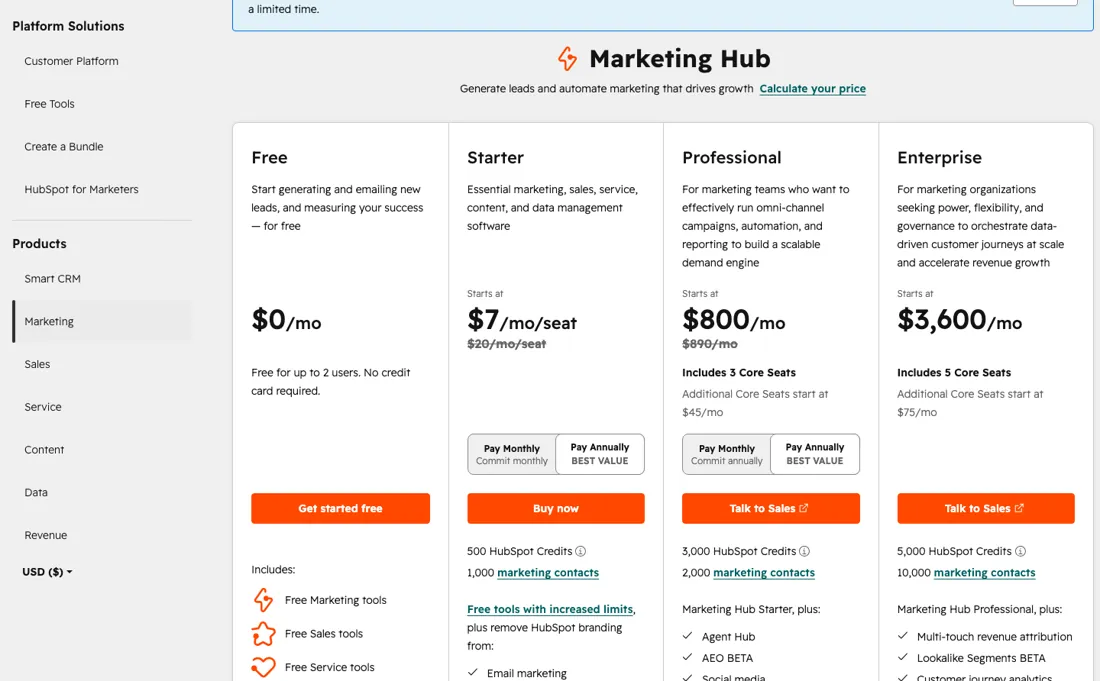
It is the number in large black type on the Starter card, and the $20 beside it in small grey type is the list price. The banner above the table explains why: up to 65% off Starter, new customers only, for a limited time. So $7 is an introductory rate and $20 is what the seat costs afterwards — a 186% step for a system that by then holds your contact database, which is the single most painful kind of software to leave.
The second is the $800. Professional carries a required one-time onboarding fee of $3,000, disclosed in a footnote under the card rather than in the price. Year one on Professional is therefore $800 × 12 + $3,000 = $12,600 if you pay annually, or $890 × 12 + $3,000 = $13,680 month to month. The onboarding adds roughly a third to the first year, and no amount of shopping around removes it — it is mandatory.
Enterprise does the same thing at $7,000 on top of $43,200 a year. The third is the seat count, because it is not the meter that usually bites. Professional includes 3 Core Seats and 2,000 marketing contacts. For a marketing platform, contacts are the axis that grows on its own: your list gets bigger whether or not you hire anyone, and the contact tier moves the bill without anyone deciding to upgrade.
Price your next two years on the list you expect to have, not the team you have now. One more thing worth knowing before you start on Free. The free tier is genuinely usable — two users, 1,000 contacts, no expiry — and that is exactly how the ladder is designed to work. The step from Starter to Professional is not incremental: at list prices a three-seat team goes from $60 a month to $890 plus $3,000 once, which is roughly fifteen times the monthly cost. Whatever you build on Free, build it knowing where the next rung is.
Watch the video review
The video version of this review, from our YouTube channel.
What HubSpot does
CRM platform with marketing, sales, service and content hubs on one contact database.
What buyers report about HubSpot
Hands-on: not tested by usReported by buyers: Capterra, Trustpilot and TrustRadius, read August and October 2026
Themes from the buyer-review sites listed at the foot of this page, read in August and October 2026. We have not run HubSpot ourselves, so this is other buyers' experience rather than ours. We summarise it here because the complaints are usually the part a vendor page leaves out.
- • The consolidation is what reviewers keep: email, landing pages, workflows and analytics on one contact database, instead of stitching separate tools together.
- • Capterra reviewers repeatedly call the interface clean and the workflow setup approachable, including people with no marketing-automation background.
- • Automation of repetitive campaign work is credited with real time savings, and several reviewers name individual support staff as helpful.
- • TrustRadius's own summary of 11 recent Marketing Hub reviews (latest May 2026, read October 2026) puts automation for email and lead nurturing first, commended by 6 of the 11, followed by drag-and-drop landing pages and having campaigns and CRM data in one place.
- • Capterra reviewers describe reporting and template customisation as locked down on the cheaper plans, forcing an upgrade to reach features they expected to have.
- • Cost tracks contact volume rather than usage, so the bill rises as the list grows even when nothing else changes.
- • On Trustpilot the complaints are commercial rather than technical: a small business billed roughly A$665 a month was auto-renewed into another twelve-month term and told early cancellation is only allowed if the company closes.
- • One reviewer says the sales team moved them from month-to-month to an annual contract, and that product problems went unaddressed afterwards.
- • A long-time user reports the Marketing Contact setting being removed across all their contacts when they bought a new licence, with only an AI assistant available to escalate to.
- • Another says their account was deleted a day into a seven-day notice period and the customer data went with it.
- • A new customer says HubSpot's own AI setup guidance started an import that burned a month's credits after 250 of 2,000 emails, and support offered no way to reset it.
- • The same TrustRadius summary says 55% of those reviewers name the price as the main drawback, especially for small companies and large contact bases, followed by limited layout customisation and reporting that needs more depth.
Where the ratings disagree. The two platforms are answering different questions. Capterra reviewers rate the software and mostly like it; Trustpilot reviewers rate the commercial relationship — renewals, cancellation terms, billing and support escalation — and that page is dominated by one-star accounts. Trustpilot also notes HubSpot has no recent history of inviting reviews, so its sample skews towards people motivated to complain. Read together they are consistent with our own pricing section: the product is not what buyers regret, the contract is.
Pages read (August and October 2026): Trustpilot, TrustRadius
When the paid plan is worth it
The honest answer is that the Free tier is not a trial, it is a working product, and most small teams should stay on it far longer than HubSpot's funnel suggests. Two users and 1,000 contacts with no expiry covers a real business for a while. The question is what forces the move. Not features, usually — the contact cap. Once you pass 1,000 contacts you are buying a paid tier whether or not you wanted the tools that come with it, and at that moment the Starter promo is what you will see.
Take it, but diary the renewal: $7 becomes $20 per seat, and a five-seat team goes from $35 to $100 a month without anyone changing anything. Professional is a different decision entirely and should be treated as one. The $3,000 onboarding fee is required, so the real question is not “is $800 a month worth it” but “is $12,600 in year one worth it”. That buys automation, omni-channel campaigns and reporting that Starter does not have.
If what you actually need is one of those three, price a dedicated tool against it before you commit. A marketing-automation tool and an analytics tool together will usually come in well under $12,600, and the argument for HubSpot has to be the single database, not any one feature. A note on HubSpot AEO, which is new: at $50 a month it tracks how your brand shows up in ChatGPT, Gemini and Perplexity across 25 prompts.
It needs no other subscription, so it is buyable on its own — worth knowing if answer-engine visibility is the only thing you came for.
How to actually use HubSpot
Start on Free and connect one thing at a time. HubSpot's free CRM holds 1,000 contacts and 1 million records across other object types, connects to Gmail, Google Workspace and most versions of Outlook, and takes no card. Two users is the hard limit, so decide early which two. The order that saves money later: import your contacts before you configure anything else, because the contact count is what decides your tier, and a messy import with duplicates inflates it.
Deduplicate first, import second. If you do go paid, buy Starter monthly rather than annually the first time. The promo applies to both, and monthly leaves you free to walk away when you discover which hub you actually use — information you will not have until you have run a quarter on it. And before you say yes to Professional, ask the sales team to put the $3,000 onboarding fee in the quote in writing: it is on the pricing page in a footnote, and a quote that omits it is a quote you will be surprised by.
Distilled from HubSpot's own marketing pricing page and free-tools pricing page, both read in a live browser session on 18 August 2026 in the USD view, including the plan footnotes Documentation read on 9 October 2026 in knowledge.hubspot.com: 'Assign and manage seats' (seat types, View-Only Seats, seat reductions at renewal) and 'Export your records' (what an export contains).
HubSpot vs Pipedrive, side by side
Each column shows the vendor’s own published entry price, read on the date shown. Entry prices can cover different services or units, so check what each one buys. We do not average them into a score.
The Pipedrive link above is an affiliate link — we may earn a commission if you sign up, at no extra cost to you — and the other column is a plain link. Neither changes what this table says.
The natural comparison is Pipedrive or Close — the honest comparison is not feature-for-feature but shape-for-shape. Pipedrive and Close are sales tools that do one job and publish a per-seat price you can multiply in your head. HubSpot is a database with hubs bolted around it, priced on two meters at once — seats and contacts — with a mandatory onboarding fee at the Professional rung. If you want a CRM, the dedicated tools are cheaper and simpler. If you want marketing, sales and service reading from one contact record, that is the thing HubSpot sells and they do not really compete. Verify all current price lists yourself; ours were read on 18 August 2026..
Frequently asked questions
Who counts as a paid seat on a HubSpot Starter or Professional bill?
Every user on Starter, Professional or Enterprise is assigned a seat. View-Only Seats are free and unlimited: they can view records, dashboards and reports, but cannot edit records, save reports, change settings or log emails. Anyone who needs to work in the CRM needs a paid Core (or Sales/Service) Seat. Seats you buy cannot be reduced until your next renewal date, and when you upgrade from the free tools to Starter the free seats are removed, so pick the full seat count at checkout (HubSpot knowledge base 'Assign and manage seats', read 9 October 2026).
Can I take my HubSpot data with me if I leave?
Records, yes: export is available on all products and plans, including free, and downloads each record's current property values and associations for contacts, companies, deals, tickets, custom objects and more. Activities such as calls and notes are not in that export; HubSpot points to the individual contact export, activity reports or the engagements API for those (knowledge base 'Export your records', last updated 2 April 2026, read 9 October 2026). You need export permissions to do it.
Is this a hands-on review of HubSpot?
This is a researched assessment, not a hands-on test — where we've used a tool ourselves, we say so explicitly. We name what each tool is good and bad at, and we have no affiliate relationship with HubSpot — we earn nothing whether you sign up or not.
- Buyer reviews on Capterra, Trustpilot and TrustRadius, read August and October 2026.
- Re-verified 2026-10-09 in a live browser on their own marketing and CRM pricing pages, USD view; first read 2026-08-18, no amount changed in between.
- A dated screenshot of that pricing page, kept on this site as the receipt.
Others in this category
Reviewed sales & crm tools that share ground with HubSpot — comparable in what they do, not drop-in swaps:
New reviews, price changes we recorded, and the cost conditions we found. No sponsored placements. Unsubscribe anytime.
This is our researched assessment — not a paid placement. How we review →