Claap Review (2026)The Sales Half Costs €48 and a Phone Call
 By Daan Haket · Researched and written with an AI assistant · who does what
The four tiers sell two different products, and only one of them is self-serve.
revenue teams that want every call captured — by default with no notetaker bot in the meeting, though a customisable bot is there for teams that prefer one — and want those calls to end up as CRM fields, coaching and deal signals rather than as transcripts nobody reopens, with enough seats to make a sales conversation worth having.
you want to buy and test the product yourself, because the tier with the CRM and coaching features is quote-led and even its trial runs through sales; you need a long retention window, since recordings age out after 2 or 3 years below Enterprise; or you need the Claap API, which the comparison table lists on Enterprise only.
Transparency: the “Visit” links on this page are affiliate links — we may earn a commission if you sign up, at no extra cost to you. No vendor can pay for a better review or verdict. How we make money →
Pricing (2026)
✓ Pricing re-verified 17 Oct 2026
| Plan | Price | What you get |
|---|---|---|
| Basic | €0 per license/month | 10 videos per user, 300 minutes total (not per month), calendar and conf-call sync, basic AI summary, Chrome recorder, collaborative workspace, Claap MCP; 5 Basic licenses, 0 guests, 3 months storage |
| Pro | €24 / $32 per license/month yearly, €30 / $40 monthly | unlimited recordings, 1,000 minutes a month, 500 AI credits per license, advanced AI summaries, meeting insights, AI video editing, 10+ integrations, private channels; 50 Basic licenses, 50 guests, 2 years storage |
| Business | €48 / $60 per license/month yearly, €60 / $75 monthly — Book a demo | unlimited recording time, 1,000 AI credits per license, ClaapAgent across meetings, CRM auto-complete, AI-generated emails, AI coaching, deal insights, smart tables, priority support; 3 years storage |
| Enterprise | custom — Book a demo | everything in Business plus SSO, SCIM provisioning, the Claap API, unlimited Basic licenses, white-glove onboarding and migration support; unlimited storage |
Licenses are priced per license per month, and the page now prints dollars beside euros. Basic is €0: 10 videos per user, 300 minutes of recording in total rather than per month, calendar and conference-call sync, basic AI summary, the Chrome recorder extension, a collaborative workspace and the Claap MCP connector, capped at 5 Basic licenses, no guests, one team, one channel, 3 video uploads and 3 months of recording storage.
Pro is €24 or $32 per license a month billed yearly, €30 or $40 monthly: unlimited recordings, 1,000 minutes a month, 500 AI credits per license pooled across the workspace, advanced AI summaries, meeting insights, AI video editing, 10+ integrations, speaker and video insights and private channels, with 50 Basic licenses, 50 guests, 10 uploads a month and 2 years of storage.
Full pricing notes (3 more paragraphs)
When we read the tooltips in September, one credit was one Claap AI chat, AI email follow-up, coaching tab or generated insight, and summaries, chapters and the AI companion consumed none. Business is €48 or $60 a month yearly, €60 or $75 monthly: unlimited recording time, 1,000 AI credits per license, ClaapAgent across all meetings, CRM auto-complete, AI-generated emails, AI coaching, deal insights, smart tables, admin recording and sharing controls and priority support, with 50 uploads a month and 3 years of storage.
Enterprise is a custom price and adds SSO, SCIM provisioning, the Claap API (marked Not included on every other tier in the comparison table), unlimited Basic licenses, white-glove onboarding and migration support. Basic says Try for free and Pro Start for free; Business and Enterprise say Book a demo, and the FAQ says a trial of Pro or Business is opened by their sales team.
Two things from our September reading are gone from the page: the $20-per-seat Power Recorder add-on and the API on every tier.
Plans change — always verify the live price on their site.
Category context: Sales & CRM. Across the 15 tools in this category that we researched with a public US-dollar price, the median entry price is $39 a month (lowest paid plan as listed, per seat where the vendor prices per seat). Claap’s entry price of $32 a month sits below that median. Compare pricing conditions in the Software Cost Atlas →
What the pricing page doesn’t say
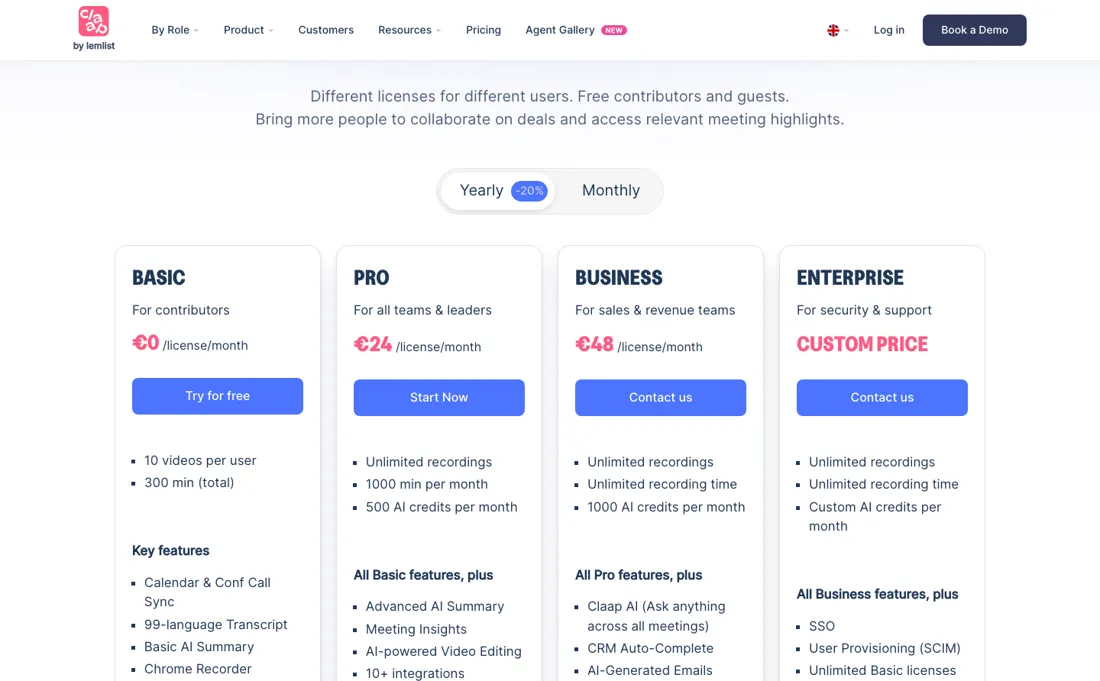
Pro at €24 is the recorder and note-taker. Everything Claap actually markets itself on — CRM auto-complete, AI coaching, deal insights, asking Claap AI a question across all your meetings — starts at Business, €48 per license a month on annual billing, and Business has no self-serve button: it says Book a demo. The pricing FAQ closes the other door too: a trial of Pro or Business is opened by their sales team.
So the features you came for cannot be bought or tested without a sales conversation. Your recordings also expire. Storage runs 3 months on Basic, 2 years on Pro and 3 years on Business; only Enterprise is unlimited. If the call archive is meant to be your evidence trail, that is a deletion date on your own data, and it is in the comparison table rather than in the plan cards.
Two smaller things worth reading twice, and one correction we owe you. The AI credits — 500 per license on Pro, 1,000 on Business, pooled across the workspace — do not meter the summaries: the tooltip is explicit that summaries, chapters and the AI companion use no credits, and a credit is spent on a Claap AI chat, an AI email follow-up, the coaching tab or a generated insight. What is missing is the rate: no price for an extra credit appears anywhere on the page, so a heavy month of coaching and insights cannot be costed before you commit.
And the free tier's 300 minutes is a total, not a monthly allowance: it is a sample, not a plan you can sit on.
Watch the video review
The video version of this review, from our YouTube channel.
⚡ Short on time? Watch the 30-second verdict Short.
What Claap does
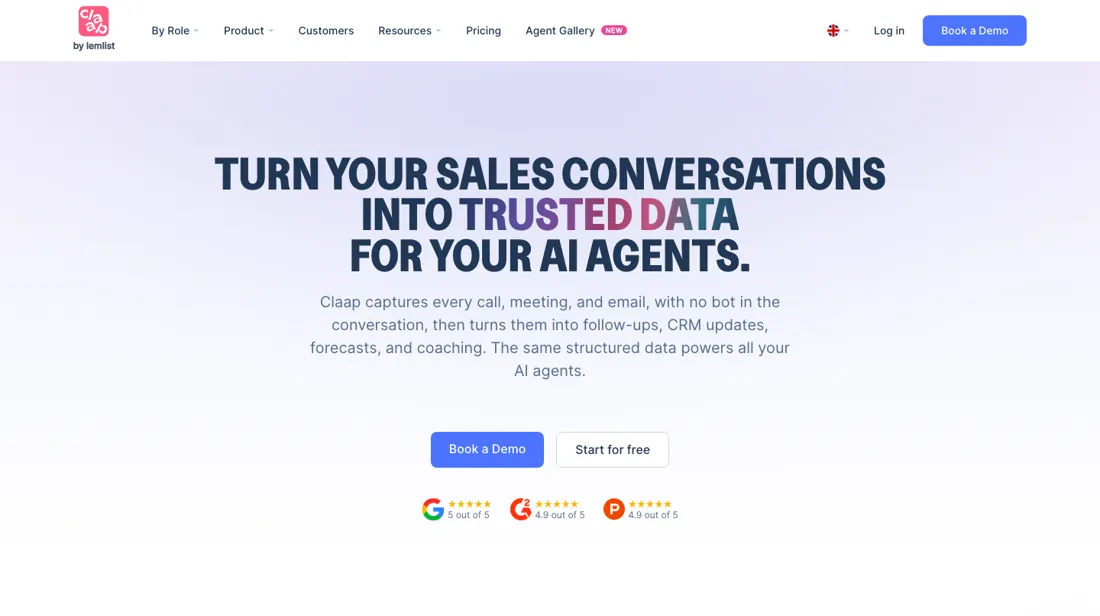
AI sales intelligence that records calls without putting a bot in the meeting, then turns them into CRM fields, follow-up emails, deal scoring and coaching.
What buyers report about Claap
Hands-on: not tested by usReported by buyers: Product Hunt, which carries 28 reviews of Claap, read September 2026
Themes from the buyer-review sites listed at the foot of this page, read in September 2026. We have not run Claap ourselves, so this is other buyers' experience rather than ours. We summarise it here because the complaints are usually the part a vendor page leaves out.
- • Time is the benefit buyers name most, and the platform's own tag counts make that countable rather than vague: time-saving is tagged on 12 of the 28 reviews, asynchronous collaboration on 10, screen recording on 7 and remote-team collaboration on 7. A manager at Luko describes rolling it out across finance, people, risk and compliance teams and says adoption was easy; someone at Libeo, around 100 people, reports that “Claap it” became a daily verb internally. One team estimates its meetings dropped by roughly 30% over a year of use.
- • The praise is specific about plumbing rather than mood: searchable built-in transcripts, videos embedded straight into Notion pages, Google SSO, a Zapier connection, a comments panel beside the video and a playback-speed control. Several reviewers credit the onboarding guides for making the rollout stick, and engineering teams say the video plus transcript gave them enough context to reproduce bugs without a meeting.
- • One account is far more serious than the rest, and it is the most recent review on the page — posted about a year before we read it. The reviewer states they never signed up, yet the recording function activated by itself during their meetings; after contacting support three times and being assured everything had been deleted, it started again during a business meeting, and the system emailed every participant without consent. They frame it as a privacy failure and a possible GDPR breach. It is a single unconfirmed voice, but it is the only recent one, so weigh it against the bot-free capture the vendor advertises.
- • The standing requests are threaded video replies — one reviewer names “answer with a video” as the feature that would let it beat Loom — a way for anonymous viewers to leave a name instead of anonymous view notifications, and meeting recording that is less limited than what they had.
Where the ratings disagree. The split here is not between platforms but between years. Almost every review on the page was written three to four years ago about Claap 2.0, an async video and meeting-notes tool, and the tags they praise describe that product. Claap today sells an AI Sales Assistant that applies MEDDIC, SPICED and BANT to deals. Read the older reviews as evidence about the recording, transcript and adoption layer — which is still underneath — and not as a verdict on the sales AI built on top of it, which nobody on that page has reviewed.
Pro records the call; Business is the part that sells
The step from €24 to €48 is not a bigger version of the same plan, it is the other half of the product. Pro gives you unlimited recordings, 1,000 minutes a month and better summaries: a good, cheap meeting recorder. Business is where Claap becomes the thing its homepage describes — CRM auto-complete that writes back to HubSpot, Salesforce, Attio or Pipedrive, AI-generated follow-up emails, AI coaching, deal insights, and Claap AI asking questions across every meeting instead of one.
If your reason for looking at Claap is any sentence containing the word CRM, Pro is not your tier and the €24 figure is not your price. That makes the decision unusually clean. Count the reps whose calls must reach the CRM without anyone typing, multiply by €48, and compare that against what your team currently loses to empty CRM fields. Everyone else on the team — managers who watch, colleagues who comment — can sit on free Basic licenses, up to 5 on the free workspace and 50 on the paid tiers, which is the part of this pricing model that genuinely saves money.
What the upgrade does not fix is the meter. AI credits are pooled per workspace at 500 or 1,000 per license, and the page never says what an extra credit costs. Ask for that number in writing during the sales call you are already required to have, along with what happens to recordings when they hit the 2 or 3-year storage limit.
Questions we checked
Facts about Claap that would change a buying decision, and where we stand on each. An unanswered question does not mean the feature is missing; it means we have not confirmed it yet.
- Which Claap license does the Allo phone integration need now that the API is listed on Enterprise only? Sources disagree
Applies to: Business and Enterprise.
Why it matters: teams dialling from Allo would budget €48 or €60 per license for Business, or a custom Enterprise quote.
Answer: Claap's Allo help article (read 8 September 2026) ties the integration to the API and to a Business license; the pricing page's comparison table (read 17 October 2026) marks the Claap API as Not included on Basic, Pro and Business. Until Claap reconciles the two, we treat Business as the documented minimum and Enterprise as possible.
Checked: Claap pricing page, comparison table (2026-10-17); Claap help, Calls & VOIP collection (2026-09-08)
Have a public source that answers one of these? How we review explains how we check and correct.
How to actually use Claap
Start on Basic and spend the 300 minutes on the one thing that makes Claap different: capture that puts no visible participant in the call. Recording runs from the Chrome extension and the Mac app instead of from a bot that joins, and it covers in-person conversations as well as video meetings. Phone calls are a separate route entirely — they arrive by integration from Aircall, Ringover, Allo or lemlist VoIP rather than from the recorder, so test that path on its own if dialled calls are the reason you are here.
A customisable bot is available if your team would rather have one, so the no-bot default is a choice rather than a limitation. Whether it changes how your prospects behave is a judgement only your own calls can make, and it is free to find out. Watch the number, though — 300 minutes is the total for the account, not a monthly allowance, so it is roughly five hour-long calls before the free tier is spent.
While you are there, check the two things that decide whether the paid tier is worth a conversation. Confirm your stack is covered: Zoom, Google Meet and Teams for conferencing, HubSpot, Salesforce, Attio or Pipedrive for CRM, and Slack, Notion or Zapier for the rest. And read the AI summary Claap produces against your own notes from the same call, because the summary quality is what everything above it is built on — and because summaries are unmetered on every paid plan, that is a test you can run as often as you like.
Then go into the sales conversation with numbers rather than questions. Ask for a Business trial specifically — the FAQ says trials are unlocked by sales, so it is a request they expect — and ask three things in writing: the top-up price of AI credits, what happens to a recording when it reaches the storage limit, and whether the euro price is fixed or converted for non-euro customers.
Where this section comes from: our research notes (94 words)
claap.io/pricing rendered in a browser on 4 September 2026 with both billing toggles and the full 100-row comparison table, plus claap.io/llms.txt, the Claap homepage and the program page at market.partnerstack.com/programs/claap, all read the same day. Re-read 17 October 2026: claap.io/pricing (plan cards, FAQ and comparison table). Read 16 October 2026 on help.claap.io: 'Understanding how billing works' (articles/9768310), the proration article (articles/15960899), 'How can I manage user licenses' (articles/15960889), 'Cancelling your subscription' (articles/7266942) and 'Understanding Claap plans, licenses, and pricing' (articles/6517952). The phone-call answer rests on the Calls & VOIP collection read 8 September 2026.
Claap vs Fireflies.ai, side by side
Each column shows the vendor’s own published entry price, read on the date shown. Entry prices can cover different services or units, so check what each one buys. We do not average them into a score.
Both names above are affiliate links: we may earn a commission if you sign up, at no extra cost to you. Neither changes what this table says.
The natural comparison is Fireflies.ai — Both record and transcribe meetings and both sit in our database, but they aim at different jobs. Fireflies is the cheaper, broader meeting assistant: it joins the call as a bot, transcribes and summarises, and works for any team that takes notes. Claap is built for revenue teams specifically, records without a bot in the conversation, and puts its money on what happens after the call — CRM fields, deal scoring against MEDDIC or BANT, coaching. Pick Fireflies if you want meetings captured cheaply across the company; pick Claap if your problem is an empty CRM and untrained reps, and you can live with the sales-led purchase..
Frequently asked questions
How much does Claap cost?
Per license per month, and since our 17 October 2026 reading the page prints dollars beside the euros: Basic €0, Pro €24 or $32 on annual billing and €30 or $40 monthly, Business €48 or $60 annually and €60 or $75 monthly, Enterprise on quote. Free Basic licenses for colleagues who only watch and comment are included on every tier, up to 5 on the free workspace and 50 on Pro and Business. The $20-per-seat Power Recorder add-on we recorded in September no longer appears on the page as read on 17 October, so treat it as historical rather than as a current price.
Can I try or buy the CRM features without talking to sales?
No. CRM auto-complete, AI coaching and deal insights start on the Business tier, and Business has no self-serve checkout: its button says Book a demo (read 17 October 2026). The pricing FAQ also says a trial of Pro or Business is opened on your workspace by their sales team, so both the purchase and the test run through a conversation.
Does Claap put a bot in my meetings?
Not unless you want one. Claap's default is a no-bot recorder that captures Zoom, Google Meet, Teams and in-person conversations from the Chrome extension and the Mac app, without a visible participant joining the call. Phone calls do not run through that recorder — see the next question. A customisable bot is available for teams that prefer it, and the free tier is enough to test which your prospects react better to.
Can Claap record my phone calls?
Not itself, and this corrects an earlier version of this review. Claap's own documentation keeps phone calls in a category of their own: they reach Claap through an integration with one of four phone systems — Aircall, Ringover, Allo or lemlist VoIP — and what arrives is a recording your phone system already made, imported within a few minutes of the call ending and then transcribed, summarised and matched to a CRM contact by phone number. The recording has to happen upstream, and the Aircall guide is blunt about it: calls which are not recorded in Aircall will not be imported. Two details decide whether this fits your team. Imports carry a minimum call length, set to 2 minutes by default and adjustable to no minimum, 15 or 30 seconds, 1 minute or 5 minutes — leave the default alone and short calls simply never appear. And the Allo route runs on Claap's API: the help article read on 8 September said that needs a Business license, while the pricing page's comparison table as read on 17 October 2026 lists the Claap API under Enterprise only. Those two sources disagree, so confirm in writing which license an Allo connection needs before you buy for it. Allo is one-way and will not backfill calls from before you connected it. If your reps dial from anything outside those four systems, phone calls are not part of what you are buying (help.claap.io, Calls & VOIP collection, read 8 September 2026).
Do AI credits pay for my meeting summaries?
No, and this is a correction to an earlier version of this review. Claap's pricing tooltip states that one credit is one Claap AI chat, AI email follow-up, coaching tab or generated insight, and that summaries, chapters and the AI companion do not use credits. So the 500 credits on Pro and 1,000 on Business meter the conversational and coaching layer, not the note-taking you bought the tool for — summaries are unmetered on every paid plan. What the page still does not publish is what an extra credit costs.
Can I get Claap's data into my own AI tools?
Through the MCP connector, yes, on every plan: the comparison table read on 17 October 2026 includes the Claap MCP on Basic, Pro, Business and Enterprise. It lets an assistant such as Claude query your call data directly instead of you exporting transcripts. The Claap API is a different matter: the same table now marks it Not included on Basic, Pro and Business and lists it on Enterprise only. An earlier version of this answer said the API came with every plan; that matched the page in September but not in October. Claap is part of lemlist.
How long does Claap keep my recordings?
Not forever, unless you are on Enterprise. The comparison table gives 3 months of recording storage on Basic, 2 years on Pro and 3 years on Business, with unlimited storage only on Enterprise. If your call archive is a compliance or evidence record, ask what happens at the limit before you commit.
Do I pay for licenses nobody is using?
Yes, until the renewal. Claap's billing guide says you are billed for every paid license in the workspace whether it is assigned or not. A Pro or Business license you take off someone stays on the bill and can be handed to someone else until the end of the cycle; only if it is still unassigned at renewal does it drop off the invoice. Licenses added mid-cycle are charged pro rata, and a mid-cycle move from Pro to Business is billed as the net difference. Switching from monthly to annual keeps your existing renewal date (help.claap.io, 'Understanding how billing works' and the proration article, read 16 October 2026).
What happens to my recordings if I cancel?
They stay. According to Claap's cancellation article, a cancelled paid subscription runs to the end of the billing period, after which the workspace drops to the Free plan and your license to Basic; existing content remains accessible and no data is deleted. What you lose is the paid features, and once you are over the Basic limits (10 videos per user, 300 minutes in total) you cannot make new recordings. The article does not say whether storage limits then apply to the older recordings (help.claap.io, 'Cancelling your subscription', read 16 October 2026).
Is this a hands-on review of Claap?
This is a researched assessment, not a hands-on test — where we've used a tool ourselves, we say so explicitly. We name what each tool is good and bad at, and we earn a commission only if you sign up, at no cost to you.
- Buyer reviews on Product Hunt, which carries 28 reviews of Claap, read September 2026.
- Re-read 2026-10-17 on claap.io/pricing, plan cards, FAQ and the full comparison table; first read 2026-09-04.
- A dated screenshot of that pricing page, kept on this site as the receipt.
Others in this category
Reviewed sales & crm tools that share ground with Claap — comparable in what they do, not drop-in swaps:
New reviews, price changes we recorded, and the cost conditions we found. No sponsored placements. Unsubscribe anytime.
This is our researched assessment — not a paid placement. The “Visit” links on this page are affiliate links: we may earn a commission if you sign up, at no extra cost to you, and it never changes our take. How we review →