Pingtree Review (2026)From $499/mo, Overage After Close
 By Daan Haket · Researched and written with an AI assistant · who does what
The $499 is a floor rather than a bill.
performance marketers, lead brokers and affiliate operations that already move real lead volume and want ping-tree routing, partner management, funnels and reporting in one system — the unlimited-users-with-roles policy on the self-service path means team size is not what pushes you up a plan.
you are a solo marketer or small team still testing whether a lead-gen idea works. $499/month plus unpublished overage is a lot of fixed cost to carry while you find out, and the included allowances are sized for volume you likely do not have yet. Also skip it if your actual problem is finding or enriching leads rather than distributing them, since this is routing plumbing, not a data provider.
Transparency: the “Visit” links on this page are affiliate links — we may earn a commission if you sign up, at no extra cost to you. No vendor can pay for a better review or verdict. How we make money →
Pricing (2026)
✓ Pricing re-verified 15 Oct 2026
(2026-10-07, read on their own pricing page; unchanged on 2026-10-15) Self Service is “From $499” per month with a free trial included, and Managed Services carries a starting cost of $2,500, “scoped with your account team”. The Self Service floor read “From $199” on our 27 August and 1 September readings; our 1 October capture and the live page on 7 October both say $499, the figure the old Startup tier carried in July.
The page itself was rebuilt between July and August: the six named tiers that were on it in July are gone, and there are now two paths rather than six. Self Service is the whole platform driven by Pingtree Copilot, with core usage — leads, pings, clicks and storage — included each month, overage billed after month close, unlimited users on role-based access, and validations and throughput added as volume climbs.
Managed Services is a scoped engagement priced on volume, markets and complexity: implementation, integrations and workflow design are included, along with a dedicated Solutions Engineer, ongoing account optimisation, priority support with SLAs where required, and optional retainers for media, creative and ad ops. There is also an “Explore Pingtree Free” entry straight into the app. No overage rate is published on the page, and the trial no longer carries a stated length — in July it said 14 days. Plans change — always verify the live price on their site.
Category context: Growth & Revenue. Across the 83 tools in this category that we researched with a public US-dollar price, the median entry price is about $30 a month (lowest paid plan as listed, per seat where the vendor prices per seat). Compare pricing conditions in the Software Cost Atlas →
What the pricing page doesn’t say
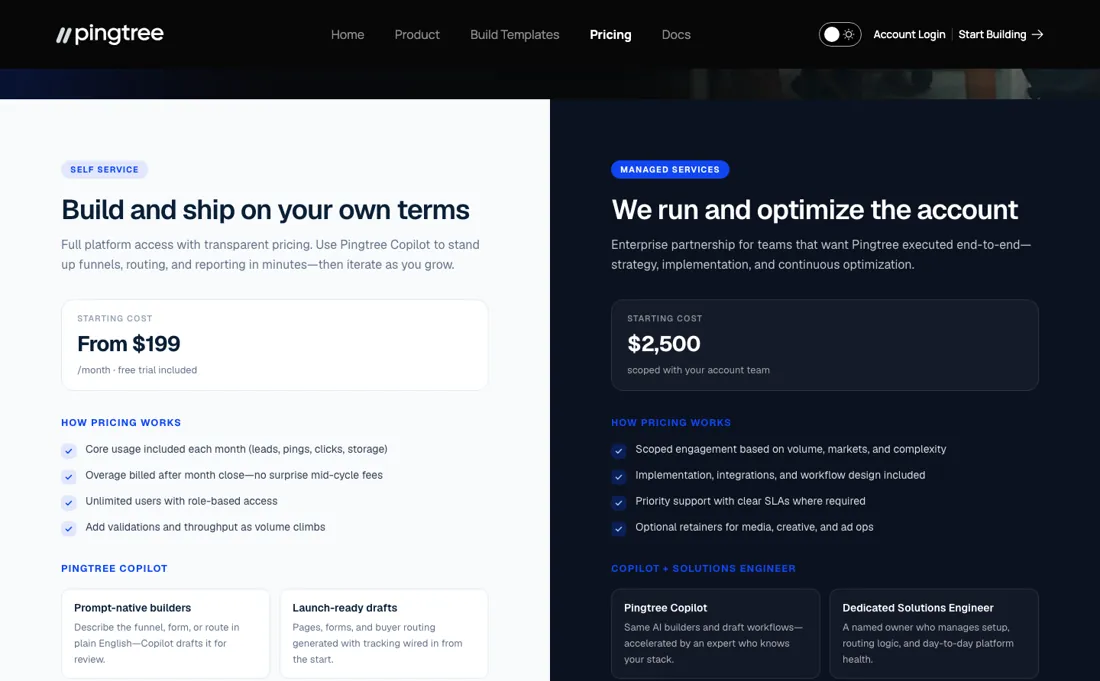
Pingtree describes its model as usage-based and prints “overage billed after month close — no surprise mid-cycle fees” directly under the Self Service price. Leads, ping requests, clicks and database API calls past the included allowances are charged afterwards. You find out what the month cost when the month is over. No overage rate is published on the pricing page, which means the one number you most need in order to budget is the one you have to ask for.
Second, the page was rebuilt between our July and August readings, and the tier structure went with it. On 27 July 2026 there were six tiers: Self Managed at Startup $499, Starter $1,250 and Growth $2,500, plus two quote-only managed tiers. On 27 August 2026 that was gone — one Self Service path from $199 a month, one Managed Services path from $2,500 — and by 1 October 2026 the Self Service floor had moved to $499.
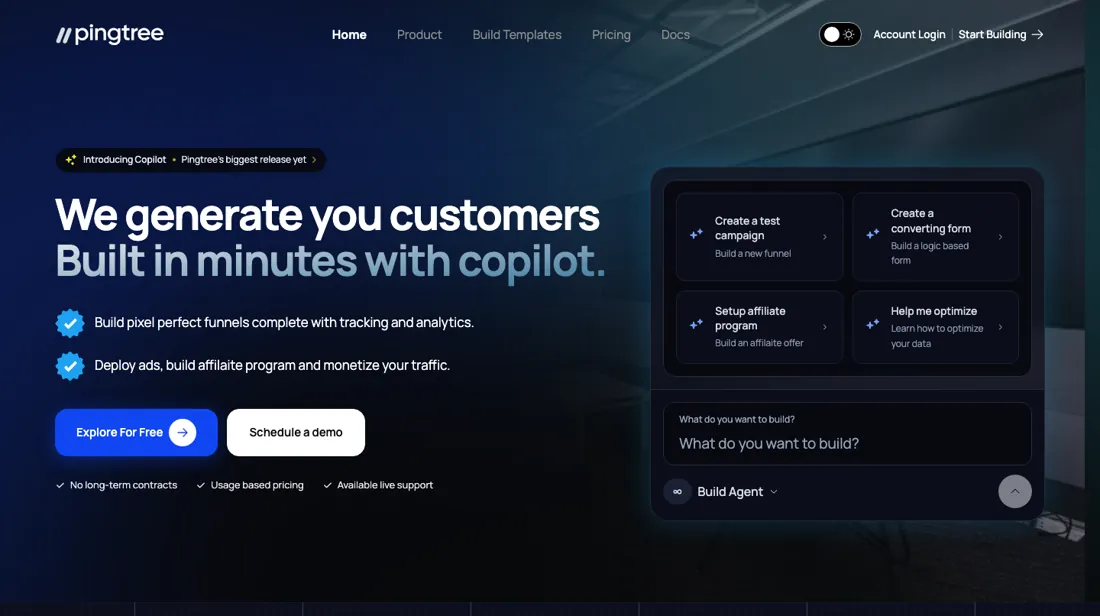
Any quote, screenshot or comparison table you were handed before October describes a price list that no longer exists, so ask for the current one in writing. There is a third gap worth naming. Copilot, the prompt-driven AI agent, is what the entire homepage is built around. Yet the pricing page is written purely in infrastructure units: leads, requests, clicks, storage, API calls. It says nothing about AI usage limits, or which path gates which Copilot capability.
Read the marketing and the pricing side by side and you cannot tell what $499 buys you of the feature you are being sold on. Pingtree's own partner manager answered that question for us in writing on 28 July 2026, and agreed the pricing page says it nowhere. The answer is in the section below on what the paid path actually buys. Three things he confirmed belong here rather than in a footnote.
The overage rate is still not published. The vendor says the figures are being pulled internally, and that he will not send a number he cannot source. So the budgeting gap above stands until a rate card exists. The trial length used to be printed twice, differently: the July pricing page said 14 days while the app's own countdown said 15 days left. The vendor calls that his own two surfaces disagreeing.
The August page prints no length at all — it says only that a free trial is included — so ask before you start the clock. And the paid upgrade screen asks for your card without restating the plan, the price or the billing terms. The vendor confirmed that, and says it is going to product. Until it changes, note down which path you picked before you type the number in.
One disclosure belongs on this page specifically. Pingtree pays us at two points in its funnel: when someone starts building, and when someone starts the free trial. Neither of those requires a purchase. We get paid whether or not you ever spend a cent with them, which is precisely why this section is about what their pricing page does not tell you.
Watch the video review
The video version of this review, from our YouTube channel.
⚡ Short on time? Watch the 30-second verdict Short.
What Pingtree does
AI-assisted funnel builder and lead-distribution platform — build funnels and forms by prompt, then route, track and monetise the leads across lead-gen, affiliate and media-buying campaigns.
What buyers report about Pingtree
Hands-on: not tested by usReported by buyers: SaaSworthy, Slashdot and lead-distribution comparisons, read August 2026
Themes from the buyer-review sites listed at the foot of this page, read in August 2026. We have not run Pingtree ourselves, so this is other buyers' experience rather than ours. We summarise it here because the complaints are usually the part a vendor page leaves out.
- • Real-time ping-and-post is the thing it does, and it covers the verticals where that model matters — legal, mass tort, payday, solar, insurance and mortgage leads.
- • Built for both sides of the transaction, buyers and sellers, rather than one.
- • General lead-generation software costs roughly $40 a month, and comparison sites put Pingtree around 650% above similar services — you are paying for the ping-post engine specifically, so make sure that is what you need.
- • We found no substantive body of independent user reviews on the major platforms. That absence is itself worth knowing at this price point: judge it on a trial and on references, not on scores.
When the paid plan is worth it
What the jump from Self Service to Managed Services buys is a person, not a product. The vendor put that in writing on 28 July 2026, and the rebuilt August page now says it out loud. Self Service is “build and ship on your own terms”: Copilot drafts the funnels, pages, forms and routing, and you steer it. Managed Services is “we run and optimize the account” — a named Solutions Engineer who owns setup, routing logic and day-to-day platform health, plus ongoing tuning of funnels, buyer waterfalls and caps.
The builder underneath is the same Copilot either way. What paying more does not fix is the number you actually need. Both paths run on included usage with overage billed after month close, and no overage rate is published for either one. Managed Services is scoped to your volume, so its $2,500 is a starting cost, not a bill. Upgrading buys you someone to build and tune the thing; it does not turn an unpredictable monthly total into a predictable one.
Settle your own lead, ping, click and API volume during the free trial — that, not the path you pick, is what the month will cost.
Our monthly capture read this pricing page in September 2026 and again in October 2026. The Self Service floor went from $199 to $499 a month, two and a half times the old figure, with the free trial still included and Managed Services unchanged at $2,500. $499 is where the cheapest self-managed tier sat in July, before the August rebuild, so the low entry price lasted about two months. Overage is still billed after month close and still not published.
Questions we checked
Facts about Pingtree that would change a buying decision, and where we stand on each. An unanswered question does not mean the feature is missing; it means we have not confirmed it yet.
- Does Pingtree Self Service bill usage after month close or deduct it live from a prepaid wallet? Sources disagree
Applies to: Self Service from $499 a month.
Why it matters: a wallet with auto-recharge can charge the card several times a month, which changes cash-flow planning for a lead-gen business.
Answer: Contradictory between the pricing page (overage after month close) and the Billing Authorization policy effective 3 May 2026 (immediate wallet deductions with auto-recharge), both read 15 October 2026. The contract decides; ask for it in writing.
Checked: Pingtree pricing page (2026-10-15); Pingtree Billing Authorization (2026-10-15); Pingtree Terms & Conditions (2026-10-15)
Have a public source that answers one of these? How we review explains how we check and correct.
How to actually use Pingtree
You can see almost the entire product before anyone asks for a card. This is the vendor's own description of the path, given to us in writing on 28 July 2026. It is not a walkthrough we have run ourselves. The day we have, this section will say so. You start free by picking a prebuilt template in your vertical and hitting use this prompt. You give a company name, an email and a mobile number, and you are inside — no card.
What you land in is the whole platform rather than a trimmed-down builder: campaign management, funnel builder, creative library, analytics and database. Copilot is already working on the build, and interviewing you about what you want. There is roughly an hour on the clock, with a banner counting it down and telling you to upgrade to the trial to keep your data safe. Starting that trial asks for name, email, mobile, company and a password — still no card — and the dashboard switches to your name with a trial countdown.
The card is only requested at the very end, on the paid upgrade. Two things to do with that. Treat the first hour as a real deadline rather than a nag. What the banner offers is to keep the work you have already done. So do not spend that hour building something you would mind losing. And use the trial for the one question the pricing page cannot answer: how many leads, ping requests, clicks and database API calls you actually put through in a normal week. That, not the headline tier, is what the month will cost you.
Distilled from Pingtree's partner manager, in writing via PartnerStack on 28 July 2026, answering the questions we put to him — the vendor's own account of his signup funnel, which we have not yet walked through ourselves Re-read 15 October 2026: pricing page https://www.pingtree.com/pricing (Self Service from $499 and Managed Services from $2,500 unchanged; trial length still not stated), Billing Authorization https://www.pingtree.com/billing-authorization (effective 3 May 2026) and Terms https://www.pingtree.com/terms (updated May 2026), for renewal, cancellation notice, wallet billing and refunds.
Pingtree vs Leadfeeder, side by side
Each column shows the vendor’s own published entry price, read on the date shown. Entry prices can cover different services or units, so check what each one buys. We do not average them into a score.
Both names above are affiliate links: we may earn a commission if you sign up, at no extra cost to you. Neither changes what this table says.
The natural comparison is Leadfeeder — these two are not substitutes, and knowing that is most of the decision. Leadfeeder identifies the companies behind anonymous traffic on your own site; Pingtree routes, sells and reports on leads you already have. If your bottleneck is not knowing who visited, Pingtree does nothing about it. If your bottleneck is deciding which buyer gets which lead at what price, Leadfeeder does nothing about it. The honest comparison for Pingtree is against dedicated lead-distribution platforms rather than anything in the lead-intelligence category — and verify every current price list yourself, because Pingtree's real cost depends on overage that is not published..
Frequently asked questions
Is Pingtree usage billed after the month or taken from a prepaid wallet?
The two official sources disagree. The pricing page (read 15 October 2026) says overage is billed after month close, with no surprise mid-cycle fees. Pingtree's Billing Authorization policy (effective 3 May 2026, read the same day) describes a wallet: usage is deducted immediately from your wallet balance, auto-recharge charges your payment method when the balance drops below your threshold, and that can happen several times in one billing cycle. Ask which model your contract uses, and what the overage rates are, since neither page prints them.
How do I cancel, and is anything refunded?
The Billing Authorization policy (effective 3 May 2026, read 15 October 2026) says subscriptions renew automatically for the same period unless cancelled at least 30 days before the renewal date, and that you can disable auto-recharge at any time. Wallet recharges and usage deductions are final and non-refundable, and an unused wallet balance is not prorated when you cancel. The Terms add that charges not disputed within 30 days are accepted. Neither document says what happens to your lead data after termination, so ask about export before you sign.
Is this a hands-on review of Pingtree?
This is a researched assessment, not a hands-on test — where we've used a tool ourselves, we say so explicitly. We name what each tool is good and bad at, and we earn a commission only if you sign up, at no cost to you.
- Buyer reviews on SaaSworthy, Slashdot and lead-distribution comparisons, read August 2026.
- 2026-10-07, read on their own pricing page; unchanged on 2026-10-15.
- A dated screenshot of that pricing page, kept on this site as the receipt.
Others in this category
Reviewed growth & revenue tools that share ground with Pingtree — comparable in what they do, not drop-in swaps:
New reviews, price changes we recorded, and the cost conditions we found. No sponsored placements. Unsubscribe anytime.
This is our researched assessment — not a paid placement. The “Visit” links on this page are affiliate links: we may earn a commission if you sign up, at no extra cost to you, and it never changes our take. How we review →