Bitscale Review (2026)200 Free Credits, Then $349/mo
 By Daan Haket · Tested hands-on · written with an AI assistant · who does what
The free tier is real and needs no card, which makes Bitscale unusually easy to judge for yourself before paying.
sales and RevOps teams that already run enrichment across several vendors and want the waterfall, the signals and the CRM sync in one place, with enough monthly volume to put 15,000 credits to work.
you enrich a few hundred records a month -- the free 200 credits or a per-lookup tool costs a fraction -- or you need a flat, predictable bill, because credits are consumption and consumption moves with your prospecting.
Transparency: the “Visit” links on this page are affiliate links — we may earn a commission if you sign up, at no extra cost to you. No vendor can pay for a better review or verdict. How we make money →
Daan created the free account and logged in; everything after that was read inside the workspace on 11 September 2026 -- the credit screen, the plans and billing screen and the upgrade panel -- alongside Bitscale's own credit documentation. Two limits worth stating plainly. We did not run an enrichment: the grid renders in a canvas our browser panel could not drive, so the per-record credit costs below come from Bitscale's published credit table and not from a meter we moved ourselves. And Bitscale is an affiliate partner of ours; their partner manager offered 2,000 bonus credits that same morning, which had not been added when we looked -- the account was on the ordinary free allowance of 200, which is what a new reader gets.
- The free tier runs two meters, not one, and the account screen shows both: 200 platform credits and 2,000 search credits, each resetting monthly, with the next search reset dated on the page. Enriching a record spends platform credits; finding one through Find People or Find Companies spends a search credit, one per record. A reader budgeting on "200 credits" is reading half the meter, and it is the half that runs out first.
- On Free, nothing carries over. The billing screen states it twice -- "Rolled-Over Credits: Not included in the plan" and "Rollover Limit: Not included in the plan" -- so an unused month is gone rather than banked. Rollover is listed among the things the first paid plan unlocks, next to credit rollover, the 100+ providers, action columns beyond 20 per grid, and the inbound integrations (RB2B, Factors, Vector).
- What one enriched record costs is published, and the range is the whole story: one to twelve platform credits per successful email or phone lookup, depending on how many providers the waterfall is allowed to try. An AI enrichment is one to two credits a run, a BitAgent website scrape one per query, and anything arriving through the API is free. On Growth that turns 15,000 credits into anywhere between 1,250 and 15,000 enriched contacts -- 2.3 cents each at one credit, 28 cents at twelve.
Pricing (2026)
✓ Pricing re-verified 28 Oct 2026
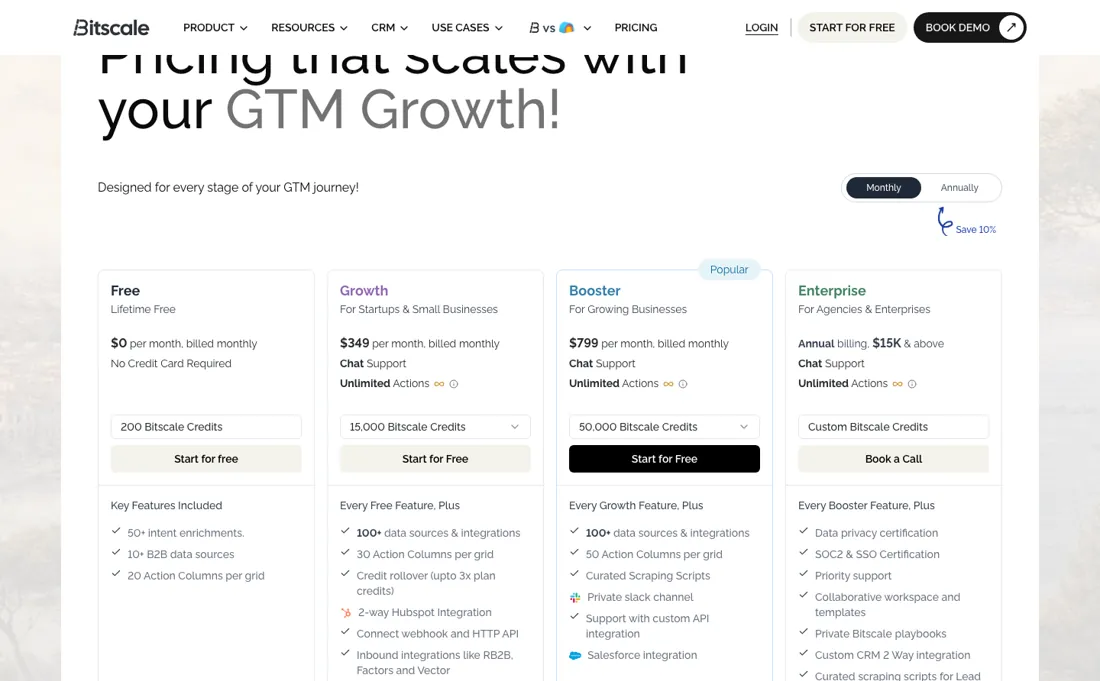
The meter is credits. Free is $0 with 200 credits, no card required, capped at 20 action columns per grid and 50,000 rows. Growth is $349 a month for 15,000 credits, 30 action columns and 100,000 rows, with a two-way HubSpot integration and inbound integrations like RB2B, Factors and Vector. Booster is $799 for 50,000 credits and 50 action columns, adding curated scraping scripts, a private Slack channel and Salesforce integration.
Enterprise is quote-only but publishes a floor most vendors hide: annual billing at $15,000 and above, adding SOC 2 and SSO, priority support, role-based team access and Snowflake pipelines. Annual billing takes 10% off. Two lines in the plan table change the arithmetic and are easy to miss. Credits roll over up to three times the plan allowance on Growth and Booster, and not at all on Free, so a quiet month is banked rather than lost.
Full pricing notes (4 more paragraphs)
And a credit is spent only when a data provider returns a valid result -- the pricing FAQ says failed lookups, formula columns and CRM syncs are always free -- so a waterfall that finds nothing costs nothing. The page also contradicts itself twice: the comparison table gives all four tiers 100+ data sources while the Free card says 10+ B2B data sources, and the Growth and Booster cards both promise Unlimited Actions while the same page's table caps action columns per grid at 30 and 50.
The step from Free to Growth is still the one to plan for: 200 credits to 15,000 with nothing in between, so the bill goes from nothing to $4,188 a year in one move. Monthly company and people search is metered separately at 2,000 on Free, 15,000 on Growth and 50,000 on Booster. Two things the pricing page does not tell you, both read on 11 September 2026.
First, what a credit actually buys: Bitscale's own credit documentation prices a found email or phone number at one to twelve platform credits per successful result, depending on how many providers the waterfall is allowed to try, with an AI enrichment at one to two credits a run and a BitAgent website scrape at one. Calls that come in through the API cost nothing.
Second, the free tier runs two meters rather than one, and the account screen shows both: 200 platform credits for enrichment and a separate 2,000 search credits for Find People and Find Companies, each resetting monthly. The upgrade panel inside the product also carries a Growth benefit the plan cards leave out -- three hours a quarter with a GTM engineer -- and states plainly what Free locks: credit rollover, more than 20 action columns per grid, the 100+ providers and the inbound integrations.
Plans change — always verify the live price on their site.
Category context: Growth & Revenue. Across the 84 tools in this category that we researched with a public US-dollar price, the median entry price is about $29 a month (lowest paid plan as listed, per seat where the vendor prices per seat). Bitscale’s entry price of $349 a month sits above that median. Compare pricing conditions in the Software Cost Atlas →
What the pricing page doesn’t say
What to check during that trial is not the feature list but your own burn rate, and Bitscale's credit table tells you the range in advance: one to twelve credits for every email or phone the waterfall finds, depending on how many providers you let it try. That is the whole budget question. The same 15,000 credits on Growth are 15,000 enriched contacts at one credit and 1,250 at twelve, so the plan you buy matters less than the depth you configure.
Run fifty real records on the free 200 credits, read the meter before and after, and multiply by your monthly volume -- that number, not the plan price, is your bill. One free-tier number is worth holding against the other. The plan table gives Free a 50,000-row grid, while Bitscale's own onboarding mail says the free plan scores up to 200 rows at a time -- and both are true, because a Score column, which grades every row against an ideal-customer profile you describe in plain English, is an AI enrichment at one to two credits a run.
The grid is not the ceiling, the 200 credits are. Finding the names draws on the separate pool of 2,000 search credits, so building the list is the cheap half; asking the product to judge it is the half that runs out.
Watch the video review
The video version of this review, from our YouTube channel.
What Bitscale does
GTM data layer that sits on top of your CRM: enrich records through waterfalls across 100+ B2B sources, track buying signals and run AI agents against the result.
What buyers report about Bitscale
Hands-on: tested 2026-09-11Reported by buyers: G2 listing g2, read September 2026
Themes from the buyer-review sites listed at the foot of this page, read in September 2026. We tested Bitscale ourselves on 2026-09-11, but one test is a narrow sample, so here is what other buyers report. We summarise it here because the complaints are usually the part a vendor page leaves out.
- • What reviewers single out is not the enrichment but the waterfall's transparency. A small-business marketer writing in September 2026 says the model shows him exactly which provider returned an email address and which did not, and values being able to supply his own API keys so he can add any source he already pays for.
- • Agency users describe it as the layer before the sender rather than a sender. A founder reviewing in June 2026 lists the jobs he actually runs through it — finding LinkedIn profiles from email addresses, separating personal from professional addresses, reading job titles, recent hires, funding signals and open postings — and says the value is turning messy lists into segments a campaign can use.
- • Onboarding is praised as real work rather than a demo: the same founder says his first call was not a product walkthrough but a session on his own use case, with a named person from the team working through how to solve it.
- • Reviewers name the outbound tools they connect it to — Instantly, SmartLead, Apollo — and describe the spreadsheet-style grid as something they set up without help.
- • The one operational complaint that repeats is the meter, and it is the same thing our own pricing note flags: a reviewer says the credit system can feel limiting for high-volume users, and that occasional enrichment misses still need checking by hand.
- • Speed at volume is the second. One reviewer reports that the API and the enrichments seem a little slow at times, and G2's own tag list carries a single performance-issues flag against seven positive tags.
- • Setup is front-loaded on field mapping. A reviewer describes having to decide which CRM fields to enrich and keep in sync before day-to-day use becomes smooth, and expects new users to need time to structure their enrichment rules and CRM sync so nothing drifts.
- • The rest of the criticism is wishes rather than faults: a higher monthly limit on the Find People search, native email validation inside the product, more native integrations, and automatic weekly monitoring of a saved company list for buying signals.
Where the ratings disagree. One platform carries the whole record, and it is lopsided: 35 of 40 reviews are five stars and none sits below three, so the listing shows a buyer almost nothing about how Bitscale fails. Two things shape that. The reviewers are overwhelmingly small-business and agency users rather than mid-market teams, and several say plainly that they are early — still early to use it, a few months now — so the set measures first impressions rather than a year of billing. The one criticism that does recur, credit burn at volume, is also the one you can measure yourself on the free tier before paying anything.
When the paid plan is worth it
The plan price is not the meter -- credits are, and the tiers buy them in bulk. Growth is $349 for 15,000 credits, Booster $799 for 50,000. Per credit that is roughly 2.3 cents against 1.6 cents, so Booster is about 30% cheaper per unit and the upgrade pays for itself the moment you would otherwise buy credits twice. Two things soften that meter, and both arrive with the first paid plan: credits roll over up to three times your plan allowance on Growth and Booster but not on Free, and a credit is spent only when a provider returns a valid result, so failed lookups, formula columns and CRM syncs cost nothing.
Paying does not only buy volume, it stops you paying for misses and for quiet months. What upgrading does not fix is the shape of the ladder. There is nothing between 200 credits and 15,000, so a team that outgrows the free tier has one move and it costs $4,188 a year, and no tier makes the enrichment itself cheaper. One feature step decides this before any of that arithmetic does: Salesforce integration sits on Booster, not on Growth.
Put the credit table against the plan and the range is wider than any tier difference. At one to twelve credits per found email or phone, Growth's 15,000 credits are somewhere between 1,250 and 15,000 enriched contacts -- two and a third cents each at best, twenty-eight cents at worst, on the same $349. What decides where you land is how many providers you let the waterfall try, which is the feature the product is sold on.
Nothing in the plan you buy moves that number; only how you configure the waterfall does.
Our monthly capture read this vendor's pricing page in September 2026 and again in October 2026, and the amounts were the same both times, including $0, $349 and $799 from the pricing above. We keep watching — the registry records what moves.
What we found running Bitscale ourselves
The first findings are at the top of this page. The rest:
- The in-app upgrade panel carries a Growth benefit the public plan cards do not mention: three hours a quarter with a GTM engineer, alongside the 15,000 credits. Worth knowing before you compare the $349 against a pure data vendor, because it is consulting time rather than volume.
- The two meters are set to become convertible. Bitscale's documentation announces 1 platform credit = 10 search credits as an upcoming feature, handled manually for enterprise accounts today. Until that ships, a month where you burn the enrichment pool cannot be topped up from the search pool, however much of it is left.
Mail in the first 14 days
Mail timeline: not measured.
The original session notes for this test were not kept with our records, so these findings cannot be re-checked against them; we have not re-run the test.
Most of our reviews are researched rather than run — how we review explains which is which, and why we do not pretend otherwise.
How to actually use Bitscale
Start on the free tier and do not build anything yet. Take fifty real records from your CRM, run one waterfall over them, and count the credits it consumed -- that number, multiplied by your monthly volume, is your actual bill and it is the only figure that matters. Count it honestly, because the meter is narrower than it looks: credits are charged only when a provider returns a valid result, so a waterfall that tries three sources and finds nothing costs you nothing, and formula columns and CRM syncs are free too.
Then check whether your CRM is on the tier you were planning to buy, since Salesforce sync arrives at Booster and not at Growth. If Attio is your system of record, the plan table answers nothing at all: Bitscale documents a native two-way Attio integration -- connected over OAuth with no API key, pulling people, companies and deals into a grid, traversing the relationships between them and pushing updates back -- but the published pricing page names only the HubSpot integration on Growth and Salesforce on Booster, and files custom CRM integrations under Enterprise.
So ask which tier carries Attio before you buy a plan for it (docs.bitscale.ai/ingredients/integrations-attio, read 15 September 2026). Only after both of those would we connect anything to production data. If you do go paid, note that unused credits roll over up to three times your plan allowance on Growth and Booster, so a slow month is banked rather than burned -- which makes the 10% annual discount easier to judge than it first looks.
Expect that count to land somewhere between one and twelve credits per found contact: that is Bitscale's own published range, and where you fall inside it depends entirely on how many providers the waterfall is allowed to try. Read the second meter too. Finding the leads draws on a separate pool of search credits -- 2,000 a month on Free, one per record from Find People or Find Companies -- so building a list and enriching it spend different budgets, and only the enrichment pool is the one that runs out.
One more enrichment is worth knowing about before you budget, because it answers a different question than the waterfall does. Bitscale documents a BuiltWith-powered tech stack lookup that reads the frameworks, platforms and tools a company actually runs -- React or Django, AWS or Shopify, HubSpot or Marketo -- so you can target on how a company operates rather than on the industry label it gives itself (docs.bitscale.ai/ingredients/tools-buildwith, read 18 September 2026).
It is an ordinary enrichment column, so it draws on the same credit pool as everything else: add it to the fifty-record count above rather than treating it as free.
Where this section comes from: our research notes (149 words)
bitscale.ai/pricing read on 8 September 2026 -- the four plan cards, the full Compare Plans table (credits, rows and action columns per grid, credit rollover, which tier carries Salesforce and SSO) and the pricing FAQ that defines when a credit is actually spent. Bitscale publishes no machine-readable pricing: both bitscale.ai/llms.txt and bitscale.ai/pricing.md return 404, so every figure there comes from the rendered pricing page. Extended on 11 September 2026 from inside a free account (the credits screen, plans and billing, and the upgrade panel) and from docs.bitscale.ai/ingredients/tutorial-credit-types, which carries the credit cost per action and the platform-versus-search distinction.
For the shared-workspace question: the Enterprise card on bitscale.ai/pricing, read on 27 October 2026. Re-read 28 October 2026 on https://bitscale.ai/pricing: Free $0 with 200 credits, Growth $349 for 15,000, Booster $799 for 50,000, Enterprise annual billing at $15K and above, Save 10% annually, rollover up to 3x plan credits, all unchanged.
Bitscale vs Clay, side by side
Where a vendor publishes a price, its column shows the entry price we read and when; where it does not, the column says so rather than filling in a figure from elsewhere. We do not average them into a score.
The Bitscale link above is an affiliate link — we may earn a commission if you sign up, at no extra cost to you — and the other column is a plain link. Neither changes what this table says.
The natural comparison is Clay or Apollo — the flexible enrichment platforms -- Clay is closest in shape, and Apollo publishes its prices, which makes it the honest benchmark for what Bitscale credits really cost you.
Frequently asked questions
What does the free plan actually include?
Two meters. Inside a free account on 11 September 2026 the credit screen showed 200 platform credits and 2,000 search credits, each resetting monthly: finding a record spends a search credit, enriching it spends platform credits, and the platform pool runs out first. On Free nothing rolls over; the billing screen says 'Not included in the plan' for both rollover lines.
How many contacts do Growth's 15,000 credits enrich?
Between 1,250 and 15,000. Bitscale's credit table, read 11 September 2026, charges one to twelve platform credits per successful email or phone lookup, depending on how many providers the waterfall may try; failed lookups are free. Growth is $349 a month for 15,000 credits (re-verified 13 September 2026), and on paid plans credits roll over up to three times the allowance. The per-record costs are Bitscale's published figures.
Do I need Enterprise for a shared workspace and templates?
On Bitscale's pricing page, read on 27 October 2026, "Collaborative workspace and templates" appears in the list of what Enterprise adds on top of every Booster feature, next to SSO and private playbooks. Enterprise is billed annually from $15K. How far sharing works on Growth or Booster is not described on the page, so treat it as not confirmed and ask before you buy a lower tier for a team that has to share grids.
Is this a hands-on review of Bitscale?
Yes. We tested Bitscale ourselves on 2026-09-11; the section above says what we tested, what we found and what we did not test, and where a figure comes from the vendor's own documentation instead. Most of our reviews are researched rather than run; we say which is which. We name what each tool is good and bad at, and we earn a commission only if you sign up, at no cost to you.
- Buyer reviews on G2 listing g2.com/products/bitscale/reviews (40 reviews, 4.8 average: 35 five-star, 4 four-star, 1 three-star and none below), read September 2026.
- Re-verified 28 October 2026 on bitscale.ai/pricing, extended on 11 September 2026 from inside a free account; every headline figure unchanged since 1 September 2026.
- A dated screenshot of that pricing page, kept on this site as the receipt.
- Our own hands-on session with Bitscale (2026-09-11), written up in full further down this page.
Others in this category
Reviewed growth & revenue tools that share ground with Bitscale — comparable in what they do, not drop-in swaps:
New reviews, price changes we recorded, and the cost conditions we found. No sponsored placements. Unsubscribe anytime.
This is our researched assessment — not a paid placement. The “Visit” links on this page are affiliate links: we may earn a commission if you sign up, at no extra cost to you, and it never changes our take. How we review →