 Essential Free Shipping Bar Review (2026)The Cart Bar Is Paid
The cart page, where a free-shipping progress bar does most of its work, is not on the free plan and not on Starter either.
Visit Essential Free Shipping Bar → Affiliate link — we may earn a commission if you sign up; it does not change what this page says.
Pricing (2026)
✓ Pricing re-verified 29 Sep 2026
Four plans priced on monthly booster views. Free covers up to 1,000 views a month with unlimited top-bar and product-page boosters. Starter is $9.99 a month for up to 10,000 views and adds geolocation targeting and excluding products from the goal. Essential is $14.99 a month for up to 50,000 views and adds cart-page boosters, upsell products inside the bar and analytics.
Professional is $29.99 a month for unlimited views and every premium feature. Paid plans carry a 7-day free trial. The listing shows monthly prices only; the help centre says a yearly billing cycle can be chosen inside the app, and we found no published yearly price. A view is counted each time the widget loads, not per visitor; the help centre says Preview mode and the theme customiser are not counted.
There is no overage charge: past the limit you get an email, and if you do not upgrade within 3 days the banners are unpublished until views reset on the 1st. All charges are in USD, billed through Shopify every 30 days. Developer Essential Apps, with an address in Vilnius, Lithuania; the listing gives a launch date of 3 June 2022 and shows 964 reviews. Plans change — always verify the live price on their site.
What the pricing page doesn’t say
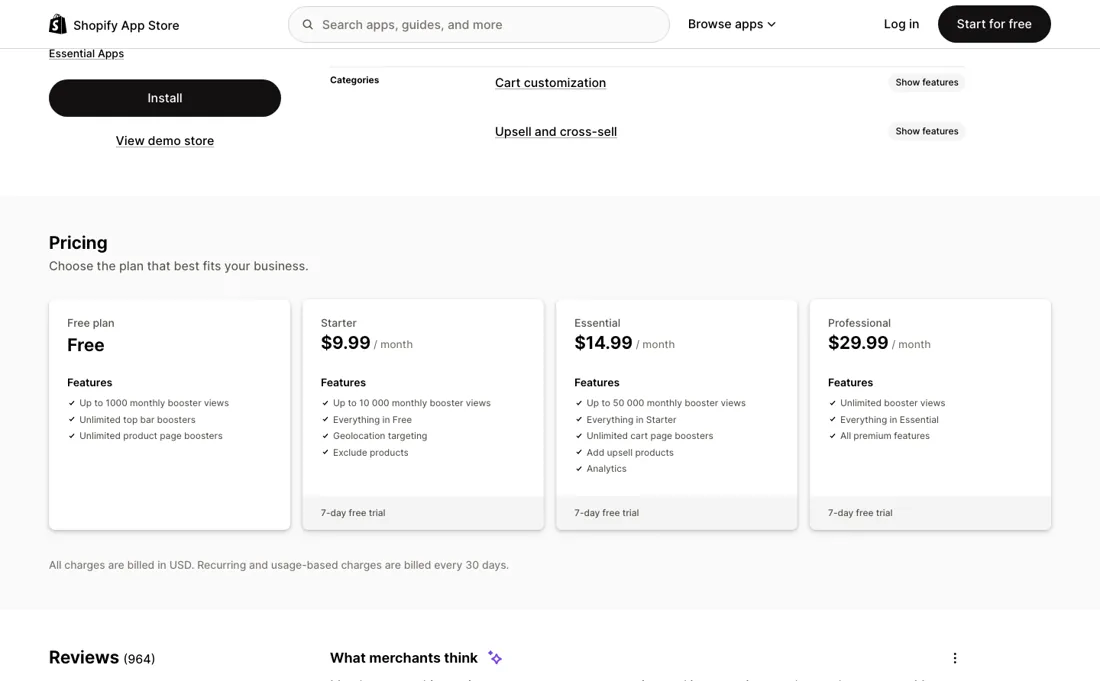
Cart-page boosters start on Essential at $14.99 a month; Free and Starter cover the top bar and product pages. One merchant uninstalled within an hour over exactly that in February 2026, calling it the obvious place for the bar; the vendor replied that the limits are on the listing, which is true. Upsell products inside the bar and the revenue analytics the listing advertises are on the same $14.99 tier.
The app shows the goal; it does not give the free shipping. The help centre says the app does not touch your store settings, so you set the free-shipping rate yourself in Shopify's shipping settings, as a conditional rate based on order price, and you do it again for every market. If the threshold in the bar and the threshold in Shopify drift apart, the bar promises something checkout does not deliver.
Currencies work the same way: a currency missing from the dropdown needs its own Shopify Market first. Views are counted on every load of every widget, and the free plan's 1,000 a month is small for a bar that sits on every product page. The help centre says Preview mode and the theme customiser are not counted; one merchant wrote in March 2026 that editing product pages in the customiser used up views, so check the counter after a design session.
Past the limit there is no charge, but three days after the warning email the banners are unpublished until the 1st. Two older complaints are worth knowing. A merchant in Japan wrote that the bar did not update when a shopper switched variants and prices; the vendor answered that real-time variant updates are supported and offered to help. And a UK merchant wrote in 2023 that uninstalling left code behind in the theme. Check the theme after removal. We have not installed the app.
What Essential Free Shipping Bar does
Shopify free-shipping progress bar for the top bar, product pages and cart, with cart goals, upsell products, geo-targeting and product exclusions; the free-shipping rate itself is set in Shopify.
The cart page is the upgrade
Views matter less here than placement. Free gives top-bar and product-page bars on up to 1,000 views. Starter at $9.99 adds 10,000 views, country targeting and the option to leave products such as gift cards and digital goods out of the goal. Essential at $14.99 adds the cart page, upsell products inside the bar and analytics, with 50,000 views. Professional at $29.99 removes the ceiling. For most stores the plan to plan around is Essential, because the cart is where a shopper decides whether to add one more item, and it is the first tier that puts the bar there.
Starter is worth it on its own only if you ship to several countries with different thresholds or sell items that should not count toward the goal. Professional makes sense once the bar loads more than 50,000 times in your peak month; below that, it buys nothing Essential does not.
How to actually use Essential Free Shipping Bar
Set up the offer in Shopify before you build the bar. In Settings, Shipping and delivery, add a rate to the shipping zone, choose Set up your own rates, add conditional pricing based on order price, enter your threshold as the minimum and leave the price at 0. Do it for every market you sell to; the app will not do it for you. Then turn on the app embed in the theme editor, create a booster, choose the product or cart page, enter the same threshold and the currency, write the message and publish.
If a currency is missing from the list, create a Shopify Market for it first. If you use country targeting, know the rule the help centre spells out: a booster made for one country wins over an All World booster there, so the All World bar will not show in that country. On a paid plan, exclude gift cards and digital products so they do not count toward the goal.
Check the views counter after you edit the theme, and if the bar does not show, the usual causes are the app embed switched off, a draft booster, a placement that does not match the page, or a custom cart drawer that replaces the theme's cart. To cancel a paid plan, switch back to Free or press Cancel subscription on the Pricing plans page.
Distilled from Essential Free Shipping Bar's Shopify App Store listing and its critical reviews, the vendor's page at essential-apps.com/free-shipping-bar, and its help-centre articles on views and plan changes, on adding the bar, on enabling free shipping in Shopify, on why the bar does not render and on cancelling, all read in a headless browser on 29 September 2026; our Kite dossier (read 17 September 2026) for the comparison. We have not installed the app.
Essential Free Shipping Bar vs Kite, side by side
Both columns come from the same place: each vendor’s own published pricing, read on the date shown in the sources at the foot of this page. We do not average them into a score.
Both names above are affiliate links: we may earn a commission if you sign up, at no extra cost to you. Neither changes what this table says: both columns come straight from the vendors’ own pricing pages.
The natural comparison is Kite — Kite is the closest app in our own dossiers with a progress bar, and the difference is what sits behind the bar. On our reading of 17 September 2026 Kite applied the reward itself - free gifts, buy X get Y and tiered discounts on native Shopify Functions - with progress bars from its $29 Starter plan and a free plan capped at 50 discount orders a month. Essential Free Shipping Bar only shows the goal: it starts free at 1,000 views and charges $9.99, $14.99 or $29.99 for more views, and the free shipping itself is a rate you set in Shopify. A store that wants one message - spend this much for free shipping - fits Essential at a fraction of the price; a store that wants the bar to unlock gifts and discounts it cannot configure in Shopify's shipping settings fits Kite..
Visit Essential Free Shipping Bar →
Frequently asked questions
What does Essential Free Shipping Bar cost?
Free up to 1,000 views a month on the top bar and product pages; Starter is $9.99 a month for 10,000 views, Essential $14.99 for 50,000 views and the cart page, and Professional $29.99 for unlimited views, with a 7-day trial on paid plans. Read on the Shopify App Store on 29 September 2026.
Can I show the free shipping bar in the cart on the free plan?
No. Cart-page boosters start on the Essential plan at $14.99 a month; the free plan and Starter cover the top bar and product pages.
Does the app turn on free shipping for me?
No. The help centre says the app does not change store settings: you add a free-shipping rate based on order price in Shopify's shipping settings yourself, for each market, and use the same threshold in the bar.
What should I weigh before buying E-commerce software?
Check your platform and version specifically. Shopify support is close to universal in this category, while WooCommerce, BigCommerce, Magento and headless setups vary a lot, and 'supported' sometimes means a generic API rather than a maintained app. A listing in your own platform's app store, with recent reviews there, is a better signal than the vendor's logo wall.
Is this a hands-on review of Essential Free Shipping Bar?
This is a researched assessment, not a hands-on test — where we've used a tool ourselves, we say so explicitly. We name what each tool is good and bad at, and we earn a commission only if you sign up, at no cost to you.
- Read 2026-09-29 on apps.shopify.com/essential-order-value-booster, on essential-apps.com/free-shipping-bar and in the vendor's help articles on views and on setup.
- A dated screenshot of that pricing page, kept on this site as the receipt.
Others in this category
Reviewed e-commerce tools that share ground with Essential Free Shipping Bar — comparable in what they do, not drop-in swaps:
New reviews, price changes we recorded, and the cost conditions we found. No sponsored placements. Unsubscribe anytime.
This is our researched assessment — not a paid placement. The “Visit” links on this page are affiliate links: we may earn a commission if you sign up, at no extra cost to you, and it never changes our take. How we review →