UpsellPlus Review (2026)Upsells Everywhere, Priced on Revenue
 By Daan Haket · Tested hands-on · written with an AI assistant · who does what
The plans are capped by the revenue they are allowed to earn you, and the first paid step does not raise that cap: Free and the $49 Launch plan both stop at $500 of upsell revenue a month.
- Best for Shopify Plus stores selling at checkout
From $49 · Basic · per month, or $500 a year · read 2026-11-17
Try UpsellPlus →Affiliate link: we may earn a commission if you sign up, at no extra cost to you. It never changes our verdict.
Is UpsellPlus right for you?
Your pain“Shoppers are ready to buy at checkout, and my store has no way to offer them a gift or add-on there.”
Does UpsellPlus solve it?Buyers say yesBuyer reports (Shopify App Store, Sep 2026): a US food brand says it found no other app that could add a gift to the cart only at checkout.
Your planPro (called Shopify Plus until November 2026), $119 a month (checkout upsells need a Shopify Plus store)
Your pain“I can't tell whether my shoppers would ever take an upsell offer.”
Does UpsellPlus solve it?PartlyOur test (17 Nov 2026): install to a cart upsell preview with 10% off took about 4 minutes and 6 clicks. We saw no shopper data, so we could not tell if shoppers would take the offer.
Your planDevelopment store: full access, never charged. Paid plans start at $49 a month.
Your pain“One good week could push me past my plan limit and raise my bill without a decision from me.”
Does UpsellPlus solve it?PartlyVendor FAQ: when you reach your revenue limit you are moved to the next tier automatically, and the $49 plan has the same limit as Free.
Your planAdvanced (called Scale until November 2026), $199 a month, stepping up in published tiers as revenue grows
- your upsell revenue sits near the $500 ceiling that Free and the $49 plan share (the first paid step buys features, not headroom) or you are not on Shopify Plus and were buying this for the checkout upsells.
The “Try” buttons are affiliate links: we may earn a commission if you sign up, at no extra cost to you, and it never changes our verdict.
Also in: Software for Shopify and online stores
Transparency: the “Visit” links on this page are affiliate links: we may earn a commission if you sign up, at no extra cost to you. No vendor can pay for a better review or verdict. How we make money →
Which UpsellPlus plan do you need?
4 plans, 3 questions, no signup.
Answer three quick questions to see your plan.
Your plan
Free
Free
One offer, all twelve upsell types; the listing no longer states a revenue ceiling (it said $500 before November 2026)
Your plan
Basic
$49 a month or $500 a year (saves 15%)
Up to $500 a month in the app's table; adds cart, pop-up, product page and post-purchase upsells, A/B tests
Your plan
Pro
$119 a month or $1,149 a year (save 20%)
Up to $2,000 a month; checkout upsells and customization, AI recommendations
Your plan
Advanced
$199 a month or $1,899 a year (save 20%)
Up to $5,000 a month and live support; the app's table steps up to Scale 1 to 5 and Unlimited at $999 above that
Probably not UpsellPlus
From your answers, look at AfterSell instead. Why ↓
Prices as we read them on 2026-11-17; check the checkout before you pay. The plan button is an affiliate link: we may earn a commission, at no extra cost to you. The AfterSell link is an affiliate link too.
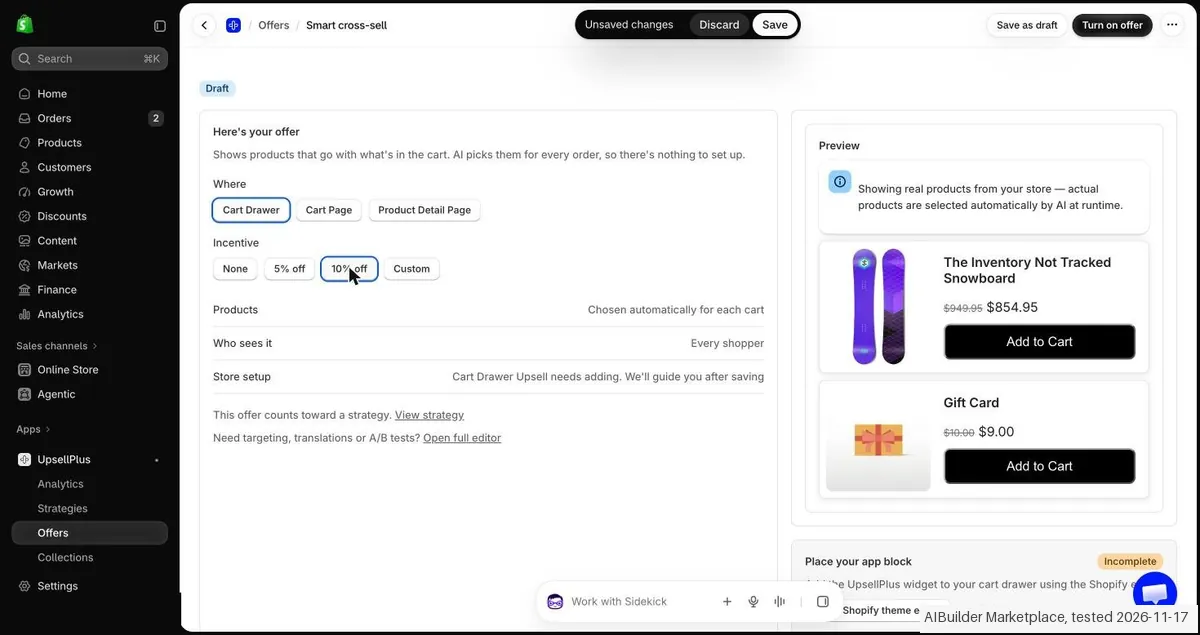
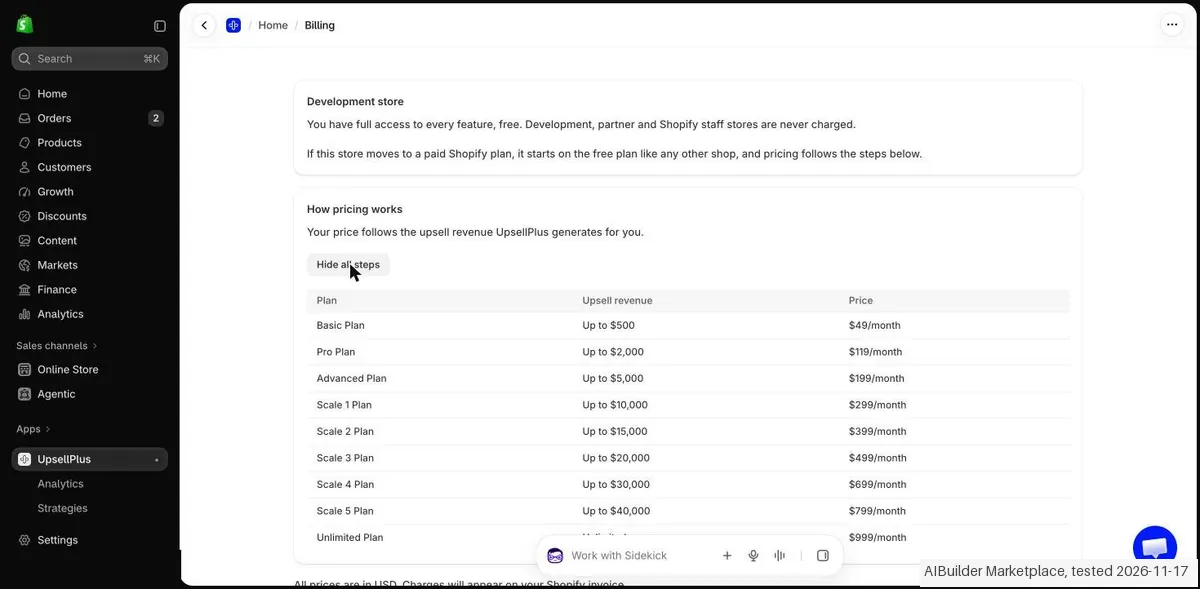
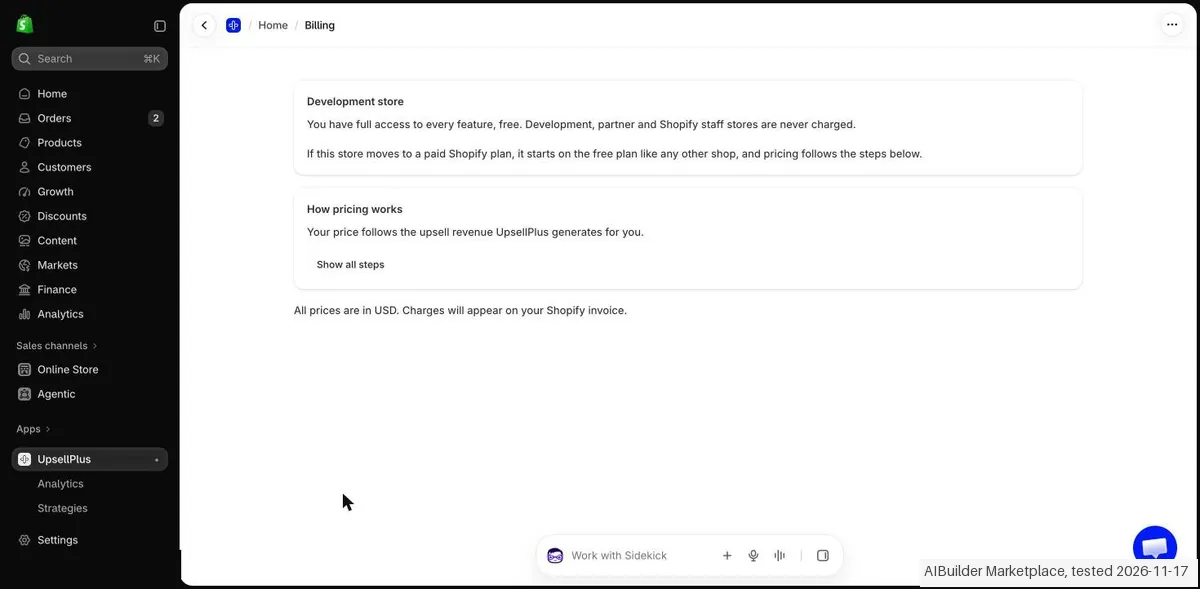
The app was installed on our Shopify development store, which we set up, and our AI assistant ran the test in our browser. On 17 November 2026 the session tested UpsellPlus on a Shopify development store: the install without a payment or approval screen, one Smart cross-sell play for the cart drawer with 10% off that gave a preview about 4 minutes and about 6 clicks after the install click (The Inventory Not Tracked Snowboard $949.95 to $854.95, Gift Card $10.00 to $9.00), the Billing page with nine revenue steps from Basic $49 to Unlimited $999 a month, and the uninstall, which asks for a reason. Nothing was saved or published and no order was placed, so no shopper data was seen. Name: the listing (apps.shopify.com/upsellpluscheckout) is titled UpsellPlus Checkout Upsell, developer UpsellPlus, Built for Shopify, rating 5.0 from 151 reviews, and matches our research; the app opens as UpsellPlus. The listing says Free plan available. Free trial available. and shows a plan box with Free (Build for free. Launch with a free trial, Choose from all 12 upsell types, Checkout Upsells (Plus only), Analytics), Basic $49 (up to $500), Pro $119 (up to $2,000) and Advanced $199 (up to $5,000), each with a 14-day free trial. Install: the Install button was clicked at about 23:19. The permission screen asked to View customer data, View staff and contributor data and View and edit store data. The Install button normally opens a grant tab; in our own tab the install form was sent into the same tab and submitted with a script. The first attempt ended in the message UpsellPlus was not added to your shop because the permission screen was closed too early; the second attempt worked. After the install the product opened at once with the setup line We analyzed your last 60 days of orders. There was no Shopify approval screen and no payment screen. Core action: See my recommended strategies, Offers, Create offer, filter Cart, Smart cross-sell, Use this play opened the offer editor with Where (Cart Drawer, Cart Page, Product Detail Page) and Incentive (None, 5% off, 10% off, Custom); we chose Cart Drawer and 10% off. The preview showed The Inventory Not Tracked Snowboard at $854.95 instead of $949.95 and Gift Card at $9.00 instead of $10.00, each with an Add to Cart button, under the note that real products from the store are shown and that actual products are selected automatically by AI at runtime. A box Place your app block was marked Incomplete: the cart drawer app block still has to be added in the theme. About 4 minutes passed between the install click (23:19) and the first preview (about 23:23), and it took about 6 clicks after the install. Nothing was saved (Discard), nothing was published, the theme was not changed and no order was placed. Plans and billing: this is a development store. Settings, Billing says Development store. You have full access to every feature, free. Development, partner and Shopify staff stores are never charged. It also says that a store on a paid Shopify plan starts on the free plan like any other shop and that pricing then follows the steps below. The page How pricing works says that the price follows the upsell revenue UpsellPlus generates, with nine steps: Basic up to $500 at $49 a month, Pro up to $2,000 at $119, Advanced up to $5,000 at $199, Scale 1 up to $10,000 at $299, Scale 2 up to $15,000 at $399, Scale 3 up to $20,000 at $499, Scale 4 up to $30,000 at $699, Scale 5 up to $40,000 at $799 and Unlimited at $999 a month. All prices are in USD and appear on the Shopify invoice. No Shopify approval screen was reached, nothing was approved. Differences with our research and the listing: the app shows the entry step as Basic Plan where our research says Launch; the app shows no Free plan among the nine steps although the listing says Free plan available (on a development store the free plan cannot be tested); the listing shows tiers up to $199 while the app shows six more steps up to $999 that are tied to upsell revenue. No price field is changed here. Cancelling: no paid plan exists on a development store, so no cancel route for a plan was seen. Settings, Apps, the menu behind the three dots for UpsellPlus offered Open app, View details and Uninstall (and a help link). The dialog Uninstall UpsellPlus? says that you will no longer be able to use the app, that data managed by the app, such as discounts, will be deleted, and that a request is sent to the app developer within 48 hours to delete all personal customer information. It requires a Reason for uninstalling. Not tested: checkout, thank-you page, post-purchase and POS upsells (Plus or paid, the listing says checkout upsells are Plus only), the free plan on a real paid store, A/B tests, analytics with real data, the cart drawer app block, a real order and any shopper data, so we could not tell whether shoppers would take an offer. Clean up: our own tab was used; the offer was not saved and the theme was not changed. UpsellPlus was uninstalled on 17 Nov through Settings, Apps with the reason Testing multiple apps and left the Installed list. Other apps were not touched and our own tab was closed. The price fields are not changed here. No kit records were entered.
How we tested
- The app was installed on our Shopify development store, which we set up, and our AI assistant ran the test in our browser
- Built one cross-sell play and previewed it, read the Billing page, and uninstalled the app
- Nothing was saved or published and no order was placed
- Text we checked: "Basic Plan". What we saw: The Billing page names the entry step Basic Plan, Up to $500, $49/month; our research calls the entry plan Launch. The app shows no plan called Launch.
- Text we checked: "Basic $49 (up to $500)". What we saw: The Billing table shows Basic Plan, Up to $500, $49/month, equal to the listing.
- Text we checked: "Pro $119 (up to $2,000)". What we saw: The Billing table shows Pro Plan, Up to $2,000, $119/month, equal to the listing.
Pricing (2026)
✓ Pricing re-verified 17 Nov 2026
| This tool | $49 | 58th cheapest of 66 |
| Cheapest | $4.95 | Essent Preorder Back in Stock |
| Median | $17 | |
| Most expensive | $1,500 | Superfiliate |
Lowest paid entry price per account a month, billed monthly, in USD, among the 66 e-commerce growth apps we have researched (read between 2026-09-28 and 2026-11-21). Only tools priced in the same unit and on the same billing are compared. This is not a market survey, and cheapest is not best.
Fixed monthly tiers based on the revenue generated through UpsellPlus offers, with no percentage commission. The listing shows four: Free runs one offer, opens all twelve upsell types plus analytics, and allows up to $500 in upsell revenue. Launch is $49 a month or $500 a year (saves 15%) and allows the same $500 of app-generated revenue a month, adding cart, pop-up and drawer upsells, product page and post-purchase upsells, multivariate A/B testing, progress bars and free gifts.
The tier named Shopify Plus is $119 a month or $1,149 a year (save 20%), raises the ceiling to $2,000 a month and adds checkout customization, checkout upsells, thank-you page customization and AI recommendations. Scale is $199 a month or $1,899 a year (save 20%) for up to $5,000 a month, live support and multivariate A/B testing. 14-day free trial on the paid tiers; charges billed every 30 days.
Full pricing notes (6 more paragraphs)
The vendor's own page adds two things the listing does not carry: a fifth Enterprise tier with no published price, sold through a demo, and a Managed Service at an extra $499 a month. That page contradicts itself on Scale - the plan card and the listing both say up to $5,000 a month, while its comparison table puts Scale under Unlimited - so we asked the vendor.
UpsellPlus support answered on 21 September 2026 that Scale is a ladder rather than a single price: $199 up to $5,000 of upsell revenue a month, $299 up to $10,000, $399 up to $15,000, $499 up to $20,000, $699 up to $30,000, $799 up to $40,000, and an Unlimited plan at $999 with no ceiling. A store that goes past $5,000 is moved automatically to the $299 tier, which covers up to $10,000.
So the plan card is the accurate one and the comparison table is wrong, and the amounts above $199 appear nowhere on the published pricing page (figures from UpsellPlus support, 21 September 2026). Hitting a ceiling is not a stop: their FAQ says you automatically upgrade to the next tier so upsells are not interrupted, so the bill rises by itself. Their FAQ also states Shopify Plus is NOT required except for checkout customization and checkout upsells, which is a Shopify restriction; cart, product page, cart drawer, thank-you and post-purchase offers work without it.
Read again on 17 November 2026: the listing (4.9 stars is not stated; it shows 5.0 from 151 reviews) now names the plans Free, Basic $49, Pro $119 and Advanced $199 a month, the tiers we recorded as Launch, Shopify Plus and Scale, each paid plan with a 14 day free trial, and its Free card now reads “Build for free. Launch with a free trial” without the $500 ceiling it carried before.
In our own test the same day the app showed no Free plan: on our Shopify development store its billing page said the store had full access to every feature, free, and that development, partner and Shopify staff stores are never charged, so no Shopify approval screen appeared. Its “How pricing works” table followed the upsell revenue the app generates: Basic $49 up to $500, Pro $119 up to $2,000, Advanced $199 up to $5,000, then the steps the vendor's support gave us in September, Scale 1 $299 up to $10,000, Scale 2 $399 up to $15,000, Scale 3 $499 up to $20,000, Scale 4 $699 up to $30,000, Scale 5 $799 up to $40,000 and Unlimited $999.
The listing shows tiers only up to $199, so the app's table is the first public place the higher steps appear. The app called the entry plan Basic, not Launch. We could not test the listing's Free plan on a development store.
Plans change, so check the live price on their site before you buy.
Category context: Growth & Revenue. Across the 91 tools in this category that we researched with a public US-dollar price, the median entry price is about $30 a month (lowest paid plan as listed, per seat where the vendor prices per seat). Compare pricing conditions in the Software Cost Atlas →
What the pricing page doesn’t say
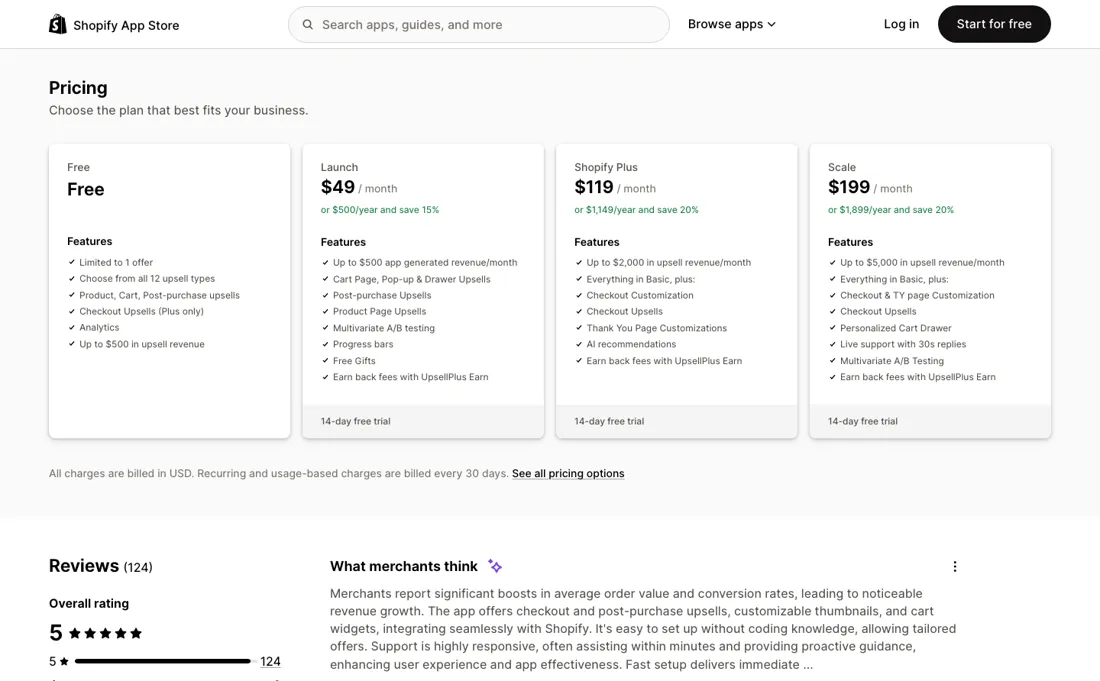
The $49 buys offers and features, not headroom: headroom starts at $119. And crossing a ceiling is not something you decide: their FAQ says you are automatically upgraded to the next tier so the offers keep running, so a good week moves the invoice on its own. Read the feature list closely too, because the tier named Shopify Plus is not the same thing as the requirement: their FAQ says Plus is needed only for checkout customization and checkout upsells, so on a standard Shopify store the checkout half of a checkout-upsell app is not what you are buying.
The last thing to know is at the top, and it is not on their pricing page. The plan card says Scale stops at $5,000 a month while the comparison table on that same page says Unlimited; we asked, and UpsellPlus support confirmed on 21 September 2026 that Scale is a revenue ladder - $199 up to $5,000 of upsell revenue a month, $299 up to $10,000, $399 up to $15,000, $499 up to $20,000, $699 up to $30,000, $799 up to $40,000, and an Unlimited plan at $999 with no ceiling - and that passing $5,000 moves a store to the $299 tier on its own.
That is better news than the Enterprise tier above it suggests, but it means the number you are quoted at signup is the floor of a ladder whose higher rungs are not published anywhere.
Watch the video review
The video version of this review, from our YouTube channel.
What UpsellPlus does
Upsells, cross-sells and free gifts across Shopify product pages, cart, checkout, post-purchase, customer accounts and POS, with AI recommendations and A/B testing in 23 storefront languages.
What buyers report about UpsellPlus
Hands-on: tested 2026-11-17Reported by buyers: Shopify App Store listing apps, read September 2026
Themes from the buyer-review sites listed at the foot of this page, read in September 2026. We tested UpsellPlus ourselves on 2026-11-17, but one test is a narrow sample, so here is what other buyers report. We summarise it here because the complaints are usually the part a vendor page leaves out.
- • The checkout-level offer is what merchants say they came for and could not get elsewhere: a US food brand wanted a gift auto-added to the cart only at checkout and reports failing to find another app that allowed it.
- • The team joins calls to build the thing rather than pointing at documentation: the same merchant says UpsellPlus hopped on a call to customise the feature, and an apparel brand describes brand feedback on the cart being executed quickly.
- • One support name recurs across independent reviews: Santiago, described as fast, professional and solving a problem in minutes.
- • A Mexican merchant at six months makes the point that matters for post-purchase offers specifically: that they integrate with the buying experience without being invasive, which is the usual failure mode of the category.
- • There are none on this platform, and that is the finding rather than an endorsement: 143 reviews and not one below five stars. The listing therefore gives a buyer no view at all of how the app fails, which is the thing you would most want from three figures' worth of reviews.
- • The review set also skews to the beginning of the relationship. Alongside merchants at eight months, nine months and about a year sit reviews written after two hours, two days, four days and six days: enthusiasm about onboarding, before a post-purchase funnel has had time to show what it does to refunds, support load or repeat purchase.
- • Nobody in the set quantifies the lift. Reviewers say the app increased average order value and call it an easy win, but the numbers behind that are not in the reviews, so the platform supports the direction and not the size of the effect.
Where the ratings disagree. A perfect 5.0 over 143 reviews is not evidence that nothing goes wrong; it is evidence that nobody dissatisfied has posted here. Set it against the neighbours in this same category and the contrast is instructive rather than damning: Easy Bundles carries 13 one-star reviews in 1,272, Evey Events 24 in 321. Those minorities are what let a buyer see the failure modes before hitting them. With UpsellPlus you get the upside in detail and have to find the downside yourself, so weight the free trial and your own first month more heavily than the score.
Pages read (September 2026): Shopify App Store
What the money actually buys
The ladder is priced by how much revenue the app is allowed to generate for you: $500 a month on Free and on Launch at $49, $2,000 on the $119 tier, $5,000 on Scale at $199. Read that column before the feature lists, because the ceilings differ far more than the features do. What $49 adds over free is offers and tooling: cart, pop-up and drawer upsells, product page and post-purchase offers, multivariate A/B testing, progress bars and free gifts, with a 14-day trial.
What $119 adds is the checkout: checkout customization, checkout upsells, thank-you page customization and AI recommendations, plus four times the revenue ceiling. Scale at $199 adds live support and a $5,000 ceiling. Annual billing takes 15% off Launch ($500 a year) and 20% off the two upper tiers ($1,149 and $1,899). What happens when you outgrow $5,000 a month is not on the listing or the pricing page, so we asked.
UpsellPlus support answered on 21 September 2026 that Scale keeps climbing in published steps - $199 up to $5,000 of upsell revenue a month, $299 up to $10,000, $399 up to $15,000, $499 up to $20,000, $699 up to $30,000, $799 up to $40,000, and an Unlimited plan at $999 with no ceiling - and that crossing $5,000 moves you to $299 automatically. Budget against that ladder rather than against the $199 on the card, because the app decides when you step up, not you.
What we found running UpsellPlus ourselves
The first findings are at the top of this page. The rest:
- Text we checked: "Advanced $199 (up to $5,000)". What we saw: The Billing table shows Advanced Plan, Up to $5,000, $199/month, equal to the listing.
- Text we checked: "Scale 1 $299 (10,000)". What we saw: The Billing table has six more steps than the listing: Scale 1 $299 (up to $10,000), Scale 2 $399 (15,000), Scale 3 $499 (20,000), Scale 4 $699 (30,000), Scale 5 $799 (40,000) and Unlimited $999 a month.
Claim vs. what we measured
We set a claim from UpsellPlus's own pages next to what we saw in our test, on the plan named. The status says whether the two describe the same thing and match; it is not a verdict on the product. Confirmations are listed too.
| What the vendor says | What we measured | Status | What it means if you buy |
|---|---|---|---|
| Basic PlanSource: our test notes, read 17 Nov 2026 | Measured 2026-11-17: The Billing page names the entry step Basic Plan, Up to $500, $49/month; our research calls the entry plan Launch. The app shows no plan called Launch.Our test, 17 Nov 2026; Development store, full access at no charge; no plan or approval screen came up | Out of dateThe recorded plan name against the Billing table; the name is a fact about the app, not a test result. | The plan our research calls Launch is shown as Basic Plan in the app; the review should use the app name. |
| Free plan available. Free trial available.Source: our test notes, read 17 Nov 2026 | Measured 2026-11-17: The listing says this. The Billing page of the app names no Free plan among its nine steps, but says that a store on a paid Shopify plan starts on the free plan like any other shop. On a development store everything is free, so the Free plan and the trial could not be tested.Our test, 17 Nov 2026; Development store, full access at no charge; no plan or approval screen came up | Not testableThe listing wording against a Billing page of a development store; no real paid store was used. | Whether a real store can use the Free plan, and for what limits, is not confirmed. |
| Basic $49 (up to $500)Source: our test notes, read 17 Nov 2026 | Measured 2026-11-17: The Billing table shows Basic Plan, Up to $500, $49/month, equal to the listing.Our test, 17 Nov 2026; Development store, full access at no charge; no plan or approval screen came up | ConfirmedThe listing plan box against the Billing table; the amount was not seen on an approval screen. | The first paid step costs $49 a month for upsell revenue up to $500, as listed. |
| Pro $119 (up to $2,000)Source: our test notes, read 17 Nov 2026 | Measured 2026-11-17: The Billing table shows Pro Plan, Up to $2,000, $119/month, equal to the listing.Our test, 17 Nov 2026; Development store, full access at no charge; no plan or approval screen came up | ConfirmedThe Pro price on the listing against the Billing table; Pro was not selected. | The Pro step costs $119 a month for upsell revenue up to $2,000, as listed. |
| Advanced $199 (up to $5,000)Source: our test notes, read 17 Nov 2026 | Measured 2026-11-17: The Billing table shows Advanced Plan, Up to $5,000, $199/month, equal to the listing.Our test, 17 Nov 2026; Development store, full access at no charge; no plan or approval screen came up | ConfirmedThe Advanced price on the listing against the Billing table; Advanced was not selected. | The Advanced step costs $199 a month for upsell revenue up to $5,000, as listed. |
| Scale 1 $299 (10,000)Source: our test notes, read 17 Nov 2026 | Measured 2026-11-17: The Billing table has six more steps than the listing: Scale 1 $299 (up to $10,000), Scale 2 $399 (15,000), Scale 3 $499 (20,000), Scale 4 $699 (30,000), Scale 5 $799 (40,000) and Unlimited $999 a month.Our test, 17 Nov 2026; Development store, full access at no charge; no plan or approval screen came up | ContradictedThe tiers of the listing against the full Billing table; the revenue steps were read but not triggered. | A store with growing upsell revenue can end up at $299 to $999 a month, which the listing, ending at $199, does not show. |
| Incentive: None / 5% off / 10% off / CustomSource: our test notes, read 17 Nov 2026 | Measured 2026-11-17: With Cart Drawer and 10% off chosen the preview showed The Inventory Not Tracked Snowboard at $854.95 instead of $949.95 and Gift Card at $9.00 instead of $10.00, which is 10% off after rounding down.Our test, 17 Nov 2026; Development store, full access at no charge; no plan or approval screen came up | ConfirmedThe shown prices against ten percent of the old prices; only the preview in the editor was seen and no cart or order. | The 10% incentive was applied correctly to both preview prices. |
| actual products are selected automatically by AI at runtime.Source: our test notes, read 17 Nov 2026 | Measured 2026-11-17: The editor says that the preview shows real products from the store and that the actual products are selected by AI at runtime. We saw two products in the preview; the choice at runtime was not seen because nothing was saved or shown to a shopper.Our test, 17 Nov 2026; Development store, full access at no charge; no plan or approval screen came up | Not testableThe editor text against a live cart that does not exist; the app block was not added and no shopper data was seen. | Which products shoppers would really see, and whether they fit the cart, is not confirmed. |
| Choose from all 12 upsell typesSource: our test notes, read 17 Nov 2026 | Measured 2026-11-17: The listing says this for the Free plan. Only one type, a Smart cross-sell for the cart drawer, was tried; the other types were not opened.Our test, 17 Nov 2026; Development store, full access at no charge; no plan or approval screen came up | Not testableThe listing list against the one offer type that was opened in the editor. | How many upsell types work, and on which plan, is not confirmed. |
| Checkout Upsells (Plus only)Source: our test notes, read 17 Nov 2026 | Measured 2026-11-17: The listing says checkout upsells are for Shopify Plus only. The store is a development store on the Basic test plan, so checkout, thank-you page, post-purchase and POS upsells were not tried.Our test, 17 Nov 2026; Development store, full access at no charge; no plan or approval screen came up | Not testableThe listing line against a store without Plus; no checkout offer was built. | The checkout upsell is not confirmed, and the listing says it needs Plus. |
| Development store. You have full access to every feature, free.Source: our test notes, read 17 Nov 2026 | Measured 2026-11-17: The Billing page of our development store says this, adds that development, partner and Shopify staff stores are never charged, and no approval or payment screen came up during the whole session.Our test, 17 Nov 2026; Development store, full access at no charge; no plan or approval screen came up | ConfirmedThe Billing text against the absence of any approval or payment screen; the text was read once and the store was not moved to a paid plan. | On a development store nothing is billed, so the test says nothing about what a real store pays. |
| Your price follows the upsell revenue UpsellPlus generates for you.Source: our test notes, read 17 Nov 2026 | Measured 2026-11-17: The Billing page says the price follows the upsell revenue the app generates, in nine steps from $49 to $999 a month. No Shopify approval screen was reached, so no total, tax or renewal term was seen.Our test, 17 Nov 2026; Development store, full access at no charge; no plan or approval screen came up | Not testableThe Billing table against a Shopify approval screen that never appeared; no tax, term or stored cost rule was compared. | The price you would pay for a given revenue is only the table in the app; a Shopify approval total was not confirmed. |
Exit test: can you take your data out?
Test date: 17 Nov 2026. We describe the friction rather than score it; this is one run with synthetic records, not a verdict on UpsellPlus.
| What we checked | What we saw |
|---|---|
| Fields offered by the export dialog | |
| Not offered in the field selector | None noted. |
| The exported file | We did not inspect the file, so data retention and loss remain unverified. |
| Awkward but not lost | The preview is only a preview: the cart drawer app block still had to be added in the theme, nothing was saved, and we saw no shopper data, so we could not tell whether shoppers would take the offer. The app calls the entry plan Basic where our research says Launch, shows no Free plan, and its price follows upsell revenue in nine steps up to $999 a month, while the listing shows tiers only up to $199. |
| Export route | No export or reimport was performed; no file was downloaded or examined. The two categorised kit records were not entered; the objects tested were not kit records. |
| Export format | No downloaded bytes examined. |
| Re-importing the export | No reimport performed. |
| Cancelling | No cancellation or downgrade performed. |
How this compares: across our exit tests of 330 tools, 60 gave us an export file. For UpsellPlus no usable export file reached us during the test session. Report 08: can you get your data out?
Mail in the first 14 days
Measurement running until 2026-11-30T23:00:00Z (last observed 2026-11-22T02:18:03.748287Z).
1 emails in the 14-day window so far; first email after signup: unknown (exact signup time not recorded); 0 with an explicit offer.
Retained inbox and junk only; removed or archived mail is outside this observation. Ambiguous supplier attribution is excluded. Day numbers use elapsed 24-hour periods since the recorded signup date at midnight Europe/Amsterdam; the signup hour is unknown. Offer flags quote literal subject/body text. Replies in our own correspondence (support tickets, our comment requests) are excluded; one-time codes, our own address, our account name and our name are replaced in brackets.
| Day | Time (UTC) | Sender | Literal subject | Folder | Offer evidence |
|---|---|---|---|---|---|
| Day 3 | 2026-11-20 14:36:22 UTC | UpsellPlus team / upsellplus.com | Design your cart drawer with AI, auto-arrange collections, and more | inbox |
Screenshots from our test (click to enlarge)
What this test does not show:
- Original store creation and identity check, which we did ourselves.
- Checkout, thank-you page, post-purchase and POS upsells.
- The free plan on a real paid store, A/B tests and analytics with real data.
- The cart drawer app block, a real order and shopper data.
- Export and reimport.
- Session and source-reading date: 17 November 2026. Times are CET. The session started at about 23:19 CET. These are approximate tester observations, not benchmark timings. Midnight timestamps are required date anchors, not measured event times.
Most of our reviews are researched rather than run. How we review explains which is which, and why we do not pretend otherwise.
How to actually use UpsellPlus
Start on the free plan and treat it as a real trial rather than a demo: it runs one offer, opens all twelve upsell types and the analytics, and allows up to $500 of upsell revenue. That is enough to learn whether your customers take an offer at all, and where they take it: product page, cart drawer, post-purchase or thank-you page. Before you pay, check two things about your own store.
First, are you on Shopify Plus? The listing marks checkout upsells as Plus-only, and they are the reason most people look at an app with Checkout Upsell in its name. Second, how much upsell revenue do you expect in a month? The Launch plan at $49 carries the same $500 ceiling as the free plan, so the tier that actually buys you headroom is $119 or $199, not $49. Work out that number first and the choice of plan makes itself. Read on apps.shopify.com/upsellpluscheckout, 31 August 2026.
Where this section comes from: our research notes (140 words)
UpsellPlus Checkout Upsell listing on the Shopify App Store (apps.shopify.com/upsellpluscheckout), re-read 19 September 2026, the four listed tiers and their revenue ceilings, annual prices, feature split and integrations; and the vendor's own pricing page https://www.upsellplus.com/pricing (read 19 September 2026, the fifth Enterprise tier, the $499-a-month Managed Service, the comparison table, and the FAQ answers on auto-upgrade, how upsell revenue is defined as net of discounts, and when Shopify Plus is actually required).
No hands-on run. Read again on 17 November 2026: the listing at apps.shopify.com/upsellpluscheckout (Free, Basic $49, Pro $119, Advanced $199, 14 day trial, 5.0 from 151 reviews). In our own test session that day we installed the app on a Shopify development store, read its billing page and revenue price table, which showed no Free plan and no charge for development stores, and uninstalled the app.
UpsellPlus vs AfterSell, side by side
Each column shows the vendor’s own published entry price, read on the date shown. Entry prices can cover different services or units, so check what each one buys. We do not average them into a score.
Both names above are affiliate links: we may earn a commission if you sign up, at no extra cost to you. Neither changes what this table says.
The natural comparison is AfterSell: Both are Shopify upsell apps and both are strongest around the checkout. AfterSell is the tighter, better-known post-purchase and checkout play; UpsellPlus spreads wider: product page, cart drawer, checkout, post-purchase, customer accounts and Shopify POS in one app, with 23 storefront languages and integrations into Klaviyo, Recharge, Appstle, Skio and Smartrr. The catch is the revenue ceiling on each UpsellPlus tier, so compare on the plan you would actually need rather than on the entry price: free and $49 stop at the same $500 a month.
Not a fit for you?
Does the “Not for you” line at the top describe you? In that case, look at AfterSell, built for Shopify stores with steady order volume that want to lift average order value with one-click post-purchase and checkout upsells.
AfterSell price: Post-Purchase $34.99 a month, capped at $999.99; the app showed 5 cents per order above 500 orders (vendor page in September: 200 orders, stepped fee) (read 2026-11-17)
The Visit link is an affiliate link: we may earn a commission, at no extra cost to you. We picked this alternative for fit first; commission only decides between equal fits.
Frequently asked questions
Can you export your data from UpsellPlus?
Exit check 2026-11-17; route excerpt: No export or reimport was performed; came along (excerpts): not tested; lost (excerpts): not tested; re-import: not tested.
What happens when I pass the revenue ceiling on my plan?
You are moved up a tier and the bill follows, without you doing anything. Their FAQ states it plainly: hit the upsell revenue limit and you automatically upgrade to the next tier so that your upsells are not interrupted. Read alongside the ladder, that is the whole pricing model in one sentence: $500 a month of upsell revenue on Free and on the $49 Launch plan, $2,000 on the $119 tier, $5,000 on Scale at $199. Crossing $500 in a good week therefore moves you from free to $49 or from $49 to $119 on its own. It is a defensible design, since the alternative is switching your offers off mid-month, but it means the invoice is driven by your own success and not by a decision you make.
Is Scale capped at $5,000 a month or is it unlimited?
Their own pricing page says both, and we could not resolve it on 19 September 2026. The Scale plan card says up to $5,000 a month in upsell revenue, and the App Store listing agrees. The comparison table further down that same page puts Scale in the 'Unlimited' column for the upsell revenue limit. One of the two is wrong, and the difference decides what happens to a store doing $8,000 of upsell revenue a month: either it sits on Scale at $199 or it lands in Enterprise pricing. Given that the tier below auto-upgrades when its ceiling is crossed, ask which it is in writing before you build around the $199 number. The app's own table, read on 17 November 2026, shows the steps above $199 as Scale 1 to Scale 5 and Unlimited at $999.
Does the App Store listing show the whole price ladder?
No: it stops one tier short. The listing shows Free, Launch at $49 a month or $500 a year, the tier named Shopify Plus at $119 or $1,149, and Scale at $199 or $1,899. The vendor's own pricing page carries a fifth option the listing never mentions: Enterprise, with no published price, sold through a demo and described as a custom plan with an audit, a dedicated customer success manager and monthly performance reviews. The same page also prices a Managed Service at an extra $499 a month on top of Scale. If you are sizing this against a competitor on listing prices alone, you are comparing against a ladder that is missing its top and its add-on.
The $119 tier is called Shopify Plus. Do I need to be on Shopify Plus to use this?
Not for most of it, and their FAQ is unusually direct about why. It says Shopify Plus is not required except when you want to customize your checkout with recommendations and customizations, that this is a Shopify restriction they cannot get around, and that offers on the cart page, product page, cart drawer, thank-you page and post-purchase page all work without it. So a standard Shopify store can buy the $119 tier for its higher revenue ceiling and its AI recommendations, and simply not get the checkout half. The Scale tier at $199 does state Shopify Plus is required. The tier name is the confusing part, not the rule. On 17 November 2026 the listing and the app call this $119 tier Pro, not Shopify Plus; the checkout limits are unchanged.
Is this a hands-on review of UpsellPlus?
Yes. We tested UpsellPlus ourselves on 2026-11-17; the section above says what we tested, what we found and what we did not test, and where a figure comes from the vendor's own documentation instead. Most of our reviews are researched rather than run; we say which is which. We name what each tool is good and bad at, and we earn a commission only if you sign up, at no cost to you.
- Buyer reviews on Shopify App Store listing apps.shopify.com/upsellpluscheckout (143 reviews, 5.0 average: 143 five-star and none at four, three, two or one), read September 2026.
- Read 2026-11-17 on apps.shopify.com/upsellpluscheckout and in our own test that day; earlier: listing and vendor pricing page re-verified 2026-09-19 on apps.shopify.com/upsellpluscheckout, USD; the Scale ladder confirmed in writing by UpsellPlus support on 2026-09-21.
- A dated screenshot of that pricing page, kept on this site as the receipt.
- Our own hands-on session with UpsellPlus (2026-11-17), written up in full further down this page.
Bottom line
Best for: Shopify Plus stores selling at checkout.
The Try button is an affiliate link; we may earn a commission at no extra cost to you.
Others in this category
Reviewed growth & revenue tools that share ground with UpsellPlus. They are comparable in what they do, not drop-in swaps:
New reviews, price changes we recorded, and the cost conditions we found. No sponsored placements. Unsubscribe anytime.
This is our researched assessment, not a paid placement. The “Visit” links on this page are affiliate links: we may earn a commission if you sign up, at no extra cost to you, and it never changes our take. How we review →