Restream Review (2026)Each Extra Seat Costs $25
 By Daan Haket · Tested hands-on · written with an AI assistant · who does what
The channel caps are the business model -- each tier buys a few more destinations.
creators, podcasters and marketing teams who broadcast one show to many platforms at once, without extra encoding hardware.
you stream to a single platform (its native studio is free) or you need broadcast-grade production control: an OBS-style tool fits better.
Transparency: the “Visit” links on this page are affiliate links: we may earn a commission if you sign up, at no extra cost to you. No vendor can pay for a better review or verdict. How we make money →
Exit test (measured 2026-11-06)
- Export route
- Download offered in item menu
- Formats
- Not tested
- Attachments included
- Not tested
- Re-import tested
- With our own file, not the standard kit (see below)
- Lost on export
- Not tested
Formats describe this export route; offered formats may not have been inspected. Full exit test and scope ↓
Tested by our team on 6 November 2026 on the free plan: Daan created the account and our AI assistant ran the test in Daan's browser. We went through onboarding, read the plan screen, uploaded a 6-second test video and opened the schedule-stream form. We stopped before connecting any channel and before payment.
How we tested
- Completed onboarding as an individual and read the plan and add-on screen
- Opened checkout and read the total without entering anything
- Uploaded the test video to Storage and opened its menu and the schedule-stream form
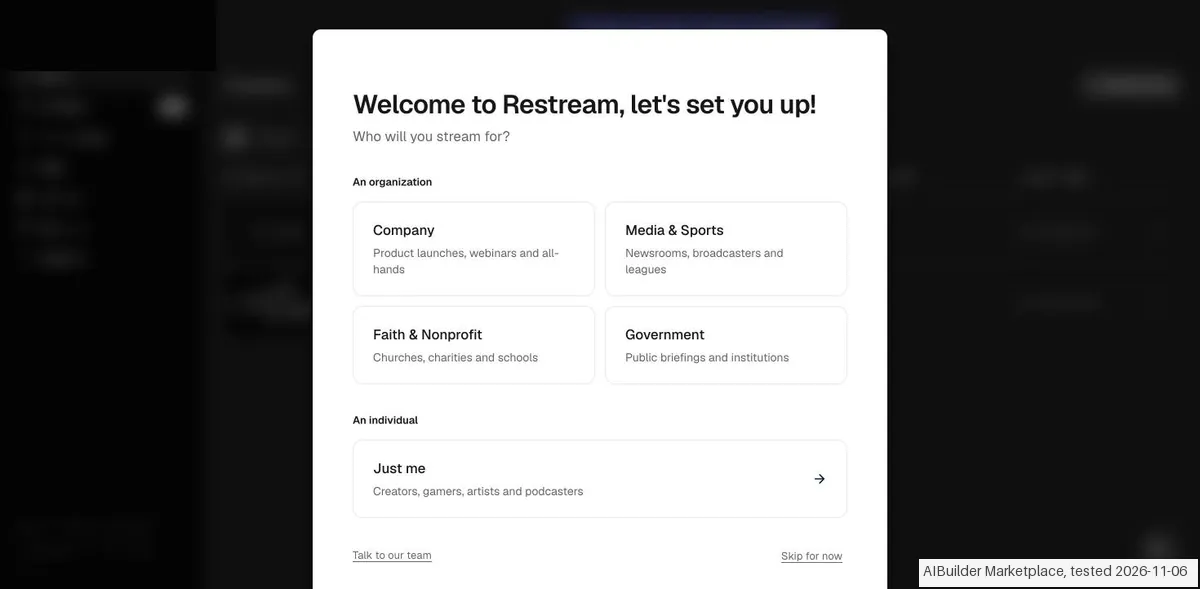
- Onboarding asks who will stream (an organization or just you). No card was requested. Two draft events, an RTMP stream and a Studio stream, already existed on the home page.
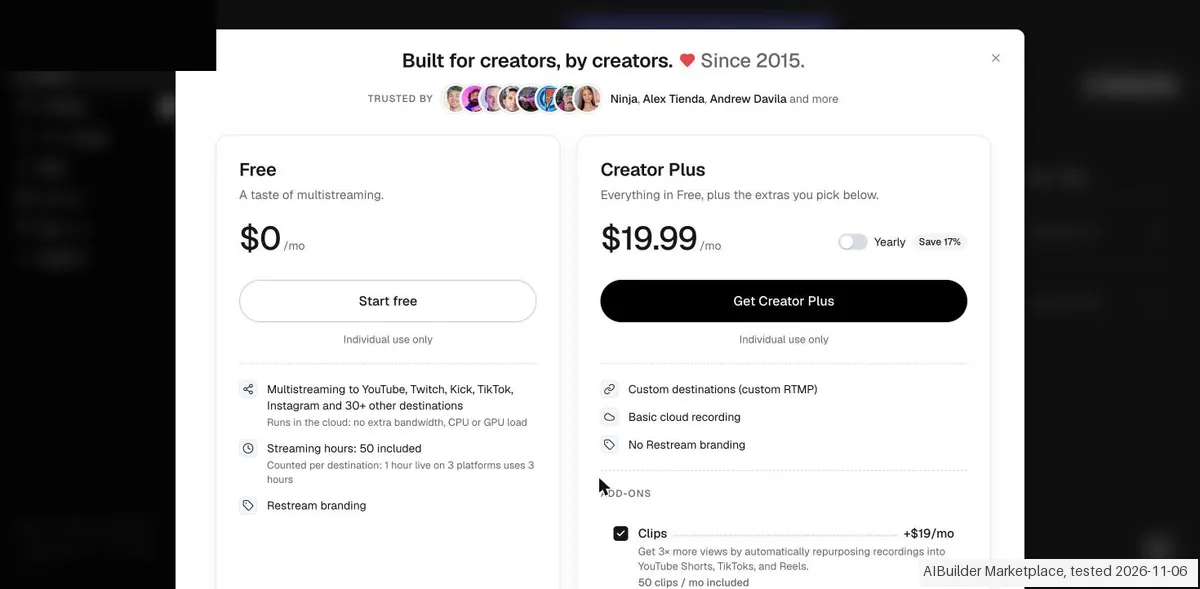
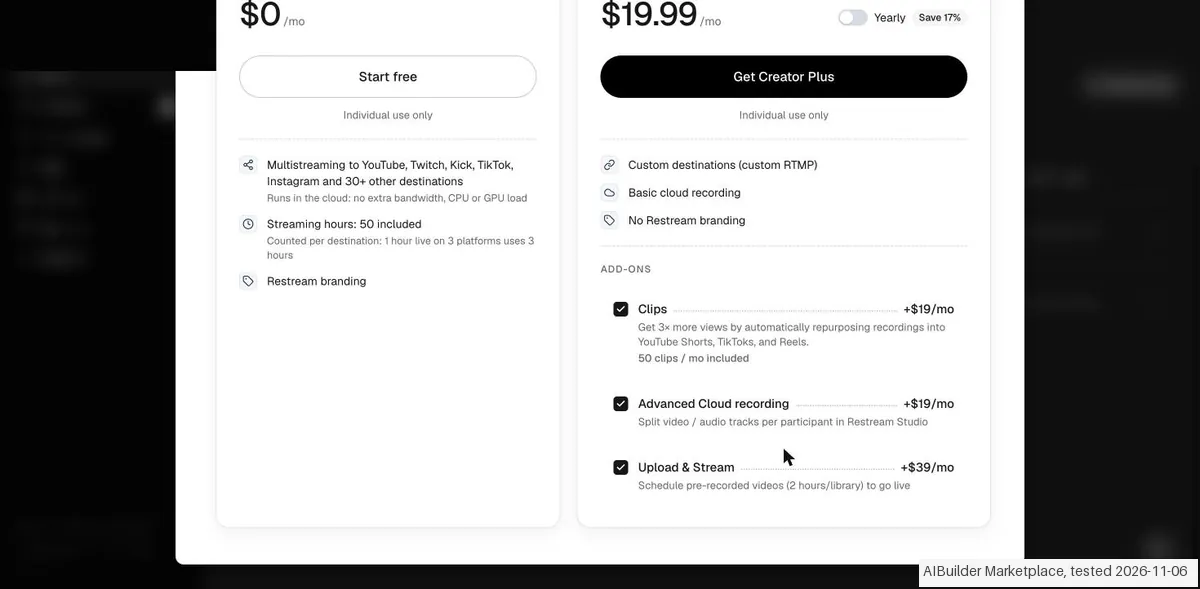
- Straight after onboarding a plan screen appears. Free is $0 with 50 streaming hours, counted per destination, so one hour on 3 platforms uses 3 hours. Creator Plus is $19.99 a month.
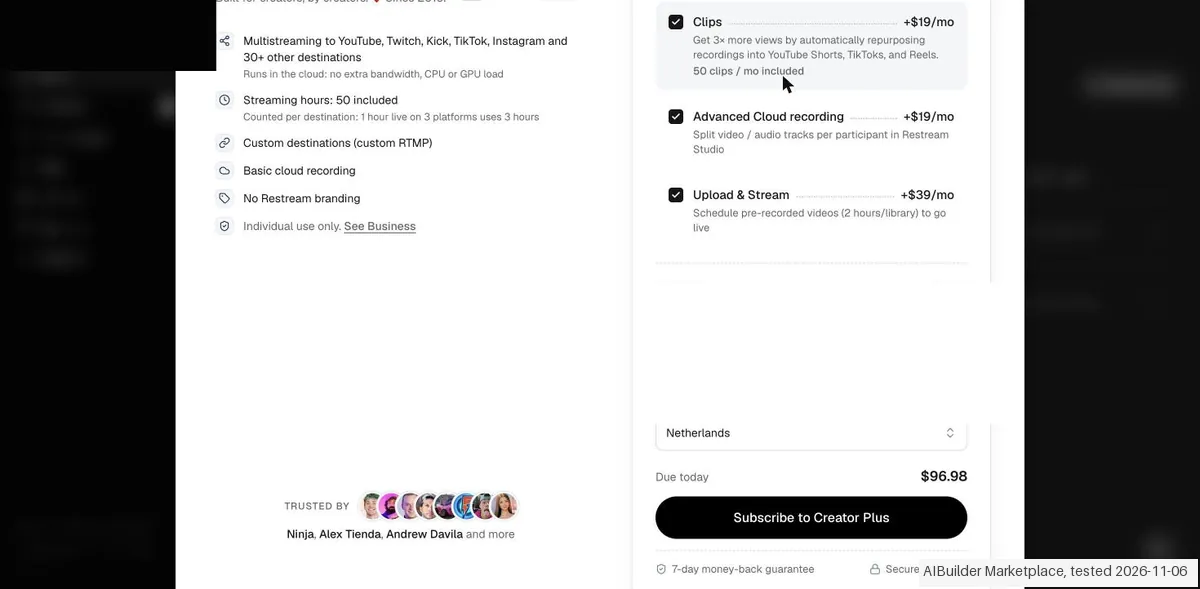
- On Creator Plus all three add-ons were ticked by default: Clips +$19, Advanced Cloud recording +$19 and Upload & Stream +$39. Checkout then showed 'Due today $96.98', nearly five times the $19.99 base price. A 7-day money-back guarantee is shown at checkout. No VAT line appeared.
Pricing (2026)
✓ Pricing re-verified 26 Sep 2026
Re-read on restream.io/pricing on 26 September 2026, with both the Creator/Business tabs and the Monthly/Annually toggle operated. Free: 2 channels with Restream branding, 1 seat. Standard $19 a month, billed as $190 a year (3 channels, 1 seat). Professional $49 a month, billed as $470 a year (5 channels, Full HD 1080p in Studio, 2 seats). Business $239 a month, billed as $2,390 a year (8 channels, website player to 1,000 viewers, 2 seats).
Enterprise is quoted. Annual therefore saves 16.7% on Standard and Business and 20.1% on Professional, not the flat 'Save 20%' the toggle advertises. Add-ons are monthly on top: Clips +$19/+$29/+$59 and Webinars +$99/+$99/+$299 across the three tiers, extra team seats $25 a seat on Professional and Business only, and extra workspaces $49 (Professional) or $239 (Business). Plans change, so check the live price on their site before you buy.
Category context: Growth & Revenue. Across the 85 tools in this category that we researched with a public US-dollar price, the median entry price is about $30 a month (lowest paid plan as listed, per seat where the vendor prices per seat). Restream’s entry price of $19 a month sits below that median. Compare pricing conditions in the Software Cost Atlas →
What the price did
We read Restream’s own pricing page on a schedule and keep every reading, so this is our record of the page. It is not a forecast, and not someone else’s summary. A change appears here only after we confirmed the new price on the page itself.
Our 17 August 2026 reading recorded Standard at about $16 a month on annual billing, Professional at $39 and Business at about $199. On 7 September 2026 the page's own annual figures -- $190, $470 and $2,390 a year -- work out to $15.83, $39.17 and $199.17 a month: the same ladder, unchanged across three weeks. The $25 seat price is unchanged too. What our earlier reading did not record is the monthly-billing column, where Business is $239.
What the pricing page doesn’t say
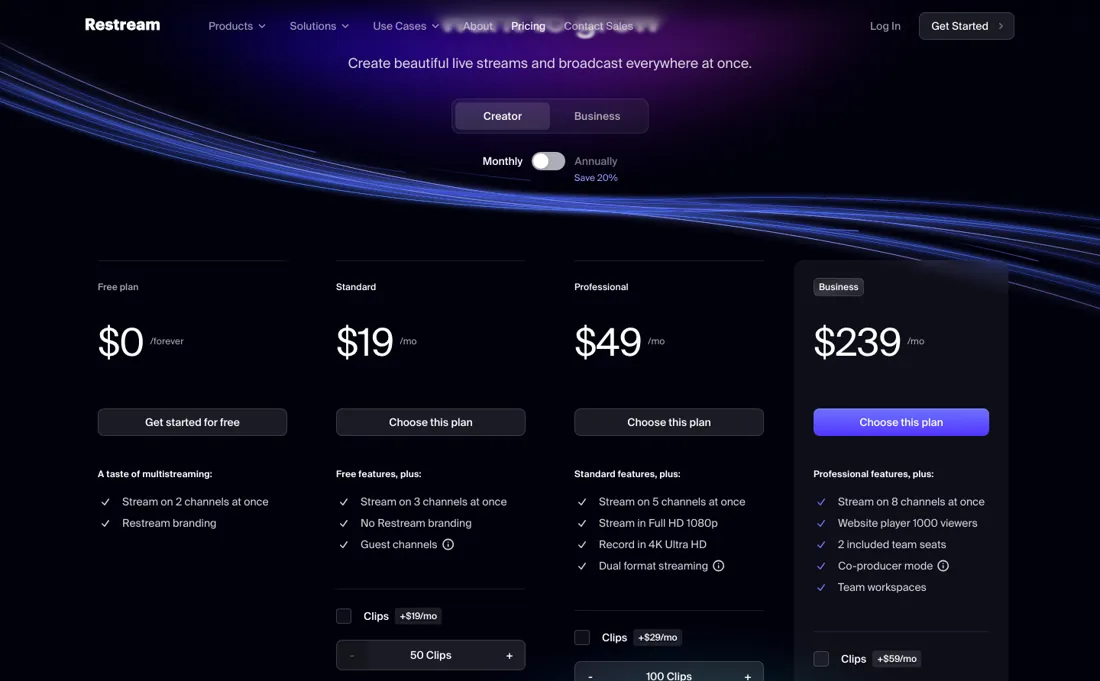
Seats are the second meter: Free and Standard include one and cannot buy another at all, while Professional and Business include two and sell extras at $25 a month. Price it at your real destination count and team size, not the sticker.
Watch the video review
The video version of this review, from our YouTube channel.
What Restream does
Multistreaming studio: broadcast one show to YouTube, LinkedIn, Facebook and Twitch at once from the browser, with guests and local recordings.
What buyers report about Restream
Hands-on: tested 2026-11-06Reported by buyers: GetApp, Capterra and Software Advice, read August 2026
Themes from the buyer-review sites listed at the foot of this page, read in August 2026. We tested Restream ourselves on 2026-11-06, but one test is a narrow sample, so here is what other buyers report. We summarise it here because the complaints are usually the part a vendor page leaves out.
- • Streaming to many destinations from one dashboard, with a usable free plan: that is the reason it exists and it works.
- • Standard on annual billing is cheap for multistreaming: reviewers reach for it as the step that removes the watermark without a real commitment.
- • Both the free plan and Standard cap at 720p. On a large screen that looks soft next to the 1080p everyone else is delivering.
- • The free plan's watermark is visible to your whole audience on every platform.
- • Facebook streaming and scheduling sit behind the paywall.
- • The step from Professional (~$49/month) to Business (~$239-299) is steep with nothing between. One reviewer reports being refused a partial refund after platform glitches, half a year in.
The per-channel price rises as you climb
Restream's ladder is sold on destination count, and destination count gets more expensive per unit the higher you go -- the reverse of how volume pricing usually works. Free covers 2 channels with Restream branding. Standard is $190 a year, $15.83 a month, for 3 channels, or $5.28 a channel. Professional is $470 a year, $39.17 a month, for 5 channels and Full HD, or $7.83 a channel. Business is $2,390 a year, $199.17 a month, for 8 channels: $24.90 a channel, 4.7 times Standard's rate (re-verified 26 September 2026 against restream.io/pricing).
Read it as marginal cost and the shape is clearer still. Going from Standard to Professional buys two more channels for $23.34, or $11.67 each. Going from Professional to Business buys three more for $160, or $53.33 each. Nobody pays $53 a channel for channels, which means Business is bought for something else -- the website player, the 1,000 concurrent viewers and stream disconnect protection are what its card actually adds.
Ask before you assume the jump is about destinations. Then the line that catches teams out, and it is worse than a price. Standard cannot add a seat at all: the comparison table prices extra seats at $25 a month each on Professional and Business, and leaves the Free and Standard cells empty. Free and Standard include one seat; Professional and Business include two. So your second person does not cost you $25 on Standard -- they cost you the move to Professional, $39.17 a month against $15.83, and the third person is the first one you pay $25 for.
If more than one person touches the stream, headcount picks your plan before channel count does. Annual billing saves 16.7% on Standard and Business and 20.1% on Professional, so the 'Save 20%' badge is a rounding of the best case. Price this at your real destination count and your real headcount, in that order, and the sticker will rarely be the answer.
Our monthly capture read this vendor's pricing page in September 2026 and again in October 2026, and the amounts were the same both times, including $59, $99, $239 and $299 from the pricing above. We keep watching, and the registry records what moves.
What we found running Restream ourselves
The first findings are at the top of this page. The rest:
- Storage accepted our 6-second MP4 (32 KB). The counter went to 1 of 3 uploads and available storage to 66%, so the limit counts files and not bytes.
- The file menu offers Schedule stream, Download, Trim video, Transcript (upgrade), Details, Rename and Delete. Create event offers a title, date with time zone, and a preticked option to create an event post in advance. Loop video needs an upgrade.
Claim vs. what we measured
We set a claim from Restream's own pages next to what we saw in our test, on the plan named. The status says whether the two describe the same thing and match; it is not a verdict on the product. Confirmations are listed too.
| What the vendor says | What we measured | Status | What it means if you buy |
|---|---|---|---|
| $19.99/moSource: app.restream.io, read 6 Nov 2026 | Measured 2026-11-06: All three add-ons were checked by default; checkout Due today $96.98 with those defaults.Our test, 6 Nov 2026; Free | ConfirmedRestream: Base plan compared with default bundled checkout; the displayed total is recorded without reverse-calculating its arithmetic. | Review each selected add-on before subscribing. |
| Due today $96.98Source: app.restream.io, read 6 Nov 2026 | Measured 2026-11-06: No payment submitted; no VAT line visible before payment data.Our test, 6 Nov 2026; Free | ConfirmedRestream: Immediate displayed checkout only, not an invoice or proof of an actual charge. | Tax treatment is unknown at the inspected point. |
| UPLOADS 1/3Source: app.restream.io, read 6 Nov 2026 | Measured 2026-11-06: Own small video occupied one of three upload slots; AVAILABLE STORAGE: 66%; expiry shown as 29 days.Our test, 6 Nov 2026; Free | ConfirmedRestream: One successful media upload; no general byte-cap calculation or durability test. | The inspected allowance counted the file slot despite its small size. |
| Create an event post in advance to invite your audienceSource: app.restream.io, read 6 Nov 2026 | Measured 2026-11-06: Checkbox was on by default; Loop video required Upgrade. Stopped before selecting channels.Our test, 6 Nov 2026; Free | ConfirmedRestream: Scheduling form defaults only; no published post or broadcast. | Review event-publicity setting before continuing. |
| TranscriptSource: app.restream.io, read 6 Nov 2026 | Measured 2026-11-06: Item menu labelled Transcript Upgrade; Download offered without a download attempt.Our test, 6 Nov 2026; Free | ConfirmedRestream: Menu availability only; no transcript output or returned media bytes. | Transcript entitlement differs from the visible download action. |
| Due today $96.98Source: app.restream.io, read 6 Nov 2026 | Measured 2026-11-06: Creator Plus base $19.99/mo. Clips +$19/mo, Advanced Cloud recording +$19/mo and Upload & Stream +$39/mo were all preselected. Checkout Due today $96.98; monthly default; Netherlands; no visible VAT line. Saved Link payment details appeared but were not touched.Our test, 6 Nov 2026; Free | ConfirmedRestream: Creator Plus base $19.99/mo. Clips +$19/mo, Advanced Cloud recording +$19/mo and Upload & Stream +$39/mo were all preselected. Checkout Due today $96.98; monthly default; Netherlands; no visible VAT line. Saved Link payment details appeared but were not touched. Cost-rule limitation: no verified same-plan/term/currency/seat/tax rule; historical anchor not comparable. | Only the recorded offer/checkout scope is established; no completed purchase. |
Exit test: can you take your data out?
Own six-second MP4 uploaded successfully per notes. UPLOADS changed from 0/3 to 1/3, storage from 100% to 66%; item showed Expires: 29 days. Schedule Video inspected; stopped before channel selection, no event saved or live stream. Test date: 6 Nov 2026. We describe the friction rather than score it; this is one run with synthetic records, not a verdict on Restream.
| What we checked | What we saw |
|---|---|
| Fields offered by the export dialog | |
| Not offered in the field selector | None noted. |
| The exported file | We did not inspect the file, so data retention and loss remain unverified. |
| Awkward but not lost | Add-ons were preticked in the plan screen and checkout, so the default basket cost $96.98 against a $19.99 base price. |
| Export route | Download offered in item menu; not used. Transcript and Loop video labelled Upgrade. No return file, reimport or live-stream test. |
| Export format | No downloaded product file. |
| Re-importing the export | No native-ID reimport. |
| Cancelling | Cancellation/downgrade not tested. |
What the exit test does not show:
- Support, invitations, cancellation and passive follow-up.
- Downloaded product exports and native-ID roundtrip.
- Full original signup screen count.
Kit check counts
Kit content-media 1.0.0; run restream-2026-11-06; observed 2026-11-06.
- export / AIBM-001: Of 10 checks: 0 kept, 0 changed, 0 lost, 0 not offered, 10 not tested
- export / AIBM-002: Of 10 checks: 0 kept, 0 changed, 0 lost, 0 not offered, 10 not tested
- reimport / AIBM-001: Of 10 checks: 0 kept, 0 changed, 0 lost, 0 not offered, 10 not tested
- reimport / AIBM-002: Of 10 checks: 0 kept, 0 changed, 0 lost, 0 not offered, 10 not tested
Each record and phase uses this kit’s checks. Counts describe this run; they are not a score or a comparison between kits.
Mail in the first 14 days
Measurement running until 2026-11-19T23:00:00Z (last observed 2026-11-10T02:18:01.899175Z).
1 emails in the 14-day window so far; first email after signup: unknown (exact signup time not recorded); 0 with an explicit offer.
Retained inbox and junk only; removed or archived mail is outside this observation. Ambiguous supplier attribution is excluded. Day numbers use elapsed 24-hour periods since the recorded signup date at midnight Europe/Amsterdam; the signup hour is unknown. Offer flags quote literal subject/body text. Replies in our own correspondence (support tickets, our comment requests) are excluded; one-time codes, our own address, our account name and our name are replaced in brackets.
| Day | Time (UTC) | Sender | Literal subject | Folder | Offer evidence |
|---|---|---|---|---|---|
| Day 0 | 2026-11-06 08:26:58 UTC | Restream team / mail.restream.io | Please confirm your email | inbox |
Screenshots from our test (click to enlarge)
What this test does not show:
- Going live: no channel was connected and the event was not saved
- Downloading the upload again
- Support, roles and invitations (free plan is individual use only), downgrade and cancellation
- The final price including VAT
Most of our reviews are researched rather than run. How we review explains which is which, and why we do not pretend otherwise.
How to actually use Restream
Count destinations and people separately, because both are metered and the seat is the one that catches teams out. Standard includes one seat and the comparison table offers no way to add another -- extra seats are priced at $25 a month on Professional and Business, and the Free and Standard cells are empty. So the price of your second person is not $25, it is the jump to Professional; settle that before you pick a tier on channel count.
Then test the thing that actually breaks, which is your upload. Multistreaming takes one feed and pushes it to several platforms, so your bandwidth and encoder settings decide the quality on all of them at once. Run a full-length test stream to your real destinations, at your real bitrate, from the venue you will broadcast from -- not a two-minute check from your desk. Use the free plan for that rehearsal, but know its limits: two channels and Restream branding on the output.
Fine for a test, wrong for a launch. And check where Full HD begins, because in Restream Studio it arrives at Professional. If you broadcast from Studio and your audience expects 1080p, Standard is a different output quality and no add-on fixes it; the pricing FAQ adds that from your own encoder software there is no such restriction, though some platforms may not accept Full HD.
Where this section comes from: our research notes (268 words)
restream.io/pricing read in a browser on 7 September 2026 with the page's own controls operated: the Creator and Business tabs, and the Monthly/Annually toggle, which does not change the headline per-month figure but adds the 'Billed as $190 / $470 / $2,390 per year' line that the annual arithmetic comes from -- read only one state and you get the ladder wrong. The Compare plans table underneath was read row by row across its five columns (Free, Standard, Professional, Business, Enterprise): included team seats 1/1/2/2, additional seats at $25 a month on Professional and Business with the Free and Standard cells empty, workspaces at $49 and $239, Studio video quality 720p up to Standard and 1080p from Professional, and channel counts 2/3/5/8.
The Clips and Webinars add-on prices come from the plan cards themselves. Re-read 26 September 2026 in the browser pane with the Annually toggle operated: $19/$49/$239 a month, billed as $190/$470/$2,390 a year, the Clips and Webinars add-ons, $25 seats and $49/$239 workspaces unchanged. The Compare plans table also gives cloud recordings from Standard up (the Free cell is empty) at 6 hours per stream and 15 days' storage on Standard, 10 hours and 15 days on Professional and 10 hours and 30 days on Business; Custom RTMP channels from Standard up; 6 on-screen participants on Free and 10 above.
The FAQ answer on Full HD (1080p in Restream Studio from Professional, no restriction from custom software) is the source of the getting-started correction. restream.io/llms.txt lists the same monthly plans; restream.io/pricing.md returns 404. https://restream.io/pricing/ was re-read 2 November 2026 for the Guest channels question (Standard card).
The natural comparison is StreamYard or OBS Studio: StreamYard wins on beginner-friendly guest shows, OBS on free pro-grade control; Restream wins on multistream breadth and scheduling.
Frequently asked questions
Can you export your data from Restream?
Exit check 2026-11-06; route excerpt: Download offered in item menu …; came along (excerpts): not_tested; lost (excerpts): not_tested; re-import: not tested.
Can I stream in 1080p on the Standard plan?
Not from Restream Studio. The comparison table (read 26 September 2026) gives Free and Standard 720p HD and Professional, Business and Enterprise 1080p Full HD, and the FAQ says 1080p through Studio needs Professional. The same FAQ adds that if you stream from your own encoder software there is no such restriction, though some platforms may not support Full HD. So if you broadcast from OBS or similar, Standard at $19 a month does not cap your resolution; if you broadcast from Studio, it does.
Does Restream record my streams on the free plan?
No. In the comparison table (read 26 September 2026) the cloud-recordings row is ticked from Standard upward and the Free cell is empty. Standard records up to 6 hours per stream and keeps recordings for 15 days; Professional records 10 hours per stream for 15 days; Business 10 hours for 30 days. Download anything you want to keep before that window closes, because storage length is the one recording limit that does not grow until Business.
Can I stream to a platform that isn't on Restream's list?
Yes, from Standard up. The comparison table (read 26 September 2026) ticks Custom RTMP channels on Standard, Professional, Business and Enterprise and leaves Free empty, and the FAQ describes it as streaming to any platform that provides an RTMP URL and a stream key, naming Wowza and GoTo Webinar as examples. Each custom destination still counts against your channel limit: 3 on Standard, 5 on Professional, 8 on Business.
Can guests add their own channels to my Restream event?
From Standard up, per the pricing page. The Standard card (re-read 2 November 2026) lists Guest channels, 'letting your guests securely add their own channels to your event', on top of the Free features; Free does not have it. That is more than guests joining your studio: their own audiences receive the stream too. The card does not say whether guest channels count against Standard's 3 simultaneous channels; not confirmed.
Is this a hands-on review of Restream?
Yes. We tested Restream ourselves on 2026-11-06; the section above says what we tested, what we found and what we did not test, and where a figure comes from the vendor's own documentation instead. Most of our reviews are researched rather than run; we say which is which. We name what each tool is good and bad at, and we earn a commission only if you sign up, at no cost to you.
- Buyer reviews on GetApp, Capterra and Software Advice, read August 2026.
- Restream’s own published pricing page.
- A dated screenshot of that pricing page, kept on this site as the receipt.
- Our own hands-on session with Restream (2026-11-06), written up in full further down this page.
Others in this category
Reviewed growth & revenue tools that share ground with Restream. They are comparable in what they do, not drop-in swaps:
New reviews, price changes we recorded, and the cost conditions we found. No sponsored placements. Unsubscribe anytime.
This is our researched assessment, not a paid placement. The “Visit” links on this page are affiliate links: we may earn a commission if you sign up, at no extra cost to you, and it never changes our take. How we review →