Birch Review (2026)$49/mo to a $10k Ad-Spend Ceiling
 By Daan Haket · Researched and written with an AI assistant · who does what
The honest catch is that pricing tracks your ad spend, so a scaling advertiser's bill rises with their budget: Pro alone ladders from $99 to $1,799 a month between a $10,000 and a $500,000 ceiling, and past $500,000 only Enterprise is left.
performance marketers and agencies running real ad budgets who want rule-based automation, scaling and creative insights across Meta, Google, TikTok and Snapchat.
you run small, simple campaigns a native ads manager handles fine, or you're not comfortable defining automation rules (bad rules scale bad decisions).
Transparency: the “Visit” links on this page are affiliate links — we may earn a commission if you sign up, at no extra cost to you. No vendor can pay for a better review or verdict. How we make money →
Pricing (2026)
✓ Pricing re-verified 13 Oct 2026
(2026, formerly Revealbot) Essential is $49/mo and Pro $99/mo up to $10K of monthly ad spend, and the price then tracks total spend across all connected accounts. Essential steps to $149 at $30K, $299 at $75K and $499 at $150K, where the tier stops; Pro steps to $249, $499, $799, $1,299 and $1,799 against $30K, $75K, $150K, $300K and $500K. Above $500K only Enterprise remains, priced on request with no spend limit.
The tier cards read 'No overages apply', but Birch's current help article on additional charges (updated 13 October 2026, and the target of the cards' own 'Overages' link) says monthly Essential and Pro plans pay a percentage of any overspend on the next bill: 0.99% at the $99 Pro tier falling to 0.36% at $1,799, and 0.49% falling to 0.33% across Essential.
Yearly plans pay no overage, but once spend passes the limit you cannot edit or create rules and reports until the next month starts. 14-day free trial, no card required. Annual billing is charged as eleven months ($540 Essential, $1,090 Pro at the $10K tier, read 13 October 2026), which the FAQ now states as '12 months for the price of 11'; the toggle's '-20%' label overstates that, since $540 against twelve months of $49 ($588) is about 8% off. Plans change — always verify the live price on their site.
Category context: Growth & Revenue. Across the 84 tools in this category that we researched with a public US-dollar price, the median entry price is about $30 a month (lowest paid plan as listed, per seat where the vendor prices per seat). Birch’s entry price of $49 a month sits above that median. Compare pricing conditions in the Software Cost Atlas →
What the pricing page doesn’t say
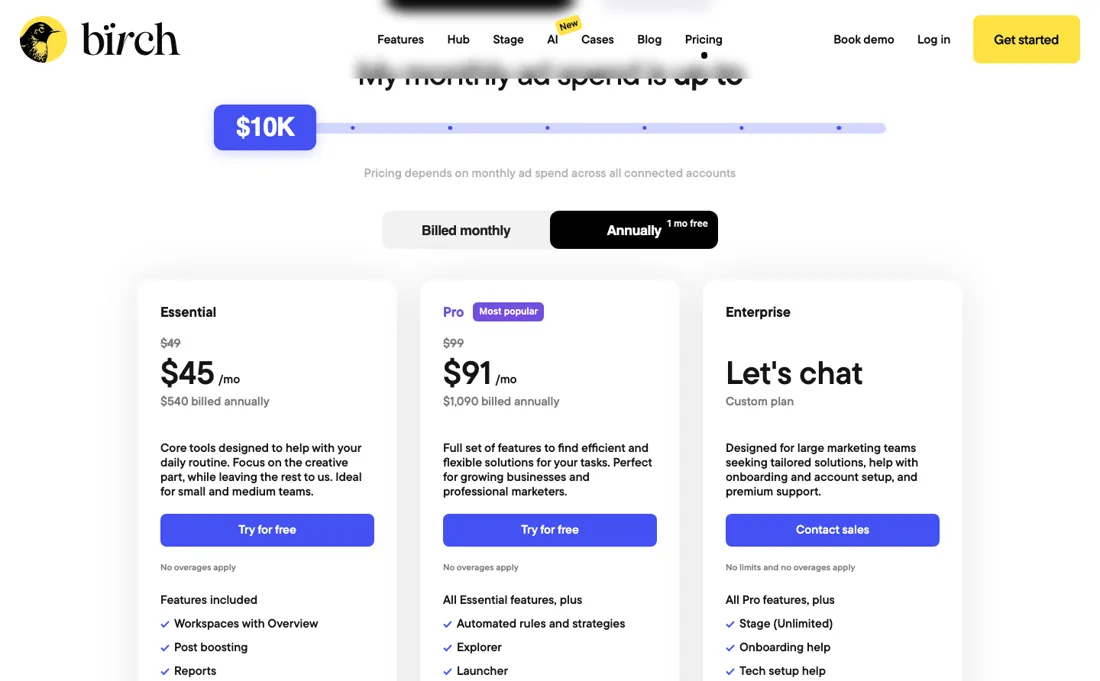
Check the annual arithmetic yourself: the toggle advertises ‘-20%’, but the page charges eleven months — $540 for Essential and $1,090 for Pro at the entry tier, about 8% off. It's also a power tool: rule-based automation across Meta, Google, TikTok and Snapchat rewards advertisers who know what to automate, and can amplify mistakes if your rules are wrong. For hands-on performance marketers, it's a serious time-saver.
Watch the video review
The video version of this review, from our YouTube channel.
⚡ Short on time? Watch the 30-second verdict Short.
What Birch does
Ad automation for performance marketers (formerly Revealbot): rule-based optimization, automated scaling and creative insights across Meta, Google, TikTok and Snapchat — run and optimize ad campaigns on autopilot.
What buyers report about Birch
Hands-on: not tested by usReported by buyers: G2, Capterra and Software Advice, read August 2026
Themes from the buyer-review sites listed at the foot of this page, read in August 2026. We have not run Birch ourselves, so this is other buyers' experience rather than ours. We summarise it here because the complaints are usually the part a vendor page leaves out.
- • Automation rules genuinely stop budget running away, and reviewers say the creative upload plus reporting in one place saves the most time.
- • Every plan includes unlimited team members, API access and Slack reports.
- • Price was the main complaint when we read reviewers in August 2026 — they cited $69/month up to $10K ad spend, rising to $299 at $500K — and said it gets steep fast at real spend; one calls the structure anti-agency. Birch's tier prices have changed since; see the pricing section for the current ladder.
- • The interface is not friendly for anyone newer to paid media, and reviewers describe it as time-consuming to learn.
- • You are buying rules-based automation on top of Meta — if you would not write those rules yourself, the tool will not write them for you.
When the paid plan is worth it
Birch's real split is not free versus paid but reporting versus automation. Essential starts at $49 per month at up to $10,000 monthly ad spend and gives you Workspaces, Post boosting, Reports, the Activity page and Slack alerts; automated rules and strategies, Explorer, Launcher, Stage, top audiences and custom metrics all sit on Pro, which starts at $99 per month. If rule-based optimisation is why you are looking at Birch, Essential is not a cheaper version of the product.
Price then tracks spend: Pro runs $99, $249, $499, $799, $1,299 and $1,799 against limits of $10,000, $30,000, $75,000, $150,000, $300,000 and $500,000. Essential stops at $499 and a $150,000 limit, so crossing into the $300,000 band means Pro at $1,299 — an $800 step that buys headroom, not features. What no upgrade fixes is measurement: Hub's server-side tracking is billed separately by event volume on top of any plan, free to 10,000 events a month and $499 at 150 million, and Stage stays on its free version until Enterprise.
The tier cards read ‘No overages apply’, yet Birch's current help article (13 October 2026) bills monthly plans 0.36% to 0.99% of any overspend and freezes rule editing on yearly plans once you pass the limit, so pin down which regime your contract is on before you sign.
Our monthly capture read this vendor's pricing page every month from July 2026 to October 2026, and the amounts were the same all 4 times, including $99, $149, $249 and $499 from the pricing above. We keep watching — the registry records what moves.
How to actually use Birch
You sign up with an email, no card required, and get a 14-day trial; then, under Settings and Platforms, you authorise Meta, Google, TikTok or Snapchat and assign each ad account to a Workspace, since only assigned accounts count as connected and are billed. Birch's own course runs to 17 videos across four chapters, with setup a single lesson in the Getting started chapter, and its help center's Getting started collection runs to 32 articles.
Where this section comes from: our research notes (163 words)
Vendor pricing page https://bir.ch/pricing (read 2026-09-11 in a live browser; the ad-spend slider was stepped through all seven positions to read the Essential and Pro ladders, and the Hub tab for the event-volume prices); the overages help article linked from that page, https://help.bir.ch/en/articles/6083528-about-additional-charges, which 301-redirects to https://help.bir.ch/en/articles/6083528-about-additional-charges-legacy-plans (read 2026-09-11) and states the charge ‘applies only to monthly plans’ with a worked example on a $199 tier that no longer appears on the pricing page; the pricing-page FAQ on the trial, annual billing and cancellation (read 2026-09-11).
Setup details come from Birch's own help center and the transcript of its course, read 2026-08-02. Re-read on 13 October 2026: the pricing page in a live browser (tier cards still 'No overages apply', annual $540/$1,090, FAQ now '12 months for the price of 11', toggle '-20%') and the help-centre articles https://help.bir.ch/en/articles/1636695-how-does-our-billing-work, https://help.bir.ch/en/articles/6061901-about-additional-charges (current overage percentages by tier), https://help.bir.ch/en/articles/4486257-inviting-users-and-managing-permissions and https://help.bir.ch/en/articles/17456979-faqs-birch-eur-and-usd-billing. Buyer opinions on this page come from G2, Capterra and Software Advice, read in August 2026.
Common Birch setup mistakes
Where Birch setups actually go wrong, and what it costs you when they do. Same sources as the setup notes above — not from a walkthrough we ran ourselves.
The friction is on the platform side.
- Birch lists only Meta assets where you are an admin of both the Business Manager and the ad account.
- Their troubleshooting article blames missing accounts on permissions, on delays after admin rights are granted, and on Meta glitches — re-authorising or toggling admin rights off and on is the fix.
- A Workspace takes unlimited ad accounts, but each ad account can sit in only one Workspace.
- Unlinking is destructive: rules become drafts, and reports, custom metrics and launch templates are deleted permanently.
- Server-side tracking needs a CNAME to signals.birch.events, with propagation up to 48 hours.
The natural comparison is Madgicx or the native ad managers — comparable ad-automation platforms — Birch's edge is granular rule automation; compare on spend-based pricing at your budget.
Frequently asked questions
Does my bill count ad spend that Birch rules did not touch?
Yes. Birch's 'How does our billing work?' article (updated 13 October 2026) says billing counts spend across every ad account connected through a Workspace for the period it was connected, not spend generated by rules. Unlinking an account stops its spend counting, but turns its rules into drafts and deletes its Launcher templates and reports. Spend also keeps counting after you cancel, until the paid period ends, unless you unlink.
What happens on a yearly plan if my ad spend passes the tier limit?
Per Birch's 'About additional charges' article (updated 13 October 2026), yearly plans keep the same monthly spend limit and charge no overage; your rules, post-boosting rules and reports keep running, but you cannot edit them or create new ones until the next month starts, or until you upgrade. Monthly plans instead keep full access and add 0.36% to 0.99% of the overspend to the next bill, and upgrading does not cancel overages already built up.
Who on my team can see billing and what does a restricted user still see?
Birch's 'Inviting users and managing permissions' article (read 13 October 2026) lists Admins (owner-level access), Users (all features on the Workspaces they are assigned to, but no integrations, team or billing settings) and Clients (email notifications only). One caveat: the Activity page shows all rule activity regardless of which ad accounts a User may access. Whether extra users cost money is not stated in that article; not confirmed.
Is this a hands-on review of Birch?
This is a researched assessment, not a hands-on test — where we've used a tool ourselves, we say so explicitly. We name what each tool is good and bad at, and we earn a commission only if you sign up, at no cost to you.
- Buyer reviews on G2, Capterra and Software Advice, read August 2026.
- Price re-verified 2026-10-13 against the vendor's own pricing page.
- A dated screenshot of that pricing page, kept on this site as the receipt.
Others in this category
Reviewed growth & revenue tools that share ground with Birch — comparable in what they do, not drop-in swaps:
New reviews, price changes we recorded, and the cost conditions we found. No sponsored placements. Unsubscribe anytime.
This is our researched assessment — not a paid placement. The “Visit” links on this page are affiliate links: we may earn a commission if you sign up, at no extra cost to you, and it never changes our take. How we review →