Nextify.ai Review (2026)3,000 Credits Is 62 Clips
 By Daan Haket · Tested hands-on · written with an AI assistant · who does what
The plans are sold in videos and images; the meter runs in credits per second, and the two do not reconcile.
advertisers who need a steady stream of short product clips and will deliberately choose the cheap model for drafts, and teams who would rather have video, avatars, lip-sync and product imagery drawing on one credit pool than pay for four separate subscriptions.
you are budgeting from the “up to N videos” figures on the pricing page, you need talking-head or avatar video at any volume — that route is 6.7 credits a second, so Pro buys seven sixty-second ads a month — or you expected the free tier to work as a trial: it is 50 watermarked credits and it cannot reach the Seedance models at all.
Transparency: the “Visit” links on this page are affiliate links — we may earn a commission if you sign up, at no extra cost to you. No vendor can pay for a better review or verdict. How we make money →
We did not summarise the marketing. Nextify.ai gave us Pro access for this test — disclosed here and in the video that goes with this review — and nothing else was agreed: no copy approval, and no draft shared before publication. On 7 September 2026 we generated a real ad from a product image inside that account, read the credit cost the app charges for every model it offers, and checked the pricing page both signed in and signed out. Everything below is what the product did and charged, not what the site says it does.
- Credits are charged per second of output, not per video. A four-second 720p clip on Seedance 2.0 — the model the editor pre-selects — cost 48 credits and took the balance from 3,000 to 2,952. The app's own credit table prices that combination at 12 a second, and the Generate button reads 48 before you commit, so the arithmetic is visible if you know to look for it.
- Every tier's video count assumes 20 credits a video. Starter's 1,000 credits are sold as 50 videos, Pro's 3,000 as 150 and Business's 8,000 as 400 — all exactly 20 apiece, which is four seconds on the cheapest 5-credit-a-second model. On the model the editor actually opens with, Pro is 62 clips; at the 15-second maximum it is 16.
- No image model costs what the image counts assume. Those counts work out at 2 credits an image on every tier, including the free one. The cheapest image model in the table is Nano Banana 2 at 1k for 7 credits, and the pre-selected GPT Image 2 is 10 — the button literally reads “Generate Image 10”. Starter's “up to 500 images” is about 100.
Pricing (2026)
✓ Pricing re-verified 17 Oct 2026
| Plan | Price | What you get |
|---|---|---|
| Free | $0 | 50 credits a month, 1 user, watermarked, basic models only; sold as up to 2 videos and 25 images. Not shown on the pricing page once you are signed in, and locked out of all three Seedance models. |
| Starter | $29/month, or $21/month billed $244 USD annually | 1,000 credits a month, 1 user, no watermark, all models; sold as up to 50 videos and 500 images |
| Pro | $79/month, or $52/month billed $617 USD annually | 3,000 credits a month, 1 user, no watermark, all models; sold as up to 150 videos and 1,500 images |
| Business | $189/month, or $114/month billed $1,361 USD annually | 8,000 credits a month, 2 users, no watermark, all models; sold as up to 400 videos and 4,000 images |
| Pay-as-you-go | $50 one-off | 1,250 credits that never expire and do not auto-renew, non-refundable — $0.04 a credit against $0.017 on annual Pro |
Five ways to pay, and the free plan is only visible when you are logged out — the signed-in pricing page starts at Starter. Free is $0 for 50 credits a month, watermarked, on the basic models only, and the page sells that as up to 2 videos and 25 images. Billed monthly the paid tiers are Starter $29, Pro $79 and Business $189.
Billed annually the same tiers are $21, $52 and $114 a month, charged $244, $617 and $1,361 a year — the 30%, 35% and 40% badges check out at 28%, 34% and 40% against the monthly rate. Credit allowances are 1,000, 3,000 and 8,000 a month; Business is the only tier with a second seat. A one-off pack of 1,250 credits is $50, never expires and does not auto-renew, which works out at $0.04 a credit against $0.017 on annual Pro — so topping up costs more than twice what the subscription does.
Subscription credits do not roll over between cycles. Refunds are limited to three days from a first subscription, and add-on packs are non-refundable. Plans change — always verify the live price on their site.
Category context: Marketing. Across the 29 tools in this category that we researched with a public US-dollar price, the median entry price is $29 a month (lowest paid plan as listed, per seat where the vendor prices per seat). Nextify.ai’s entry price of $29 a month sits roughly at that median. Compare pricing conditions in the Software Cost Atlas →
What the pricing page doesn’t say
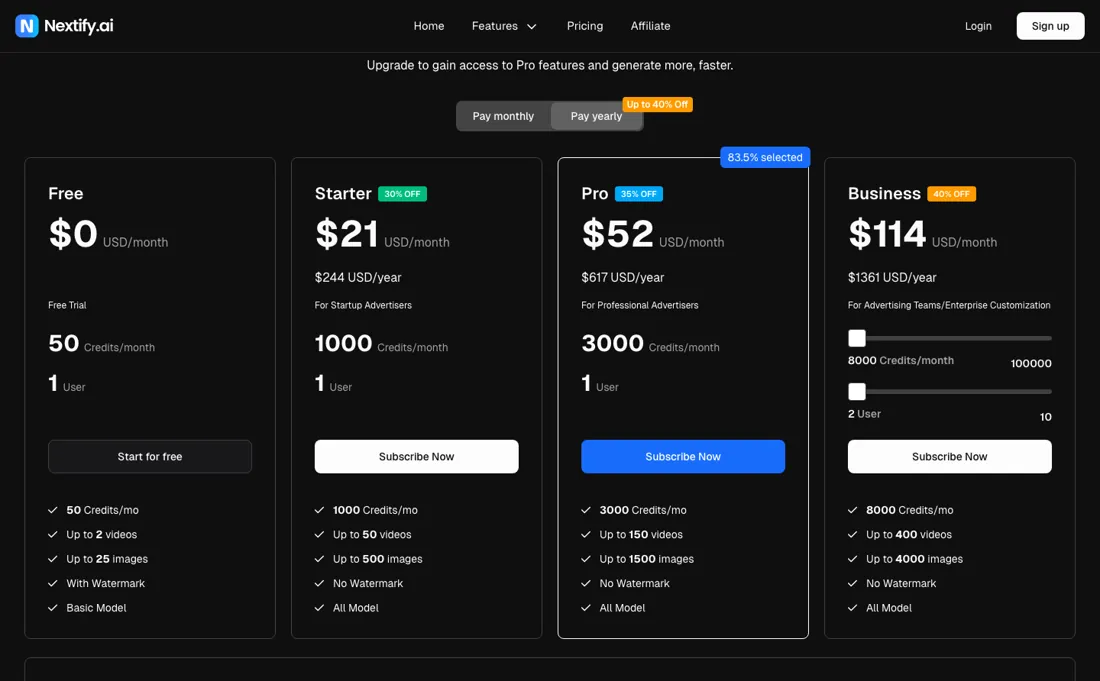
Every tier's headline count works out at 20 credits a video and 2 credits an image — 1,000 credits become “up to 50 videos” and “up to 500 images”, 3,000 become 150 and 1,500, 8,000 become 400 and 4,000. The app's own credit table prices video per second of output: Seedance 2.0, the model the editor pre-selects, is 12 credits a second at 720p, so the default four-second clip costs 48.
We generated one and watched the balance fall from 3,000 to 2,952. That makes Pro 62 clips a month rather than 150, and 16 if you use the 15-second maximum. The 20-credit figure is reachable, but only on the 5-credit-a-second model at four seconds. The image claim has no such escape hatch: the cheapest image model in the table is 7 credits and the pre-selected one is 10, so nothing in the product costs the 2 credits those counts assume, and Starter's 500 images is nearer 100.
Watch the video review
The video version of this review, from our YouTube channel.
What Nextify.ai does
AI ad-video generator for advertisers and e-commerce sellers: turn a product image, a script or a brief into a vertical or landscape video ad, with avatar presenters, lip-sync, product image sets and image cloning in the same workspace. Eight tools in one credit pool — Create Video Ad, Viral Video, Video Cloning, UGC Product Video, Lip-sync, Image Generator, Listing Images and Image Cloning — running on Seedance, Kling, MiniMax, HeyGen, GPT Image and Nano Banana models you pick per generation. Metered in credits per second of output rather than per finished video, with the cost shown on the generate button before you commit.
When the paid plan is worth it
The sticker buys a credit allowance shared across eight tools, and the allowance is spent per second of output rather than per finished asset — so what the money is worth depends almost entirely on which model you point it at. Free is $0 for 50 credits a month, watermarked and restricted to the basic models. That restriction matters more than the credit count: the app's model configuration marks all three Seedance video models as unavailable to free users, so the free tier runs on Kling or MiniMax.
At MiniMax's 8 credits a second and a three-second minimum, 50 credits is two short clips. Treat it as a sample of the interface, not of the product people actually buy. Starter is $29 a month, or $21 billed annually at $244 a year, for 1,000 credits. Pro is $79 or $52 ($617 a year) for 3,000. Business is $189 or $114 ($1,361 a year) for 8,000 credits and a second seat.
Annual billing is the real saving — 28% to 40% depending on the tier — and it is what makes the per-second rates bearable. Convert the allowance before you choose a tier. On annual Pro a credit is $0.017; on monthly Pro it is $0.026; bought as a top-up pack it is $0.04. A four-second clip on the pre-selected Seedance 2.0 at 720p costs 48 credits, so $0.82, $1.26 or $1.92 depending on how you bought the credit.
The same four seconds at 1080p is 22 credits a second, so 88 credits. A sixty-second avatar ad on the HeyGen route is 402 credits — $6.89 on annual Pro, $16.08 if you are topping up. Two structural details decide whether a tier fits. Credits do not roll over, so a plan sized for a busy month is simply wasted in a quiet one. And topping up costs more than twice per credit what the subscription does, which pushes irregular buyers towards the next tier up rather than towards the pack.
The refund window is three days from a first subscription; add-on packs are non-refundable, though they never expire.
Our monthly capture read this vendor's pricing page in September 2026 and again in October 2026, and the amounts were the same both times, including $52, $114, $244 and $617 from the pricing above. We keep watching — the registry records what moves.
What we found running Nextify.ai ourselves
The first findings are at the top of this page. The rest:
- The avatar tools are the expensive ones, and they are the reason most people arrive. UGC Product Video and Lip-sync run on HeyGen AV4 at 6.7 credits a second, identical at 720p and 1080p, over 3 to 120 seconds. A 30-second avatar ad is 201 credits and a 60-second one is 402, so a Pro month is fourteen or seven of them.
- Free users cannot reach the Seedance models at all. The model configuration marks seedance-2.0, seedance-2.0-fast and seedance-2.0-mini as unavailable on the free plan, so the 50 free credits run on Kling or MiniMax with a watermark — about two three-second clips.
- “In seconds” is not what happens, but “three minutes” is fair. Our four-second clip took 126 seconds from submit to finished file, against the app's own on-screen estimate of four minutes. The homepage claim “Product Image to Viral Ad in 3 Minutes” holds up; the “in seconds” line on the same page does not.
- The output was accurate to the prompt. We asked for a stainless steel insulated bottle on a kitchen counter in morning light, a hand picking it up, clean styling and no text overlay, and that is what came back — 9:16, 720p, four seconds, with generated audio. Nothing in the result argued against the tool; the argument is with the pricing page.
- The pricing page hides the free plan once you sign in. Signed out, Free sits at the head of the ladder; signed in, the same URL starts at Starter.
Most of our reviews are researched rather than run — how we review explains which is which, and why we do not pretend otherwise.
How to actually use Nextify.ai
Work out your credits per second before you look at the tiers, because the plan counts will mislead you. Open any of the video tools, set the model, resolution and duration you actually intend to use, and read the number on the Generate button — that is the true price and it appears before you commit. The editor opens on Seedance 2.0 at 720p and four seconds, which is 48 credits.
The same four seconds is 20 credits on Seedance 2.0 Mini, 40 on Seedance 2.0 Fast or Kling v3, 32 on MiniMax H3, and 88 at 1080p on Seedance 2.0. Pick the model per shot rather than per project. Mini at 5 credits a second is a quarter the price of Seedance 2.0 at 12, and it is the only way the advertised video counts are reachable at all. Use it for variations and drafts, and spend the expensive model on the one cut you will actually run.
Budget the avatar tools separately. UGC Product Video and Lip-sync run on HeyGen AV4 at 6.7 credits a second, the same price at 720p and 1080p, over durations from 3 to 120 seconds. If avatars are why you are here, size the plan on those seconds and ignore the video count entirely: Pro is fourteen thirty-second ads a month, or seven sixty-second ones. Do the same arithmetic for images. GPT Image 2 at 1k is the default at 10 credits and Nano Banana 2 at 1k is the cheapest at 7.
Nothing in the product costs the 2 credits the tier counts assume, so halve what the pricing page promised, then halve it again. Then choose monthly against annual on the discount rather than the commitment: annual is 28% off Starter, 34% off Pro and 40% off Business, and it takes a credit from $0.026 down to $0.017. Buy top-up packs only for genuine overflow — at $0.04 a credit they cost more than twice the subscription rate, although they never expire.
Where this section comes from: our research notes (95 words)
Our own Pro account inside the product on 7 September 2026: one real generation from a product image, the credit cost the app charges for every model it offers, the model configuration that says which models each plan may use, and nextify.ai/pricing read both signed in and signed out in both billing modes. Re-read 17 October 2026: nextify.ai/pricing signed out. Read 16 October 2026: nextify.ai/refund-policy (3-day window, 20-credit limit, processing fee up to 6%) and nextify.ai/terms (sections 2.1, 2.5 and 2.6: ownership of output, renewal and the five-day cancellation notice, no refunds for partial periods).
Nextify.ai vs Pippit, side by side
Each column shows the vendor’s own published entry price, read on the date shown. Entry prices can cover different services or units, so check what each one buys. We do not average them into a score.
Both names above are affiliate links: we may earn a commission if you sign up, at no extra cost to you. Neither changes what this table says.
The natural comparison is Pippit — the alternative people weigh this against — Pippit is CapCut's credit-metered AI ad maker, and the split is what the meter punishes. Pippit's buyers report credits consumed by generations that failed; Nextify charges predictably per second and shows the cost on the button before you commit, but prices that second well above what its own plan counts imply.
Frequently asked questions
How many videos do the credits really buy?
Fewer than the plan cards say, because each plan's video count is worked out at 20 credits per video. In our test on 7 September 2026 a four-second 720p clip on Seedance 2.0, the model the editor pre-selects, cost 48 credits, so Pro's 3,000 credits are 62 such clips rather than 150, and 16 at the 15-second maximum. Pro is $79 a month, or $52 billed annually (read 7 September 2026).
Is buying extra credits cheaper than upgrading?
No. A one-off pack of 1,250 credits is $50, about $0.04 a credit, against about $0.017 on annual Pro (read 7 September 2026). Packs never expire and do not renew; subscription credits do not roll over, refunds are limited to three days from a first subscription, and packs are non-refundable.
What can I do on the free plan?
Little video. Free is 50 credits a month, watermarked; on 7 September 2026 the model configuration marked the Seedance models unavailable on Free, which leaves about two three-second clips on Kling or MiniMax. The free plan is only listed on the pricing page when you are signed out.
How do I stop a Nextify subscription renewing?
Cancel at least five days before the renewal date. Nextify's terms (sections 2.5 and 2.6) say a subscription renews automatically at the then-current rate, monthly unless your subscription page says otherwise, and that to avoid the next charge you cancel in billing management five days before renewal. There is no credit for the unused part of a period; after cancelling you keep the paid plan until the end of the period already paid for (nextify.ai/terms, read 16 October 2026).
When can I get a refund from Nextify?
Rarely. The refund policy sets two conditions together: the request has to reach support within 3 days of the purchase, and you must not have used more than 20 credits, which is the amount the plan cards count as a single video. An approved refund may also carry a processing fee of up to 6% of the payment. Credit packs are non-refundable (nextify.ai/refund-policy, read 16 October 2026).
Who owns the ads Nextify generates?
You do, as far as Nextify is concerned. Its terms say it claims no ownership of what you upload or of what the service generates from it, does not restrict commercial use of that output, and assigns to you any rights it might acquire in it. The terms do not settle third-party rights, such as a likeness or a product image you did not make, so that remains your own check (nextify.ai/terms, section 2.1, read 16 October 2026).
Is this a hands-on review of Nextify.ai?
Yes. We tested Nextify.ai ourselves on 2026-09-07; the section above says what we tested, what we found and what we did not test, and where a figure comes from the vendor's own documentation instead. Most of our reviews are researched rather than run; we say which is which. We name what each tool is good and bad at, and we earn a commission only if you sign up, at no cost to you.
- Read 7 September 2026 on nextify.ai/pricing, signed in and signed out, in both billing modes; re-read 17 October 2026 signed out, where the annual figures, the $29, $79 and $189 monthly rates in the page data, the credit allowances and the $50 pack were unchanged.
- A dated screenshot of that pricing page, kept on this site as the receipt.
- Our own hands-on session with Nextify.ai (2026-09-07), written up in full further down this page.
Others in this category
Reviewed marketing tools that share ground with Nextify.ai — comparable in what they do, not drop-in swaps:
New reviews, price changes we recorded, and the cost conditions we found. No sponsored placements. Unsubscribe anytime.
This is our researched assessment — not a paid placement. The “Visit” links on this page are affiliate links: we may earn a commission if you sign up, at no extra cost to you, and it never changes our take. How we review →