Crazy Egg Review (2026)
 By Daan Haket · Researched and written with an AI assistant · who does what
The entry plan is thin on recordings — 50 a month against Hotjar's far more generous free tier. Throughout this review we weigh it against Hotjar.
lean marketing teams that want heatmaps, recordings and built-in A/B testing in one consolidated tool — noting that testing starts on the $99 Plus plan, not the $29 Starter.
you want generous recordings, automatic heatmaps and qualitative feedback — Hotjar's free tier and product depth suit product teams better.
Transparency: the “Visit” links on this page are affiliate links — we may earn a commission if you sign up, at no extra cost to you. No vendor can pay for a better review or verdict. How we make money →
Pricing (2026)
✓ Pricing re-verified 10 Oct 2026
Four plans, all billed annually, each with a 30-day free trial and, in the vendor's words, no overages, ever. Starter is $29 a month: 5,000 tracked pageviews, 5 heatmap reports and 50 recordings a month, with 6 months of recordings storage. Plus is $99 a month: 150,000 pageviews, 75 heatmap reports, 1,000 recordings, 2 years of storage, and unlimited A/B testing, CTAs and error tracking, with A/B targeting by device type.
Pro is $249 a month: 500,000 pageviews, 100 heatmap reports, 5,000 recordings, targeting by device, country, UTMs and conversions, and export of heatmaps and recordings to AI. Enterprise is $599 a month: 1,000,000 pageviews, 200 heatmap reports, 10,000 recordings, targeting by all audience segments and SAML single sign-on. Every plan includes unlimited website domains, unlimited team members, web analytics, conversion tracking and surveys.
More heatmaps or recordings are sold as add-ons through sales, with no price printed. A Free plan, no card required, covers web analytics, instant heatmaps, conversion analytics and surveys. Historical: on 21 August 2026 the pricing page we read showed a different three-plan ladder, Analytics from $29 and Growth from $99 on pageview sliders plus a quoted Enterprise, while the vendor's pricing.md already listed Starter, Plus, Pro and Enterprise at $29, $99, $249 and $599. Plans change — always verify the live price on their site.
Category context: Growth & Revenue. Across the 83 tools in this category that we researched with a public US-dollar price, the median entry price is about $30 a month (lowest paid plan as listed, per seat where the vendor prices per seat). Crazy Egg’s entry price of $29 a month sits roughly at that median. Compare pricing conditions in the Software Cost Atlas →
What the pricing page doesn’t say
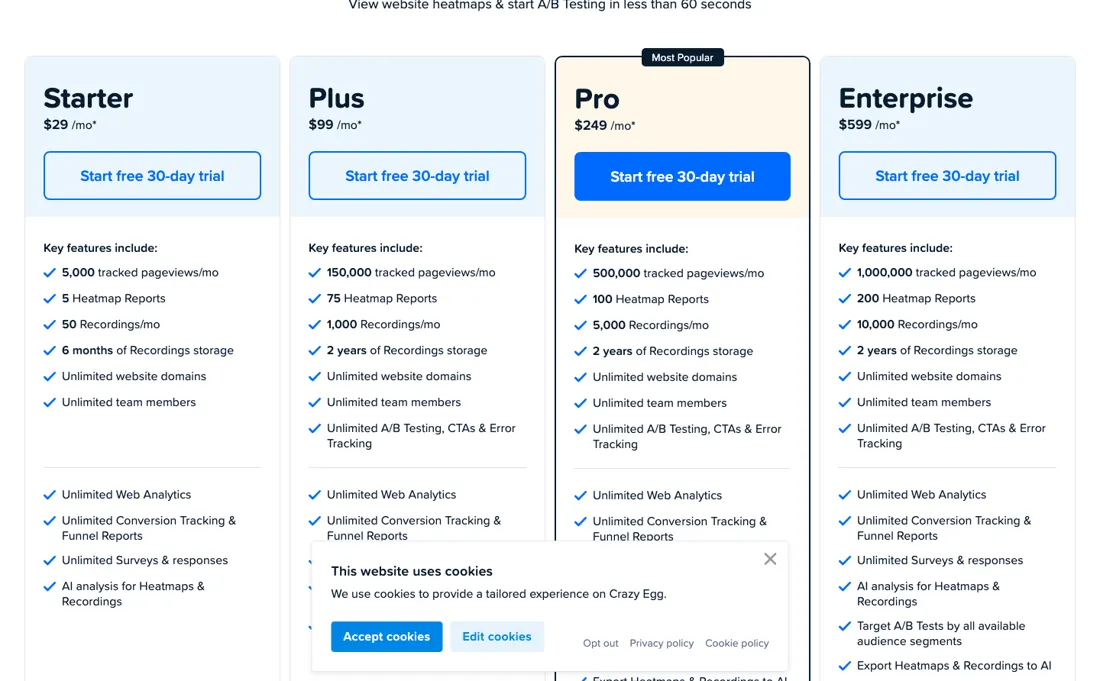
And A/B testing is not in it at all: that starts on Plus at $99, which jumps straight to 150,000 pageviews. Heatmaps need manual per-page setup and annual-only billing locks you in. Like all these tools it's diagnostic — it shows what's broken, it doesn't fix it. Worth knowing before you treat a result as banked: Crazy Egg states it can run A/B tests “after implementing just a small code snippet directly on the website”, which means a winning variant is served by that snippet rather than written into your pages.
Stop paying and the original page is what visitors get. Move the winner into your own templates once a test settles.
Watch the video review
The video version of this review, from our YouTube channel.
⚡ Short on time? Watch the 30-second verdict Short.
What Crazy Egg does
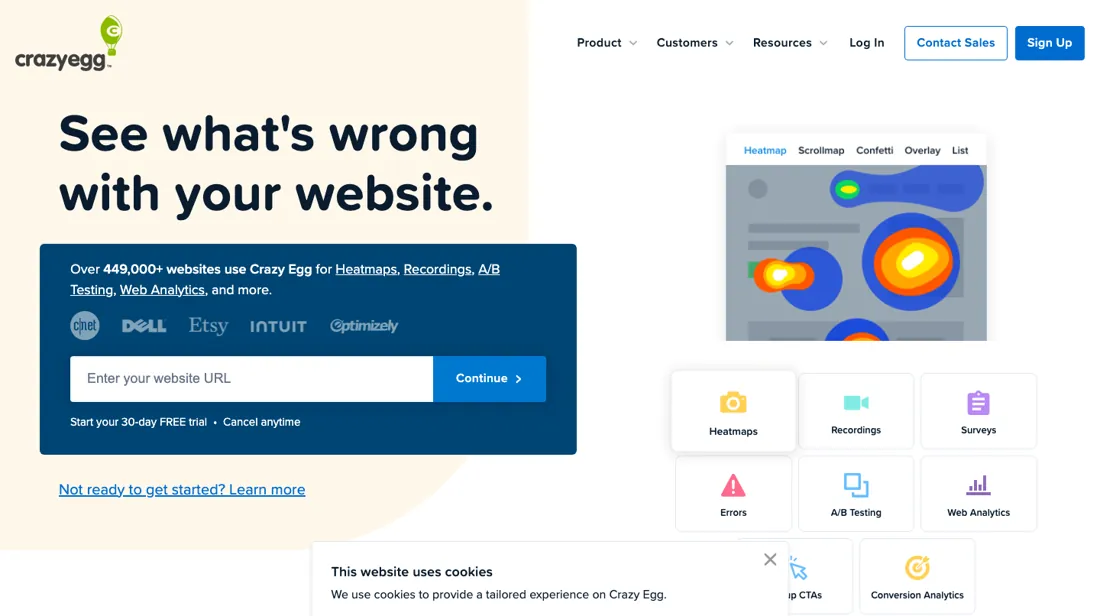
Website optimization with heatmaps, scroll maps, session recordings and A/B testing — see how visitors behave and lift conversions with data.
What buyers report about Crazy Egg
Hands-on: not tested by usReported by buyers: G2 and Capterra, read August 2026
Themes from the buyer-review sites listed at the foot of this page, read in August 2026. We have not run Crazy Egg ourselves, so this is other buyers' experience rather than ours. We summarise it here because the complaints are usually the part a vendor page leaves out.
- • Heatmaps and scrollmaps that a non-specialist can read on day one — 4.2 on G2 across 127 reviews, with support repeatedly called responsive.
- • A good first step into optimisation if you have never looked at how people actually use your pages.
- • Session limits are the recurring complaint, and reviewers with more than a handful of pages hit them quickly.
- • No real-time processing — you wait for data.
- • Reviewers who got serious about optimisation report outgrowing it. Treat it as a starting tool rather than a permanent one.
- • Annual billing only, so the smallest commitment is a full year. In August 2026 the plan names and pageview steps were different from today's Starter, Plus, Pro and Enterprise ladder (see the price section); A/B testing still starts on the $99 plan, not the $29 one.
When the paid plan is worth it
Crazy Egg sells four annual plans, and the step that changes what you can do is the first one. Starter at $29 a month is heatmaps, recordings and analytics only; A/B testing, CTAs and error tracking start on Plus at $99. That step is also a capacity jump, from 5,000 to 150,000 tracked pageviews, 5 to 75 heatmap reports and 50 to 1,000 recordings, so a small site that only wants testing pays for thirty times the traffic allowance it will use.
Above Plus the steps buy volume and targeting rather than new tools: Pro at $249 adds 500,000 pageviews, targeting by country, UTMs and conversions, and export of heatmaps and recordings to AI tools; Enterprise at $599 adds a million pageviews and SAML single sign-on. Seats and domains never decide the tier, because every plan includes unlimited of both. What upgrading does not solve: the meter stops rather than bills. At the monthly cap data collection pauses until the 1st, so a traffic spike leaves a gap on any plan, and the only fix is buying the next tier for the whole year.
Heatmaps still need per-page setup on every plan, and recordings stay behind when you leave, because snapshots are the only data Crazy Egg lets you export.
How to actually use Crazy Egg
One script does all the collection, and Crazy Egg documents three ways to place it: copy and paste the tracking snippet, use a native integration, or email a developer — with guides for Google Tag Manager, a WordPress plugin, Wix, Squarespace's Code Injection and Tealium. The vendor puts installation at under five minutes. What matters more is what happens next, because only two things switch on by themselves. Web Analytics and the Live Activity feed start collecting the moment the script is live; Heatmaps, Recordings, Surveys, CTAs and A/B tests each require manual setup before they produce anything.
Heatmaps in particular are created per page, though there is a bulk option for making several at once, and recordings have a sampling rate you set yourself. Crazy Egg's own suggested order is to read Web Analytics first, add heatmaps and recordings on the high-traffic or high-exit pages that surfaces, then deploy surveys or CTAs, and only then test.
Distilled from Crazy Egg's support site, chiefly the 'Crazy Egg Getting Started Guide' and its Installation Methods category at support.crazyegg.com, plus the pricing page at crazyegg.com/pricing, read 21 August 2026. Re-read 10 October 2026: crazyegg.com/pricing (plans and FAQ, in a browser and by plain fetch) and the support articles 'Cancel Crazy Egg Subscription' (support.crazyegg.com/?p=317) and 'Delete Crazy Egg Data' (support.crazyegg.com/knowledge-base/delete-crazy-egg-data/).
The natural comparison is Hotjar — the session-billed behavioural-analytics rival. Weigh it against Hotjar on the job you actually need done.
Frequently asked questions
What happens when I hit the monthly pageview or recording limit?
Crazy Egg does not bill overages. Its pricing FAQ (read 10 October 2026) says data collection pauses when you reach the monthly tracking limit and resumes automatically on the 1st of the following month; you can upgrade, or buy more heatmap reports or recordings as an add-on through sales, with no add-on price printed. Heatmaps track 100% of pageviews on targeted pages by default, and setting a lower sample rate on a heatmap uses fewer tracked pageviews. Upgrades take effect immediately and are prorated; downgrades start at the next billing cycle.
What can I take with me if I cancel or leave?
Less than you might expect. Crazy Egg's support article 'Delete Crazy Egg Data' (read 10 October 2026) says the only data you can export is Snapshots, and user recordings are permanently deleted with no recovery when the account is deleted. The 'Cancel Crazy Egg Subscription' article says you keep dashboard access until the end of the billing period and must reactivate afterwards to see your data, a trial ends immediately when cancelled, and no refunds or credits are given for partially used months, upgrades or downgrades. Because every plan is billed annually, cancelling stops the renewal rather than the year already paid.
Do extra team members or websites cost more?
No. The pricing page (read 10 October 2026) states that every plan includes unlimited website domains and unlimited team members, and that tracked pageviews cover multiple domains at no extra cost; the agency section adds that seats come with role-based access control for each domain. What scales the price is tracked pageviews, recordings and features, not people.
Is this a hands-on review of Crazy Egg?
This is a researched assessment, not a hands-on test — where we've used a tool ourselves, we say so explicitly. We name what each tool is good and bad at, and we earn a commission only if you sign up, at no cost to you.
- Buyer reviews on G2 and Capterra, read August 2026.
- Read 2026-10-10 on crazyegg.com/pricing, in a browser and by plain fetch, both showing the same ladder.
- A dated screenshot of that pricing page, kept on this site as the receipt.
Others in this category
Reviewed growth & revenue tools that share ground with Crazy Egg — comparable in what they do, not drop-in swaps:
New reviews, price changes we recorded, and the cost conditions we found. No sponsored placements. Unsubscribe anytime.
This is our researched assessment — not a paid placement. The “Visit” links on this page are affiliate links: we may earn a commission if you sign up, at no extra cost to you, and it never changes our take. How we review →