AgencyAnalytics Review (2026)
 By Daan Haket · Researched and written with an AI assistant · who does what
Cost scales linearly with clients — great at 5, pricey at 50+. Throughout this review we weigh it against Databox.
marketing agencies that need white-label client reports from 85+ integrations — automated, on-brand and hands-off.
you're a solo operator with a couple of data sources, or you want rock-solid single-dashboard KPI tracking — Databox or a lighter tool may fit better.
Transparency: the “Visit” links on this page are affiliate links — we may earn a commission if you sign up, at no extra cost to you. No vendor can pay for a better review or verdict. How we make money →
Pricing (2026)
✓ Pricing re-verified 11 Sep 2026
| Plan | Price | What you get |
|---|---|---|
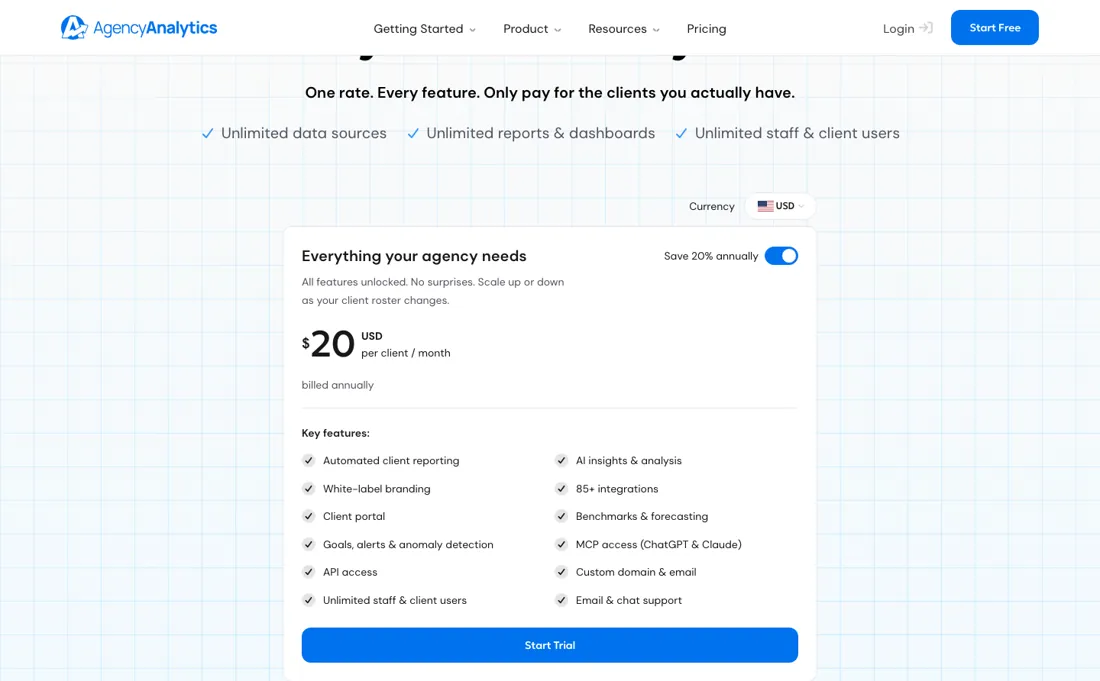
| Everything your agency needs | $20 USD per client/mo, billed annually | one rate with every feature unlocked — unlimited data sources, reports, staff and client users; you pay per client on your roster, so a 25-client agency pays $500 a month; above 25 clients the vendor quotes |
One published rate: $20 USD per client / month billed annually, with no clients included in the base, so cost scales directly with your roster (a 25-client agency pays $500/mo; past that it is a quote). Month to month is $25 per client: the card never prints it, but the page's own schema.org block publishes an AggregateOffer with lowPrice $20 and highPrice $25, which is exactly the advertised "Save 20% annually".
Add-ons on top: Rank Tracker $41.67/mo per 500 keywords, AI Tracker $20.83/mo per 250 credits. Past 25 clients the vendor quotes instead of publishing. Plans change — always verify the live price on their site.
Category context: Growth & Revenue. Across the 82 tools in this category that we researched with a public US-dollar price, the median entry price is about $29 a month (lowest paid plan as listed, per seat where the vendor prices per seat). Compare pricing conditions in the Software Cost Atlas →
Correction after re-checking: (re-verified 2026-09-11) AgencyAnalytics lists a single per-client plan at $20 USD per client / month billed annually, with an Enterprise "contact us" route for agencies at 25+ clients. Rank Tracker ($41.67/mo per 500 keywords) and AI Tracker ($20.83/mo per 250 credits) are separate add-ons priced on top of that rate, not included in it. The card advertises "Save 20% annually" without printing a month-to-month figure, but the structured data on the same page does: an AggregateOffer with lowPrice 20 and highPrice 25, so monthly is $25 per client. The currency selector now offers USD, CAD, AUD, NZD, GBP and EUR.
What the price did
We capture AgencyAnalytics’s own pricing page every month and keep the figures, so this is our record of the page — not a forecast, and not someone else’s summary.
Our monthly capture of agencyanalytics.com/pricing came back without a readable amount in both the 7 July and the 2 August 2026 run, so this series is our own dated reads rather than the automated one. On 23 July 2026 the page showed $20 USD per client / month billed annually, with Rank Tracker at $41.67 and AI Tracker at $20.83 per month; on 11 August 2026 all three were unchanged, and on 11 September 2026 they were unchanged again. The page itself did move between the July and August captures - it grew from 7,851 to 8,578 characters - so the copy was rewritten while the rate stayed put. The September read added a figure the series never had: the schema.org AggregateOffer on that same page carries lowPrice 20 and highPrice 25, which puts the unprinted month-to-month rate at $25 per client.
What the pricing page doesn’t say
The most-cited complaint is connector reliability: data sources disconnect and the platform doesn't always flag the failure clearly. Solo or small-data setups get little value from it.
Watch the video review
The video version of this review, from our YouTube channel.
What AgencyAnalytics does
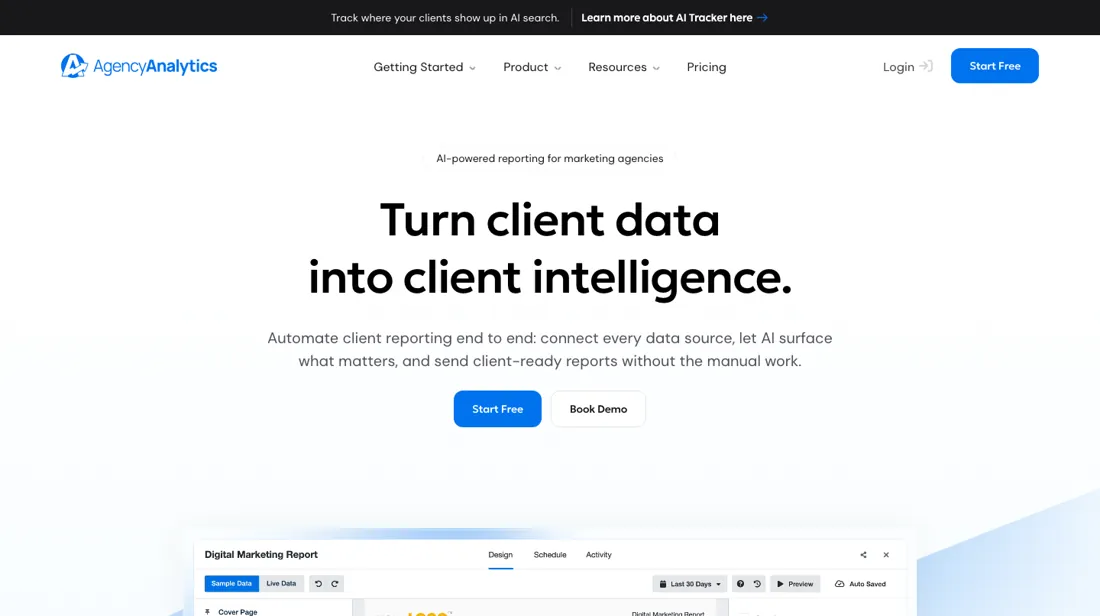
Client reporting and dashboards built for marketing agencies: aggregate 85+ marketing platforms into white-label dashboards and automated reports, with per-client KPI goals. White-labeling on every plan.
What buyers report about AgencyAnalytics
Hands-on: not tested by usReported by buyers: G2 and Capterra, read August 2026
Themes from the buyer-review sites listed at the foot of this page, read in August 2026. We have not run AgencyAnalytics ourselves, so this is other buyers' experience rather than ours. We summarise it here because the complaints are usually the part a vendor page leaves out.
- • Time saved on client reporting — automated reports are the single most-cited reason agencies keep it.
- • White-label delivery quality, and that the custom domain is on every plan including the cheapest.
- • Support response speed, rated above 9/10 by G2 reviewers.
- • No global template management. You cannot push one change across all client reports at once — reviewers have flagged this for two years and it is still open.
- • Integrations disconnect and need re-authorising.
- • Several reviewers say the higher plans feel like worse value than the lower ones, so there is little pull to upgrade.
When the paid plan is worth it
AgencyAnalytics publishes one rate: $20 USD per client / month, billed annually, with "Save 20% annually" beside it. The card never prints the monthly figure; the page's own schema.org block does, as an AggregateOffer with lowPrice $20 and highPrice $25, so monthly is $25 per client. There is no free plan, only a 14-day trial with no credit card and a 30-day money-back guarantee. You pay per client, and staff and client users are unlimited, so cost tracks the roster you already invoice; putting a junior on reporting adds nothing.
It pays for itself when you rebuild the same reports for a stable roster every month. It works against you when your client count swings, because you pay per client whether or not that client got a report, and the annual rate carries a 1-year commitment while monthly has none. Budget the add-ons separately: Rank Tracker $41.67/month per 500 keywords, AI Tracker $20.83/month per 250 credits. Paying more fixes neither recurring complaint: integration outages are, in the vendor's words, "by far the most common reason for missing data", and same-name metrics calculated differently stay different at any price. Past 25 clients the vendor quotes rather than publishing a rate.
Questions we checked
Facts about AgencyAnalytics that would change a buying decision, and where we stand on each. An unanswered question does not mean the feature is missing; it means we have not confirmed it yet.
- Is there a live link from one report template to every client report? Per public documentation
Applies to: all plans.
Why it matters: agencies with many clients want one design change to reach every report without redoing per-client edits.
Answer: No. Editing a template changes only reports made from it afterwards; Apply Template overwrites the selected existing reports and cannot be reversed.
Checked: AgencyAnalytics help: Manage and Apply Report Templates (2026-10-06)
Have a public source that answers one of these? How we review explains how we check and correct.
How to actually use AgencyAnalytics
The vendor's getting-started guide is eight videos. The first four are Welcome & Quick Start (4 minutes), Quick Account Tour (4.5), Add & Organize Clients (2) and Connect a Data Source (2.5). The rest are Create a Dashboard (7.5), Build and Schedule a Report (4.5), Set Up Branding / White Labeling (3), and Manage Users and Permissions (4). The vendor's own tutorial weighting suggests where the work sits: connecting a source gets 2.5 minutes, while building a dashboard gets 7.5 and scheduling a report another 4.5.
Read that as the vendor's emphasis, not as a measure of your time. A Client is "one business relationship you manage in AgencyAnalytics", and you connect its sources from the 85+ integrations. Plan for numbers that disagree with the native platform. The troubleshooting doc tells you to match the exact start and end dates used in the source platform, and warns that similarly named metrics are calculated differently — its "Clicks" pulls from the "Total Clicks" metric in Facebook Ads.
Integration outages are the vendor's stated most common cause of missing data, so expect reconnection work; the Connect Your Data help collection alone runs to 110 articles.
Distilled from vendor pricing page and vendor help-centre articles (getting-started guide, data-and-access-issues, data-mismatch troubleshooting, Connect Your Data collection), all fetched directly this session. On 6 October 2026 we also read the help centre articles Billing and Subscriptions, Client FAQ, Cancel Your Subscription, Manage Exports and Transfer Clients, Manage and Apply Report Templates, Create and Manage Client Templates and Create and Manage Users (help.agencyanalytics.com/en/articles/10073397, 8758422, 15507764, 8602801, 15234399, 10389651 and 9774477). The buyer reports elsewhere on this page come from G2 and Capterra, read August 2026.
AgencyAnalytics vs Databox, side by side
Each column shows the vendor’s own published entry price, read on the date shown. Entry prices can cover different services or units, so check what each one buys. We do not average them into a score.
Both names above are affiliate links: we may earn a commission if you sign up, at no extra cost to you. Neither changes what this table says.
The natural comparison is Databox — the all-rounder KPI-dashboard tool. Weigh it against Databox on the job you actually need done.
Frequently asked questions
What do agencies actually say about AgencyAnalytics on Reddit?
"agency analytics reddit" is the single biggest search that reaches this page, so it deserves a straight answer: we do not summarise Reddit threads here, because we cannot verify who wrote them or when. What we can point at is the vendor conceding the most common complaint in its own documentation. AgencyAnalytics' help centre calls integration outages "by far the most common reason for missing data", and its troubleshooting doc warns that similarly named metrics are calculated differently between platforms - its "Clicks" pulls the "Total Clicks" metric from Facebook Ads. If connector reliability is what you are trying to research, that is the vendor answering in writing.
What does AgencyAnalytics cost for a real client roster?
One published rate: $20 USD per client per month, billed annually, with unlimited staff and client users (read on the vendor pricing page 11 September 2026). Twenty-four clients is $480 a month at that rate; from 25 clients up the vendor stops publishing a price and asks you to contact sales for a custom plan. Price the add-ons on top of that: Rank Tracker at $41.67 a month per 500 keywords and AI Tracker at $20.83 a month per 250 credits, both billed annually. The currency selector also offers CAD, AUD, NZD, GBP and EUR.
Is there a month-to-month price?
Yes: $25 USD per client per month. The plan card only shows "Save 20% annually" beside the $20 annual rate and never prints the monthly one, but the structured data on that same page publishes an AggregateOffer with lowPrice 20 and highPrice 25 - and $20 divided by 0.8 is exactly $25, so the two agree. What the page does spell out is what you trade: monthly plans carry no commitment and can be cancelled any time, while the discounted annual plan requires a one-year commitment. The 14-day trial needs no credit card, and there is a 30-day money-back guarantee (all read 11 September 2026).
Does AgencyAnalytics connect to AI tools?
Two ways, per AgencyAnalytics' own pages. Its home page (read 6 October 2026) lists MCP alongside AI Tracker and Views; the vendor's partner mail of 2 October 2026 describes MCP as connecting client data to whatever AI tool an agency already uses. AI Tracker shows how a client appears in AI search across ChatGPT, Gemini and others, and it is a paid add-on: $20.83 a month per 250 credits on annual billing in our 11 September 2026 reading.
Can I change one template and update every client report at once?
Partly, and the catch matters. AgencyAnalytics' help centre (Manage and Apply Report Templates, read 6 October 2026) says editing a report template changes only the template: reports already made from it stay as they are. To roll a design out to existing reports you select them and use Apply Template, which overwrites their content and, in the vendor's words, cannot be reversed, so any per-client edits in those reports are lost. Page templates are account-wide, but a page you have already added to a report does not follow later changes to the template, and client templates only shape clients you create after the change. So there is a bulk overwrite, not a live link from one template to every report, which is the gap G2 reviewers describe as missing global template management.
What exactly am I billed for, and can I pause a client?
You pay per Client, and the help centre's Client FAQ (read 6 October 2026) defines one Client as one website or URL you track. A Client cannot be paused or archived: the only way to stop paying for it is to delete it, after exporting a backup if you want one. Restoring a deleted Client adds a prorated charge for the rest of the billing period and the full amount at renewal. Staff and client users stay unlimited. On annual billing there are no prorated or partial refunds if you cancel mid-year, and by default only the Admin user sees billing at all.
What happens to my data if I cancel, and what can I take with me?
Per the cancellation article (read 6 October 2026), you keep access until the end of the paid term; after that you and your clients lose access to every dashboard and report, and three months later all account data is permanently deleted. What you can take out, per Manage Exports and Transfer Clients: PDF downloads of dashboard sections and reports, and for each client a ZIP of keyword ranking data and integration settings as CSV files, which only an admin can export. Custom dashboards, reports and users cannot be exported that way and have to be rebuilt, so export what you need before the term runs out.
Is this a hands-on review of AgencyAnalytics?
This is a researched assessment, not a hands-on test — where we've used a tool ourselves, we say so explicitly. We name what each tool is good and bad at, and we earn a commission only if you sign up, at no cost to you.
- Buyer reviews on G2 and Capterra, read August 2026.
- AgencyAnalytics’s own published pricing page.
- A dated screenshot of that pricing page, kept on this site as the receipt.
Others in this category
Reviewed growth & revenue tools that share ground with AgencyAnalytics — comparable in what they do, not drop-in swaps:
New reviews, price changes we recorded, and the cost conditions we found. No sponsored placements. Unsubscribe anytime.
This is our researched assessment — not a paid placement. The “Visit” links on this page are affiliate links: we may earn a commission if you sign up, at no extra cost to you, and it never changes our take. How we review →