AltText.ai Review (2026)
 By Daan Haket · Researched and written with an AI assistant · who does what
The headline ‘5¢ per image’ only holds for a plain JPG in one language.
image-heavy sites that need alt text written back into the CMS automatically: e-commerce catalogues, publishers and long-running blogs on WordPress, Shopify, WooCommerce, Magento, BigCommerce, Contentful, DatoCMS or Storyblok. The native integrations, page crawler, CSV import/export and developer API let you clear thousands of missing alt attributes without touching them by hand.
you have a few dozen images. Write those yourself for free and you will describe them better than any model, because you know why each image is on the page. Also skip it if your visuals are diagram-, product- or brand-specific enough that every generated line needs rewriting anyway — in which case the credits buy you a draft you were going to redo.
Transparency: the “Visit” links on this page are affiliate links — we may earn a commission if you sign up, at no extra cost to you. No vendor can pay for a better review or verdict. How we make money →
Pricing (2026)
✓ Pricing re-verified 10 Oct 2026
| Plan | Price | What you get |
|---|---|---|
| Free | $0 | 25 credits to start, no credit card; advanced formats locked |
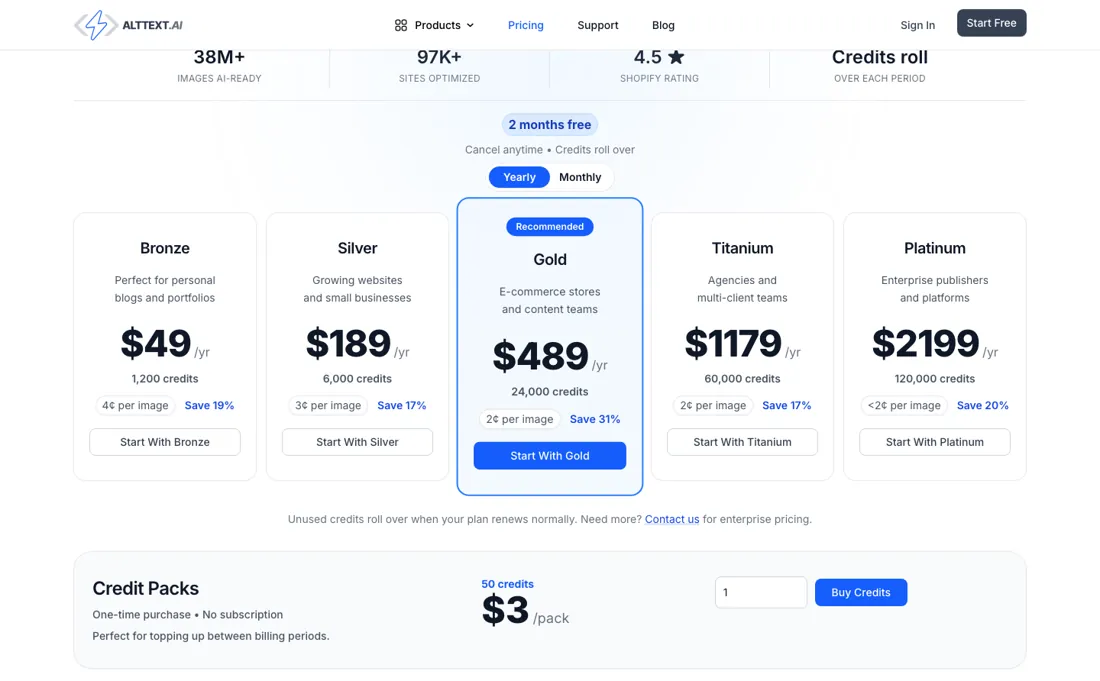
| Bronze | $5/mo | 100 credits a month, 5¢ an image — $49/yr for 1,200 credits |
| Silver | $19/mo | 500 credits a month, 4¢ an image — $189/yr for 6,000 credits |
| Gold | $59/mo | 2,000 credits a month, 3¢ an image — $489/yr for 24,000 credits |
| Titanium | $119/mo | 5,000 credits a month, 2¢ an image — $1,179/yr for 60,000 credits |
| Platinum | $229/mo | 10,000 credits a month — $2,199/yr for 120,000 credits |
| Credit pack | $3 | 50 credits, one-time, no subscription |
Credit-metered — one credit = one image. Free trial: 25 credits, no credit card required. Monthly: Bronze $5/mo (100 credits/mo, 5¢ per image), Silver $19/mo (500), Gold $59/mo (2,000), Titanium $119/mo (5,000), Platinum $229/mo (10,000). Annual buys the same yearly credit volume at a discount the page labels 17-31% off: $49/yr (1,200 credits), $189/yr (6,000), $489/yr (24,000), $1,179/yr (60,000), $2,199/yr (120,000). One-time credit packs are 50 credits for $3 with no subscription; beyond 120,000 credits a year is custom enterprise pricing.
Unused plan credits roll over when the plan renews on its normal cycle, and banked rollover credits and one-time packs stay in the account — but the FAQ states that changing plans, up or down, forfeits the current period’s unused plan credits. You can cancel anytime and keep what is unused, and every feature ships on every plan. Two multipliers change the real per-image cost: advanced formats (AVIF, HEIC, HEIF, JP2, SVG, TIFF) bill 2 credits and are paid-plans-only, and each additional translation language costs 1 more credit per image. Plans change — always verify the live price on their site.
Category context: Marketing. Across the 24 tools in this category that we researched with a public US-dollar price, the median entry price is $29 a month (lowest paid plan as listed, per seat where the vendor prices per seat). AltText.ai’s entry price of $5 a month sits below that median. Compare pricing conditions in the Software Cost Atlas →
What the pricing page doesn’t say
AVIF, HEIC, SVG and TIFF bill double — precisely the formats a performance-tuned image pipeline outputs — and every extra language adds another credit per image, so by the published rules one AVIF product shot in five languages is six credits, not one. Those advanced formats are also locked out of the 25-credit free trial, so the one thing you cannot measure before paying is your own burn rate. Credits are spent on generation rather than on acceptance: regenerate a line you didn’t like and you pay again, and AltText.ai states plainly that used credits are not normally refundable.
The category caveat an honest review owes you: models describe what is visibly in a photo well, but alt text is a judgement call. Whether an image is decorative or informative, and what your brand actually calls the thing in it, is context the model doesn’t have. Bulk generation is a far better starting point than the empty alt attributes on most sites, but treat the output as a draft to spot-check.
‘ADA compliance’ here means the field gets filled, not a legal guarantee that what’s in it is right.
Watch the video review
The video version of this review, from our YouTube channel.
⚡ Short on time? Watch the 30-second verdict Short.
What AltText.ai does
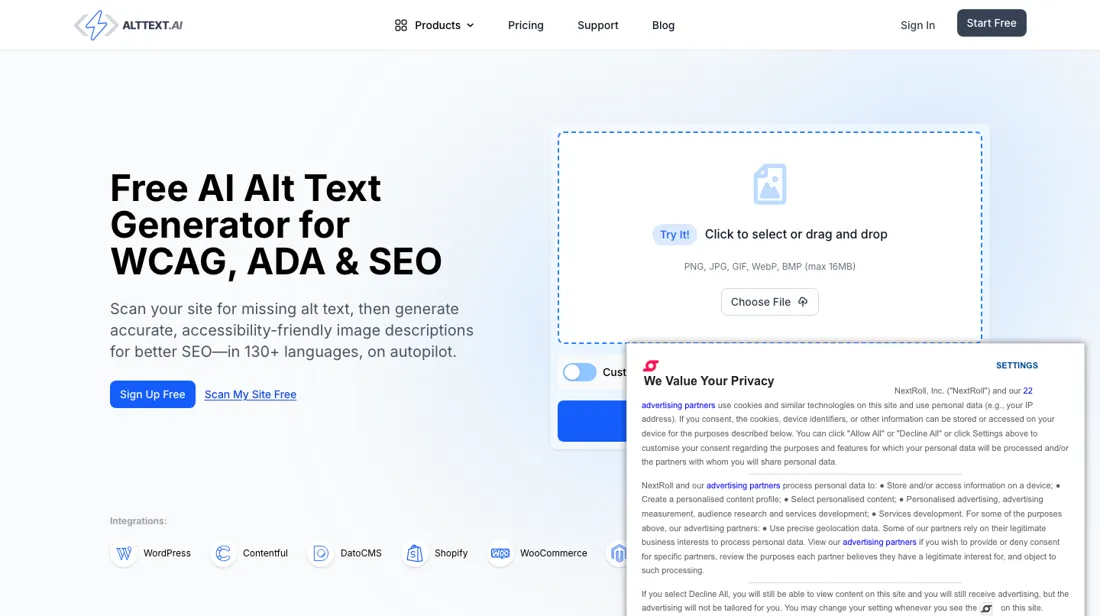
Bulk AI alt-text generation for image-heavy sites: crawls your pages or plugs into your CMS (WordPress, Shopify, WooCommerce, Magento, Contentful, DatoCMS) and writes the alt attributes back automatically, in 130+ languages.
What buyers report about AltText.ai
Hands-on: not tested by usReported by buyers: G2, WordPress, read August 2026
Themes from the buyer-review sites listed at the foot of this page, read in August 2026. We have not run AltText.ai ourselves, so this is other buyers' experience rather than ours. We summarise it here because the complaints are usually the part a vendor page leaves out.
- • 4.7 to 4.8 across G2, WordPress.org and Shopify — bulk processing an existing image library is what reviewers name as the time saver.
- • A free 25-credit trial, and unused credits roll over each period.
- • Each additional language costs an extra credit per image. On a multilingual site that multiplies faster than the pricing page suggests.
- • Credit rules are hard to forecast, and reviewers say so directly — they want predictable pricing.
- • Accuracy slips on complex images.
- • Value is thin for smaller sites with few images.
When the paid plan is worth it
The paid split here is unusual in one specific way: the pricing page lists the same integrations and features on every plan, so moving up a tier buys credit volume and a lower unit rate and nothing else. Bronze is $5/mo for 100 credits (5c per image), Silver $19/mo for 500, Gold $59/mo for 2,000 (3c). The step to Gold only pays back near real volume — at roughly 300 images a month you are paying about $40 extra for a rate you never reach, and Silver is the fit.
Watch the one-time pack: 50 credits for $3 works out at 6c an image, above the cheapest subscription, so pay-as-you-go is the most expensive rate on the page rather than the cautious one. Annual discounts are uneven too: the page labels Bronze $49/yr as 19% off (18.3% against 12 x $5) but Gold $489/yr as 31%. And spend down before you switch: changing plans, up or down, forfeits the current period’s unused plan credits, and the Credits & Billing guide says no timing trick avoids that, not even switching right before renewal.
What upgrading does not buy: a better model, or any review or approval step. A Platinum line reads like a Bronze one, and someone still has to read it.
How to actually use AltText.ai
Fastest route to something real: sign up for the 25 free credits (no card), and run the free scanner at alttext.ai/crawl-analyzer against your site first so you know how many images actually lack alt text before you pick a plan. On WordPress, install the Alt Text AI connector plugin (20,000+ active installs, PHP 7.4+ and WordPress 4.7+), paste the API key from your account's API Keys page, then run Bulk Generate against images with no alt text.
Elsewhere the web UI takes uploads or URLs, plus CSV, Dropbox, Cloudinary and page-scrape imports.
Distilled from vendor docs (alttext.ai/docs, the WordPress integration page and the support FAQ), plus the public WordPress.org plugin listing for install counts and system requirements Re-verified 10 October 2026: alttext.ai/pricing (all monthly and yearly prices unchanged; the page's 19% saving on Bronze works out at 18.3% against 12 x $5), alttext.ai/docs/credits-and-billing, alttext.ai/docs/webui/account and alttext.ai/docs/account-cancellation, read 10 October 2026.
Common AltText.ai setup mistakes
Where AltText.ai setups actually go wrong, and what it costs you when they do. Same sources as the setup notes above — not from a walkthrough we ran ourselves.
Where people stall: local, staging and password-protected sites.
- The docs call it critical to uncheck "This site is reachable over the public internet" in Technical Settings, otherwise their servers cannot fetch your images and nothing happens.
- Second, letting WordPress regenerate missing metadata during a bulk run — the docs warn this causes failures and timeouts on shared hosting.
- Third, images under 50x50 pixels or over 16MB are rejected.
- If bulk runs die midway, WP-CLI batch size is settable from 1 to 50, default 10.
AltText.ai vs accessiBe, side by side
Each column shows the vendor’s own published entry price, read on the date shown. Entry prices can cover different services or units, so check what each one buys. We do not average them into a score.
Both names above are affiliate links: we may earn a commission if you sign up, at no extra cost to you. Neither changes what this table says.
The natural comparison is accessiBe — accessiBe is an accessibility overlay — a script that patches issues in the visitor’s browser at runtime. AltText.ai writes real alt text into your CMS, so it lives in your source, ships to every visitor and is what search crawlers actually read. Pick the overlay for broad WCAG patching across a site you cannot easily edit; pick AltText.ai when you specifically want durable alt text in the page itself.
Frequently asked questions
If I cancel, does the alt text stay on my site?
On most integrations, yes. AltText.ai's Account Cancellation guide (alttext.ai/docs/account-cancellation, read 10 October 2026) says alt text written by an integration stays in your site's database, and your image library and account stay accessible for viewing and CSV export. The exception is InstantAlt, the HTML snippet: it needs an active subscription to display anything, so its alt text stops rendering when you cancel. After cancelling, the WordPress and Shopify apps, browser extensions and API stop processing new images; one-time packs and banked rollover credits stay usable.
Can I switch plans at my renewal date without losing credits?
No, according to the Credits & Billing guide (alttext.ai/docs/credits-and-billing, read 10 October 2026): any plan change, up or down, forfeits the current period's unused plan credits when it takes effect, and the guide says there is no timing trick that preserves them, including switching right before a renewal date. Only a normal same-plan renewal rolls credits forward. The pricing page FAQ still suggests changing plans at your billing date; the guide is the more specific of the two. Banked rollover credits and one-time packs are not affected, so spend down the current period first.
Can I cap what one client site spends?
Yes, per API key. The Your Account documentation (alttext.ai/docs/webui/account, read 10 October 2026) lets you create as many keys as you want and set a maximum number of credits per key per billing period, for example one client site limited to 250 credits. The support FAQ says there is no limit to how many websites one account can serve, and a whitelabel setting hides your plan name in integrations. Credits still come from one shared account balance.
Is this a hands-on review of AltText.ai?
This is a researched assessment, not a hands-on test — where we've used a tool ourselves, we say so explicitly. We name what each tool is good and bad at, and we earn a commission only if you sign up, at no cost to you.
- Buyer reviews on G2, WordPress.org, the Shopify App Store and AppSumo, read August 2026.
- Re-verified 10 Oct 2026; figures unchanged since 26 Aug 2026.
- A dated screenshot of that pricing page, kept on this site as the receipt.
Others in this category
Reviewed marketing tools that share ground with AltText.ai — comparable in what they do, not drop-in swaps:
New reviews, price changes we recorded, and the cost conditions we found. No sponsored placements. Unsubscribe anytime.
This is our researched assessment — not a paid placement. The “Visit” links on this page are affiliate links: we may earn a commission if you sign up, at no extra cost to you, and it never changes our take. How we review →