
Cartly Review (2026)Cart Drawer, Free to 20 Orders
 By Daan Haket · Tested hands-on · written with an AI assistant · who does what
The price follows your orders: $16.99 a month up to 100 orders, $49.99 for 301 to 750 and $199.99 above 5,000.
- Best for Shopify stores that want a slide cart with upsells
From $16.99 · Growth · Growth for up to 100 orders a month, as the in-app pricing table · read 2026-11-21
Try Cartly →Affiliate link: we may earn a commission if you sign up, at no extra cost to you. It never changes our verdict.
Is Cartly right for you?
Your pain“My cart is a plain page and I want an upsell right where people check out.”
Does Cartly solve it?YesOur test (21 Nov 2026): about 3.5 minutes after install the drawer opened in the theme editor preview with a You might also like upsell, and Add put the item in the cart.
Your planGrowth, $16.99 every 30 days plus usage fees; 14 day trial
Try Cartly →
Your pain“I have almost no orders and do not want to pay a monthly fee for a cart app yet.”
Does Cartly solve it?PartlyThe app lists Free for the first 20 lifetime orders. In our test the plan screen offered only Growth and Enterprise, with no Free button.
Your planFree for the first 20 lifetime orders; Growth from $16.99 a month after that
Try Cartly →
Your pain“I need to know what the bill does when orders go up.”
Does Cartly solve it?Vendor says yesThe pricing table in the app steps up with orders: $16.99 up to 100, $49.99 for 301 to 750 and $199.99 above 5,000. Our development store paid nothing.
Your planGrowth, $16.99 to $144.99 by order volume; $199.99 above 5,000 orders
Try Cartly →
- you run market-driven shipping, want a flat price that does not grow with orders, or need proof on a live storefront before you install.
The “Try” buttons are affiliate links: we may earn a commission if you sign up, at no extra cost to you, and it never changes our verdict.
Also in: Software for Shopify and online stores
Transparency: the “Visit” links on this page are affiliate links: we may earn a commission if you sign up, at no extra cost to you. No vendor can pay for a better review or verdict. How we make money →
What Cartly costs at your size
What each plan costs a month on annual billing (monthly billing below it), per order a month from Cartly’s own pricing page. The cheapest plan at each size is in bold.
| Orders a month | Growth | Enterprise |
|---|---|---|
| 50 orders a month | not published $16.99 monthly | not published $199.99 monthly |
| 300 orders a month | not published $24.99 monthly | not published $199.99 monthly |
| 1,000 orders a month | not published $84.99 monthly | not published $199.99 monthly |
| 5,000 orders a month | not published $144.99 monthly | not published $199.99 monthly |
| 20,000 orders a month | not available | not published $199.99 monthly |
Prices read 2026-11-21; tax excluded unless the vendor says otherwise. Calculated by our cost engine; the same numbers are in our open data.
See current prices on Cartly →Our AI assistant ran the test on 21 November 2026 on a Shopify development store with the Basic plan, in the real admin with the interface in English. We installed Cartly Cart Drawer from its Shopify App Store page, chose the Growth plan, switched Cart status on and opened the cart drawer in the theme editor preview. About 3 minutes 30 seconds passed between pressing Install and the drawer showing a You might also like upsell. Shopify marked the plan as a test charge that is not billed, so we paid nothing. We removed nothing from the store besides Cartly itself at the end of our first attempt.
How we tested
- Our AI assistant ran the test in the real Shopify admin and theme editor with the interface set to English; nothing was paid
- The notes record screens, times and wording; five screenshots were kept
- Install: the Shopify dialog asked for view access to customer device and activity data and staff data, and to view and edit customers, products, orders, discounts, store analytics, Shopify Functions and the Online Store. It also warned that the app does not support market-driven shipping and that you can switch back to legacy shipping profiles until 1 July 2027.
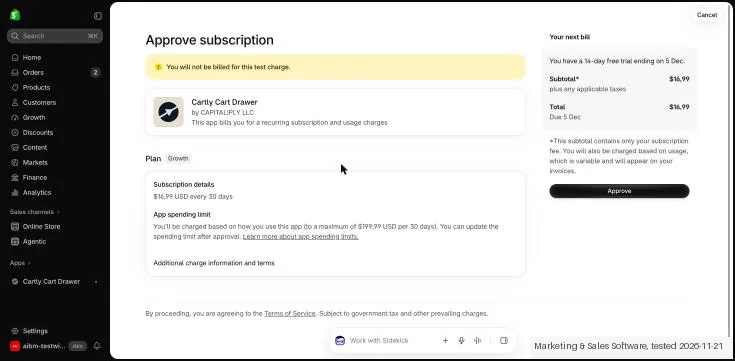
- Plan: the app asked us to choose a plan and offered Growth at $16.99 a month plus usage fees by order volume with a 14 day free trial, and Enterprise at $199.99 a month. Shopify showed "You will not be billed for this test charge", Growth at $16.99 every 30 days, a trial ending on 5 December and a spending limit of $199.99 per 30 days. No card was asked for.
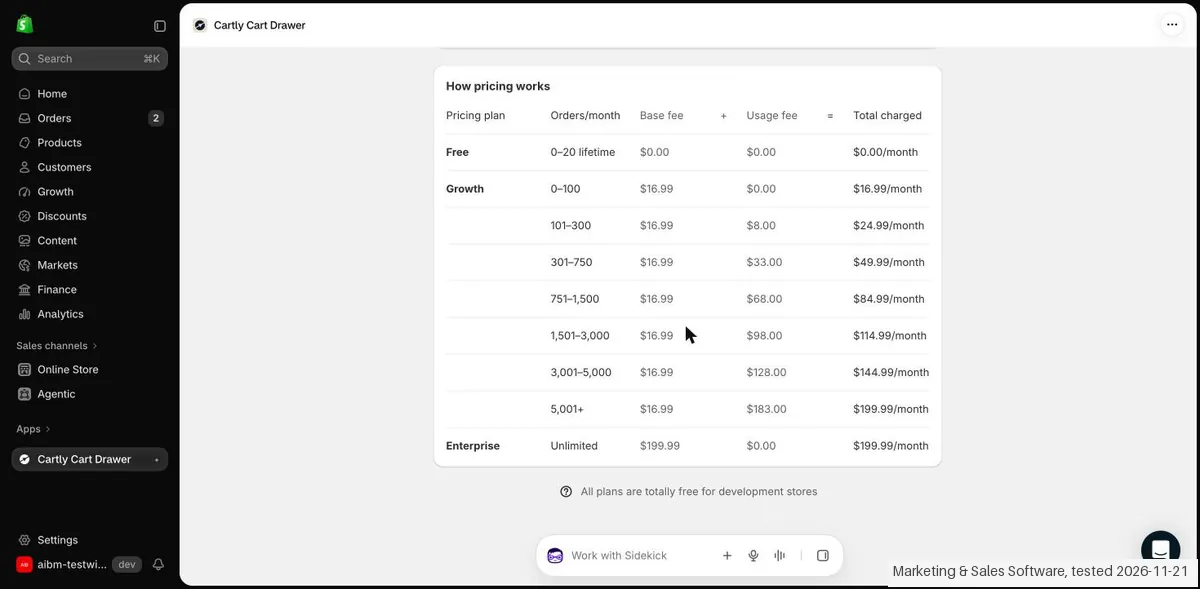
- Pricing table: the app lists Free for the first 20 lifetime orders, then Growth tiers of $16.99 (up to 100 orders), $24.99 (101 to 300), $49.99 (301 to 750), $84.99 (751 to 1,500), $114.99 (1,501 to 3,000) and $144.99 (3,001 to 5,000), then $199.99 above that. The note says all plans are totally free for development stores.
Pricing (2026)
✓ Pricing re-verified 21 Nov 2026
Free for the first 20 lifetime orders. Growth is $16.99 a month for up to 100 orders, $24.99 for 101 to 300, $49.99 for 301 to 750, $84.99 for 751 to 1,500, $114.99 for 1,501 to 3,000 and $144.99 for 3,001 to 5,000, then $199.99 above 5,000 orders, with a 14 day free trial. Enterprise is a fixed $199.99 a month with no usage fees.
All plans are free on development stores. On our development store Shopify showed Growth as a test charge of $16.99 every 30 days with a spending limit of $199.99 per 30 days, and we paid nothing. Plans change, so check the live price on their site before you buy.
Category context: E-commerce. Across the 63 tools in this category that we researched with a public US-dollar price, the median entry price is about $15 a month (lowest paid plan as listed, per seat where the vendor prices per seat). Cartly’s entry price of $16.99 a month sits above that median. Compare pricing conditions in the Software Cost Atlas →
The honest knock
The app says it does not support market-driven shipping. In our test Cart status was off after install, and the plan screen offered no Free button although the table lists Free for 20 orders.
What Cartly does
Shopify slide cart drawer app with upsells under the cart, free for the first 20 orders and then priced by order volume.
Free for 20 orders; Growth from $16.99 by order volume
The table lists Free for your first 20 lifetime orders. Past that, Growth at $16.99 a month covers up to 100 orders, and the fee steps up with order volume: $49.99 for 301 to 750 orders, $114.99 for 1,501 to 3,000 and $199.99 above 5,000. Enterprise is a fixed $199.99. If your orders are well above 5,000 a month, Enterprise costs the same as the top Growth tier. Below that, check which tier your last three months of orders fall into before you start.
What we found running Cartly ourselves
The first findings are at the top of this page. The rest:
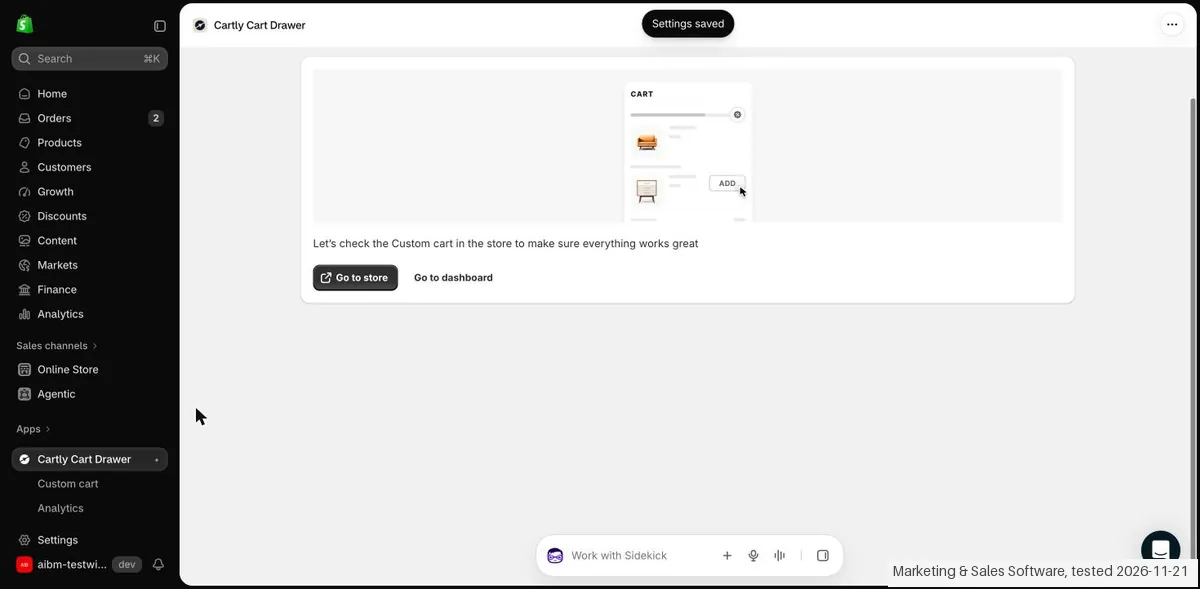
- Cart status: the Custom cart page showed Cart status Off. Its side preview already showed a You might also like upsell, but that is a preview inside the admin. After we switched Cart status on, saved and chose to activate in all markets, the app reported "Settings saved".
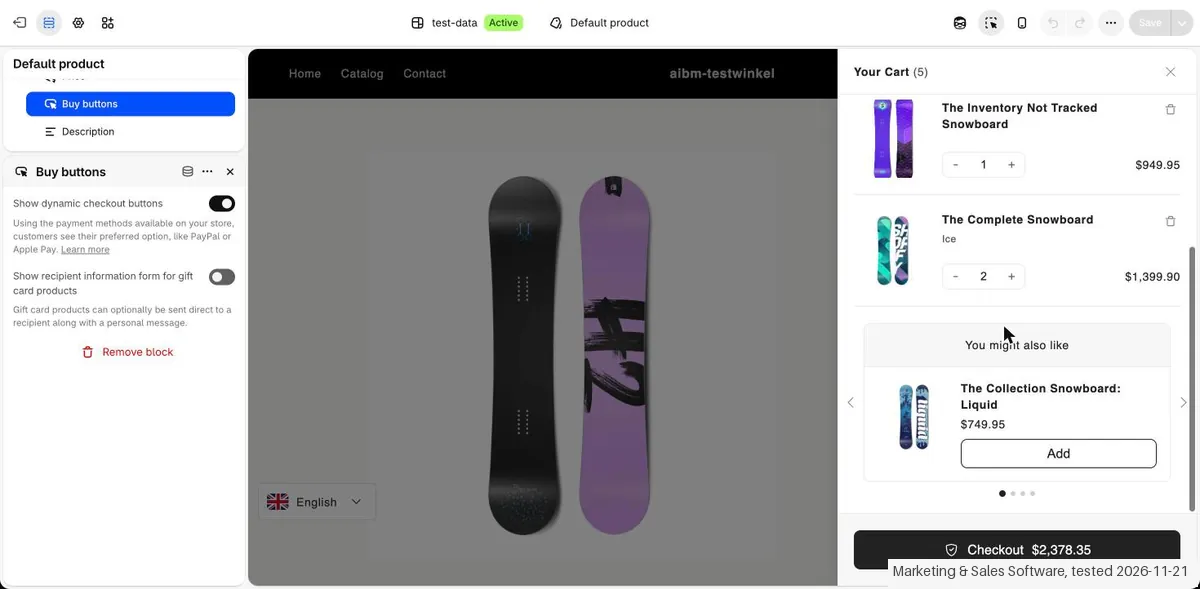
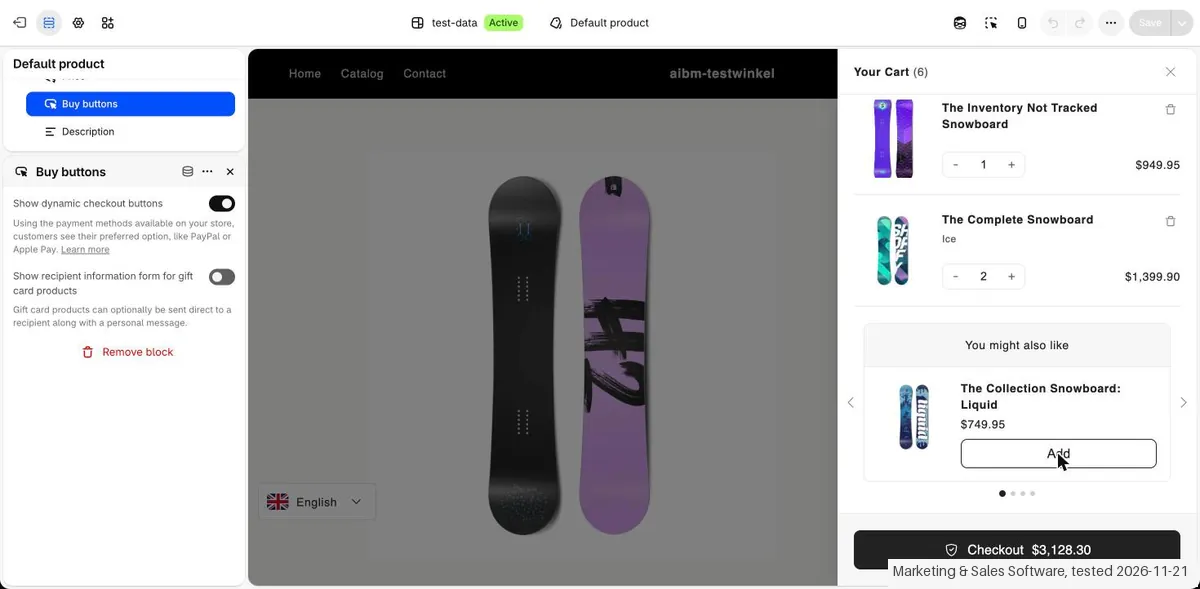
- Drawer: in the theme editor preview the Cartly drawer opened with 5 items and a checkout total of $2,378.35, and a You might also like block offered a snowboard at $749.95. Pressing Add made it 6 items and $3,128.30.
- Not on a live storefront: the store is password protected, so we saw the drawer only in the editor preview. On product pages another app on our store blocked Add to cart, so we opened the drawer from the cart icon.
Screenshots from our test (click to enlarge)
What this test does not show:
- Not tested: the drawer on a public storefront, the reward bar, timers and sticky add to cart, building our own upsell rules, the Enterprise plan, and a real checkout.
- Not tested: paying. Shopify showed a test charge on our development store, so we cannot say how the trial converts or how usage fees show on a real invoice.
Most of our reviews are researched rather than run. How we review explains which is which, and why we do not pretend otherwise.
How to actually use Cartly
Open the Cartly page in the Shopify App Store, choose Install and confirm the access request. Pick a plan; Growth starts with a 14 day free trial. Open Custom cart in the app and switch Cart status on, then save and choose where it should show. Open your theme preview and click the cart icon to see the drawer. In our test the first upsell showed 3 minutes 30 seconds after install.
Distilled from Cartly Cart Drawer by CAPITALIPLY LLC on the Shopify App Store (apps.shopify.com/cartly-cart-drawer-upsell), the pricing table inside the app, and our hands-on test of 21 November 2026 on a Shopify development store. Cartly is listed through our Shoffi partner link, so we may earn a commission if you install it through our link; it does not change what we write.
The natural comparison is Shopify's own cart page: The standard Shopify cart is a plain page with no upsell block. Cartly puts a drawer with a You might also like upsell on top of it, for a monthly fee that rises with orders.
Frequently asked questions
How much does Cartly cost?
The app lists Free for the first 20 lifetime orders and then Growth at $16.99 a month for up to 100 orders, rising with order volume to $144.99 for 3,001 to 5,000 orders and $199.99 above that. Enterprise is a fixed $199.99 a month with no usage fees. Growth has a 14 day free trial. Read in the app on 21 November 2026; all plans are free on development stores.
Did Shopify show a real charge in your test?
No. On our development store the Growth charge appeared as a Shopify test charge that would not be billed: $16.99 every 30 days, a 14 day trial ending on 5 December, and a $199.99 spending limit per 30 days. It asked for no card.
How long does setup take?
About 3 minutes 30 seconds in our test, from pressing Install to a cart drawer with an upsell in the theme editor preview. We had to switch Cart status on first; it was off when we opened the page.
What does it ask to access?
The install dialog on 21 November 2026 asked for view access to customer device and activity data and staff data, and to view and edit customers, products, orders, discounts, store analytics, Shopify Functions and the Online Store.
Does it work with every shipping setup?
Cartly's install screen said market-driven shipping is not supported; legacy shipping profiles remain an option until 1 July 2027. We did not test shipping.
How do I remove Cartly?
Open Settings, Apps, choose Cartly Cart Drawer and Uninstall. Shopify asks for a reason, says data managed by the app such as discounts will be deleted, and sends a request to the developer within 48 hours to delete personal customer information. Billing is under Settings, Billing.
Is it well reviewed?
The Shoffi listing for our scan put it at 4.9 from 93 reviews and the app has been around since 2017. We did not check those reviews ourselves.
What do we not know?
How the drawer behaves on a live storefront, how the reward bar, timers and custom upsell rules work, what a real invoice looks like once usage fees apply, and how it handles shipping on market-driven shipping setups.
Is this a hands-on review of Cartly?
Yes. We tested Cartly ourselves on 21 November 2026; the section above says what we tested, what we found and what we did not test, and where a figure comes from the vendor's own documentation instead. Most of our reviews are researched rather than run; we say which is which. We name what each tool is good and bad at, and we earn a commission only if you sign up, at no cost to you.
- Read 2026-11-21 in the Cartly app and on apps.shopify.com/cartly-cart-drawer-upsell.
- Our own hands-on session with Cartly (21 November 2026), written up in full further down this page.
Bottom line
In one line: Slide cart drawer app for Shopify with upsells under the cart; free for the first 20 orders, then from $16.99 a month by order volume.
Best for: Shopify stores that want a slide cart with upsells.
The Try button is an affiliate link; we may earn a commission at no extra cost to you.
Others in this category
Reviewed e-commerce tools that share ground with Cartly. They are comparable in what they do, not drop-in swaps:
New reviews, price changes we recorded, and the cost conditions we found. No sponsored placements. Unsubscribe anytime.
This is our researched assessment, not a paid placement. The “Visit” links on this page are affiliate links: we may earn a commission if you sign up, at no extra cost to you, and it never changes our take. How we review →