Warn Review (2026)Checkout Blocking Is Shopify Plus Only
 By Daan Haket · Researched and written with an AI assistant · who does what
The app is called Warn: Warnings Checkout Blocks, and blocking checkout is the one thing most readers of this listing cannot buy at the advertised price.
shopify merchants who know exactly which notice they need — a Prop 65 label, a shipping-delay alert, an age-verification disclaimer, a we-no-longer-ship-here message — and want it on the right products, collections or countries without touching theme code, for $6.99 a month or nothing at all if one plain warning will do.
you are on a standard Shopify plan and specifically want the checkout blocked or a warning shown on the Checkout page: both are Plus Plan features and the Plus Plan is for Shopify Plus stores, so the capability the app's name advertises is not available to you at any price here. Also skip it if you sell off Shopify, or if what you actually need is consent and privacy management — cookie banners, consent records, data-subject requests — rather than a notice on a page..
Transparency: the “Visit” links on this page are affiliate links — we may earn a commission if you sign up, at no extra cost to you. No vendor can pay for a better review or verdict. How we make money →
Pricing (2026)
✓ Pricing re-verified 14 Oct 2026
| Plan | Price | What you get |
|---|---|---|
| Free | no published price | One textual warning across unlimited products, styling, per-product and per-country targeting |
| Premium | $6.99 a month or $41.94 a year | Unlimited warnings/notes/pop-ups, cart/checkout warnings, product/collection targeting, US-state geo-targeting; not for Shopify Plus |
| Plus Plan | $12.99 a month or $77.94 a year | Same features plus Checkout warnings and ability to block checkout; for Shopify Plus stores |
Summarised from the pricing notes below; the notes carry the conditions.
Billed in USD, every 30 days, and the ladder has three steps rather than the two the app's own summary suggests. Free gives you one textual warning across unlimited products, with the styling, per-product targeting and per-country targeting included. Premium is $6.99 a month or $41.94 a year, and the annual figure really is half of twelve monthly payments. It lifts the cap to unlimited warnings, notes and pop-ups, adds cart and checkout warnings, targeting by product or collection, and US-state geo-targeting on top of country targeting — but the plan is labelled for all stores EXCEPT Shopify Plus.
Plus Plan is $12.99 a month or $77.94 a year, again exactly half of twelve monthly payments, and it is the Shopify Plus plan: the same feature list, plus warnings shown on the Checkout itself and the rule that lets a warning block checkout when configured. Both paid plans carry a 7-day free trial. Plans change — always verify the live price on their site.
Category context: E-commerce. Across the 49 tools in this category that we researched with a public US-dollar price, the median entry price is $19 a month (lowest paid plan as listed, per seat where the vendor prices per seat). Warn’s entry price of $6.99 a month sits below that median. Compare pricing conditions in the Software Cost Atlas →
What the pricing page doesn’t say
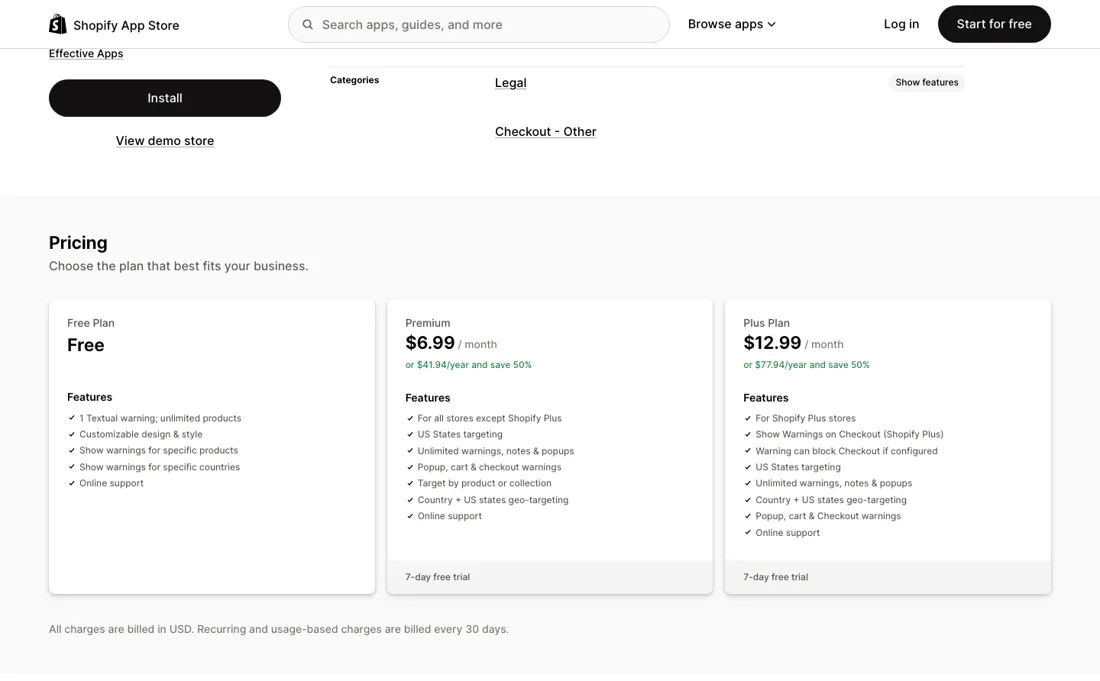
Checkout blocking, and showing a warning on the Checkout page at all, sits on the Plus Plan at $12.99 a month — and that plan says, in the App Store's own words, that it is for Shopify Plus stores. The $6.99 Premium plan says the opposite: for all stores except Shopify Plus. So the two tiers are not a small ladder and a big one, they are two different audiences, and which one you may buy is decided by your Shopify subscription rather than by how much warning you need.
If you are on a standard Shopify plan and came here to stop a checkout, read the plan labels before you install. The second thing to be clear about is what the app does and does not take off your hands. It renders the notice, targets it by product, collection or country, and styles it to your store. It does not tell you what Proposition 65, a GDPR withdrawal notice or an age-verification disclaimer has to say in your jurisdiction, and it does not keep that wording current when the rule changes.
The compliance language stays your problem and your liability; this is the display layer for it.
Watch the video review
The video version of this review, from our YouTube channel.
What Warn does
Shopify app from Effective Apps that adds customizable warnings — Prop 65 labels, shipping-delay alerts, age-verification and withdrawal disclaimers — to product, cart and checkout pages, as text or pop-ups, targeted globally or by product, collection, country or US state. On the App Store since December 2019.
When the paid plan is worth it
The free tier is more usable than most: one textual warning, across unlimited products, already styled to your store and targeted by product and by country. You upgrade when one warning stops being enough, and the $6.99 Premium plan is what that buys — unlimited warnings, notes and pop-ups, cart and checkout warnings, targeting by collection as well as product, and geo-targeting down to US state — although the developer's own help article says state-specific warnings are not supported, so prove that one in the trial before you pay for it.
Read the plan labels before the price, though, because they decide for you. Premium says it is for all stores except Shopify Plus; the $12.99 Plus Plan is the Shopify Plus one, and it is the only place the app's headline feature lives — a warning shown on the Checkout page, and the rule that lets it block checkout. On a standard Shopify plan, no amount of money on this listing buys checkout blocking.
What upgrading does not solve is the writing. Neither plan tells you what Proposition 65, a GDPR withdrawal notice or an age-verification disclaimer has to say, and neither updates that wording when the rule changes; the app is the display layer and the liability stays yours. Annual billing is exactly half of twelve monthly payments on both paid tiers, $41.94 and $77.94.
Questions we checked
Facts about Warn that would change a buying decision, and where we stand on each. An unanswered question does not mean the feature is missing; it means we have not confirmed it yet.
- Does Warn support warnings targeted to a single US state? Sources disagree
Applies to: Premium and Plus plans.
Why it matters: state targeting is listed as a paid feature, and a California-only Proposition 65 notice is a typical reason to buy.
Answer: The App Store listing (read 14 October 2026) lists US state targeting on both paid plans; the developer's help article says state-specific warnings are not supported.
Checked: Warn on the Shopify App Store (2026-10-14); Effectify help: Can I Display Warnings Only for Specific States? (2026-10-14)
Have a public source that answers one of these? How we review explains how we check and correct.
How to actually use Warn
Start on the free plan and write one warning. The free tier already includes the styling and the product- and country-level targeting, which is enough to see whether a notice reads the way you want in your own theme before anything is charged. Put it on the product that actually needs it rather than site-wide. Check your Shopify subscription before you choose a paid plan, because it decides which one you are allowed to buy.
Standard stores take Premium at $6.99 a month; Shopify Plus stores take the Plus Plan at $12.99, and only that plan shows a warning on the Checkout page or lets one block checkout. Both carry a 7-day free trial, so use it on the exact case you bought the app for. Have the wording ready before you install. The app renders and targets the notice; what it must legally say is yours to supply and yours to keep current. Read on apps.shopify.com/product-notes, 20 September 2026.
Where this section comes from: our research notes (148 words)
Read in a live browser on 20 September 2026. The Shopify App Store listing at apps.shopify.com/product-notes gave the complete three-step price ladder (Free; Premium $6.99 a month or $41.94 a year; Plus Plan $12.99 a month or $77.94 a year), the 7-day free trial on both paid plans, the USD billing every 30 days, the per-plan feature lists, and the two plan labels that decide eligibility — Premium 'for all stores except Shopify Plus' and the Plus Plan for Shopify Plus stores, where the Checkout-page warning and the checkout-blocking rule sit.
No third-party ratings were used. Re-read on 14 October 2026, when the ladder, trials and plan labels were unchanged (18 listing reviews, 4.9). For the buyer questions, the developer's help centre was read the same day: “About Warn: Country Product Warnings” (https://www.effectify.help/en/article/about-warn-country-product-warnings-832nnh/), “How to Setup Warn” (https://www.effectify.help/en/article/how-to-setup-warn-country-product-warnings-1cuxph2/) and “Can I Display Warnings Only for Specific States?” (https://www.effectify.help/en/article/can-i-display-warnings-only-for-specific-states-8ie290/).
Warn vs Consentmo, side by side
Each column shows the vendor’s own published entry price, read on the date shown. Entry prices can cover different services or units, so check what each one buys. We do not average them into a score.
The Warn link above is an affiliate link — we may earn a commission if you sign up, at no extra cost to you — and the other column is a plain link. Neither changes what this table says.
The natural comparison is Consentmo — They are answers to different questions that both get filed under compliance. Consentmo is consent and privacy management: cookie banners, GDPR and CCPA consent records, data-subject requests — the paperwork side. Warn is the notice itself, placed on a product, cart or checkout page and targeted by product, collection, country or US state. If your problem is a Prop 65 label on 40 products or a shipping-delay banner for two countries, Warn is the narrower and cheaper fit at $6.99 a month. If your problem is proving what a visitor consented to, a warning app does not address it at all. The one place they meet is checkout blocking, and there Warn's answer depends on your Shopify plan rather than on the app..
Frequently asked questions
Can I show a warning only to shoppers in one US state, such as California?
The sources disagree. The App Store listing, read 14 October 2026, lists US state targeting on both paid plans (Premium $6.99 and Plus $12.99 a month). The developer's help article “Can I Display Warnings Only for Specific States?” (effectify.help, updated 13 May 2026, read 14 October 2026) says the app does not support state-specific warnings, because visitor location cannot be detected reliably at state level. If a state-level notice is the reason you are buying, set it up during the 7-day trial and check it from inside and outside that state before you pay. Country targeting is not in dispute, and it is on the free plan.
Does a confirmation pop-up give me a record that the shopper acknowledged the warning?
Not that the documentation says. The help article “About Warn: Country Product Warnings” (effectify.help, read 14 October 2026) describes confirmation pop-ups that require customers to acknowledge a message before proceeding, but neither that article nor the App Store listing says the acknowledgement is stored on the order or anywhere else. Not confirmed: if you need proof that a customer saw an age or safety notice, ask the developer before you rely on the pop-up as a record. The same developer's TnC app does write a consent date to the order, from its $10.99 Advanced plan.
Is this a hands-on review of Warn?
This is a researched assessment, not a hands-on test — where we've used a tool ourselves, we say so explicitly. We name what each tool is good and bad at, and we earn a commission only if you sign up, at no cost to you.
- Prices read 2026-09-20 on apps.shopify.com/product-notes.
- A dated screenshot of that pricing page, kept on this site as the receipt.
Others in this category
Reviewed e-commerce tools that share ground with Warn — comparable in what they do, not drop-in swaps:
New reviews, price changes we recorded, and the cost conditions we found. No sponsored placements. Unsubscribe anytime.
This is our researched assessment — not a paid placement. The “Visit” links on this page are affiliate links: we may earn a commission if you sign up, at no extra cost to you, and it never changes our take. How we review →