VideoUpload Review (2026)YouTube Team Board From $20/mo
 By Daan Haket · Researched and written with an AI assistant · who does what
VideoUpload is built for YouTube only: publishing and channel stats go to YouTube, not to other platforms.
YouTube creators and small production teams that juggle editors, scripts and review over spreadsheets and chat, and want one board from idea to scheduled upload.
you publish mainly outside YouTube, work alone without editors, or already run review and approval in a general project tool you are happy with.
Transparency: the “Visit” links on this page are affiliate links — we may earn a commission if you sign up, at no extra cost to you. No vendor can pay for a better review or verdict. How we make money →
Pricing (2026)
✓ Pricing re-verified 3 Nov 2026
VideoUpload charges one flat price per workspace, with no per-seat fees: only the workspace owner pays, and editors, scriptwriters and designers join free within the plan's team limit. Creator costs $25 a month, or $240 billed yearly ($20 a month), for you plus 2 team members, 1 channel, 50 GB of storage, 2 GB per upload and 100 AI credits a month.
Studio costs $59 a month, or $564 a year ($47 a month), for you plus 5, up to 5 channels, 500 GB, client review links, editor payment tracking and API and Claude (MCP) access. Agency costs $149 a month, or $1,428 a year ($119 a month), for you plus 30, unlimited channels, 5 client workspaces, 2 TB and priority support. The plan cards show the yearly price per month ($20, $47, $119); the comparison table shows the monthly prices.
On 3 November a founding-member offer gave 50% off the first 3 months on monthly plans, with today's price locked in. Every account starts with a 14-day trial of Studio features (you + 5, 10 GB) without a card, and a full refund is available within 14 days of the first payment. Plans change — always verify the live price on their site.
Category context: Marketing. Across the 31 tools in this category that we researched with a public US-dollar price, the median entry price is $29 a month (lowest paid plan as listed, per seat where the vendor prices per seat). VideoUpload’s entry price of $25 a month sits below that median. Compare pricing conditions in the Software Cost Atlas →
What the pricing page doesn’t say
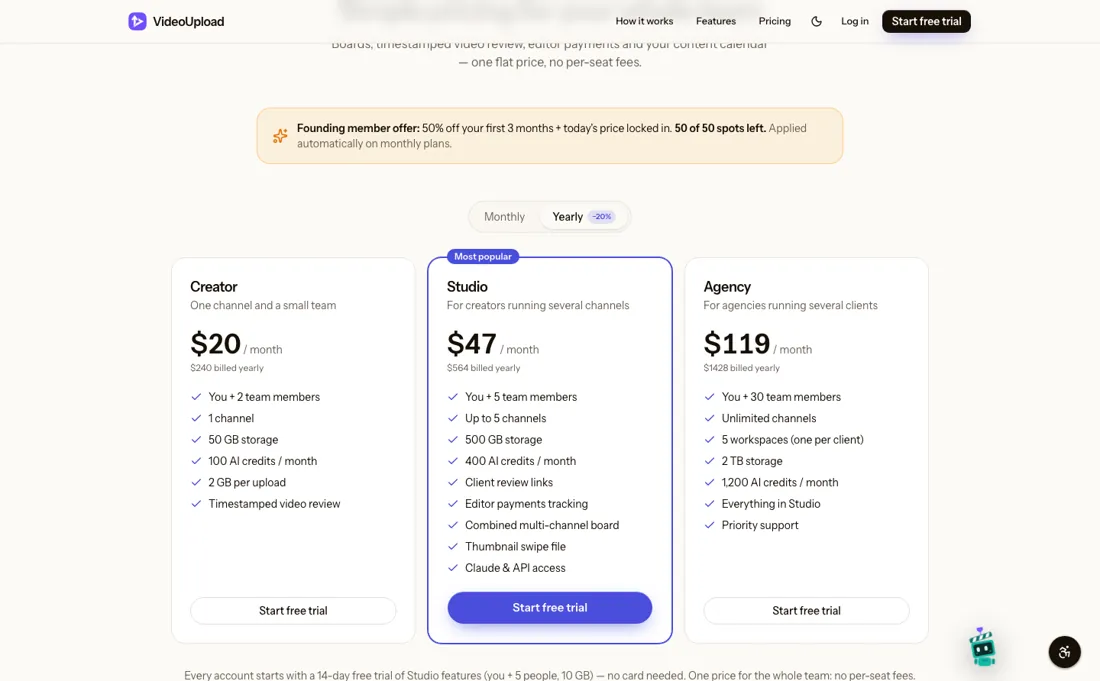
If you stop paying, uploaded video files are deleted after 30 days (boards, notes and comments are kept). The pricing page shows yearly per-month prices on the cards and monthly prices in the table, so read both. AI writing uses credits that reset monthly; extra credits are a paid top-up.
What VideoUpload does
Production board for YouTube teams: scripts, edits, timestamped video review and publishing to YouTube in one place, with editor payment tracking. One price per workspace; editors join free.

Studio if you run more than one channel
Creator is enough for one channel and a team of three. Studio is the step to take if you run several channels, want clients to review by link without an account, or want to track what each editor is owed; it also adds API and Claude access. Agency only makes sense when you need separate workspaces per client or a team above six people.
How to actually use VideoUpload
Start the 14-day free trial on videoupload.team; no card is needed and the trial includes Studio features for you and 5 people with 10 GB. Add your YouTube channels (the connection is Google-verified) and invite your editors, who join free. The board comes with stages from Idea to Uploaded, which you can change. Editors upload each version to the video's card; you leave comments pinned to the exact second and flip between versions.
When a video is approved, you write the title and description, or let the AI writer draft them from the transcript, pick a thumbnail and publish or schedule it on YouTube straight from the board, without downloading the file.
Distilled from VideoUpload's own website: the homepage and the pricing page with its FAQ, read on 3 November 2026. VideoUpload is an affiliate partner of ours through Lemon Squeezy. We have not used the software ourselves.
VideoUpload vs monday.com, side by side
Each column shows the vendor’s own published entry price, read on the date shown. Entry prices can cover different services or units, so check what each one buys. We do not average them into a score.
Both names above are affiliate links: we may earn a commission if you sign up, at no extra cost to you. Neither changes what this table says.
The natural comparison is monday.com — monday.com is in our dossiers as a general work-management board: on 23 October 2026 it had a free plan for 2 seats and Basic at $9 per seat a month. VideoUpload is built only for YouTube teams, with timestamped video review and direct publishing, and charges one price for the whole team instead of per seat.
Frequently asked questions
How much does VideoUpload cost?
Read on 3 November 2026: Creator $25 a month ($240 a year), Studio $59 a month ($564 a year) and Agency $149 a month ($1,428 a year). It is one price per workspace, with no per-seat fees.
Do my editors need to pay?
No. Only the workspace owner has a plan; editors, scriptwriters and designers join free within the plan's team limit (you + 2, you + 5 or you + 30).
Is there a free trial?
Yes, 14 days of Studio features for you and 5 people with 10 GB, without a card. There is also a full refund within 14 days of your first payment.
What happens to my videos if I stop paying?
Uploads pause and you can still open and download everything for 30 days. After that, uploaded video files are deleted, while boards, notes and comments are kept. VideoUpload says it emails you first.
How do the AI credits work?
From a transcript the AI writes 3 title ideas, a description, chapters, hashtags and tags. Fast costs 1 credit, Balanced 2 and Best 4 per roughly 30 minutes of video; monthly credits reset on the 1st and top-up credits never expire.
Is this a hands-on review of VideoUpload?
This is a researched assessment, not a hands-on test — where we've used a tool ourselves, we say so explicitly. We name what each tool is good and bad at, and we earn a commission only if you sign up, at no cost to you.
- Read 2026-11-03 on videoupload.team/pricing.
- A dated screenshot of that pricing page, kept on this site as the receipt.
Others in this category
Reviewed marketing tools that share ground with VideoUpload — comparable in what they do, not drop-in swaps:
New reviews, price changes we recorded, and the cost conditions we found. No sponsored placements. Unsubscribe anytime.
This is our researched assessment — not a paid placement. The “Visit” links on this page are affiliate links: we may earn a commission if you sign up, at no extra cost to you, and it never changes our take. How we review →