TiXel Review (2026)It Works, or It Tracks Nothing
 By Daan Haket · Researched and written with an AI assistant · who does what
The rating is the most useful number on this listing, but not for the reason an average usually is.
- Best for Shopify merchants running Meta and TikTok ads
From $19.99 · Unlimited Plan · per month, or $119.94 a year at a stated 50% saving · read 2026-11-02
Try TiXel →Affiliate link: we may earn a commission if you sign up, at no extra cost to you. It never changes our verdict.
Is TiXel right for you?
Your pain“Ad-blockers and Safari hide purchases from my browser pixel, so my ad numbers look worse than they are.”
Does TiXel solve it?Vendor says yesShopify App Store listing, 2 November 2026: the one paid plan includes server-side Events API pixels, and the rating reads 4.8 across 106 reviews.
Your planUnlimited Plan, $19.99 a month or $119.94 a year
Try TiXel →
Your pain“A pixel can install cleanly and record nothing, and I'd only find out after the trial ends.”
Does TiXel solve it?PartlyBuyer reports (Shopify App Store, August 2026): one-star reviews describe following the setup steps and getting no page views or add-to-carts, with no support reply.
Your planUnlimited Plan, with a one-day free trial; run a test purchase the same day
Try TiXel →
- you run one pixel for one brand, since Shopify's Meta and TikTok channels do that for nothing; or you cannot put real traffic through the store inside the one-day trial, because the reported failure is a pixel that installs cleanly and then tracks nothing.
The “Try” buttons are affiliate links: we may earn a commission if you sign up, at no extra cost to you, and it never changes our verdict.
Also in: Software for Shopify and online stores
Transparency: the “Visit” links on this page are affiliate links: we may earn a commission if you sign up, at no extra cost to you. No vendor can pay for a better review or verdict. How we make money →
- Checkout showed: What the checkout showed is in the claim table below
- Tax: Not shown before card details: the final amount with tax is unknown, not zero
- Renewal: Renews automatically
The app was installed on our Shopify development store, which we set up, and our AI assistant ran the test in our browser. We installed TiXel on our Shopify development store on 17 November 2026 to add a Meta or TikTok pixel. The app opened on a plan choice and the Shopify approval screens asked for a payment method, so we could not use the product. We never enter a card in a test.
How we tested
- Installed from the Shopify App Store on our development store; the plan screens and the payment step were read; nothing was approved or paid; the app was uninstalled after the test.
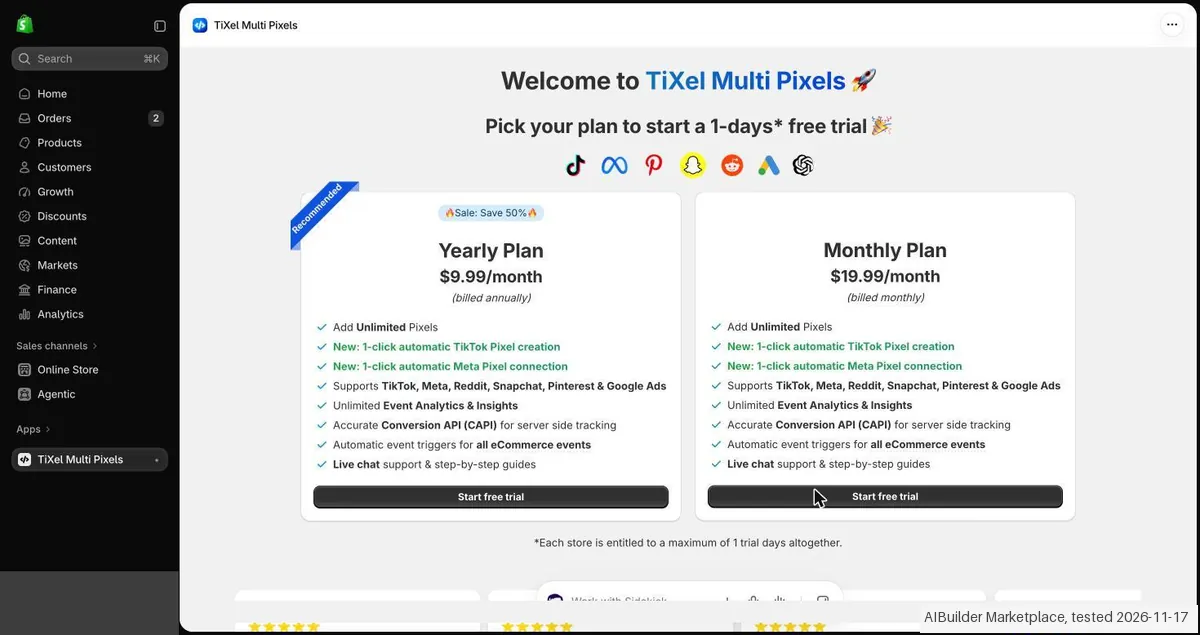
- The app opens on a plan choice: a Yearly Plan at $9.99/month billed annually and a Monthly Plan at $19.99/month. The trial is one day per store.
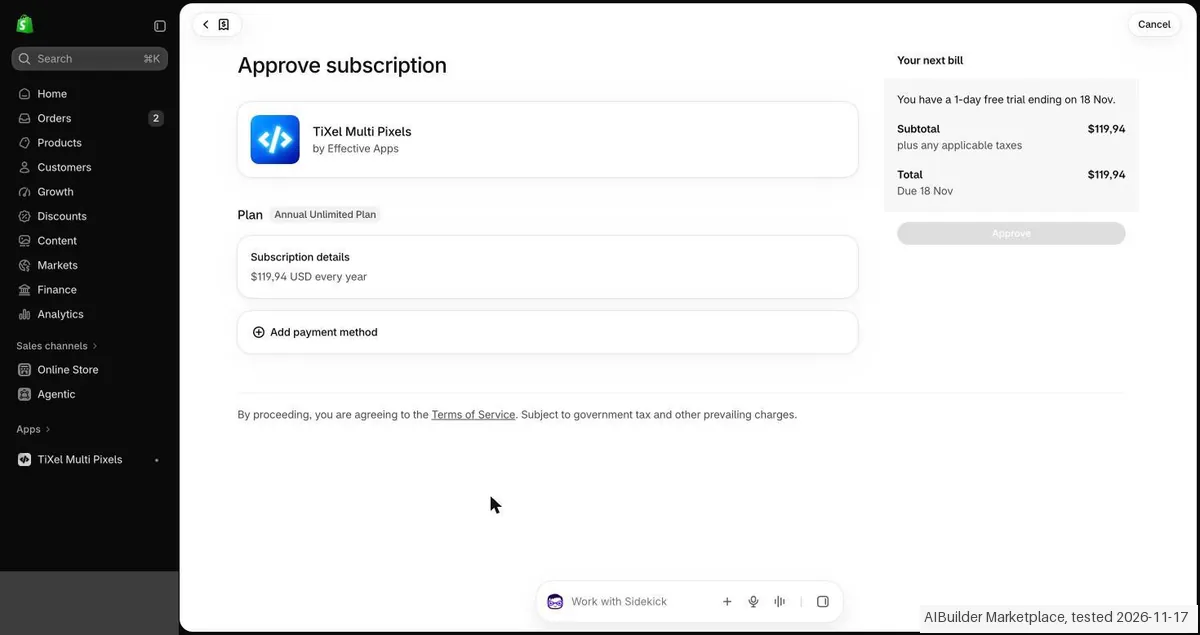
- Shopify asked $119,94 a year for the yearly plan and $19,99 every 30 days for the monthly plan. Both screens had an Add payment method row and a greyed out Approve button, with no test charge line.
- The listing names a free Development Stores plan. In our test (17 Nov 2026) the app did not offer it on our development store.
Pricing (2026)
✓ Pricing re-verified 2 Nov 2026
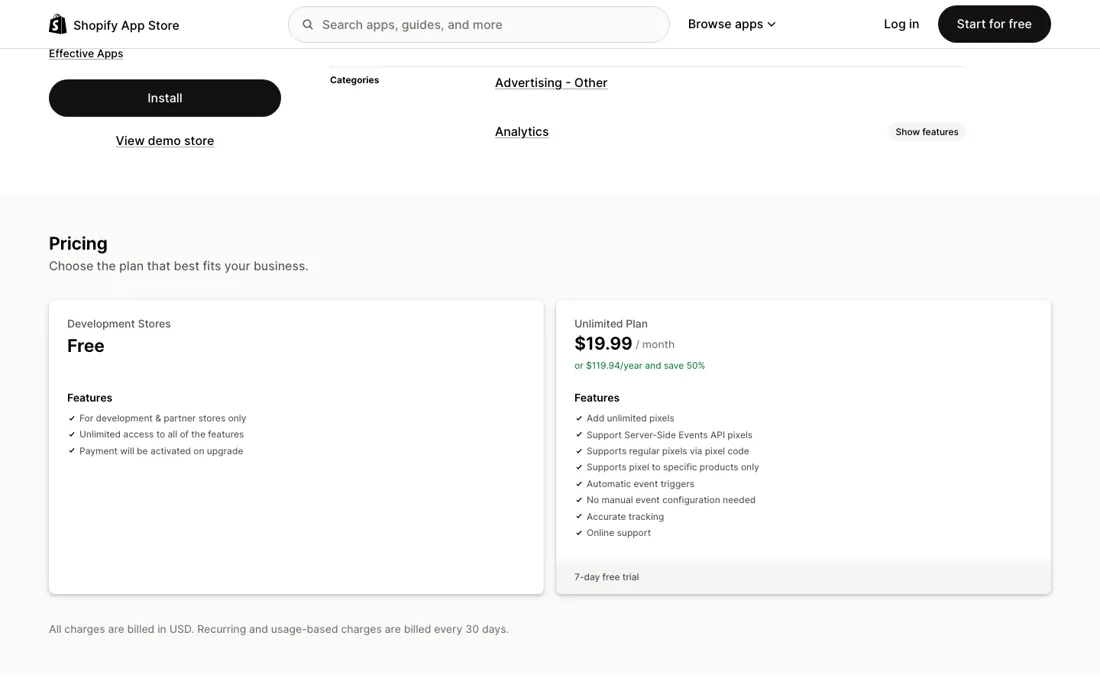
One paid plan and no ladder to climb, and the amounts are unchanged since 22 August 2026. Unlimited Plan is $19.99 a month, or $119.94 a year at a stated 50% saving, and carries unlimited pixels, server-side Events API pixels, regular pixels via pixel code, pixels scoped to specific products, automatic event triggers with no manual event configuration, accurate tracking and online support.
One term has changed again and it matters: the free trial is now one day, where the listing advertised seven in September and three in August. The other tier, Development Stores, is still free but only for development and partner stores, with billing activated on upgrade, the same shape as this developer's Blocky listing. Charges are in USD and recur every 30 days.
Developer Effective Apps, 13 Max Nordau, Ashdod, Israel; the app launched 19 October 2020. The review record has moved a long way: 106 reviews at 4.8 on 2 November 2026, up from 93 at 4.6 in September and 78 at 4.1 in August, distributed 97 five-star, 4 four-star, none at three or two, and 5 one-star. Plans change, so check the live price on their site before you buy.
Category context: Marketing. Across the 34 tools in this category that we researched with a public US-dollar price, the median entry price is $29 a month (lowest paid plan as listed, per seat where the vendor prices per seat). Compare pricing conditions in the Software Cost Atlas →
What the pricing page doesn’t say
Read on 18 September 2026 it is 4.6 across 93 reviews, and the shape behind it is 84 five-star, 3 four-star, nothing at three or two, and 6 one-star. A month earlier it was 4.1 across 78, with 7 at the bottom. Nothing sits in the middle on either reading. That is not a mediocre product; it is a binary one: it works immediately, or it installs cleanly and then tracks nothing at all.
The one-star reviews describe the same failure in the same words: the pixel is set up by the instructions, no page views or add-to-carts ever arrive, and support does not reply. We cannot verify what happened in any individual account, but the consistency of the complaint is itself information. What is new since August is that the developer now answers them in public. A reply dated 2 September 2026 attributes the empty data to manual pixel configuration, where one mismatched ID or event setting is enough to stop events being recorded at all, and says that step is no longer needed: TiXel now integrates officially with Meta and TikTok and links the pixel to your ad account automatically.
That is the vendor's account of its own worst reviews, so treat it as a claim to test rather than a fix to trust. It is at least a specific and checkable one, but the trial has shrunk to a single day (it was seven in September), which leaves very little room to check it before you are billed. On 2 November 2026 the record stood at 106 reviews, with 97 five-star and 5 one-star.
Watch the video review
The video version of this review, from our YouTube channel.
What TiXel does
Shopify app for Meta and TikTok pixels, with unlimited pixels, product-level scoping and server-side Events API tracking on one flat plan.
What buyers report about TiXel
Hands-on: stopped at payment step 2026-11-17Reported by buyers: Shopify App Store, read August 2026
Themes from the buyer-review sites listed at the foot of this page, read in August 2026. We installed TiXel on 2026-11-17, but the app asked for a payment method before it did anything, so we could not use the product; this is other buyers' experience rather than ours. We summarise it here because the complaints are usually the part a vendor page leaves out.
- • 68 of the 78 reviews are five stars and they are short, near-identical and almost all about setup speed and the support desk rather than about tracking: Reduceri Zilnice (United States, nine months, 9 March 2026) on accurate information and a support team on point, Fitnesa Kanāls (Latvia, over a year, 25 May 2026) on getting everything set up quickly, plus Renvero (United States, about two months), Vaiyra (United States, 23 days) and My Store (Netherlands, five days).
- • Filtering the listing to one, two and three stars returns exactly seven reviews and all seven are one-star: confirming there is no middle: 68 five, three four, none at three or two, seven at one.
- • Two of the most detailed describe the same failure in the same terms, and neither has a public reply from the developer under it. Solara (United States, two months, 17 June 2026): installed for a Facebook pixel, followed the setup instructions step by step, and got no page views and no add-to-carts at all, then no answer across several support attempts. dayzze.com (Egypt, three days, 15 April 2026) reports the same for a TikTok pixel, adding that the app kept trying to charge them and that support refused a refund.
- • Three more are about billing rather than tracking, and these the developer did answer publicly. fresh produced. (Belgium, three months, edited 8 February 2026) says a year was taken without their asking; Effective Apps replied on 3 February 2026 that Shopify requires manual approval for any charge, that their records show the subscription approved on 22 January 2026, and that a pixel was successfully installed afterwards. Akali Antwerp (Belgium, five days, 23 February 2026) says they were charged for a year and got no reply; the developer answered that the message had gone to a no-reply address of theirs. Pets Planet SA (South Africa, nine minutes, 16 December 2022) was stuck on the payment approval screen, which the developer attributed to Shopify's billing and later reported resolved. Two of the seven one-stars carry no text at all.
Where the ratings disagree. The distribution is the finding, because it is binary rather than mediocre: nothing sits at two or three stars. Either the pixel fires and the review is two lines of thanks, or nothing arrives at all and the review is a page long. Nobody has written the in-between review, which is what you would expect from a tool that either connects or does not. Set that against a three-day trial and the shape of the risk is clear: three days is enough to see the pixel installed but often not enough traffic to confirm events are landing, and the annual option at $119.94 sits right behind it. Two Belgian merchants say a year was taken they did not choose; the developer answers, with dates, that Shopify's own approval step makes that impossible. We cannot settle that from outside, and both accounts stay on the listing. What a buyer can do is treat the three days as a test with a deadline and verify events in the ad platform, not in the app, before the trial runs out.
Pages read (August 2026): Shopify App Store
When the paid plan is worth it
There is no upgrade decision here, so the only arithmetic is monthly against yearly. At $19.99 a month the year costs $239.88; at $119.94 paid up front it is half that. For a tool you either keep permanently or abandon in the first week, that saving is real, but the order matters. Prove the pixel fires before you buy a year of it. What the plan actually buys is worth reading against what you already have.
Shopify's own Meta and TikTok channels install pixels for free, and the case for paying $19.99 is the parts they do not cover: unlimited pixels on one store, server-side Events API alongside the browser pixel, and pixels scoped to individual products. If you run one pixel for one brand, the free channel apps may already be enough. The server-side piece is the strongest argument. Browser pixels lose events to ad-blockers and to Safari's tracking prevention, and the Events API is the standard answer.
If that is why you are here, it is the feature to verify first rather than the one to assume.
What happened when we installed TiXel
The first findings are at the top of this page. The rest:
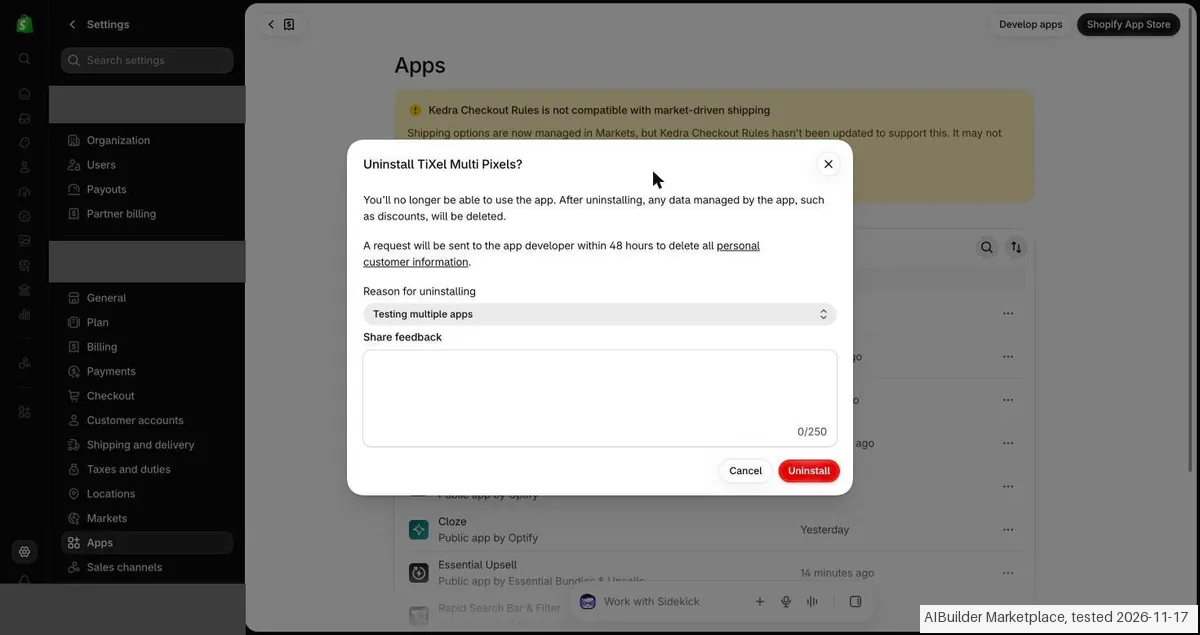
- The app was uninstalled after the test; nothing was paid.
Claim vs. what we measured
We set a claim from TiXel's own pages next to what we saw in our test, on the plan named. The status says whether the two describe the same thing and match; it is not a verdict on the product. Confirmations are listed too.
| What the vendor says | What we measured | Status | What it means if you buy |
|---|---|---|---|
| Free plan available. Free trial available.Source: our test notes, read 17 Nov 2026 | Measured 2026-11-17: The listing says Free plan available and shows a Development Stores plan, Free, for development and partner stores. In our test (17 Nov 2026) the app on our development store offered only the Yearly and the Monthly Plan, and both needed a payment method.Our test, 17 Nov 2026; Annual Unlimited Plan approval screen, not approved, development store | ContradictedThe free plan label on the listing against the plan screen in the app on a development store. | A development store cannot count on the free plan the listing names; in our test the app asked for a paid plan first. |
| *Each store is entitled to a maximum of 1 trial days altogether.Source: our test notes, read 17 Nov 2026 | Measured 2026-11-17: The plan screen and both approval screens show a trial of one day, ending on 18 Nov.Our test, 17 Nov 2026; Annual Unlimited Plan approval screen, not approved, development store | ConfirmedThe trial line in the app against the trial end date on the Shopify screens. | The trial lasts one day, so there is little time to check the tracking before the first charge. |
| $9.99/month (billed annually)Source: our test notes, read 17 Nov 2026 | Measured 2026-11-17: The yearly card in the app shows $9.99/month billed annually; Shopify charges $119,94 every year for it and the listing says $119.94/year, about $10 a month.Our test, 17 Nov 2026; Annual Unlimited Plan approval screen, not approved, development store | ConfirmedThe yearly card in the app against the yearly price on the listing. | The yearly plan costs $119.94 at once; the app shows it as $9.99 a month. |
| $119,94 USD every yearSource: our test notes, read 17 Nov 2026 | Measured 2026-11-17: The Shopify approval screen for the Annual Unlimited Plan shows a 1-day free trial ending on 18 Nov, total $119,94 due 18 Nov, $119,94 USD every year, Add payment method and a greyed out Approve; the monthly screen showed $19,99 USD every 30 days. There was no test charge line and nothing was approved.Our test, 17 Nov 2026; Annual Unlimited Plan approval screen, not approved, development store | ConfirmedThe yearly and monthly prices on the listing against the Shopify approval screens; no tax line was shown and no stored cost rule was compared. | The yearly price of $119.94 and the monthly price of $19.99 match the listing. |
Exit test: can you take your data out?
On 17 November 2026 the session installed TiXel (TiXel Multi Pixels in the admin) on a Shopify development store. The app opened on a plan choice with a Yearly and a Monthly plan and a trial of one day, and the Shopify approval screens asked for a payment method, so no pixel was added. The app was uninstalled; nothing was paid. Install: the install form was sent at about 22:38; the dialog Install app for TiXel Multi Pixels by Effective Apps asked for customer data, staff data and store data. The app opened at about 22:39 on Welcome to TiXel Multi Pixels. Core action NOT DONE: the app asks for a plan first and Shopify asks for a payment method for it. No pixel ID was entered, no Meta or TikTok connection was made and no event overview was seen. Plans in the app: Yearly Plan $9.99/month billed annually (Sale: Save 50%) and Monthly Plan $19.99/month billed monthly, both with Add Unlimited Pixels, 1-click automatic TikTok Pixel creation, 1-click automatic Meta Pixel connection, the Conversion API for server side tracking and automatic event triggers; each store gets at most 1 trial day altogether. No free Development plan was offered. Checkout: the yearly plan opened the Shopify screen Approve subscription: Annual Unlimited Plan, $119,94 USD every year, a 1-day free trial ending on 18 Nov, total $119,94 due 18 Nov, the row Add payment method and a greyed out Approve. The monthly plan showed Monthly Unlimited Plan, $19,99 USD every 30 days with the same trial and row. The line You will not be billed for this test charge was NOT on either screen, so nothing was approved and no card was entered. Cancelling: no subscription existed. Settings, Apps, Uninstall opened Uninstall TiXel Multi Pixels? which warns that data managed by the app will be deleted, says a request goes to the developer within 48 hours to delete personal customer information, and needs a reason (Testing multiple apps). Clean up: the app was uninstalled and is gone from Installed; no theme or product change. Our own tab was closed. No kit records were entered. Test date: 17 Nov 2026. We describe the friction rather than score it; this is one run with synthetic records, not a verdict on TiXel.
| What we checked | What we saw |
|---|---|
| Fields offered by the export dialog | |
| Not offered in the field selector | None noted. |
| The exported file | We did not inspect the file, so data retention and loss remain unverified. |
| Awkward but not lost | The trial lasts only one day per store, the app shows nothing before a plan is approved, and both approval screens needed a payment method with no test charge line. |
| Export route | No export or reimport was performed; no file was downloaded or examined. The two categorised kit records were not entered; the objects tested were not kit records. |
| Export format | No downloaded bytes examined. |
| Re-importing the export | No reimport performed. |
| Cancelling | No cancellation or downgrade performed. |
What the exit test does not show:
- Original store creation and identity check, which we did ourselves.
- Export and reimport.
- Session and source-reading date: 17 November 2026. Times are CET. The session started at about 22:38 CET. These are approximate tester observations, not benchmark timings. Midnight timestamps are required date anchors, not measured event times.
How this compares: across our exit tests of 257 tools, 60 gave us an export file. For TiXel no usable export file reached us during the test session. Report 08: can you get your data out?
Screenshots from our test (click to enlarge)
What this test does not show:
- Not tested: adding a Meta or TikTok pixel and seeing the event overview. The app asks for a payment method before it does anything.
- The pixel ID field, the test mode, the server side Conversion API and deduplication.
- The Development Stores plan the listing names, which the app did not offer on our development store.
- Any paid plan or trial; neither approval screen was approved.
Most of our reviews are researched rather than run. How we review explains which is which, and why we do not pretend otherwise.
How to actually use TiXel
Install it when you can test it the same day. The trial is one day as of 2 November 2026 (it was seven in September and three in August), and the failure this app is criticised for is not a crash but a silence: the pixel appears installed and no events arrive. You need traffic through the store to tell those apart. So verify rather than assume. Fire a test view, an add-to-cart and a checkout yourself, then open Meta Events Manager or TikTok Events and confirm all three arrived with the right event names.
Do it within the trial day, while uninstalling is still an option rather than an argument about a refund. Take the official route in while you are there: the developer says TiXel now connects straight to your Meta and TikTok ad accounts and links the pixel for you, which removes the manual step its worst reviews describe. And if server-side tracking is why you came, test it separately.
Distilled from apps.shopify.com/tixel, plan cards, the trial length, the review distribution and the developer's public reply of 2 September 2026. First read 22 August 2026, re-read 18 September 2026. For the product-specific pixel question: the Unlimited plan card on apps.shopify.com/tixel, read on 26 October 2026. Plan cards, trial length (now one day) and the review distribution re-read on 2 November 2026.
Frequently asked questions
Can you export your data from TiXel?
Exit check 2026-11-17; route excerpt: No export or reimport was performed; came along (excerpts): not tested; lost (excerpts): not tested; re-import: not tested.
How long is the free trial, and is it enough?
One day as of 2 November 2026, and that is short. The listing said three days in August and seven in September, so check the current card before you install. One day is only enough if you are ready to test the moment you install: put a genuine view, add-to-cart and checkout through the store straight away, then check Meta Events Manager or TikTok Events for all three by name. If they are not there before the trial runs out, uninstall rather than wait. Do not install it on a quiet day or leave the verification to the end, because the reported failure mode is silent and looks exactly like a correct installation until you go and look at the other side.
Why pay $19.99 when Shopify's Meta and TikTok channels install a pixel free?
For most stores you should not, and that is the honest answer. The free channel apps handle the ordinary case: one pixel, one brand, standard events. What this charges for is the cases they do not cover: unlimited pixels on a single store, which matters if you run several brands or agencies through one shop, pixels scoped to specific products, and server-side Events API pixels alongside the browser one. That last is the strongest reason to pay: browser pixels lose events to ad-blockers and to Safari's tracking prevention, and the Events API is the standard answer to it. If none of those three describe you, the free channels are not a compromise. At $19.99 a month or $119.94 a year the decision is small either way, but prove the pixel fires before you buy twelve months of it.
How do I check the server-side tracking is really sending?
Check it as its own test, because a working browser pixel proves nothing about it. In Meta Events Manager the two arrive as different connection methods (browser and server) and an event can show up under one while the other sends nothing at all; a rising total event count is not evidence. Fire a purchase or a checkout yourself, then look at the event's source rather than its tally, and check the deduplication is working so one order is not counted twice. Do this inside the trial. The app's plan text promises server-side Events API pixels and automatic event triggers with no manual configuration, so if the server source is empty after real traffic, that is the feature you are paying for not working, and it is a support question while you still owe nothing.
Can I fire a pixel only on certain products?
Yes, on the top tier. The Shopify App Store listing, read on 26 October 2026, lists support for a pixel on specific products only under the Unlimited plan. If you run separate ad accounts or brands per product line, that is the feature to check; whether events then reach the right pixel is worth confirming in Meta Events Manager during the trial.
Is this a hands-on review of TiXel?
No. We tried to start a trial of TiXel on 2026-11-17 and the app asked for a payment method before it did anything, so this is a researched assessment; the section above shows what happened. We name what each tool is good and bad at, and we earn a commission only if you sign up, at no cost to you.
- Buyer reviews on Shopify App Store (listing slug tixel; 78 reviews, plus the one-, two- and three-star filter read separately), read August 2026.
- Re-verified 2026-11-02 on apps.shopify.com/tixel.
- A dated screenshot of that pricing page, kept on this site as the receipt.
- Our own install of TiXel (2026-11-17), which stopped at the payment step, written up in full further down this page.
Bottom line
In one line: The free trial is now one day, and the one-star reviews describe a pixel that installs cleanly and then records nothing, so test events the day you install.
Best for: Shopify merchants running Meta and TikTok ads.
The Try button is an affiliate link; we may earn a commission at no extra cost to you.
Others in this category
Reviewed marketing tools that share ground with TiXel. They are comparable in what they do, not drop-in swaps:
New reviews, price changes we recorded, and the cost conditions we found. No sponsored placements. Unsubscribe anytime.
This is our researched assessment, not a paid placement. The “Visit” links on this page are affiliate links: we may earn a commission if you sign up, at no extra cost to you, and it never changes our take. How we review →