PageFly Review (2026)Free Plan, Paid From $24 a Month
 By Daan Haket · Tested hands-on · written with an AI assistant · who does what
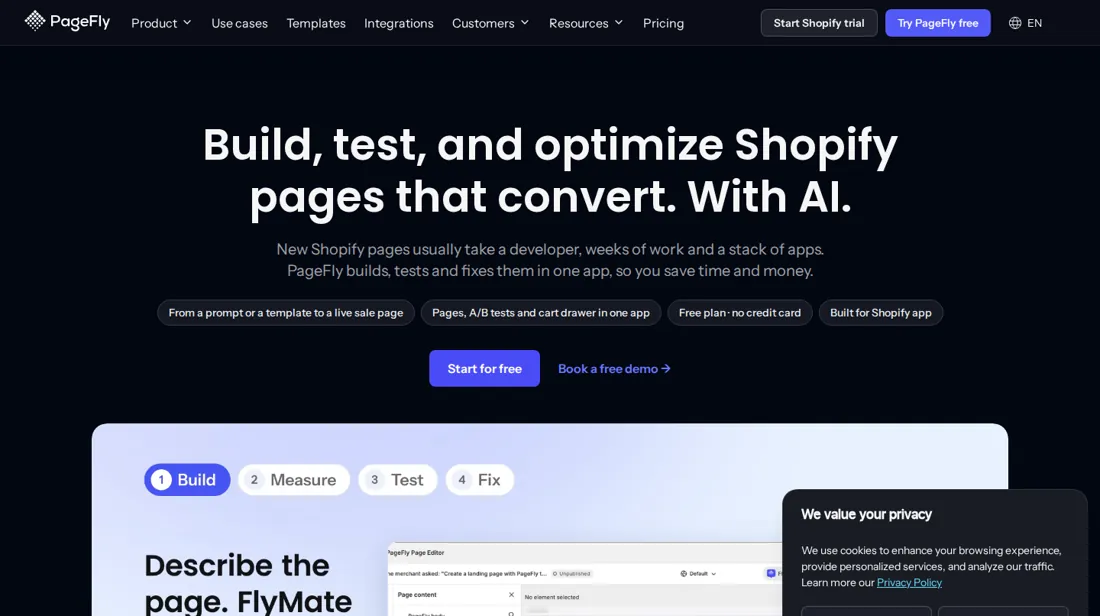
The price depends on how many pages you publish, and the website and the App Store list different plan ladders (the website shows Optimize and Power, the listing shows Enterprise at $299).
- Best for Shopify stores running paid traffic to landing pages
- Not for stores that only need a few new theme sections
From $24 · Builder · per month for 5 published pages or sections and 80 AI credits, billed · read 2026-11-17
Try PageFly free →Affiliate link: we may earn a commission if you sign up, at no extra cost to you. It never changes our verdict.
Is PageFly right for you?
Your pain“We pay for clicks and send them to a template page that nobody has ever tested against another version.”
Does PageFly solve it?Vendor says yesPricing page, read 17 Nov 2026: Optimize lists A/B testing, heatmaps on 10 pages and a sales funnel, and Accelerate adds unlimited pages. These are vendor claims we have not tested.
Your planOptimize, $39 a month for 20 pages or sections
Try PageFly →
Your pain“A developer quote for one landing page costs more than the campaign will earn in its first month.”
Does PageFly solve it?PartlyOur test (18 Nov 2026): a free template page appeared in the editor 2 minutes after install, no card. The store preview worked only after saving, and the page needs the theme app embed to go live.
Your planFree plan: 1 page, 10 AI credits, no card. Builder is $24 a month, with a $1 first month offer in the app.
Try PageFly →
- Stores that only need a few new theme sections. Pricing page, read 17 Nov 2026: the free plan allows 1 published page or section and Builder starts at $24 a month for 5, which is a page-builder price for a section-sized job. Better fit: Section Library.
The “Try” buttons are affiliate links: we may earn a commission if you sign up, at no extra cost to you, and it never changes our verdict.
Also in: Software for freelancers and solo businesses · Software for Shopify and online stores
Transparency: the “Visit” links on this page are affiliate links: we may earn a commission if you sign up, at no extra cost to you. No vendor can pay for a better review or verdict. How we make money →
The app was installed on our Shopify development store, which Daan set up, and our AI assistant ran the test in Daan's browser. On 18 November 2026 the session tested PageFly (PageFly AI Page Builder) on a Shopify development store: the install without a separate account, a short setup, a Coming soon page from a template in the editor about 1.5 minutes after the install, saved and previewed on the store but not published, the yellow bar that the app embed is off in the theme, the plan page with Builder, Optimize and Accelerate, a pop-up offering Builder for $1 in the first month, and the uninstall dialog, which asks for a reason. Nothing was paid, approved or published.
How we tested
- Installed from the Shopify App Store on our development store; a template page was built in the editor, saved and previewed, not published; the plan screens were read; nothing was paid or approved; the app was uninstalled after the test.
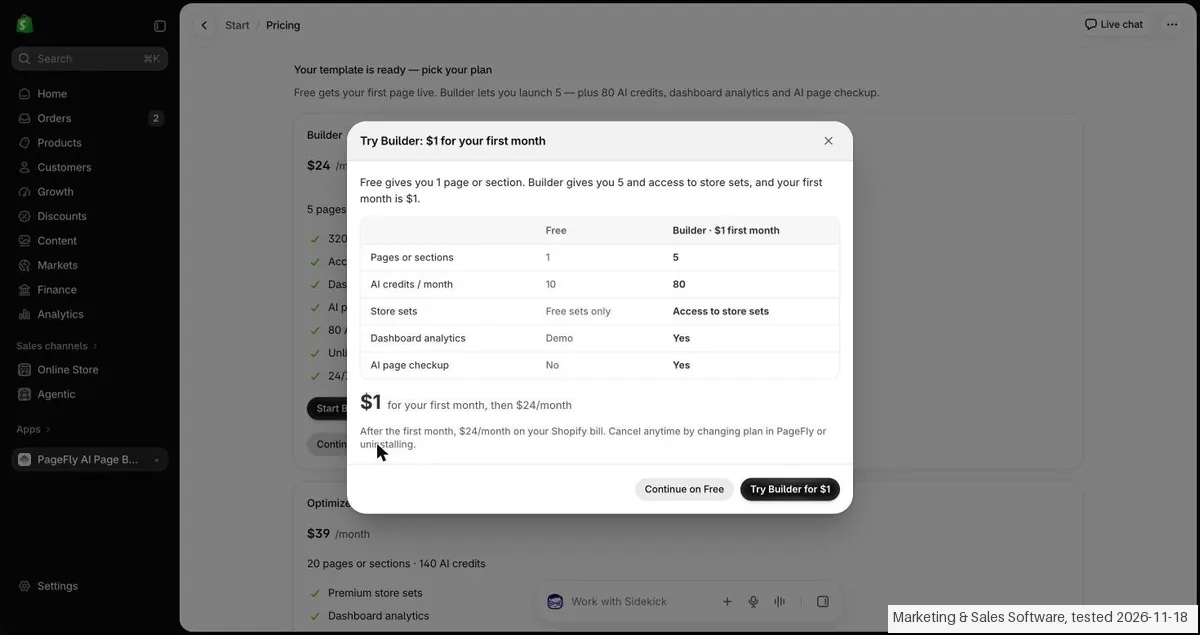
- Text we checked: "1 published slot". What we saw: The listing gives Free 1 published slot (1 page or 1 section) and 10 AI credits per month. In our test (18 Nov 2026) the app pop-up showed Free with 1 page or section and 10 AI credits a month, store sets Free sets only, dashboard analytics Demo and AI page checkup No.
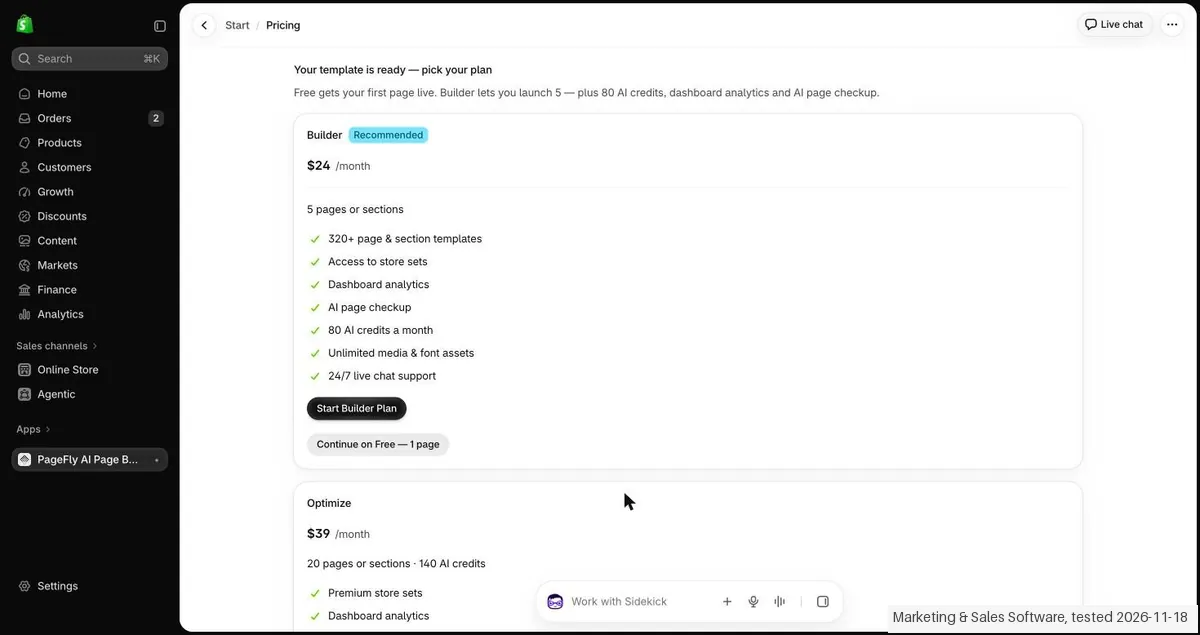
- Text we checked: "$24 /month". What we saw: The listing shows Builder at $24 / month from 5 published pages or sections and from 80 AI credits per month. In our test (18 Nov 2026) the plan page showed Builder (Recommended) at $24 /month with 5 pages or sections and 80 AI credits a month.
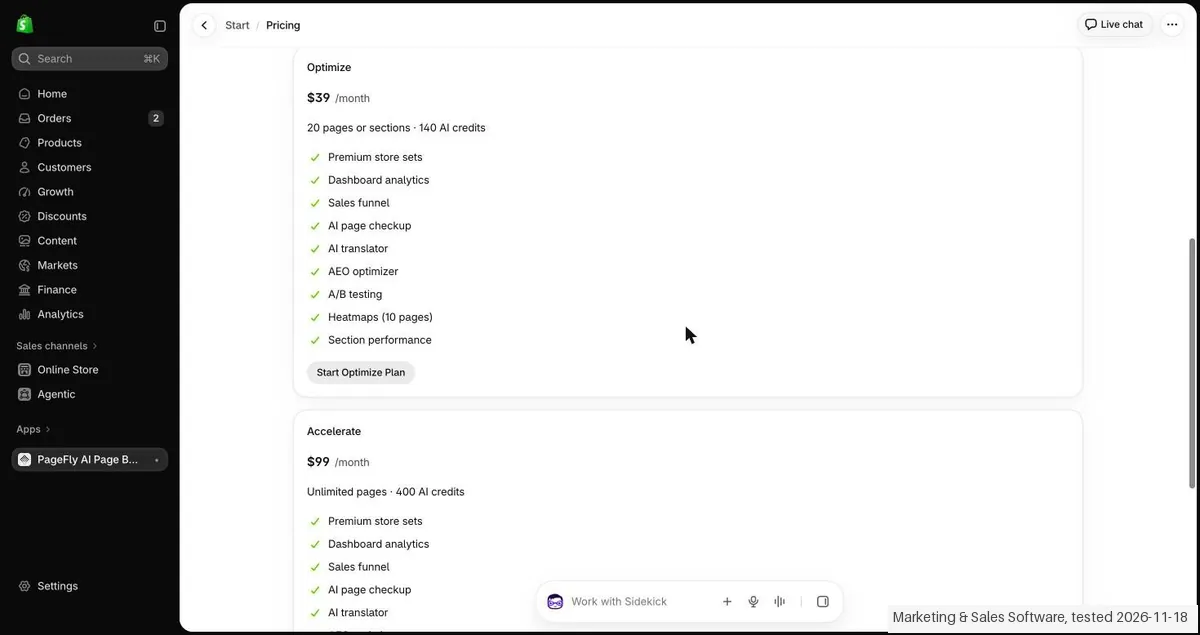
- Text we checked: "$99 /month". What we saw: The listing shows Accelerate at $99 / month or $990/year with unlimited published pages and 400 AI credits per month. In our test (18 Nov 2026) the plan page showed Accelerate at $99 /month with unlimited pages and 400 AI credits; the yearly price was not seen in the app.
Pricing (2026)
✓ Pricing re-verified 17 Nov 2026
| This tool | $24 | 44th cheapest of 66 |
| Cheapest | $4.95 | Essent Preorder Back in Stock |
| Median | $19 | |
| Most expensive | $1,500 | Superfiliate |
Lowest paid entry price per account a month, billed monthly, in USD, among the 66 e-commerce growth apps we have researched (read between 2026-08-24 and 2026-11-18). Only tools priced in the same unit and on the same billing are compared. This is not a market survey, and cheapest is not best.
Free: $0, 1 published page or section, 10 AI credits a month, 320+ templates, demo dashboard, no card. Builder: $24 a month for 5 pages or sections and 80 AI credits; the website says the price moves with a slot slider and the App Store lists $5 per 5 extra pages or sections. Optimize: $39 a month for 20 pages or sections, 140 AI credits, A/B testing, heatmaps on 10 pages, sales funnel.
Accelerate: $99 a month or $990 a year, unlimited pages and sections, full CRO suite (A/B testing, heatmaps, AEO optimizer, cart drawer). Power: $199 a month or $1,990 a year (listed on the website only). Enterprise tiers for Shopify Plus and multi-store brands: Scale $299, Dominate $499, Empire $999 a month. 30-day money-back guarantee on the first payment of a paid plan, once per store. Plans change, so check the live price on their site before you buy.
Category context: E-commerce. Across the 62 tools in this category that we researched with a public US-dollar price, the median entry price is about $14 a month (lowest paid plan as listed, per seat where the vendor prices per seat). PageFly’s entry price of $24 a month sits above that median. Compare pricing conditions in the Software Cost Atlas →
What the pricing page doesn’t say
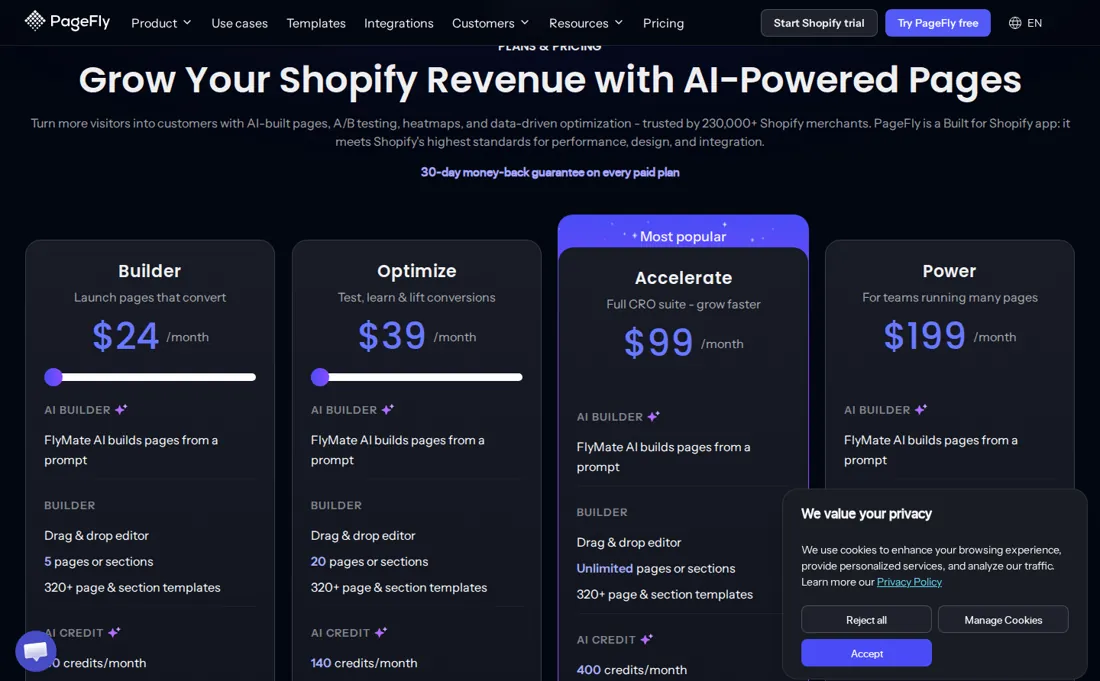
The free plan allows only one published page or section, and A/B testing starts on the $39 plan. We ran the free plan on a development store on 18 November 2026; the paid plans and the live-store result of the page are untested by us.
What PageFly does
Shopify page builder with an AI page generator, drag-and-drop editor, 320+ templates, A/B testing and heatmaps; a free plan covers one published page, paid plans tier by page count.
Builder lifts 1 page to 5; A/B testing starts on Optimize at $39
Builder is the first paid plan and lifts the limit from 1 published page or section to 5, with 80 AI credits a month instead of 10 and live dashboard analytics. Optimize at $39 adds A/B testing, heatmaps on 10 pages and a sales funnel, which is the first plan where you can test one page version against another. Accelerate at $99 removes the page limit and adds unlimited heatmaps in the CRO suite. Most stores with a few campaign pages will sit on Builder or Optimize.
What we found running PageFly ourselves
The first findings are at the top of this page. The rest:
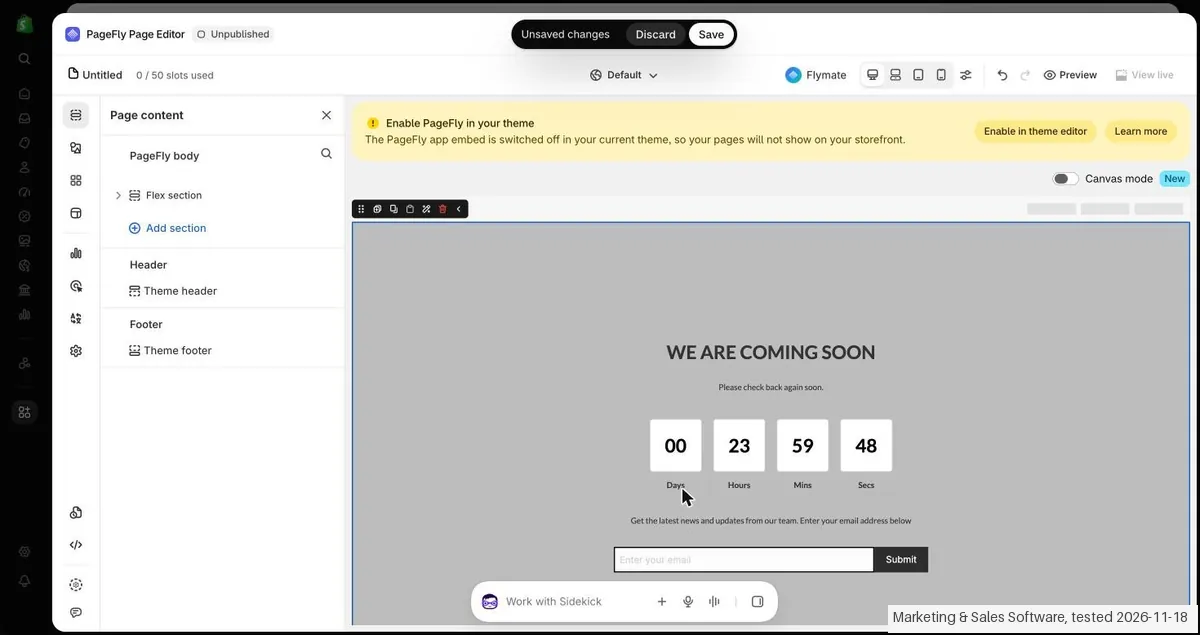
- Text we checked: "Once saved, the page will be ready for preview". What we saw: Preview before saving gave Not found on the store. After Save the Preview showed the page inside the theme header and footer with heading, text and e-mail field, but the countdown was empty and the editor bar still said Untitled.
Claim vs. what we measured
We set a claim from PageFly's own pages next to what we saw in our test, on the plan named. The status says whether the two describe the same thing and match; it is not a verdict on the product. Confirmations are listed too.
| What the vendor says | What we measured | Status | What it means if you buy |
|---|---|---|---|
| 1 published slotSource: our test notes, read 18 Nov 2026 | Measured 2026-11-18: The listing gives Free 1 published slot (1 page or 1 section) and 10 AI credits per month. In our test (18 Nov 2026) the app pop-up showed Free with 1 page or section and 10 AI credits a month, store sets Free sets only, dashboard analytics Demo and AI page checkup No.Our test, 18 Nov 2026; Free plan only; the plan page and the $1 pop-up were read, no plan was started | ConfirmedThe Free line on the listing against the Free column of the pop-up in the app; the limit was not run into, because nothing was published. | The free plan lets you put one page or section live with 10 AI credits a month; for more you need a paid plan. |
| 0 / 50 slots usedSource: our test notes, read 18 Nov 2026 | Measured 2026-11-18: In our test (18 Nov 2026) the editor bar said 0 / 50 slots used while the account was on the free plan that promises 1 page. Nothing was published, so it is not known whether the app stops at 1 or at 50.Our test, 18 Nov 2026; Free plan only; the plan page and the $1 pop-up were read, no plan was started | Not testableThe editor counter against the plan limit of 1 page; no second page was made and nothing was published. | The counter in the editor does not tell you the real limit of the free plan; count on 1 page. |
| $24 /monthSource: our test notes, read 18 Nov 2026 | Measured 2026-11-18: The listing shows Builder at $24 / month from 5 published pages or sections and from 80 AI credits per month. In our test (18 Nov 2026) the plan page showed Builder (Recommended) at $24 /month with 5 pages or sections and 80 AI credits a month.Our test, 18 Nov 2026; Free plan only; the plan page and the $1 pop-up were read, no plan was started | ConfirmedThe Builder price on the listing against the plan page in the app; Builder was not started. | Builder costs $24 a month for 5 pages or sections, on the listing and in the app. |
| Try Builder: $1 for your first monthSource: our test notes, read 18 Nov 2026 | Measured 2026-11-18: In our test (18 Nov 2026) the button to continue on Free opened a pop-up offering Builder at $1 for the first month, then $24/month on the Shopify bill. The listing does not mention this offer. The offer was not accepted.Our test, 18 Nov 2026; Free plan only; the plan page and the $1 pop-up were read, no plan was started | Not testableThe pop-up in the app against a listing that names no first month offer; no approval screen was opened for it. | You may be offered Builder for $1 in the first month, but this offer is not on the listing and was not tried. |
| $39 /monthSource: our test notes, read 18 Nov 2026 | Measured 2026-11-18: In our test (18 Nov 2026) the plan page showed Optimize at $39 /month with 20 pages or sections and 140 AI credits, A/B testing, heatmaps for 10 pages and an AEO optimizer. The listing of 18 Nov 2026 names no Optimize plan.Our test, 18 Nov 2026; Free plan only; the plan page and the $1 pop-up were read, no plan was started | Not comparableThe Optimize column in the app against a listing without that plan; there is no listing price to compare it with. | There is a middle plan at $39 in the app that the listing does not show, so the listing is not the full price list. |
| $99 /monthSource: our test notes, read 18 Nov 2026 | Measured 2026-11-18: The listing shows Accelerate at $99 / month or $990/year with unlimited published pages and 400 AI credits per month. In our test (18 Nov 2026) the plan page showed Accelerate at $99 /month with unlimited pages and 400 AI credits; the yearly price was not seen in the app.Our test, 18 Nov 2026; Free plan only; the plan page and the $1 pop-up were read, no plan was started | ConfirmedThe Accelerate price on the listing against the plan page in the app; the yearly option was not seen in the app. | Accelerate costs $99 a month for unlimited pages; a yearly price of $990 is on the listing only. |
| Enterprise $299Source: our test notes, read 18 Nov 2026 | Measured 2026-11-18: The listing shows Enterprise at $299 / month with 1,600 AI credits per month. The app showed no Enterprise plan in our test (18 Nov 2026).Our test, 18 Nov 2026; Free plan only; the plan page and the $1 pop-up were read, no plan was started | Not testableThe Enterprise line on the listing against a plan page in the app that does not show it. | Enterprise is on the listing only; how to get it from inside the app was not seen. |
| AI Page CheckupSource: our test notes, read 18 Nov 2026 | Measured 2026-11-18: The listing names AI Page Checkup under Accelerate. In our test (18 Nov 2026) the app listed AI page checkup for Builder, Optimize and Accelerate and the pop-up said Yes for Builder and No for Free. The feature was not tried.Our test, 18 Nov 2026; Free plan only; the plan page and the $1 pop-up were read, no plan was started | Not testableThe feature lists on the listing and in the app against each other; neither plan was started. | Whether AI Page Checkup comes with Builder or only with Accelerate depends on whether you read the app or the listing. |
| A short setup first. About 3 minutes.Source: our test notes, read 18 Nov 2026 | Measured 2026-11-18: The onboarding promised about 3 minutes. The template page was open in the editor at 13:10:41, about 1.5 minutes after Install was confirmed and 2 minutes after the start, after 8 to 9 clicks.Our test, 18 Nov 2026; Free plan only; the plan page and the $1 pop-up were read, no plan was started | Not comparableAI-assisted browser test includes pauses and waiting for Daan; record screens and prerequisites, not human time-to-value. | You can have a first page from a template in the editor within a few minutes of installing. |
| No AI credits neededSource: our test notes, read 18 Nov 2026 | Measured 2026-11-18: The template route said No AI credits needed and the Coming soon template opened without any credit prompt. The credit balance was not read before and after, so the use of credits was not measured.Our test, 18 Nov 2026; Free plan only; the plan page and the $1 pop-up were read, no plan was started | Not testableThe label on the template route against a credit balance that was not read. | Building from a template looks free of credits, which matters on a free plan with 10 credits. |
| Once saved, the page will be ready for preview.Source: our test notes, read 18 Nov 2026 | Measured 2026-11-18: Preview before saving gave Not found on the store. After Save the Preview showed the page inside the theme header and footer with heading, text and e-mail field, but the countdown was empty and the editor bar still said Untitled.Our test, 18 Nov 2026; Free plan only; the plan page and the $1 pop-up were read, no plan was started | ConfirmedThe text of the save dialog against the Preview before and after saving; the page was not published. | You have to save before you can preview, and the preview may not show every element of the template. |
| The PageFly app embed is switched off in your current theme, so your pages will not show on your storefront.Source: our test notes, read 18 Nov 2026 | Measured 2026-11-18: The editor showed this bar after the template was opened. The app embed was not switched on and the page was not published, so the page was never seen on the live storefront.Our test, 18 Nov 2026; Free plan only; the plan page and the $1 pop-up were read, no plan was started | Not testableThe warning in the editor against a theme that was left unchanged; publishing was left out on purpose. | Before a PageFly page is visible to shoppers you have to switch on the app embed in your theme, which changes the theme and was not done here. |
| $1 for your first month, then $24/monthSource: our test notes, read 18 Nov 2026 | Measured 2026-11-18: No Shopify approval screen was reached: Continue on Free was chosen in the pop-up, so no total, tax, term or payment step was seen for any plan.Our test, 18 Nov 2026; Free plan only; the plan page and the $1 pop-up were read, no plan was started | Not testableThe prices on the plan page and the pop-up against a Shopify approval screen that never appeared; no tax line, term or stored cost rule was compared. | No price you would pay was seen on a Shopify approval screen, so only the plan page and the pop-up are confirmed. |
Exit test: can you take your data out?
The app was installed on our Shopify development store, which Daan set up, and our AI assistant ran the test in Daan's browser. On 18 November 2026 the session tested PageFly (PageFly AI Page Builder) on a Shopify development store: the install without a separate account, a short setup, a Coming soon page from a template in the editor about 1.5 minutes after the install, saved and previewed on the store but not published, the yellow bar that the app embed is off in the theme, the plan page with Builder, Optimize and Accelerate, a pop-up offering Builder for $1 in the first month, and the uninstall dialog, which asks for a reason. Nothing was paid, approved or published. Install: the App Store listing was opened at 13:08 and the install form was sent in our own tab. Shopify showed its Install app screen with three data blocks (customer data, staff data and store data) and Install was confirmed at about 13:09. No separate PageFly account, e-mail address or password was asked. The onboarding said A short setup first. About 3 minutes. It had a box to accept all cookies, which was left off, and it said that the app embed has to be switched on in the theme before pages can show on the storefront. After Next the app asked how to build the first page: Build with AI in PageFly (Free plan: 10 AI credits, 1 page or section) or Browse templates (No AI credits needed), plus rebuilding pages from the current site and importing PageFly pages. Core action: Browse templates, the Templates tab (135 templates) and the Pixel Coming soon template, without AI credits. The page was open in the PageFly editor at 13:10:41, about 1.5 minutes after Install was confirmed and 2 minutes after the start, after 8 to 9 clicks. The editor showed Page content, a Flex section, 0 / 50 slots used and a yellow bar Enable PageFly in your theme, which said the app embed is switched off in the current theme, so the pages will not show on the storefront. The template has the heading WE ARE COMING SOON, a countdown (Days, Hours, Mins, Secs) and an e-mail field with Submit. Preview before saving opened the store address of the PageFly preview and gave Not found. After Save (a dialog with a Page title field that says the page will be ready for preview once saved and must be published to go live) the Preview showed the page on the store inside the theme header and footer: heading, text and e-mail field were there, but the countdown was empty. The title stayed Untitled in the editor bar although the title Coming soon test was typed. The page was saved but NOT published; the theme was not changed and the app embed was not switched on. Plans in our test (18 Nov 2026): after the template the app showed a plan page that says Free gets your first page live and Builder lets you launch 5 with 80 AI credits, dashboard analytics and AI page checkup. Builder (Recommended) $24 /month, 5 pages or sections, 80 AI credits a month; Optimize $39 /month, 20 pages or sections and 140 AI credits, with A/B testing, heatmaps for 10 pages and an AEO optimizer; Accelerate $99 /month, unlimited pages and 400 AI credits, heatmaps for 50 pages. The button to continue on Free opened a pop-up Try Builder: $1 for your first month (Free 1 page and 10 AI credits against Builder 5 and 80), then $24/month on the Shopify bill. Continue on Free was chosen; no Shopify approval screen came up, nothing was approved and no card or payment method was seen. Listing: The live App Store listing apps.shopify.com/pagefly, read again on 18 Nov 2026 just before this delivery, is titled PageFly AI Page Builder (with a star sign between the words), has the label Free plan available and a rating of 4.9 from 5,924 reviews. It lists Free (1 published slot, 1 page or 1 section, 10 AI credits per month), Builder at $24 / month (from 5 published pages or sections, from 80 AI credits per month, with $5 per 5 extra pages or sections as an option), Accelerate at $99 / month or $990/year (unlimited published pages and sections, 400 AI credits per month, with AI Page Checkup) and Enterprise at $299 / month (1,600 AI credits per month). The listing names no Optimize plan and no $1 first month. So the listing confirms Free, Builder at $24 and Accelerate at $99. Optimize at $39 and the $1 first month were seen only in the app, in our test (18 Nov 2026). Enterprise, the yearly price and the extra slots were seen only on the listing. The listing names AI Page Checkup under Accelerate, while the app lists it for Builder. The editor counter 0 / 50 slots used on the free plan does not match the 1 page that Free promises. Cancelling: no paid plan was started, so there was nothing to cancel. Plan and app both end through Settings, Apps, the PageFly row, the menu and Uninstall. The dialog says the app can no longer be used, that data managed by the app will be deleted and that a request goes to the developer within 48 hours to delete personal customer information. A reason is required before Uninstall becomes active; feedback is optional. Not tested: the paid plans (Builder, Optimize, Accelerate), the $1 first month, A/B testing, heatmaps, AI Page Checkup, building a page with AI credits (FlyMate), store sets, theme sections, the MCP connector, publishing to the live store, switching on the app embed and whether the countdown works once the embed is on. Clean up: our preview tab and the admin tab were closed. The app was uninstalled through Settings, Apps with the reason Testing multiple apps and Shopify confirmed the uninstall. The saved, unpublished page goes with the app data. No theme change was saved, no product was made and other apps were not touched. The price fields are not changed here. No kit records were entered. Test date: 18 Nov 2026. We describe the friction rather than score it; this is one run with synthetic records, not a verdict on PageFly.
| What we checked | What we saw |
|---|---|
| Fields offered by the export dialog | |
| Not offered in the field selector | None noted. |
| The exported file | We did not inspect the file, so data retention and loss remain unverified. |
| Awkward but not lost | A page made in PageFly does not show on the storefront until you switch on the app embed in your theme, and the Preview only works after Save. The countdown of the template was empty in the preview. The title we typed did not show in the editor bar, which kept saying Untitled. The editor said 0 / 50 slots used on a free plan that promises 1 page. The plans in the app and on the listing differ: the app shows Optimize at $39 and a $1 first month for Builder, the listing shows neither but names Enterprise at $299 and a yearly price for Accelerate. |
| Export route | No export or reimport was performed; no file was downloaded or examined. The two categorised kit records were not entered; the objects tested were not kit records. |
| Export format | No downloaded bytes examined. |
| Re-importing the export | No reimport performed. |
| Cancelling | No cancellation or downgrade performed. |
What the exit test does not show:
- Session and source-reading date: 18 November 2026. Times are CET. The session started at about 13:08 CET. These are approximate tester observations, not benchmark timings. Midnight timestamps are required date anchors, not measured event times.
Screenshots from our test (click to enlarge)
What this test does not show:
- Original store creation and identity check, which Daan did himself.
- The paid plans (Builder, Optimize, Accelerate) and the $1 first month.
- A/B testing, heatmaps, AI Page Checkup and building a page with AI credits.
- Store sets, theme sections and the MCP connector.
- Publishing to the live store, switching on the app embed and whether the countdown works then.
- Export and reimport.
Most of our reviews are researched rather than run. How we review explains which is which, and why we do not pretend otherwise.
How to actually use PageFly
Install PageFly from the Shopify App Store and start on the free plan, which needs no credit card. Publish one landing page from a template, or describe the page to the AI builder, and check how many of your 10 monthly AI credits that uses. Because the free plan allows one published page or section, decide which page matters most before you build. We have not run an account ourselves yet, so we cannot say how long a first page takes or how clean the output is.
Distilled from pagefly.io/pages/pricing (rendered page) and apps.shopify.com/pagefly, read on 17 November 2026. The listing showed rating 4.9 from 5,926 reviews and a launch date of 28 September 2017. PageFly is an affiliate partner of ours through its own partner programme, and we may earn a commission if you buy through our link. We have not paid for a plan.
PageFly vs Section Library, side by side
Each column shows the vendor’s own published entry price, read on the date shown. Entry prices can cover different services or units, so check what each one buys. We do not average them into a score.
Both names above are affiliate links: we may earn a commission if you sign up, at no extra cost to you. Neither changes what this table says.
The natural comparison is Section Library: Section Library adds ready-made sections inside your theme editor, while PageFly builds whole pages and tests them. If you only need a few new sections, start with the smaller tool.
Frequently asked questions
Can you export your data from PageFly?
Exit check 2026-11-18; route excerpt: No export or reimport was performed; came along (excerpts): not tested; lost (excerpts): not tested; re-import: not tested.
How much does PageFly cost?
Per the pricing page read on 17 November 2026, in US dollars: Free is $0 for one published page or section, Builder is $24 a month, Optimize is $39 a month, Accelerate is $99 a month or $990 a year and Power is $199 a month or $1,990 a year. The App Store listing read the same day shows Free, Builder, Accelerate and Enterprise at $299. Builder and Optimize prices move with a page-count slider on the website.
Can I try PageFly without paying?
Yes. The free plan costs $0, needs no credit card and includes one published page or section, 10 AI credits a month and 320+ templates. It shows a demo dashboard instead of real analytics. Every paid plan also carries a 30-day money-back guarantee on the first payment, once per store, per the pricing page.
Which plan do I need for A/B testing?
Optimize at $39 a month is the first plan the pricing page lists with A/B testing, heatmaps on 10 pages and a sales funnel. Accelerate at $99 adds unlimited pages and sections and the full CRO suite. Builder and Free do not list A/B testing.
Is this a hands-on review of PageFly?
Yes. We tested PageFly ourselves on 2026-11-18; the section above says what we tested, what we found and what we did not test, and where a figure comes from the vendor's own documentation instead. Most of our reviews are researched rather than run; we say which is which. We name what each tool is good and bad at, and we earn a commission only if you sign up, at no cost to you.
- Read 2026-11-17 on pagefly.io/pages/pricing and apps.shopify.com/pagefly, US dollars, billed monthly unless stated.
- A dated screenshot of that pricing page, kept on this site as the receipt.
- Our own hands-on session with PageFly (2026-11-18), written up in full further down this page.
Bottom line
In one line: Shopify page builder with AI page generation and A/B testing: free plan, paid from $24 a month.
Best for: Shopify stores running paid traffic to landing pages.
The Try button is an affiliate link; we may earn a commission at no extra cost to you.
Others in this category
Reviewed e-commerce tools that share ground with PageFly. They are comparable in what they do, not drop-in swaps:
New reviews, price changes we recorded, and the cost conditions we found. No sponsored placements. Unsubscribe anytime.
This is our researched assessment, not a paid placement. The “Visit” links on this page are affiliate links: we may earn a commission if you sign up, at no extra cost to you, and it never changes our take. How we review →