 Evey Events Review (2026)Free to Install, $1 a Ticket
Transparency: the “Visit” links on this page are affiliate links — we may earn a commission if you sign up, at no extra cost to you. No vendor can pay for a better review or verdict. How we make money →
Nobody gets caught by the monthly fee here; they get caught by the per-ticket one.
Visit Evey Events → Affiliate link — we may earn a commission if you sign up; it does not change what this page says.
Watch the 2-minute review
The video version of this review, from our YouTube channel.
Pricing (2026)
✓ Pricing re-verified 1 Oct 2026
Four tiers, and every one of them charges twice: a monthly fee and a fee per ticket processed. Lite is free to install and takes $1.00 per ticket. Growth is $19 a month and $0.75. Standard, the tier the store marks Popular, is $49 and $0.50. Professional is $189 and $0.25. The paid tiers carry a 7-day free trial. Read that structure the right way round: the monthly fee is not what you are buying, it is what you pay to lower the per-ticket rate, so the correct plan follows from your ticket volume and nothing else.
The crossings are exact. Lite and Growth cost the same at 76 tickets a month; below that Lite wins. Growth and Standard cross at 120. Standard and Professional cross at 560. So a store selling 300 tickets a month pays $199 on Standard against $244 on Growth and $264 on Professional -- the middle tier, and the store's own Popular label happens to be right for that range.
One feature line changes that arithmetic and sits above the crossover: Collect fees on every ticket sold appears on Standard and Professional only, so passing the per-ticket cost to attendees is itself a paid feature. Beyond that, feature differences barely enter into it until Professional, which is where reserved seating, Klaviyo and Mailchimp integrations, the multi-vendor dashboard and priority support live. The app is published by Staytuned and carries a 4.5 rating from 327 reviews (read 1 October 2026). Plans change — always verify the live price on their site.
Category context: E-commerce. Across the 33 tools in this category that we researched with a public US-dollar price, the median entry price is $19 a month (lowest paid plan as listed, per seat where the vendor prices per seat). Evey Events’s entry price of $19 a month sits roughly at that median. Compare pricing conditions in the Software Cost Atlas →
What the price did
We capture Evey Events’s own pricing page every month and keep the figures, so this is our record of the page — not a forecast, and not someone else’s summary.
Unchanged across our readings of 1 September, 8 September and 1 October 2026: Lite free plus $1 a ticket, Growth $19 a month plus $0.75, Standard $49 plus $0.50 and Professional $189 plus $0.25, with the 7-day trial on the paid tiers.
What the pricing page doesn’t say
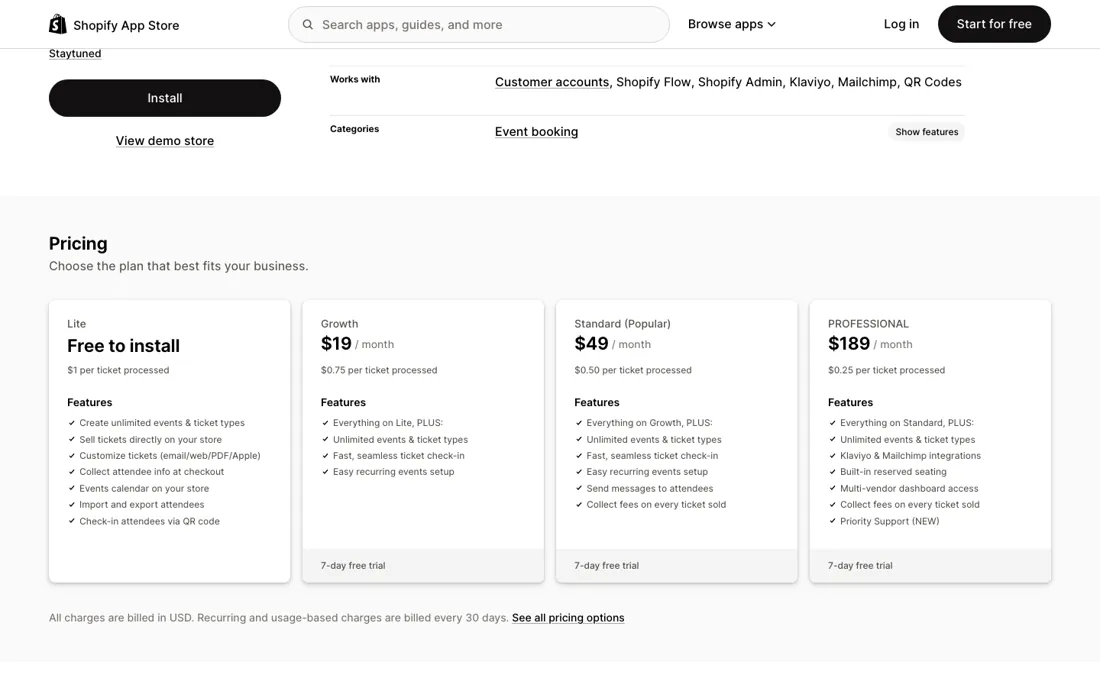
On Lite the app is free to install and then takes a dollar off every ticket you sell, which is invisible until you sell volume and then is the largest line on the invoice. Work out your monthly ticket count before you install anything, because that single number picks your plan: under 76 stay on Lite, 76 to 120 move to Growth, 120 to 560 move to Standard, above that Professional.
Getting this wrong is not a small error -- at 300 tickets a month the gap between the best and worst choice is about $65 every month.
What Evey Events does
Sell event tickets straight from your Shopify store: unlimited events and ticket types, QR check-in, attendee data at checkout.
What buyers report about Evey Events
Recurring themes from the buyer-review sites listed at the foot of this page, read in September 2026. We have not run Evey Events ourselves, so this is other buyers' experience rather than ours. We summarise it here because the complaints are usually the part a vendor page leaves out.
- • Support is the single most-praised thing, and merchants name individuals rather than a queue — Roel working through a theme-and-app conflict by trial and error, Sharky answering what one merchant called stupid questions. A Canadian organiser with three years on the app describes Evey staff contacting Shopify's billing department themselves and following up until a complex case was resolved.
- • Large in-person events are where reviewers say it earns its place: several people can scan at the same time, check-in is described as easy, and attendees pull their tickets up without trouble. A Guatemalan reviewer of about two years calls it extremely functional for big events and says it almost never errs.
- • Tenure in the review set is unusually long — reviewers writing at two, three and more than three years of continuous use, which is a different signal from a wall of first-week enthusiasm.
- • Ticket products are described as easy to configure and as collecting the attendee information organisers actually need, once set up correctly.
- • The sharpest complaint is a free-plan trap with real money attached. A US ghost-tour operator configured recurring events in the admin while on the free plan; the admin let them do it, but customers could not actually book. They found out after promoting the tours on one of their busiest days, and originally left one star (later revised up after more time with the app).
- • Multi-day events are handled awkwardly enough that a merchant works around them: scheduling a two-day event appears to bill for two days, so they schedule one day instead.
- • Express checkout has to be switched off for ticket products — a bookshop running semi-annual pop-ups reports disabling Shop Pay and the Apple/Google Pay buttons, which is a conversion cost on the rest of the funnel.
- • For free or online activities the pricing stops making sense: the Guatemalan reviewer who rates it highly for large in-person events says it is very expensive for online activities and stopped using it for them, because most of those are free.
Where the ratings disagree. The average hides a split rather than describing a middle. 254 of 321 reviews are five-star and 24 are one-star, with almost nothing in between — twelve threes and six twos across three hundred reviews. So 4.5 is not the experience anyone has; the shape is that most organisers are delighted for years and a small group hits something that stops ticket sales outright. Reading the one-star cluster is therefore worth more than reading the average, and the setup traps above are where they land.
Pages read (September 2026): Shopify App Store
When the paid plan is worth it
Upgrading is arithmetic, not judgement, and the app is unusually honest about it: every tier lists both numbers, so the monthly fee is simply what you pay to lower the per-ticket rate. Two places break that pattern and are worth knowing before you run the sums. Collecting your own fee on every ticket sold is a paid feature that starts at Standard, so the tier that lets you pass the per-ticket cost on to attendees is $49, not free -- for a store that adds a booking fee, that alone can settle the choice below the volume crossover.
And Professional at $189 adds built-in reserved seating, Klaviyo and Mailchimp integrations, multi-vendor dashboard access and priority support. If you need assigned seating you are on that tier whatever your volume says, and the $0.25 rate then softens the blow. What upgrading does not do is remove the per-ticket fee: there is no tier at any price where tickets stop costing money, so a store with high volume and thin margins should price the fee itself, not the plan. Below Professional, ignore the feature lists and run the numbers.
How to actually use Evey Events
Count last month's tickets before you install; that number chooses your plan and nothing else does. Start on Lite even if the count says otherwise, run one real event through it, and check that the ticket email and the QR check-in behave the way you want in front of actual attendees -- that is the part you cannot judge from a feature list. Then move to the tier your volume dictates.
Decide separately whether you want to add your own booking fee, because that is not a volume question: collecting a fee on every ticket sold starts at Standard, so if you plan to pass the app's per-ticket cost on to attendees you are choosing a $49 tier for a feature rather than for a rate. Re-check the count every few months: this pricing punishes a store that grew and never revisited its plan.
Distilled from The Shopify App Store listing at apps.shopify.com/event-tickets, read on 8 September 2026: the four plan cards with both their monthly and per-ticket rates, the per-tier feature lists (including which tiers may collect a fee on every ticket sold), the works-with list for Klaviyo, Mailchimp and Shopify Flow, and the rating panel. The crossover figures are arithmetic on those published rates, not vendor claims. Re-read 1 October 2026 on the same listing: the four plan cards, the per-tier feature lists and the rating panel, all in the served HTML.
The natural comparison is a dedicated ticketing platform — the real comparison is not another Shopify app but Eventbrite or similar -- Evey wins when keeping attendees inside your store data matters more than box-office depth.
Frequently asked questions
What does Evey Events cost?
Four tiers, and every one of them charges twice -- a monthly fee and a fee on every ticket processed. Re-read on apps.shopify.com/event-tickets on 19 September 2026, unchanged since 8 September: Lite is free to install and takes $1.00 a ticket. Growth is $19 a month plus $0.75. Standard, the tier the store marks Popular, is $49 plus $0.50. Professional is $189 plus $0.25. The three paid tiers carry a 7-day free trial, and charges are billed in USD every 30 days.
Which plan is cheapest for my ticket volume?
This is arithmetic rather than judgement, and the crossings are exact. Lite and Growth cost the same at 76 tickets a month, Growth and Standard at 120, Standard and Professional at 560. So: under 76 stay on Lite, 76 to 120 take Growth, 120 to 560 take Standard, above that Professional. At 300 tickets a month that is $199 on Standard against $244 on Growth and $264 on Professional -- roughly $65 a month between the best and the worst choice, which is why the count comes before the install.
Can I pass the per-ticket fee on to attendees?
Only from Standard at $49 upwards. "Collect fees on every ticket sold" appears on the Standard and Professional cards and on neither tier below them, so charging your own booking fee is itself a paid feature. For a store that intends to add one, that can settle the plan below the volume crossover: the $49 tier pays for itself as soon as the fee you collect covers it.
What can I not do on the free Lite plan?
Recurring events are the trap. "Easy recurring events setup" first appears on the Growth card at $19, but the admin still lets you configure recurring events on Lite -- a merchant writing on the listing describes setting them up, seeing everything look correct from the admin side, and finding out only after a lost day of troubleshooting that customers could not buy tickets for them without an upgrade. Further up, reserved seating, the Klaviyo and Mailchimp integrations and the multi-vendor dashboard are Professional-only, so if you need assigned seating you are on the $189 tier whatever your volume says.
What should I weigh before buying E-commerce software?
Check your platform and version specifically. Shopify support is close to universal in this category, while WooCommerce, BigCommerce, Magento and headless setups vary a lot, and 'supported' sometimes means a generic API rather than a maintained app. A listing in your own platform's app store, with recent reviews there, is a better signal than the vendor's logo wall.
Is this a hands-on review of Evey Events?
This is a researched assessment, not a hands-on test — where we've used a tool ourselves, we say so explicitly. We name what each tool is good and bad at, and we earn a commission only if you sign up, at no cost to you.
- Buyer reviews on Shopify App Store listing apps.shopify.com/event-tickets (321 reviews, 4.5 average: 254 five-star, 25 four, 12 three, 6 two, 24 one), read September 2026.
- Re-verified 1 October 2026 on apps.shopify.com/event-tickets; every rate unchanged since 1 September 2026.
- A dated screenshot of that pricing page, kept on this site as the receipt.
Others in this category
Reviewed e-commerce tools that share ground with Evey Events — comparable in what they do, not drop-in swaps:
New reviews, price changes we recorded, and the cost conditions we found. No sponsored placements. Unsubscribe anytime.
This is our researched assessment — not a paid placement. The “Visit” links on this page are affiliate links: we may earn a commission if you sign up, at no extra cost to you, and it never changes our take. How we review →