VidPal Review (2026)
 By Daan Haket · Tested hands-on · written with an AI assistant · who does what
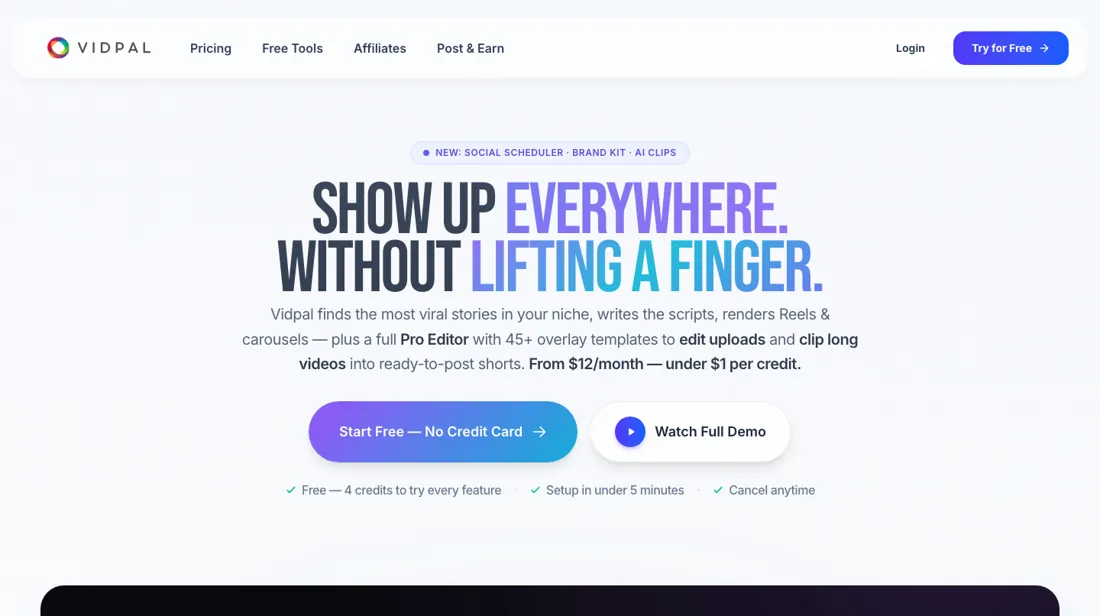
Credits don't carry over month to month, and a few users report slow support/account responses, so run the free plan through a full create-and-publish loop before you pay.
- Best for Creators running faceless topic channels
From $12 · per month billed annually ($144/yr), or $19 month to month · read 2026-10-07
Try VidPal free →Affiliate link: we may earn a commission if you sign up, at no extra cost to you. It never changes our verdict.
Is VidPal right for you?
Your pain“Every day I hunt for trending topics, script, voice and post, and it eats my week.”
Does VidPal solve it?Vendor says yesVendor docs (Aug 2026): the tool finds trending stories, writes the script, adds voiceover and visuals, and posts on schedule to Instagram, YouTube, TikTok and Facebook.
Your planPro, $23 a month billed annually, or $39 month to month (auto-publish starts here)
Your pain“I can't tell whether auto-made videos are good enough to post before I pay.”
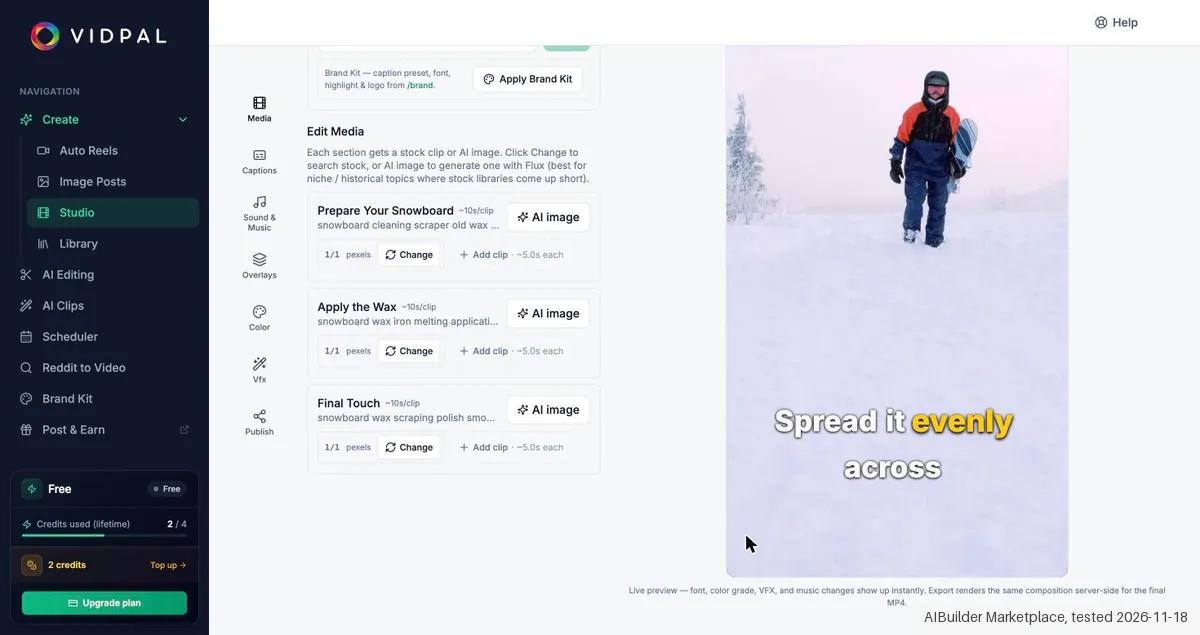
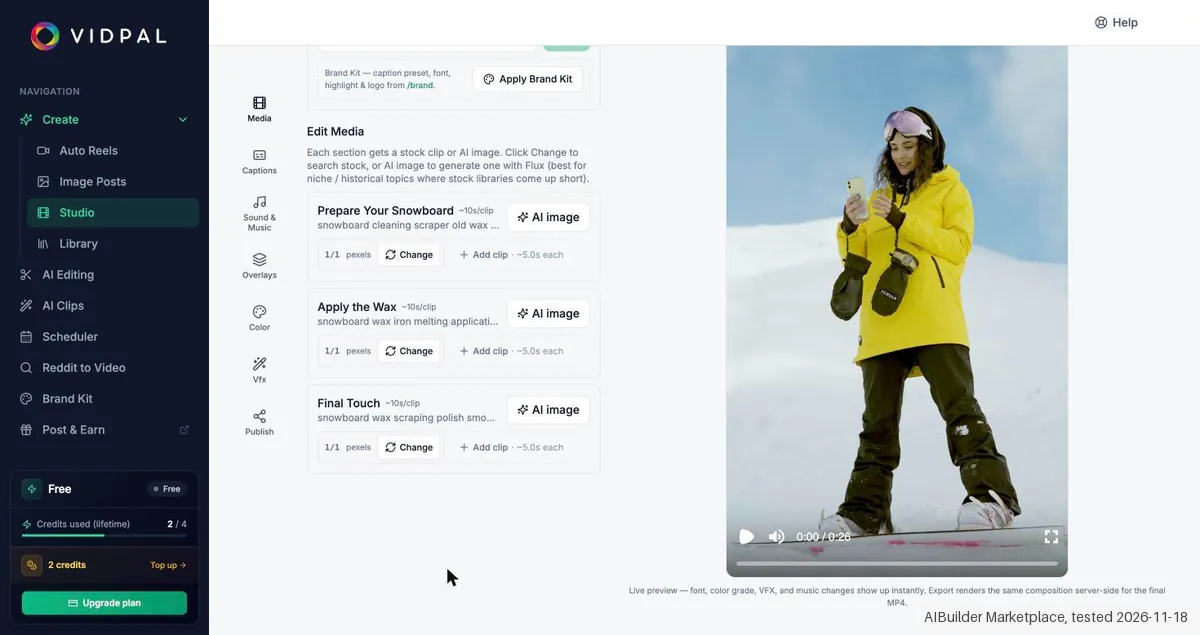
Does VidPal solve it?PartlyOur test (21 Nov 2026): after a vendor fix, a 26 second Short played about 55 seconds after Generate, but its stock clips showed no waxing, so it needed new clips before posting.
Your planFree plan, 4 lifetime credits and no card. Starter at $12 a month billed annually removes the watermark.
Your pain“We post twice a day, and our monthly credits run out before the month does.”
Does VidPal solve it?PartlyPricing page, read 7 Oct 2026: one credit buys a single Reel or carousel, and monthly credits do not carry over to the next month.
Your planBusiness, $41 a month billed annually, or $69 month to month
- you want hands-on creative control over every video, or your brand can't afford auto-published AI content going out without a human check.
The “Try” buttons are affiliate links: we may earn a commission if you sign up, at no extra cost to you, and it never changes our verdict.
AIBUILDERMARKETPLACE, 10% off all paid VidPal plansCompare in the AtlasSee our test ↓Transparency: the “Visit” links on this page are affiliate links: we may earn a commission if you sign up, at no extra cost to you. No vendor can pay for a better review or verdict. How we make money →
- Checkout total: €20.97 including tax (€3.64 tax), Starter, monthly: EUR 17.33 a month plus VAT EUR 3.64, total EUR 20.97; external Dodo Payments checkout, nothing entered or paid
- Reader code:
AIBUILDERMARKETPLACE(terms in the offer box on this page)
Which VidPal plan do you need?
4 plans, 2 questions, no signup.
Answer two quick questions to see your plan.
Your plan
Free
Free
4 lifetime credits, standard exports, watermark, no card
Your plan
Starter
$12/mo billed annually ($144/yr) or $19 month to month
15 credits a month; no auto-publish
Your plan
Pro
$23/mo annually ($276/yr) or $39 month to month
40 credits, auto-publish and scheduling, 2K exports
Your plan
Business
$41/mo annually ($492/yr) or $69 month to month
100 credits, 4K exports, three daily slots
Prices as we read them on 2026-10-07; check the checkout before you pay. The plan button is an affiliate link: we may earn a commission, at no extra cost to you.
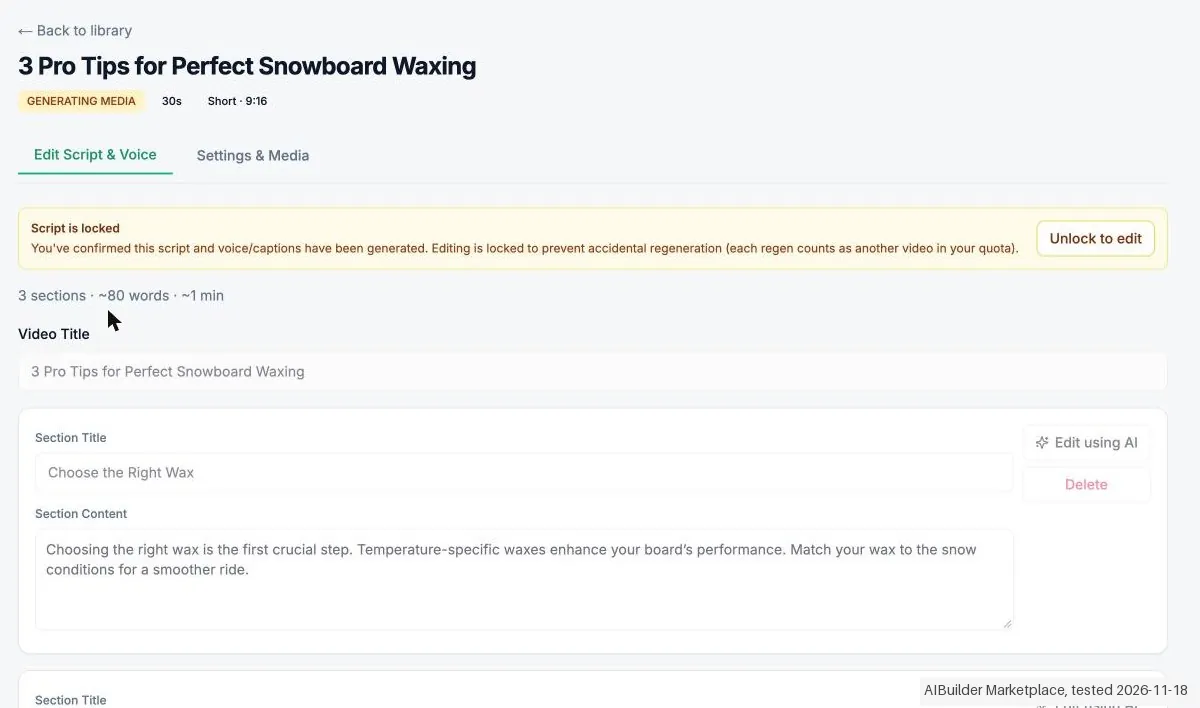
We created the account and our AI assistant ran the test in our browser. On 18 November 2026 the session started one 30s Short in VidPal Studio from a prompt, with stock footage and no avatar. The script was ready after about 25 seconds and confirming it used 1 of 4 free credits, but the video did not finish: not reached after 12+ min, 2 retries, 1 of 4 credits used, and 21 minutes after the start the Studio card still said GENERATING MEDIA with a black preview. So the watermark, the resolution, the length and the quality of a finished video were not seen, and nothing is said about the cause. The prices are unchanged against the research notes (annual $12, $23 and $41, monthly $19, $39 and $69), with a banner 50% off all plans for life-time and struck through prices in both views. The Starter monthly checkout showed EUR 17.33 plus EUR 3.64 VAT, total EUR 20.97, and nothing was paid. The app has no button to cancel or delete the account.
How we tested
- The test used an account we made, and our AI assistant ran it in our browser; Free plan; nothing was paid
- Evidence screenshots are in English with names and addresses masked
- Text we checked: "Confirm script & generate voice". What we saw: After Confirm script & generate voice the credit counter went at once to 1 / 4 (3 credits left), before any video existed, and it stayed at 1 / 4 when the render did not finish. The Free plan has 4 lifetime credits.
- Text we checked: "Crafting the video, it usually takes 30-90 seconds". What we saw: In this one run the video was still pending after more than 12 minutes and after 2 retries, and still at 14:47, 21 minutes after the start; the retries were refused while the render counted as in progress. The cause is not known.
- Text we checked: "50% off all plans for life-time". What we saw: The billing page had the banner Limited-time launch offer, 50% off all plans for life-time, with struck through prices of $24, $46 and $82 in the annual view and $38, $78 and $138 in the monthly view. Our research names only the annual struck through prices.
Pricing (2026)
✓ Pricing re-verified 7 Oct 2026
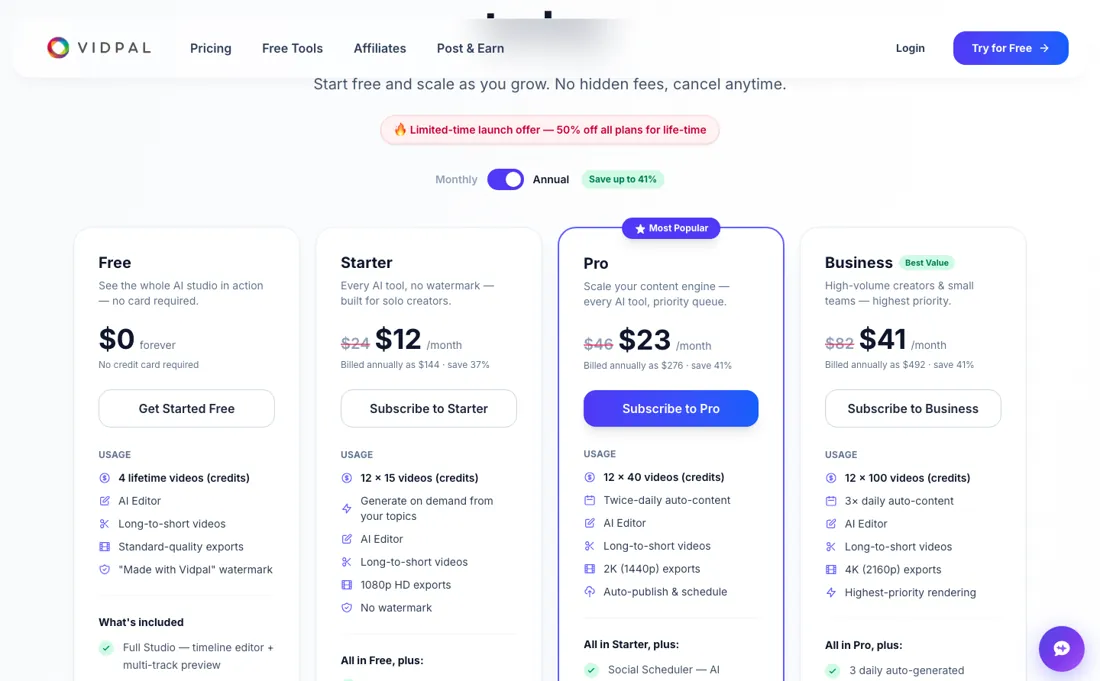
(2026) Free: 4 lifetime credits, standard-quality exports, "Made with Vidpal.ai" watermark, no card. Starter $12/mo billed annually ($144/yr) or $19 month to month, 15 credits/mo; Pro $23/mo annually ($276/yr) or $39 month to month, 40 credits, auto-publish and scheduling, 2K exports; Business $41/mo annually ($492/yr) or $69 month to month, 100 credits, 4K, three daily slots; Enterprise on quote. One credit is a Reel, a carousel, an editing upload or ten minutes of clip source; an AI Avatar or long-form video is five.
Monthly credits do not roll over, annual credits arrive as a yearly pool, and top-up packs expire after 60 days. Refunds cover the unused credit balance within 30 days. Plans change, so check the live price on their site before you buy.
Category context: Growth & Revenue. Across the 91 tools in this category that we researched with a public US-dollar price, the median entry price is about $30 a month (lowest paid plan as listed, per seat where the vendor prices per seat). VidPal’s entry price of $12 a month sits below that median. Compare pricing conditions in the Software Cost Atlas →
Correction after re-checking: VidPal confirmed in writing on 7 October 2026 that month-to-month billing is $19 (Starter), $39 (Pro) and $69 (Business), and annual billing $12, $23 and $41 a month ($144, $276 and $492 a year). The pricing page, re-read the same day, gives the same monthly figures in its FAQ; the plan cards still strike through $24, $46 and $82 next to the annual prices, so expect the $19, $39 or $69 rate if you choose monthly billing. (re-verified 2026-10-07)
AIBUILDERMARKETPLACE, 10% off all paid VidPal plans (Starter, Pro and Business), on monthly and annual billing, and on every renewal, not only the first payment. VidPal confirmed in writing on 7 October 2026 that the code is active and has no end date.Vendor-confirmed: Confirmed in writing by John, VidPal, 7 Oct 2026. Not tested by us at a checkout. Claim the deal →
What the price did
We read VidPal’s own pricing page on a schedule and keep every reading, so this is our record of the page. It is not a forecast, and not someone else’s summary. A change appears here only after we confirmed the new price on the page itself.
Unchanged. Every price on VidPal’s pricing page was identical across our 13 reads from 23 Jul 2026 to 17 Nov 2026 (117 days).
VidPal’s pricing page, as we read it
Watch the video review
The video version of this review, from our YouTube channel.
⚡ Short on time? Watch the 30-second verdict Short.
What VidPal does
Autonomous content engine for faceless and topic-based channels: it discovers trending stories in your niche, auto-generates short-form videos and carousels with AI voiceovers, and auto-publishes them across Instagram, TikTok, YouTube and more.
What the vendor's material says about VidPal
Hands-on: tested 2026-11-18Reported by buyers: none found
We found no independent buyer reports of VidPal. The points below come from product documentation and category comparisons, read in August 2026. They describe what is offered, not what buyers experienced, so weigh them as documentation, not as reviews.
- • It runs the whole loop unattended: finds trending stories in your niche, writes the script, generates voiceover and visuals, burns in captions, renders 9:16 and publishes to Instagram, YouTube, TikTok and Facebook on schedule.
- • Approval is optional rather than a gate, which is the difference between an engine and an editor.
- • We found no independent user reviews, so there is nothing outside the vendor's own material to judge the product on. In August 2026 we also found no published pricing detail; that has since changed, and VidPal now publishes its plans and credit allowances (see the pricing section above).
- • Publishing without review is the feature and the risk. Anything the engine gets wrong about a trending story goes out under your name: decide whether you actually want approval off.
Pro's autopilot runs out on day 20
Vidpal's free plan is the trial: 4 lifetime credits, standard-quality exports and a "Made with Vidpal.ai" watermark, no card. On annual billing the paid tiers are Starter $12 a month ($144 a year, 15 credits), Pro $23 ($276, 40 credits), Business $41 ($492, 100 credits) and Enterprise on quote; month to month it is $19, $39 and $69, as VidPal confirmed in writing on 7 October 2026 (the plan cards still show $24, $46 and $82 struck through).
Auto-publish and scheduling start on Pro, so Starter will not post for you. But Pro's own arithmetic undercuts its pitch. One credit buys a Reel, a carousel, an editing upload or ten minutes of clip source, and twice-daily autopilot spends its 40 credits in twenty days. Business is the first tier whose allowance survives a month: 100 credits against three slots a day is 33 days. Credits do not roll over on monthly billing; annual plans receive the year's credits as one pool, and top-up packs expire after 60 days.
What upgrading does not fix: the free plan cannot auto-publish at all, so hands-free posting, the thing you are actually buying, is the one thing you cannot test before you pay for it.
Our monthly capture read this vendor's pricing page in September 2026 and again in October 2026, and the amounts were the same both times, including $69, $144, $276 and $492 from the pricing above. We keep watching, and the registry records what moves.
What we found running VidPal ourselves
The first findings are at the top of this page. The rest:
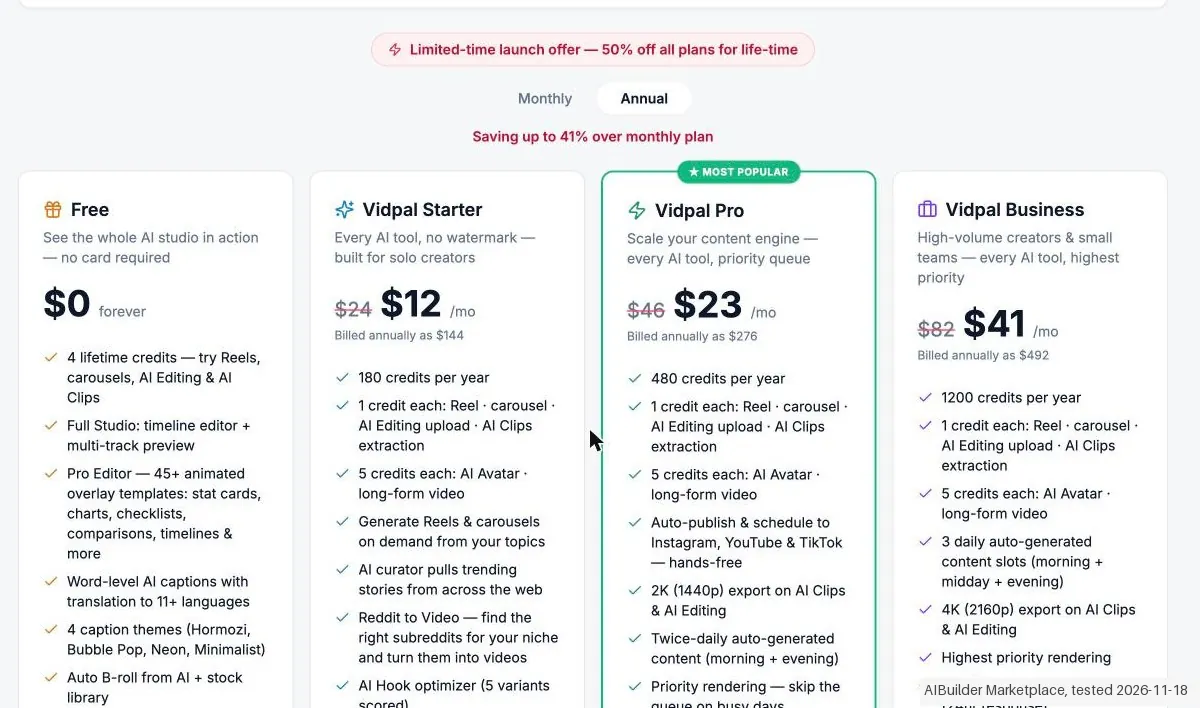
- Text we checked: "Starter $12/mo (strike $24), billed $144, 180 credits/yr". What we saw: Annual: Starter $12 a month, billed $144, 180 credits a year; Pro $23, $276, 480 a year; Business $41, $492, 1200 a year. The same amounts are in our research and were seen again on the public page.
- Text we checked: "Starter $19 (strike $38), 15 credits/mo". What we saw: Monthly: Starter $19 (struck through $38) with 15 credits a month, Pro $39 ($78) with 40 a month, Business $69 ($138) with 100 a month. The same as in our research and on the public page.
- Text we checked: "Generate Short Video (1 cr)". What we saw in a retest on 21 November 2026, after VidPal told us the 18 November outage was fixed: the same prompt and settings gave a script in about 20 seconds and a playable 26 second Short about 55 seconds after we pressed Generate. The captions ran word by word in sync, and the in app preview showed no watermark (we did not export). The three stock clips showed people in snow, not a board being waxed, so the video was not postable without changing clips. The credit counter went from 1 / 4 to 2 / 4 when the script was generated, although the confirm button says the quota is used at confirm. The Short from 18 November still showed GENERATING MEDIA.
Claim vs. what we measured
We set a claim from VidPal's own pages next to what we saw in our test, on the plan named. The status says whether the two describe the same thing and match; it is not a verdict on the product. Confirmations are listed too.
| What the vendor says | What we measured | Status | What it means if you buy |
|---|---|---|---|
| Newcomers unsure the output is postableSource: our test notes, read 18 Nov 2026 | Measured 2026-11-18: The test concept (a 30s Short from a prompt, stock footage, no avatar) never gave a video: 21 minutes after the start the Studio card still said GENERATING MEDIA, with a black preview and no export.Our test, 18 Nov 2026; Free plan; the Starter monthly checkout was viewed, nothing was paid | Not testableThe recorded audience against a render that did not finish; no preview, export or watermark was seen. | Whether the output is postable could not be judged, because no finished video was seen. |
| Generate Short Video (1 cr)Source: our test notes, read 18 Nov 2026 | Measured 2026-11-18: From the click at 14:26:00 the script 3 Pro Tips for Perfect Snowboard Waxing (3 sections, about 80 words) was ready after about 25 seconds.Our test, 18 Nov 2026; Free plan; the Starter monthly checkout was viewed, nothing was paid | Not comparableOur own timing of the script step; our research gives no time for it. | The script step is quick; it is the video step after it that was the problem in our run. |
| Confirm script & generate voiceSource: our test notes, read 18 Nov 2026 | Measured 2026-11-18: After Confirm script & generate voice the credit counter went at once to 1 / 4 (3 credits left), before any video existed, and it stayed at 1 / 4 when the render did not finish. The Free plan has 4 lifetime credits.Our test, 18 Nov 2026; Free plan; the Starter monthly checkout was viewed, nothing was paid | ConfirmedThe credit counter before and after the confirm click; no credit was refunded or restored in the test. | A free credit is spent when you confirm the script, also if no video comes out. |
| Crafting the video, it usually takes 30-90 seconds.Source: our test notes, read 18 Nov 2026 | Measured 2026-11-18: In this one run the video was still pending after more than 12 minutes and after 2 retries, and still at 14:47, 21 minutes after the start; the retries were answered with Voice or render is in progress. Wait for it to finish before retrying auto-assign. The cause is not known.Our test, 18 Nov 2026; Free plan; the Starter monthly checkout was viewed, nothing was paid | ContradictedThe wait time on the page against our own stopwatch of one render; no second render was tried. | The page promises 30-90 seconds and our one run did not finish in 21 minutes; one run is not a measure of how often this happens. |
| "Made with Vidpal.ai" watermarkSource: our test notes, read 18 Nov 2026 | Measured 2026-11-18: The Free plan lists a Made with Vidpal.ai watermark on exports. No export was made because the render did not finish, so the watermark, the resolution and the length were not measured.Our test, 18 Nov 2026; Free plan; the Starter monthly checkout was viewed, nothing was paid | Not testableThe Free plan line on the billing page against a render that never finished. | What a free video looks like on export is not confirmed by this test. |
| 50% off all plans for life-timeSource: our test notes, read 18 Nov 2026 | Measured 2026-11-18: The billing page had the banner Limited-time launch offer, 50% off all plans for life-time, with struck through prices of $24, $46 and $82 in the annual view and $38, $78 and $138 in the monthly view. Our research names only the annual struck through prices.Our test, 18 Nov 2026; Free plan; the Starter monthly checkout was viewed, nothing was paid | ConfirmedThe banner and struck through prices in the app and on the public page against our research, which has the annual ones only. | The prices shown are the discounted ones; the struck through prices are the list prices before the offer. |
| Starter $12/mo (strike $24), billed $144, 180 credits/yrSource: our test notes, read 18 Nov 2026 | Measured 2026-11-18: Annual: Starter $12 a month, billed $144, 180 credits a year; Pro $23, $276, 480 a year; Business $41, $492, 1200 a year. The same amounts are in our research and were seen again on the public page.Our test, 18 Nov 2026; Free plan; the Starter monthly checkout was viewed, nothing was paid | ConfirmedThe three annual plan cards against our research and the public page; credits are a count and were not used. | The annual prices have not changed against our research. |
| Starter $19 (strike $38), 15 credits/moSource: our test notes, read 18 Nov 2026 | Measured 2026-11-18: Monthly: Starter $19 (struck through $38) with 15 credits a month, Pro $39 ($78) with 40 a month, Business $69 ($138) with 100 a month. The same as in our research and on the public page.Our test, 18 Nov 2026; Free plan; the Starter monthly checkout was viewed, nothing was paid | ConfirmedThe three monthly plan cards against our research and the public page. | The monthly prices have not changed against our research. |
| Account, Billing, Change picture, Sign outSource: our test notes, read 18 Nov 2026 | Measured 2026-11-18: The app has no button to cancel a plan or delete the account: the avatar menu has Account, Billing, Change picture and Sign out, and the Account page has only connections, a name and a password reset by e-mail. Our research found an e-mail route, which was not used.Our test, 18 Nov 2026; Free plan; the Starter monthly checkout was viewed, nothing was paid | Not testableThe cancellation route from our research against the menus of an account on the Free plan; no cancel step was run. | How to stop a paid plan could not be seen in the app, and no paid plan was bought. |
| EUR 20.97Source: our test notes, read 18 Nov 2026 | Measured 2026-11-18: The checkout of Dodo Payments for Starter monthly, shown for the Netherlands, said EUR 17.33 a month plus VAT EUR 3.64, total EUR 20.97, against $19 on the plan card. Nothing was filled in and the tester went back.Our test, 18 Nov 2026; Free plan; the Starter monthly checkout was viewed, nothing was paid | Not comparableThe plan card in dollars against a checkout in euros with VAT; no conversion was made and no stored cost rule was compared. | A Dutch buyer pays VAT on top of the Starter price, in euros, so the total is higher than the number on the card. |
Exit test: can you take your data out?
Account and start: the account was created by us and was signed in; our AI assistant ran the test in our Chrome from 14:24 (Amsterdam). The interface was in English. The onboarding asked How did you hear about us? and Google search was chosen. Core action: Studio, Create New, Short 9:16, From Prompt with the text 3 tips to wax a snowboard (Sample Snowboards), 30s, Stock Footage, Hook Intro None and no avatar. At 14:26:00 Generate Short Video (1 cr) was clicked and the script was ready after about 25 seconds: 3 Pro Tips for Perfect Snowboard Waxing, 3 sections, about 80 words. At about 14:26:50 Confirm script & generate voice was clicked and the credit counter went at once to 1 / 4 (3 credits left). That is the moment the video counts, with or without a result. After that the page stayed on Generating voice & captions and Generating media for each section. After about 3 minutes it said Taking longer than usual and offered Try again; Try again was pressed 2 times and the answer was Voice or render is in progress. Wait for it to finish before retrying auto-assign. At 14:39 the Studio list still said GENERATING MEDIA (more than 12 minutes). At 14:47, 21 minutes after the start, the same concept (no new credits, no new attempt) still showed the badge GENERATING MEDIA, 30s and Short, the credits 1 / 4 used, a black preview with Generating voice & captions, and per section only Assign and AI image with no clip assigned. The Edit Script & Voice tab said Script is locked. Result in this one run: not reached after 12+ min, 2 retries, 1 of 4 credits used. No preview and no export were seen, so the watermark, the resolution, the length and the quality of a finished video were not measured. Nothing is said here about the cause. Plans: Billing page of the app, read by the tester on 18 Nov 2026, with the banner Limited-time launch offer, 50% off all plans for life-time. Free: $0, 4 lifetime credits, a Made with Vidpal.ai watermark on exports, AI Avatar and long-form locked. Annual: Starter $12 a month (struck through $24), billed $144, 180 credits a year; Pro $23 (struck through $46), $276, 480 a year, with auto-publish and 2K; Business $41 (struck through $82), $492, 1200 a year, with 4K. Monthly: Starter $19 (struck through $38), 15 credits a month; Pro $39 (struck through $78), 40 a month; Business $69 (struck through $138), 100 a month. The public page vidpal.ai/pricing was read again just before this delivery the same day with the same prices in both views (annual $12, $23 and $41 with $24, $46 and $82 struck through, billed $144, $276 and $492; monthly $19, $39 and $69 with $38, $78 and $138 struck through) and the same banner. So the prices are unchanged against our research. The deviation is that our research names only the struck through annual prices; the monthly view also has struck through prices. The credit card in the app said 3 from this month's plan; the free credits are 4 lifetime credits. Checkout: for Starter monthly the checkout of Dodo Payments (shown for the Netherlands) said EUR 17.33 a month plus VAT EUR 3.64, total EUR 20.97, against $19 on the plan card; nothing was filled in and the tester went back. No screenshot was kept because the page showed a name and Dutch text. Cancelling: the app has no button to cancel a plan or to delete the account. The Account page has only connections, a name and a password reset by e-mail; the avatar menu has Account, Billing, Change picture and Sign out; Help & feedback is a form to the founder (cancelled before sending). Our research names an e-mail route for cancelling and refunds, which was not used. Not tested: export, watermark, resolution, video quality, publishing, the connections (deliberately not linked), a paid plan and the payment. Clean up: the account and one Studio concept (3 Pro Tips for Perfect Snowboard Waxing, still GENERATING MEDIA) stay; the own tab of the retry was closed; nothing was bought. No kit records were entered. Test date: 18 Nov 2026. We describe the friction rather than score it; this is one run with synthetic records, not a verdict on VidPal.
| What we checked | What we saw |
|---|---|
| Fields offered by the export dialog | |
| Not offered in the field selector | None noted. |
| The exported file | We did not inspect the file, so data retention and loss remain unverified. |
| Awkward but not lost | Confirming the script took 1 of the 4 free credits before any video existed, and when the render did not finish the credit was still gone. The page says that crafting the video usually takes 30-90 seconds; in our one run it was still pending after 21 minutes, and the retry was refused while the render counted as in progress. The Free plan puts a watermark on exports (not seen by us). The app shows no button to cancel or delete the account; the recorded points to an e-mail route. |
| Export route | No export or reimport was performed; no file was downloaded or examined. The two categorised kit records were not entered; the objects tested were not kit records. |
| Export format | No downloaded bytes examined. |
| Re-importing the export | No reimport performed. |
| Cancelling | No cancellation or downgrade performed. |
What the exit test does not show:
- Session and source-reading date: 18 November 2026. Times are CET. The session started at about 14:24 CET. These are approximate tester observations, not benchmark timings. Midnight timestamps are required date anchors, not measured event times.
How this compares: across our exit tests of 330 tools, 60 gave us an export file. For VidPal no usable export file reached us during the test session. Report 08: can you get your data out?
Mail in the first 14 days
Measurement running until 2026-12-01T23:00:00Z (last observed 2026-11-22T02:18:03.748287Z).
2 emails in the 14-day window so far; first email after signup: unknown (exact signup time not recorded); 0 with an explicit offer.
Retained inbox and junk only; removed or archived mail is outside this observation. Ambiguous supplier attribution is excluded. Day numbers use elapsed 24-hour periods since the recorded signup date at midnight Europe/Amsterdam; the signup hour is unknown. Offer flags quote literal subject/body text. Replies in our own correspondence (support tickets, our comment requests) are excluded; one-time codes, our own address, our account name and our name are replaced in brackets.
| Day | Time (UTC) | Sender | Literal subject | Folder | Offer evidence |
|---|---|---|---|---|---|
| Day 0 | 2026-11-18 12:48:23 UTC | VidPal team / support.vidpal.ai | Welcome to Vidpal | inbox | |
| Day 0 | 2026-11-18 12:48:23 UTC | VidPal team / support.vidpal.ai | Verify your Vidpal account | inbox |
Screenshots from our test (click to enlarge)
What this test does not show:
- A finished video: the render did not complete, so the preview, the export, the watermark, the resolution, the length and the quality were not seen.
- Publishing and the connections, which were deliberately not linked.
- A paid plan and the payment.
- Cancelling a paid plan; the app shows no cancel button and the recorded route by e-mail was not used.
- Export of a file into a kit, and reimport.
Most of our reviews are researched rather than run. How we review explains which is which, and why we do not pretend otherwise.
How to actually use VidPal
Vidpal's homepage promises setup in under 5 minutes; its own cross-posting guide budgets about 15 minutes once several platforms are involved, so plan for the longer figure. You pick niche topics, set a brand voice and connect a social account. The free plan's 4 credits need no card, so you can see output before paying, though free renders carry the "Made with Vidpal.ai" watermark. Check what your plan allows before you build a workflow around posting.
Manual sharing to Instagram, YouTube and TikTok starts at Starter; auto-publish and scheduling only at Pro.
Distilled from vendor sources only: vidpal.ai homepage, the pricing page and its FAQ (re-read 2026-09-01), the vendor cross-posting guide on the Vidpal blog, and the vendor use-cases page. No independent tutorials, forum threads or user reports found for vidpal.ai. The buyer notes elsewhere on this page draw on product documentation and category comparisons (read August 2026), not only on VidPal's own pages. VidPal's terms (vidpal.ai/terms) read 23 October 2026 for the AI-label rule and content ownership.
Common VidPal setup mistakes
Where VidPal setups actually go wrong, and what it costs you when they do. Same sources as the setup notes above.
The friction sits in the connections.
- The vendor guide says platforms are authorised via OAuth, with separate connect flows for YouTube and TikTok and Instagram running through the Graph API's three-step container flow.
- Facebook Reels is not part of the automation; the guide describes extending the workflow there by hand.
- On review controls the pricing FAQ is explicit: every Reel, carousel, avatar and clip lands in your Library first and nothing is shared until you approve it: auto-publish on Pro and Business is the exception you switch on deliberately.
The natural comparison is Hypernatural: another faceless-video generator.
Frequently asked questions
The page shows two different monthly prices, which one is real?
The lower one. On 7 October 2026 VidPal confirmed to us in writing that month-to-month billing is $19 for Starter, $39 for Pro and $69 for Business, and that annual billing is $12, $23 and $41 a month ($144, $276 and $492 a year). The pricing page, re-read the same day, still shows both: the plan cards strike through $24, $46 and $82 next to the annual prices, labelled "save 37%" on Starter and "save 41%" on Pro and Business, while the FAQ lower down gives the $19, $39 and $69 that VidPal confirmed. Those save percentages also work out against $19, $39 and $69, not against the struck-through figures. Annual billing is still the cheaper route: on Pro it is $276 a year against $468 for twelve monthly payments.
If I pay for the year, do I get all the credits up front?
Yes, and that is the main practical reason to choose annual. The plan table read 20 September 2026 states the annual allowance as 12 × 15, 12 × 40 and 12 × 100 videos (180, 480 and 1,200 credits) and the FAQ confirms annual plans are billed up front with the credits delivered as a yearly pool you can spend unevenly across the twelve months. Monthly billing has no such flexibility: credits reset at the start of each cycle and do not carry over. Two expiry rules sit outside that pool. Credit packs bought on top of a plan are valid for 60 days from purchase. And the refund, per the same FAQ, covers the unused portion of your credits within 30 days of payment, by email to support@vidpal.ai, so an unspent annual pool is not a year of refundable balance. Upgrades take effect immediately with prorated billing; downgrades wait until the end of the period.
Which plan do I need for the export quality I want?
Export quality is a hard tier line, not a setting. Read on 20 September 2026, the comparison table runs Free at standard quality with a "Made with Vidpal" watermark, Starter at 1080p with the watermark gone, Pro at 2K (1440p) and Business at 4K (2160p), with the 2K and 4K limits stated specifically for AI Clips and AI Editing. So if you need 4K masters you are on the $41-a-month annual tier regardless of how few videos you make, and its 100 credits come along whether you use them or not. Two other things move with the same line: auto-publish and scheduling to Instagram, YouTube and TikTok start at Pro, and AI Avatar and long-form video are locked on Free entirely, at 5 credits each once enabled. Payment runs through Dodo Payments as merchant of record rather than through Vidpal directly.
Can I remove the AI label or the source attribution from captions I publish?
No. VidPal's terms (vidpal.ai/terms, read 23 October 2026) say you may not remove the AI-assisted label or the source attribution. The terms do not tie this to a plan, so a paid tier does not lift it.
Do I keep ownership of the videos I upload?
Yes, according to VidPal's terms (vidpal.ai/terms, read 23 October 2026): you retain ownership of the videos, recordings and other content you upload. The terms page is the only source for this; we have not seen it tested.
Is this a hands-on review of VidPal?
Yes. We tested VidPal ourselves on 2026-11-18; the section above says what we tested, what we found and what we did not test, and where a figure comes from the vendor's own documentation instead. Most of our reviews are researched rather than run; we say which is which. We name what each tool is good and bad at, and we earn a commission only if you sign up, at no cost to you.
- Buyer reviews on product documentation and category comparisons, read August 2026.
- Price re-verified 2026-10-07 against the vendor's own pricing page and confirmed by VidPal in writing.
- A dated screenshot of that pricing page, kept on this site as the receipt.
- Our own hands-on session with VidPal (2026-11-18), written up in full further down this page.
Bottom line
Best for: creators running faceless topic channels.
The Try button is an affiliate link; we may earn a commission at no extra cost to you.
Others in this category
Reviewed growth & revenue tools that share ground with VidPal. They are comparable in what they do, not drop-in swaps:
New reviews, price changes we recorded, and the cost conditions we found. No sponsored placements. Unsubscribe anytime.
This is our researched assessment, not a paid placement. The “Visit” links on this page are affiliate links: we may earn a commission if you sign up, at no extra cost to you, and it never changes our take. How we review →